Finally, the last professional you should consider finding is a lawyer. Depending on your business model, you may be dealing with a lot of contracts, agreements, perhaps copyright agreements, etc. Unless you are very familiar with reading legalese, I recommend getting someone that explain the ins and out very carefully. In the consulting world, everything is about a contract for a period of time. Those contracts pretty define what you can and can’t for the length of the contract, as well as possibly for a period of time after the contract. I’ll have a separate post later on explaining some of the things to watch out for in contracts. A lawyer can look these over pretty quickly and let you know what you should consider revising or not accepting in any contract. I’ve found that every organization is different that I’ve worked for, and so is there wording in the contract. Also, if you’re planning on producing or selling any type of products, a lawyer will be able to advise you on exactly what you need to file to protect yourself. It could a terms and conditions of any sale, it could be a disclosure about the product you’re selling and what you are liable for, or it could be just to protect yourself if you do end up being sued for anything. I haven’t used my lawyer a whole lot, but it in nice to know he’s there when I need him.
Author: piehlm
Building your Support Team – Part 2
Next up, have a financial investment person you trust. You may already have one, but if you don’t, go find one. Then sit down and talk to them for an hour and explain everything you’re planning on doing with your company. Explain what you plan to do, based on your accountant’s recommendations how much you plan to be putting into savings for the business, how much into a 401K, etc. The next thing that your financial person can do for you is to set up all your business accounts. Depending on what you choose to do, you may need to set up a 401K program for you business, and this isn’t as easy as it sounds. It turns out that there are quite a few options available to set up a 401K for your company. The type you choose will have a lot to do with how much growth and how many employees you expect to employ. If you plan to just be a 1 or 2 person operation, you can probably use a Solo-K, but if you plan to have a full staff that you will be providing the 401K benefits to, you’ll need to look at other options. You’ll also want to figure out exactly how you’ll plan to invest your money. If you’ll primarily be investing all your earnings into yourself, or back into the company, your options are pretty easy, but if you’re a consultant like me, you’ll need to keep some money put away for any periods when you are without a contract. You can also think about investing that savings into CD’s or bonds or something else you can keep relatively liquid. These are all of the different things you should sit down with your financial professional to talk about. They may have a lot of suggestions for you and a lot of things you never thought about.
You’re next member of your team is an insurance person. This could be your financial person if they also deal in insurance, but often you’ll need someone separate. It’s easiest to find an insurance broker, just because there are so many different types of insurance, and they can find you the best coverage for the best price, since they are not locked into a single company. Some of the insurance coverages you’ll need to consider include, business auto policy, business liability, professional liability, errors and omissions coverage, unemployment insurance, disability insurance, life insurance, workman’s comp, etc. I had no idea that there were so many insurances policies that I would need. Every one of my contracts has had different insurance requirements. If you do consulting, often you’ll only need a policy for the length of a contract, and then your next contract won’t require it. So be sure that you can cancel a policy at any time (and often you can even get a refund for the unused portion if you pre-paid.
Building Your Support Team – Part 1
The next thing I recommend is to find your professional support team. This includes an accountant, an insurance professional, a lawyer and a financial/investment person. Now, this will initially sound expensive, but most of these professionals will only charge you for the time they spend working on your stuff.
Here’s why you need an accountant. An accountant will help you set up your accounting basics. They can also tell you how much you should be paying for state and federal taxes. they will tell you what sorts of things you can deduct on your taxes, including depreciation, a home office, mileage on your vehicle etc. They can also “run the numbers” for you about how much you should be putting into savings, in case your new company has some quiet periods, financially, they can figure out exactly how much you can put into your 401K from the employee and the employer if you choose to do that, and if you choose the S-Corp route, how much you should pay yourself as a salary vs. how much you take as a distribution from the company. You’ll also find that when you run your own business you suddenly have to file new tax forms that you are responsible for . Some are due every time you pay salary, some are due quarterly, and some are due yearly. Depending on your level of experience and amount of time you’re willing to spend on paperwork, you can decide to fill it out yourself, but I highly recommend that you get a professional accountant to fill it out the first time and explain what you need to do. I learned this the hard way. When I was on the bench for 6 months, I decided I could figure out my tax forms. So I copied one of my previous quarterly returns. Well, a month later, I suddenly received a bill from the IRS for $12,000. Well, my taxes were paid in full, but since I screwed up the return, I had to spend the next 6 months going back and forth with the IRS trying clear this up without paying major penalties or the $12,000, which I didn’t have to spare at the time. Since then, I gladly pay my accountant to take care of this stuff for me. At a bare minimum, you want to find someone you trust to take care of your yearly tax returns.
I recommend getting a copy of Quickbooks or some other financial software you can use to track your business. This has actually been invaluable for me because each quarter or year end, as long as I make my entries, I can just print off a couple of forms (or if your accountant uses Quickbooks, you can just give them the “accountant’s copy” and they have all of my transactions for the business. Again, I highly recommend getting your accountant to set up all your accounts. Based on your business, you may have different needs, or want to track different expenses. But no matter what your business model is, you can quickly see accounts payable, accounts receivable. You can print off professional invoices and purchase orders. You can track your bank accounts, taxes and expense very easily. You don’t need to be an accountant to use this software. Believe me, I’m a software guy, not an accountant, but it’s pretty easy to update every 2 weeks or a month depending on your volume of transactions. I spend on average 1hr a month doing pretty much everything (and I track my weekly travel expenses in the system). It’s totally worth the effort.
Setting up your Business Bank Account
In my last post, I talked about how to get started, how to get the paperwork rolling for your new business. This time, I wanted to start talking about some of the key pieces you need for your business.
First order of business, get yourself a business checking account. Now this initially sounded like an easy task to me. So I started checking out the banks in my area and quickly realized that business checking accounts have a lot more options than your average personal account. Here’s some of the big things to keep in mind when selecting your bank/account type.
1. First and foremost, you can’t open a business bank account without your business paperwork. Normally, your Article of Incorporation or some similar form of proof that you are truly a business and registered with the state you are opening your account in. When I moved to NC from MN, I decided to switch banks. I had been with US Bank and I loved them, but they had no presence in NC/SC, so I had to make a switch. Before I could open any account, I needed the actual NC paperwork that proved I was licensed to do business in that state.
2. Bank Fees. Does the account carry a monthly fee? If you carry a high enough balance, is the fee waived? Is it likely that you will be able to carry that balance every month. My account charges me $12.95 every month if I don’t maintain a $5000 balance for the entire month. This can add up quickly, so I do everything I can to maintain that balance. Make sure you know exactly how and why your bank will charge you fees. Some of the other fees to check on are: Does your bank charge your for ATM’s that aren’t in your network? Are you charged for viewing your checks online? Do they charge you to download your transactions into Quicken or Quickbooks? Do you earn interest on your account? All these add up quickly, especially when you’re just starting out. You need to look at how you bank to decide which fees don’t matter and which ones will kill you.
3. How long will the bank hold your checks after you first open your account? Now this is something I never thought of. When I first started with my bank, I was getting paid by check. Now since I had a bank account, I figured it was no big deal. I quickly found that until the bank thinks you’re reliable, they will hold your funds for 7 – 10 days. Now, if you’re just starting out, this is a long time to have money just sitting in your bank that you can’t spend. Many banks will release your funds immediately if you direct deposit it, however, this isn’t always an option. Just be prepared for this possibility.
4. Can you do most of your banking online? Does your bank offer free online bill pay. For me, this feature is invaluable. I spend a lot of time on the road, so I want to be able to pay all my bills online, anytime I want. Make sure to find out how much your bank charges for this convenience.
5. Can you tie your personal account to your business account? this was another important feature for me. Since I setup as an S-Corp, it meant that I would be paying a salary to my employee (me). So I wanted to link up my accounts so I could do easy fund transfers from my business account to my personal account.
6. Extra things. Most accounts will allow you to do wire transfers, but only after you’ve filled out some additional paperwork. For example, I needed to move some money around in a hurry. Well, with the new money laundering laws, any large checks must be held for 7 days by any account. A wire transfer was my only option. Well, I called up my bank, and they informed me that I would have to visit a live bank person, fill out some paperwork, and then I could do a wire transfer over the phone. Well, I was on the road, and my bank wasn’t in the area. I made it work, but it took a lot of phone calls and extra stress. My advice to anyone starting out, get yourself set up to do wire transfers. You may never need it, but just in case, have the paperwork in place.
Wow. I forgot just how much effort it was to get a “simple” bank account set up for my business. Anyway, next post, I’ll hit the next set of needs to focus on for your new business.
Thanks for reading,
Mike
Creating your Business
Well, with a new website design, I decided it was time to visit some old things I talked about a while ago. I wanted to start at the beginning. Creating your company. This is a step that I think everyone should do. Why do I say that? No matter who you are, you’ve had an idea, or thought that you know enough to go out on your own. With your own company, you can do that. It’s cheap and low maintenance.
What do you really need to get a company started? You need about 3 different “potential” company names. I recommend doing some web searches to see if the name exists, and more important, does the website exist. Your first step should be to make sure your domain name is available. You don’t even need to do anything with it (yet), you’ll want to get it reserved as soon as you know that your company name is “official”. I used 123cheapdomains.com, but any registration service will work.
Now, once you have found your domain, you’re ready to register your company. There are a lot of websites out there that take care of everything for you. I personally used www.mycorporation.com. I know there are a lot of others, but I can only personally vouch for this website. It was easy, it was reasonable, and it was worth it. I believe when I registered my company in 2006, it was only $300 for the whole process (not including state registration). They even give you all of the paperwork you need to send in to get yourself registered in your state of incorporation. There are lots of options and lots of extra little things that you can buy, but in all honesty, all you need is that federal tax ID. So you can buy the extra services like annual reports, or a stamp with your business name, but from first hand experience, you really don’t need any of it. Just stick with the basics (you can always get the fancy stuff later if you find you really need it.
Now, after a couple weeks you’ll get your confirmation of your business name and tax ID. As soon as you get this, buy your domain.
I’ll save the details for that stuff for my next post.
Thanks for reading,
Mike
VC – Moving a product line with ALE
Alright, today I’m switching gears. For those of you that know me, you’ll know that VC is actually my first job in SAP, so I still hold a fondness for everything variant configuration related. I recently helped out a client to move a product line from one system to another, so I thought I’d share it with all of you how we used ALE to accomplish this.
Now let me begin by saying I’m not a basis person, I only know enough to be dangerous. So, in order to initially get ALE up and running, work with your basis team. They need to set the EDI partners, and all of the object types. Some of it may also be trial and error the first time. Simply because SAP provides multiple options for the same object, and some options only work with certain processes. If there’s interest, I can do more homework and go into this on another post. For today, I’m going to assume your ALE connections are properly setup.
Moving all of the VC master data is no small feat. When I first started in 3.0F, there was no ALE, so we actually wrote ABAP to do uploads and downloads to other systems. ALE is much easier and much faster. Like everything in VC, there is a process a certain order to things, so I’m going to run down those right now.
About this guide: All of the fields you need to be concerned with are listed below in the screen shots. Every one of the transactions contains the field Logical system. I will refer to that as the Target system. In addition, most screens contain a field for Engineering Change Number. Below, I define these fields. It is up to you determine if you should be populating the ECM field, and you must work with your basis person if you are not sure the correct value to use for the Logical System.
Target System: The SAP system you wish to populate. Please note, your basis person must creating/maintain the ALE system.
Engineering Change Management (ECM): Your VC modeling may or may not include engineering change numbers. I encourage all clients to use ECM due to the high level of maintenance required. In order to transfer most pieces of a VC model with engineering change management using ALE, you must maintain ECM in all systems, including the development system.
Note: For All screens, you can often use the wild card, if you maintained a standard naming convention. in that event, simply enter XYZ* to capture all product line specific data.
Engineering Change Management:
TXN: CC92
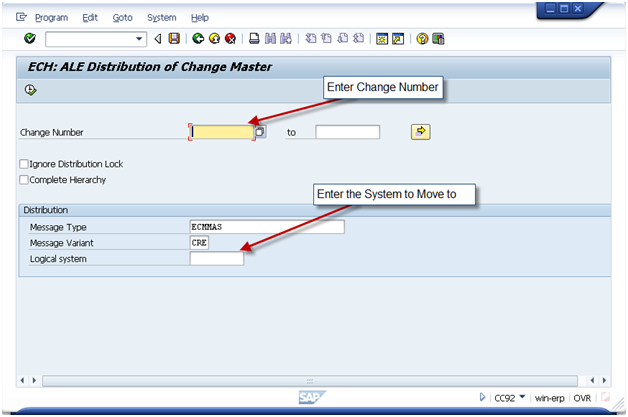 For the ECM number you have 2 options depending on your system setup.
Typically, most companies will create the change number in their production system, then move that ECM to other system. In that event, execute CC92 in the production system, and logical system will be the development or QA system. This, by the way, is my recommended way of doing things.
You can also use a Push system, if you wish to have your ECM driven from the test system. Usually, this would require a unique ECM number range specific to VC, but it can be accomplished.
Characteristics
TXN: BD91
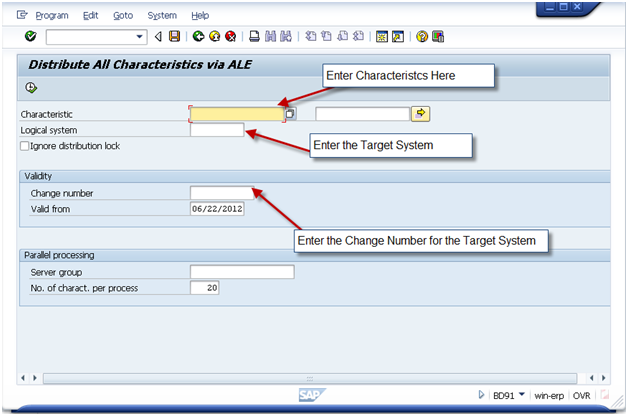 Note, if you use preconditions at a characteristic or characteristic value level, some of your characteristics may fail to load. If this occurs, continue loading the classes and object dependencies. After that is completed, reload the failed characteristics.
Classes
TXN: BD92
 The following items must exist first:
- Characteristics
Variant Table Structures
TXN: CLD3
 Please note, this transaction does not allow for ECM because the table structure is not under ECM control.
The following items must exist first:
- Characteristics
Variant Table Contents
TXN: CLD4
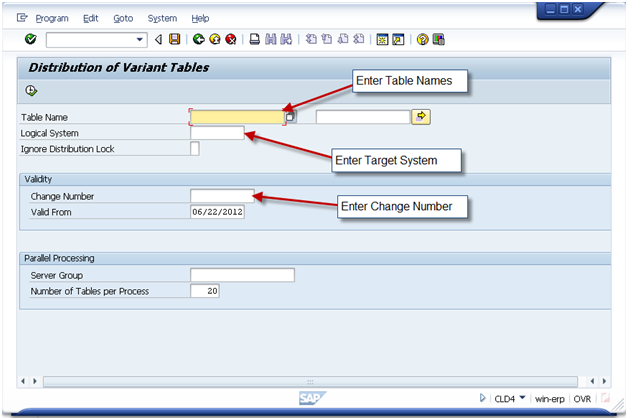
The following items must exist first:
- Characteristics
- Table Structures
KMAT Material Masters
TXN: BD10
Message Type: MATMAS
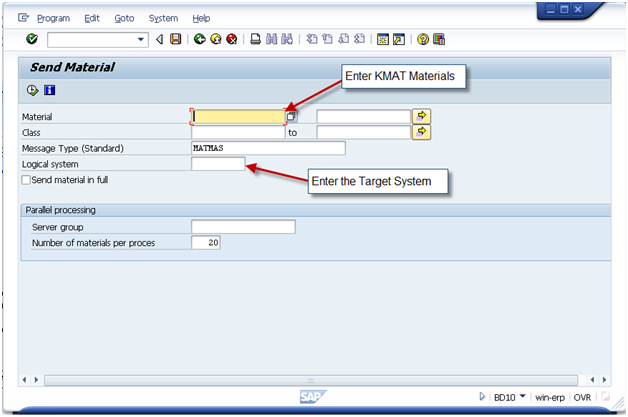
Classification
TXN: BD93
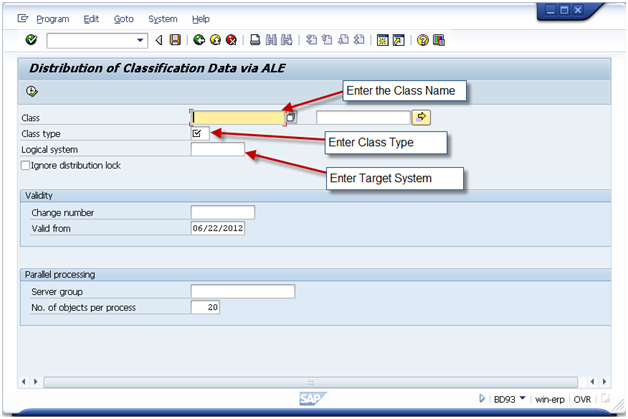
Please note, this data only needs to be moved if you maintained classification at a material level. This is often used with class type 200 functionality, as well as nested KMATs with restricted characteristic values.
The following items must exist first:
- Characteristics
- Classes
- Materials
Variant Functions
TXN: CUFD
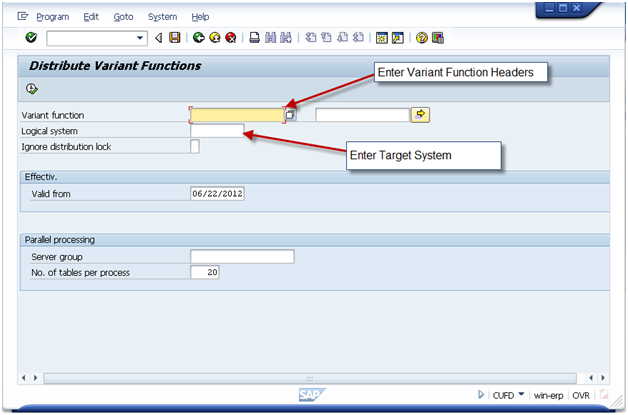
Note, this functionality is not always used. Only in the event of an instance where ABAP coding is required. This is discouraged, if possible, since this functionality cannot be easily converted to the IPC.
The following items must exist first:
- Characteristics
Object Dependencies
TXN: CLD2
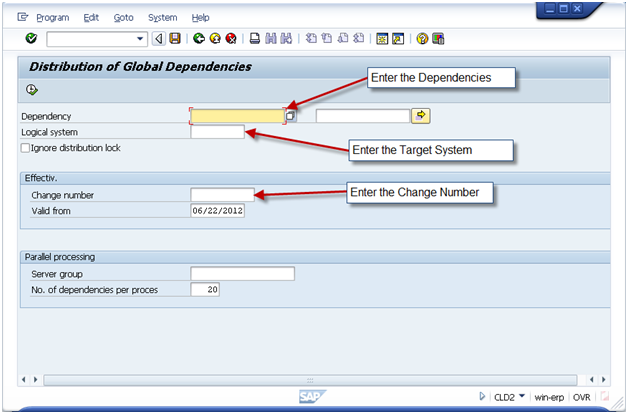
The following items must exist first:
- Characteristics
Dependency Nets
TXN: CUK2
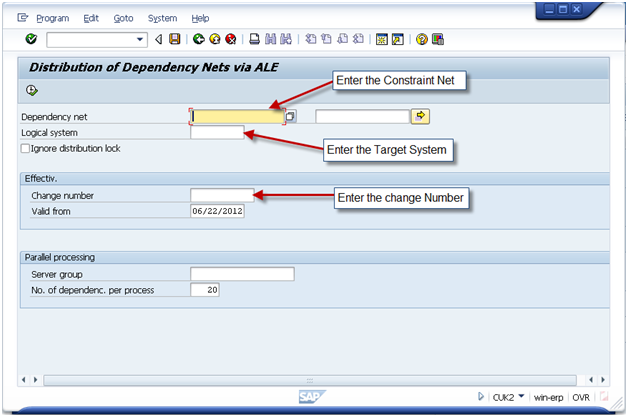
Please note, it is not necessary to move individual constraints, moving the constraint net automatically moves all constraints.
The following items must exist first:
- Characteristics
- Classes
Configuration Profiles
TXN: CLD1
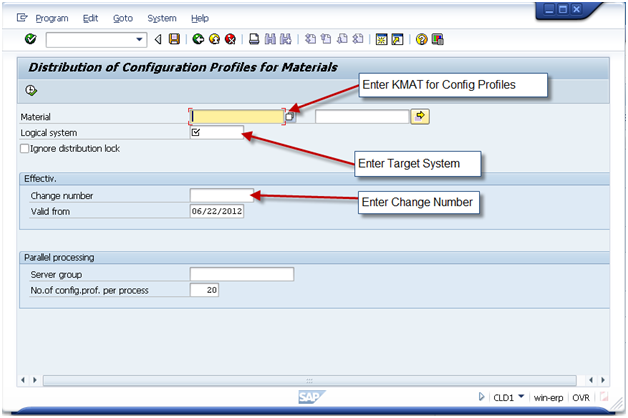
The following items must exist first:
- Characteristics
- Classes
- Object Dependencies
- Constraint Nets
- KMAT Materials
Bill of Materials
TXN: BD30
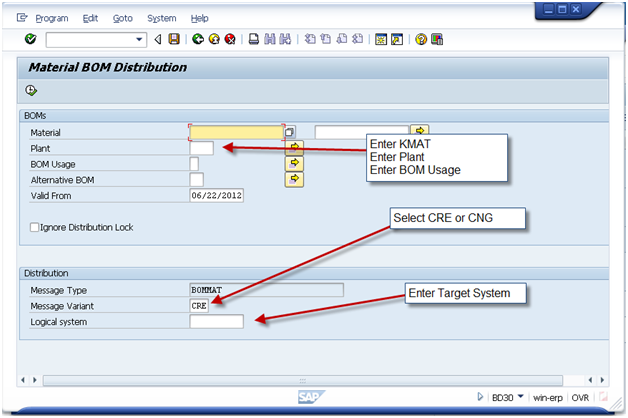
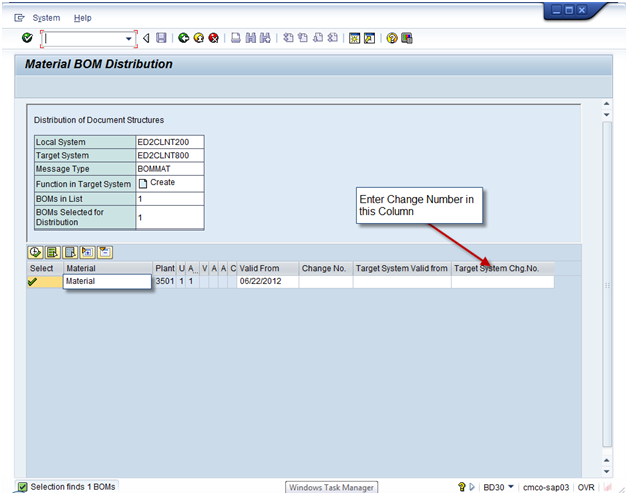
Please note, if you have Sales BOMS and Production BOMS, you will need to call this transaction separately for each.
Also, you may have a list of materials BOM’s to move, be sure to enter the change number in every row of the Target System Chng. NO column.
The following items must exist first:
- Characteristics
- Classes
- Object Dependencies
- KMAT Materials
- Components in the BOM
Interface Design
TXN: CUID
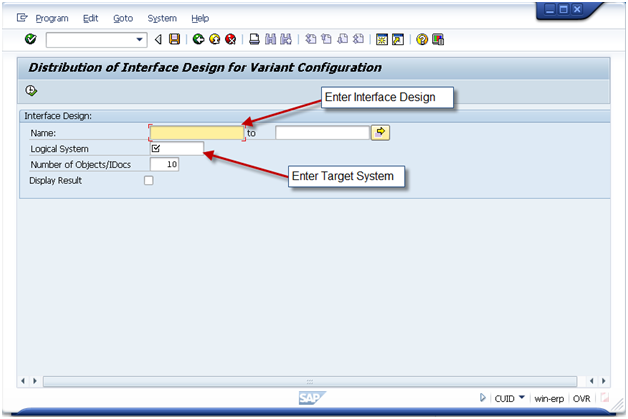
The following items must exist first:
- Characteristics
- Classes
- Configuration Profile
- KMAT Materials
- Object Dependencies
- Constraint Nets
Pricing Condition Records
TXN: VK12
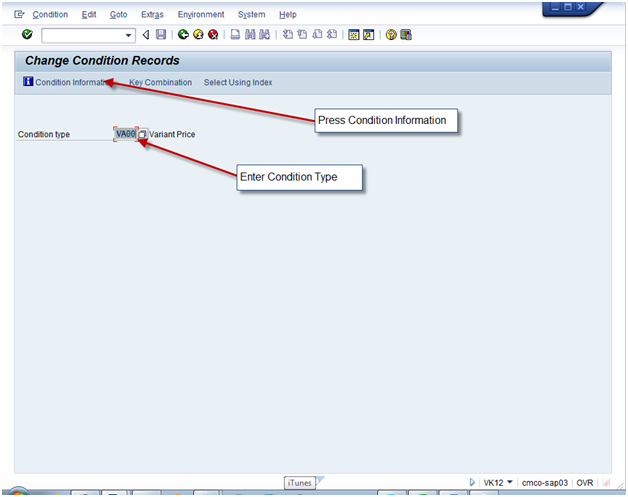
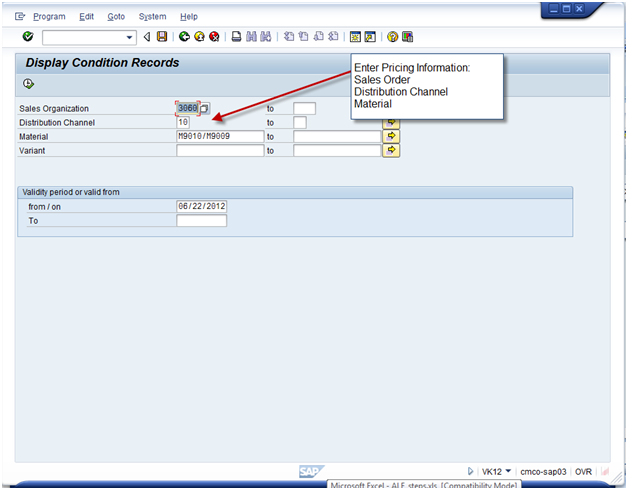
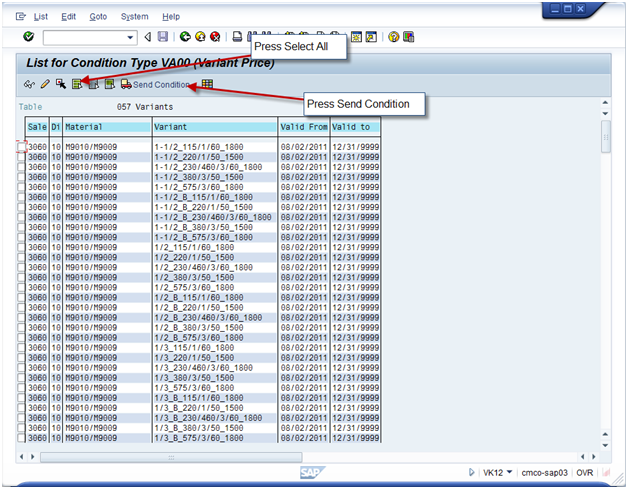
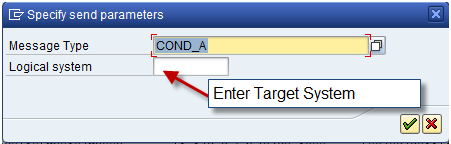
The following items must exist first:
- KMAT Materials
Routing/Reference Operation Sets
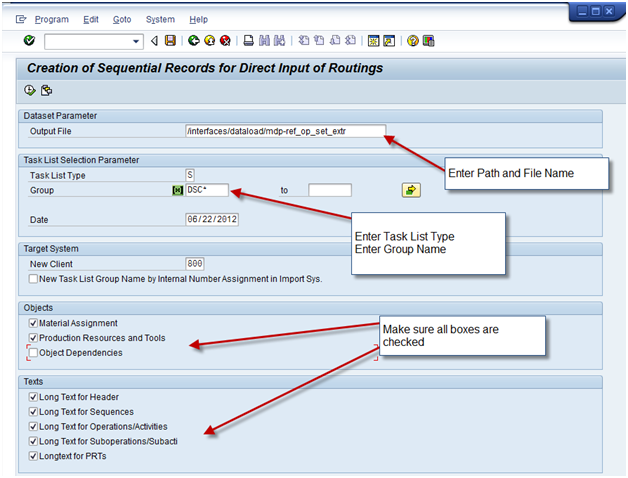
Program: RCPDIRO1

Program: RCPTRA02
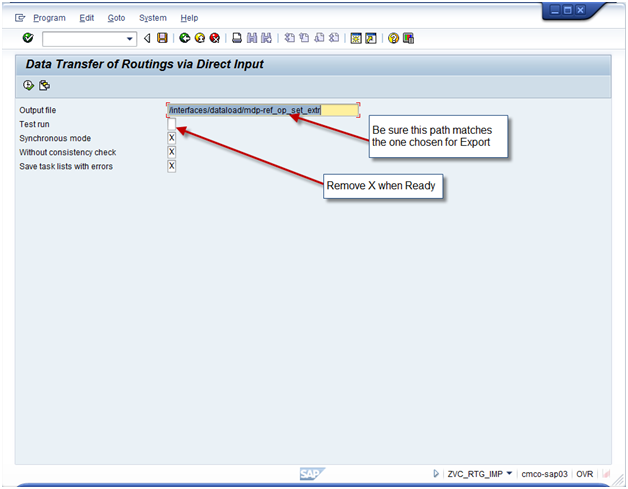 This the one piece that does not use ALE. It actually uses a more simple technology of downloading a file, and then uploading it. You need to make sure the basis person has defined a directory that is valid in both the original and target systems.
Remember, if you use reference operation sets, you must first transfer those. Use Type S. Then execute again using Type N.
The following items must exist first:
- Characteristics
- Classes
- KMAT Materials
- Object Dependencies
- Work Centers
How to check for errors:
IDOC Status Monitor
TXN: BD87
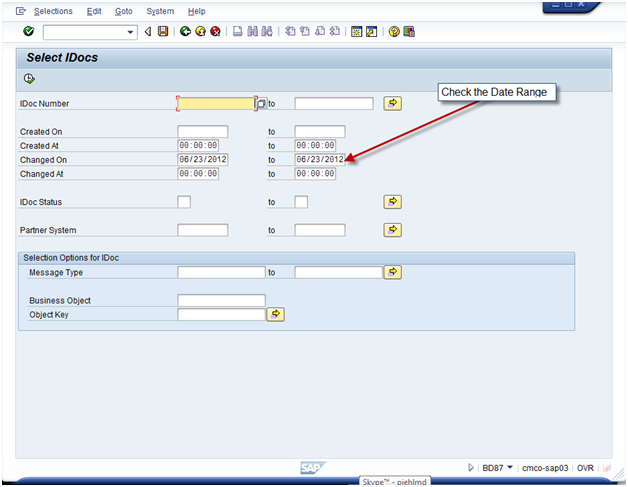
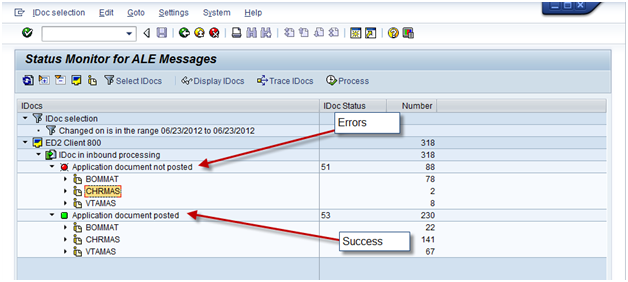
To monitor the success or failure, log into the target system and execute this transaction.
After executing the transaction you’ll be able to see what failed and what succeeded. If anything failed, you’ll be able see the IDOC log to see exactly what failed and why. (See the next section).
Analyze Application Log
TXN: SLG1
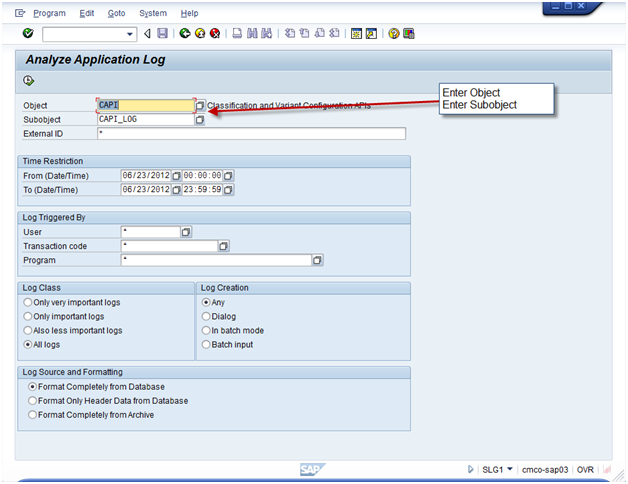
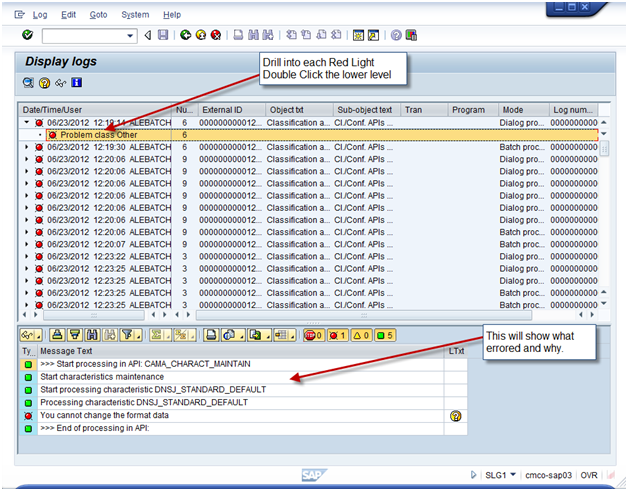
Use this log to understand the errors. Certain errors may require manual changes in the target system. Other errors simply need a piece of data that has not yet been moved. As soon as the missing data is created in the target system, you can re-execute the IDOC in BD87, or you can send it again using the transaction in the original system.
SAP SM Blueprinting Questions – Technical
Welcome back. This is the last piece in my series on talking about SAP SM blueprinting. This last edition will focus on the Technical aspects of service management. So let’s get right into it.
Forms
This is the biggest piece of the technical aspect of Service Management. When it comes to service there are a lot of documents, but it all depends on what the business plans to use. First off, for every document, be sure to get sample documents for EVERYTHING that the client says is required. During realization, you’ll need to analyze every one of these and determine the mapping of old to new data. Here’s the forms you need to consider:
- Service Quotation: Does this look just like a standard sales quotation? Are you use RRB to determine the detailed cost of the quote?
- RMA/RGA paperwork: Does this come from the notification or repair sales order. I will recommend using the repair sales order, but I’ll leave that for another post :). Does this look like an order confirmation or is completely different?
- Service Order Paperwork: There’s a bunch of options here that come standard in SAP.
- Time Ticket – do you need this print out? should this look like the production order shop floor papers?
- Pick List – is this something that should be printed? who does this work, does the repair group pick their own components, or does the warehouse?
- Shop Floor Papers – do you need this print out? should this look like the production order shop floor papers?
- etc.
- Invoice – Do you need a special invoice for service? Again, I always suggest to avoid this if at all possible.
Technical
This is the piece is the easiest part of blueprinting because you should completely skip it. Don’t start talking user exits, BAPI’s or anything custom at this point. This doesn’t mean to ignore the stuff, but initially, save this until realization. Remember, you don’t need to solve every problem, for now, just collect them all.
Interfaces
Interfaces are anything that needs to link into SAP, but is not part of SAP. The most common example of this is Taxware/Vertex. Now there may also be existing websites that link into the existing system, there may be some external part planning, an outside application to handle scheduling, etc. I personally always dislike this part because it tends to be the biggest headache. Your biggest goal is to figure out everything that needs to come into SAP, and more importantly, determine if SAP can handle this with standard functionality so the interface can be replaced with SAP. Be sure to get as many details as possible, including functionality and what information is exchanged between systems. This is likely to be a time consuming piece of realization to get all the details and possibly design a technical interface to replicate the old behavior.
Alright, this wraps up everything I have for the blueprinting. If you have anything I’ve missed, please let me know. I always hope to learn something as well.
I’ll be back soon,
thanks,
Mike
SAP SM Blueprinting Questions – Service Processing
Now, onto more of the nitty gritty, what do you need to find out about the actual processing of the service orders. In this part of the SAP SM blueprinting series we cover what do you need to find out when it comes actually performing the repairs. So let’s get into it.
How many service orders do you process in a day/week/month?
It’s old fashioned, and I think everyone knows this, but I’d hate to skip over the obvious. This question helps you gauge how to structure your processes. Just having an idea that the service department processes 1 order every 2 weeks, or they process 25 in a day. You’ll need to start thinking about how the service group will see their open orders, how they will notify other groups when they start or complete the orders, etc. Simply put, the answer to this question will set the stage of what you need to do for all realization about the actual repair process that occurs.
How many different service order types do you utilize, and what is the purpose of each?
You may need to phrase this question differently depending on your audience. The gist of the question is determine how different “types” of orders you process. A type of order is anything that it is either tracked separately for financial or processing issues. For example, if the accounting department needs to separate the costs of an Field service type order from an in-house order. Sometimes, it’s purely fro reporting to know which orders need to processed ahead of others (for example, an in-house repair would need to be processed before the exchange orders that will just go back into your “spares” inventory. Keep in mind, the more order types you create, the more maintenance you will be responsible, so like everything, drive to the minimum number of order types you can.
Do you break a single repair up into multiple smaller pieces?
SAP uses sub-service orders to accomplish the breaking of main service order up in multiple pieces. This is especially useful when you deal with equipment that is broken into multiple pieces for repair. This often happens with larger pieces of equipment that get broken down into more management sub-assemblies, each that need their own repair. Sub service orders in SAP work great for this, because you are not allowed to complete the “main” service order until it’s sub-service orders have been completed. So you can build an entire structure of orders if your process is complex. However, remember that using these orders now doubles or triples the amount of master data to maintain for each order. So if your shop is small, be aware they will have to do a lot more system work. Short story, only implement if needed, and make sure that the people that will be dealing with day to day
Do you perform subcontracting for any service repair (in-house or external)?
Another thing to determine is if you have to worry about any subcontract or 3rd party to do work on a part. There are several different ways that you subcontracting impacts the service order.
- The first way is that you need a component that is purchased. In SAP, if you don’t have the material in stock, it will generate a purchase requisition for the component. It may also be for a part that is not maintained as a material master in your system (this could be something like ordering hammers for the field service tool belts).
- The next way is that you may send the part being repaired (or a portion of it) to an outside vendor to perform a specialized service or process that you do not offer. It could be special diagnostics or tooling on the part. This again requires a purchase requisition.
- do you need to see that the inventory has left your facility? In SAP, you can implement the A&D solution to actually perform the material movements and SAP deliveries to show that the part has left/come back into the facility. This is very nice functionality, but keep in mind that it has limitations, and it adds multiple additional steps to the process. Find out how necessary the requirement is perform you promise it. It requires certain enhancement packs to be installed and activated, so if you go down this path, you’ll need to work with the basis/development team to accomplish this.
- The next thing to consider is, do you use a 3rd party service center to do the entire repair. In this event, please check out my post on Warranty Claims: SAP Warranty Claims: A Guide for Beginners
How should the costs be broken up?
The cost breakdown is simply the broad categories that display on the service order as you do planning or actual hours & components. Some of the common breakdowns include:
- Labor
- Travel Costs
- Components
- External Components
- etc…
Remember, these categories have no impact on anything financially. It is simple “buckets” that the particular cost elements are grouped into to.
Do you perform repetitive service tasks for certain products?
This question is related more to master data than service processing, however it fits much better into this portion of the blueprint. It’s important to find out if your client does repetitive steps for a particular repair. This could by service material (service process) or by serviceable material (material that is being repaired). If the same steps are performed every time, you need to set up General Task Lists, and teach the business how to use General Task Lists. If you are not familiar with these tasks list, it’s simple a routing and component list that can be automatically copied into the service order upon creation.
How do you need to track your time entries to the service order?
This question helps you drive to the answer of if you need to pursue CATS (computer aided time sheets). CATS is a useful tool if you use SAP to handle your payroll and your service orders. Keep in mind that the standard time entry tools for service orders (IW41, IW42 for example) can handle entering in personnel numbers, multiple confirmations, etc. CATS certainly provides better reporting, and looks more like a time sheet for your employees entering their time. CATS will certainly require a lot more configuration, including setting up an organization structure (often a difficult and controversial topic for any organization). As a general guideline, I will steer clients away from CATS unless they have solid reasons for using it (often if the client does Project Systems and Service, both will want to use CATS, then it makes sense to use CATS).
If you perform service at the customer’s location, who enters in the time and material for the job?
This question is typically more business process related, but it is certainly information you need to know. The reason it’s important is because you need to know if field personnel will be entering in their own time and materials, or will they be emailing, faxing or mailing in their time sheets to someone in an office who will enter it for them. If they intend to enter it in the field, you need to know if they have internet connection in the area. In our day and age, most places have internet coverage, however there are still locations on our globe that do not have easy connectivity or have very weak or slow connections. In that event, you need to be very sensitive to making someone log into SAP, if they are using just a 3g network. You may need to look into a web interface that provides a small amount of bandwidth to get the confirmations entered.
If you perform service at the customer’s location, do you ever send components for a service job?
This is one of the famous loaded questions you ask. It’s pretty rare to do service and never send components. The reason for this is to determine HOW you need to handle the components. There are several common ways to handle this.
- The service technician is located at the office or a plant with parts and takes parts with them to the customer. In this event, the technician simply issues the parts to the order and removes them from stock. Packs them up, and takes them to the client. If there are extra parts, they are returned to the warehouse after the completion of the job.
- The service technician maintains “trunk” stock. This simply means they have a list of stocked components with them at all times. These “trunk” locations are typically a storage location in SAP. Then the stock is issued from their SLOC to the order.
- The parts are shipped ahead of the tech by way of a sales order/delivery process. They are shipped directly to the customer, perhaps as a no charge order, but this again needs to be determined by the business.
If you perform service at the customer’s location, do you perform scheduling of your technicians?
Now this question will often get a quick “Yes” from the customer. However, you need to dig into the how. Many clients simply track their techs on MS Outlook, Excel, or the big calender hung in the boss’ office. Now some clients have a far more sophisticated method to track their people, and when they are available, but you need to know what level of complexity you need to implement. In addition, you need to find out if they track the travel time, how are the tech’s schedule maintained? Is there an automated connection to the call center? Do they schedule “real-time” with the customer? Who has access to view this? Do they track skills of each tech to determine who can do what? Keep in mind, to implement this in SAP is usually a very custom solution requiring quite a bit of development. SAP does offer a solution, but it is an add-on, and last I looked into it, it is only for CRM.
Do you perform any service parts planning?
Service parts planning can often mean a lot of different things depending on the client. Some of the things you need to determine are:
- Are the parts being planned independent of the production demands?
- If it is a shared stock, who wins? By that it’s important to understand in the event of limited stock, does a sales order get the stock, does service get the stock or does production get the stock?
- How do you forecast service demands? How much history is currently used to determine the service forecasting?
Alright, here’s the stuff I can think of related to service processing. As always, I welcome your comments on anything I missed, or even anything else you would like me to cover… Next time we’ll talk about a few of the remaining “oddball” items, such as forms, technical stuff, and financial stuff.
Thanks for reading,
Mike
SAP SM Blueprinting Questions – Shipping and Receiving
This next installment of SAP SM Blueprinting is a short and sweet one, but be sure not to over look these details. If you perform in-house repairs or returns, you need to understand what processes need to be accounted for. Here’s a good starting point.
Do you currently have any special processes or requirements after receiving the material into stock?
Often when you receive materials into your plant, there are special requirements, special areas, or people to notify. Be sure to check if any of the following might apply:
- Does the inspection or service department need to be notified?
- Does the customer receive any notification when their part has been received?
- Does Customer service need to be notified upon receipt? This could be to issue a credit, or an email to the customer.
- Do any movements need to occur from the dock to the service department?
Where do the returns get received?
While this is a simple question, it can have a lot of configuration implications.
- Do you need a specific storage location for all repairs and/or returns?
- Will the repairs be processed in an inventory managed or warehouse managed storage location?
- Is a unique shipping point needed for repairs? This is often very helpful in the storage location determination.
The ever present of question of serialization
It seems question never goes away. Shipping and receiving is often the forgotten when dealing with returns and repairs. If your shipping and receiving areas are familiar with serial numbers, this should go pretty quickly. However, if serialization is new to the group, be sure they are prepared for the following
- Repairs may require a serial number, what if the serial number isn’t readily available or visible?
- What if the serial number returned doesn’t match what is expected?
- Will shipping ever be required to create a serial number for a repair? If so, is the labeling hardware available in an accessible location?
Shipping the Product back to the customer
- Do you need to be concerned with returnable packaging?
- What paperwork needs to be provided to the customer upon return of the product?
- How are special shipping instructions provided to the shipping department?
Hope you found this helpful, and as always, please post anything else I may have missed or if you have any questions.
Thanks,
Mike
SAP SM Blueprinting Questions – Sales / Customer Service
Well, I’m back again to continue my blog on blueprinting for SAP Service Management / Customer Service. This next portion tends to be one of the biggest areas for me in dealing with SAP SM blueprinting. I’ll do my best to keep it straight forward to give you the best details I can on SAP SM Blueprinting. Please also refer to my other posts about Master Data and the Call Center blueprinting.
What processes does your business currently utilize?
This one simple question usually has the most impact on the service blueprint, at least in my experience. You need to understand what processes your customer currently uses. Once you understand what those processes are, you should be able to map them to SAP relatively easily. Inevitably, some of the processes won’t be mentioned, so do your best to ask about each of these in detail.
- Repair and Return Processing (in-house)
- This is the standard SAP repair processing. This will involve sales orders, deliveries, service orders and often notifications. There are a lot of variations that can be built into this standard process, and you’ll want to understand if any of them apply. Some of the variants include:
- Are Loaned Items offered to customers? are they offered to all customers or only customers who have purchased a “premium” service of some time.
- How does scrapping need to handled for customer own equipment?
- Is it fixed price billing? or Time and Material billing?
- How many in a day/week/month?
- This is the standard SAP repair processing. This will involve sales orders, deliveries, service orders and often notifications. There are a lot of variations that can be built into this standard process, and you’ll want to understand if any of them apply. Some of the variants include:
- Advanced Exchange Processing
- This process is a variation of the standard repair process. The exchange is simply sending a new unit to the customer before receiving the customer’s unit. This is often offered as a premium service to customers. Some questions that need to be addressed for this process include:
- How does billing occur? is the customer billed as soon as the exchange is sent, and credited upon receipt of the customer’s equipment? Or is the customer billed after the unit is received and repaired?
- Are brand new units sent as an exchange? or are refurbished units sent as as exchange?
- What happens to the repaired inventory? Is it stocked as a new number or different valuation type? is it put back into stock as new? Does it need to go to a special inventory location?
- Does the repair of exchange need to be tracked separately? does it require it’s own service order type? does it need special scheduling, for example all standard repairs must be done first before working on any exchange units? It is first come, first serviced?
- Is it fixed price billing or Time and Material billing?
- How many in a day/week/month?
- This process is a variation of the standard repair process. The exchange is simply sending a new unit to the customer before receiving the customer’s unit. This is often offered as a premium service to customers. Some questions that need to be addressed for this process include:
- On-site/Field Service Processing
- On-site or Field Service is usually the easier process. Typically this consists of a service order that gets charged time and expenses. However, like everything else, there are a lot of processes that can be combined with on-site service.
- How do you deal with components needed for the On-Site work? Are the parts sent to customer directly? do you use “trunk” stock where your technicians carry their own stock? Do you charge the customers for the shipping of parts? Do you ever use customer’s parts in the order and if so, do you need to account for those in any of the processes?
- Do you use sub-contractors or 3rd parties to perform any on-site work? Do you need to track items like per-deim? hotel? airfare?
- Do you track or charge for travel time?
- Do you schedule your technicians? need a calender of events to know who is where?
- How are costs currently tracked/entered? do the technicians enter the information? is the information sent to someone on-site?
- How many in a day/week/month?
- On-site or Field Service is usually the easier process. Typically this consists of a service order that gets charged time and expenses. However, like everything else, there are a lot of processes that can be combined with on-site service.
- Returns for Credit
- The easiest of the service processes, the simple return for credit. No repairs, no replacements, just a credit. Some additional pieces to consider include:
- How does the stock need to handled when it is returned? does it need to be sent to quality, repairs or production before issuing the credit?
- How is the process handled if the material is damaged upon return? is credit still issued? is it partially credited? Is it repaired, and if so, where does the cost go?
- When is it returned to stock? can it go back to unrestricted inventory as is, or does it need to be a different valuation type or a different material?
- How many in a day/week/month?
- The easiest of the service processes, the simple return for credit. No repairs, no replacements, just a credit. Some additional pieces to consider include:
- Returns for replacement
- This is a gray area as far as I’m concerned in the service world. This could actually fall under the repair process and be executed like a service exchange, or it could just be a return order, with another sales order (free or paid) order to follow up.
- The biggest think that drives this one way or the other is finance. If it should count for or against your service revenue, this by all means, add it to the service process. However, if it’s just a cost of sales, you’ll want to be careful trying to make it fit into service. Someone’s budget might take a hit that they weren’t expecting. In general, try to steer this away from repair orders.
- How many in a day/week/month?
Do you perform quoting of repairs?
Such a simple question… right? nothing ever is in SAP. When you talk about quoting in the service order, there are always little considerations you have to take into account. So make sure you know what you need in advance.
- Do you quote in house repairs? if so, do you quote them before or after the product arrives in-house?
- If you quote them after, please check out my blog post: SAP SM: Quoting In-House Repairs. It will explain how to quote using the repair sales order you received the repair on.
- Do you quote time and materials? or do you quote as a fixed price?
- Do you need to begin processing before the quote is approved? for example, do you need to make or buy materials that have a long lead time?
- How do you track your quote approval/rejections?
How do you price/bill your repairs?
The pricing and billing of the repair order is actually a much easier question (at least initially).
- Do you offer fixed price repairs?
- Do you offer time and material billing? If so, what do you bill for?
- Labor?
- do you break it out by straight time, over-time, travel time? If so, do you have pricing and costing rates for each of them?
- Materials
- do you break it out by material types? Finished goods? raw materials? etc?
- Do you display each material used? or just lump them all together into a single total?
- Subcontract
- do you need to break this into labor and materials as well?
- On-Site expenses? do you incur these? If so, how do these need to be broken down to the customer?
- Labor?
Do you deal with warranty of products?
Warranty tends to be one of the most challenging pieces to deal with when it comes to the repair process. There are a lot of variables, and it seems that everyone handles it differently. So make sure you collect a lot of information. I’ll do my best to arm with as many questions as I can think of.
- How do you Track warranty? is it through serialization? equipment records? time of shipment?
- When does the warranty start? shipment? registration? receipt? time of creation?
- if it’s registration, how do you track that? is there an interface?
- How your warranty measured? straight time? operating hours? mileage? or a combination of multiple things?
- If it isn’t straight time, how do you track the other metrics? is there any automation to capture the numbers or is it a manual process?
- What is covered by the warranty? Time? Materials? customer service? on-site service? everything?
- When do you know that something is warranty? do you know at the time of the customer contact? or not until you actually evaluate the material and see if it falls under warranty (this is a big one in determining how to handle warranty).
- Do you accrue for warranty costs? if so, how? is money taking out of each sale of particular parts to go into an accrued warranty account? is there no accrual? What accounts should be credited/debited when doing a warranty service of any time?
- Are there special considerations for profitability or COPA? (I’m no expert here, so if you’re like me, make sure you have your FICO person available to translate. ha ha)
- what happens if someone doesn’t state it’s warranty? what is the process going to be? (this one is always more for me, because without fail, setting something as warranty is often forgotten and need to be corrected after the fact. Have a plan for this)
- Do you perform your own service work for the warranty, or do you allow 3rd parties to repair the product and then bill you? (if so, see my post SAP Warranty Claims: A Guide for Beginners).
Do you use service contracts/extended warranty/etc?
Since we’re talking about warranty, the conversation wouldn’t be complete without talking about contracts. Unless you offer a lifetime warranty, often you will give your customers an option to purchase an extended warranty or perhaps some sort of maintenance plan. Like warranty, contracts require a lot of information to set the process up correctly.
- What do you sell under a service contract? is a yearly maintenance visit? X hours of support? full repair/replacement? Exchange processing for quick turn around? extended warranty, for some or all facets of your product?
- Do you use deferred revenue for the contract?
- Do you use a billing plan? or do you bill everything up front?
- What accounts need to be credit/debit for the contract revenue?
- How is service recognized? what accounts needs to be credited/debited when something is under contract?
- Will you track specific serial numbers under the contract? or any products the customer owns? (serial number tracking is encouraged)
- DO you have a cancellation policy? do you have a method for extending the contract?
- Do you track the costs vs. revenue associated with the contract?
This was a big topic, so inevitably, I missed something. Please add things I have overlooked to help all of us get better at blueprinting,
Thanks,
Mike