Variant Configuration – BOM Class Nodes

Happy Halloween,

I hope you consider this a treat, and not a trick =)  Today I wanted to talk a little about using class nodes in a variant bill of material.  In the old days, this was using class type 200, however, you are no longer constrained to using just 200, you can use 300 as well.  This is a handy method to dynamically add materials to a variant bill of material.  I’ll start with the how…

First, create yourself a class type 200 or 300, and be sure on the additional data that you check the following fields.
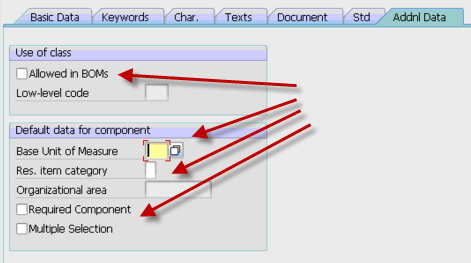
All of the fields are self explanatory, so I’m not going into a lot of details (please comment if you’d like more info).  The really important field is the first check box.  This will allow you to add it to the BOM.  The remaining fields will set some defaults for your and the additional behavior.

Once you have this class add, you need to make sure that the characteristic is either included in the your parent configuration (and is passed to your bom class node ) or is set using an object dependency at the BOM level.

Once you have this, you just need to attach the materials that can be selected using this class.  I prefer transaction CL24N to add the materails, but there are multiple ways to connect the material to the class using the standard classification transactions.  The important thing is that each material you enter needs to have the characteristic values set manually in CL24N.  This is how the system knows which material to replace the class node with.

Hopefully this all makes sense, because the part of the post I really want to talk about is some things to be aware of when using bill of material class nodes.  The first is change management.  If you use ECM to control your variant configuration bill of material, this method completely circumvents that process.  Using the class nodes, you can link and unlink materials with no ECM record.  So you must be aware of the loss of traceability when using this approach.  The second topic is that if you commonly obsolete and superscede materials in your bill of materials, finding where the materials are used can be a challenge as well.  The where-used for class types works, but if you are using CS15, you must remember to check the Class checkmark.  So if whomever is running the where used isn’t familiar that the part is used in VC class nodes, it could be easy to overlook when doing a replacement part.  This could lead to inaccurate BOM’s and confusion on the floor.  THis segways into the whole phasing out of a component on a bill of material.  If for example, you have a component that you will be replacing, but still have 50 pieces in stock that you would like to use up.  Managing the class type and when to change to the new component will be very manual and must be done at the right time by someone monitoring the stock.  it won’t be as simple as the rest of the boms that will be changed automatically using date shifting the of the ECO.

Now, despite this items, it has some very good features.  The first features is the required component.  This is especially useful if  you have order boms.  this is will quickly notify you if the class node failed to find a component (but only if you check the required box, see above).  If you use just selection conditions, you won’t get the easy visibility that component didn’t get picked that you were expecting.  The second cool feature, again related to order boms, is that you can manually find an item for a class node and replace it.  So if there is a component that is close, but normally used, you can manually select it from the list and pull it into your BOM.  this can be especially useful if you have multiple options for a single part, and you manage the part by your stock levels.  Someone can quickly evaluate which part you in stock, and switch the class node to that part (making your promise date look much better => ).

Well, I hope this was a treat for you…  if not, well, I’ll try better for next year,

As always if you need more in depth help, we offer consulting to help you streamline your VC processes,

thanks for reading,

mike

SAP Data – What good is it if you don’t use it?

A couple weeks ago, I was chatting my friend Justin, and we got into a great discussion about how businesses seem to be so poorly run, despite having access to almost limitless data.  So, what’s the deal?  how is it in an age of ERP systems that capture everything you do, we still see so many organizations struggling, or worse yet, barely hanging?  Well, we came up with a couple of things that I believe explain a lot (and I hope you can learn from it).  Most of this will be from my experience of SAP data.

1.  If you don’t know what the data means, how can you interpret it properly.  This sounds so simple, but when you stop to think about it, in a giant system like SAP, there is so much data.  If don’t know what the data means, how can you possibly use it?  In addition, the bigger the system, the harder it is to mix and match the data into something that makes sense to your team.

2.  If you don’t know where to find the data, it’s gonna be tough to use.  Again, similar to the first point, knowing the data is in there, doesn’t help you find what you NEED to know.  In an ERP system, often there is so much data, that getting the stuff you really need can be challenging.  SAP for example has so many different dates, that knowing which data you really need to be using can be a challenge.  Figuring out the correct data, and then pulling it together to give you the information you need often takes someone with a lot of knowledge about the system.

3. Analysis of the data is key to pinpointing the true issue.  Once you have all the information, and you’ve put it into a readable format, now someone needs to look at it and interpret what it means.  Take my area for example, Service management.  If you have an issue with repairs in-house not happening quickly enough.  There are many areas to review to figure out where the bottleneck really is.  The issue could be the receiving group not processing the delivery soon enough, it could be that the service order doesn’t get released in a timely manner due to missing parts or lack of capacity.  It could even be that the service department doesn’t enter in the data when they need to.  If you don’t know what data to look it, you could be solving the wrong problem.

4.  If you don’t use the information, things can’t get any better.  Now, this is the most difficult of all things to overcome.  When an organization doesn’t act on the data they have extracted, things will not improve.  As a consultant, this is the most frustrating place to be.  Seeing upper management receiving all the data to pinpoint where things are “broken”, but then not taking any actions to improve the the organization.  A couple years back, I was a on a project where inventory was in a terrible predicament.  Things were in the wrong place, employees were not properly transacting things in the system, and every day it got worse.  The entire team kept telling them to perform a full physical inventory, yet the business refused.  Instead, they spent days and weeks counting certain areas they believed were causing the issues.  All this managed to do was shift the problem around and never solve the issue.

As you can see, there are a lot of things preventing businesses from running at their best.  The good news is that of the issues listed above can be solved if you can get someone that does the data, and how to analyze it.  The 4th issue… well that’s beyond anything I can offer any help for =)

Anyway, I’m sure I left a bunch of stuff out…  but I hope you enjoyed it.


Mail Chimp – Using an Old List

Hello again,

Now that I’ve been experimenting with Mail Chimp further, I have another valuable lesson.  If you have an old list, don’t be surprised if your account is temporarily suspended.  I just had it happen to me with the last newsletter I sent out.  I imported my list into Mail Chimp to test my list.  I purposely didn’t filter out the returned names I’ve received in the past, thinking that maybe Mail Chimp could get through where I couldn’t.  Ooops.  I ended up getting 40% of my list bouncing, and instantly my account got put on hold until I could explain what happened.  I explained that it was an old list that I hadn’t really been emailing in a while.  They were ok with that.  Also, note that you get 2 warnings and then your account is shut down.  So, play by the rules.  it’s for everyone’s benefit.

The other thing I learned is that you can NOT include any names that you did not gather personally.  I recently did a marketing campaign with SAP EcoHub that resulted in some names (I’ll tell you more about that later).  Because there was a third party involved, I had to remove those names from my Mail Chimp list.  Another valuable lesson learned for me.

On the bright side, for the time ever in my newsletter I can see how many people opened it, someone else takes care of any returned mails and unsubscribes, and I can even see if they’ve clicked into my link for the rest of the article.  I love Mail Chimp, but I’m still learning.

I recommend checking them out.  Now that I’ve cleaned my list pretty well, I’m going to look at doing a pay as you go auto responder.  I need to get more details on if I still get 12,000 newsletter, and pay for the auto-responder, or if you lose that benefit when you start paying (I certainly hope not).


Creating the Sales Contract

when you finally  get the pleasure of doing a sale, you need to make sure you have the right paperwork in place.  One of the key things is the sales contract.  Luckily, I had the agreement that I signed for the SAP partnership, so I was able to use that a guide for structuring my own sales Contract.  What I learned is that there are some pretty standard pieces of it…  then from there, you just need to add your own spin.

For example, here’s the main pieces of mine that I just put together.

1.  The general section.  From the ones I’ve seen, this is the easy part.  It has the name of what you’re selling with a short description, the customer’s information (name, address, etc..)  My contact info and any annexes (additional documents)

2.  Scope of the agreement.  this pretty much specifies what you are selling and what’s included/not included.  It also defines who “you” are.

3.  Next is the Renumeration…  pretty much, what’s the agreed upon price.  Any discounts, etc.  the short story behind this, what are you getting for the sale.  In my case, I gave a list price, then stated the discount the customer gets in exchange for a reference and signing the agreement by a certain date.

4.  Invoicing and Payment.  Pretty simple…  payment terms.  when will they pay by, do you offer a cash discount, do you provide the product or service before or after receiving payment.

5.  the next one was something I added in because it was a customer concern.  that was support.  Because I’m a small company, the customer is obviously concerned about how I will support the product after the sale.  The funny thing is, actually he’s likely to get much better support out of me than he is a bigger company, but regardless, it still needs to be spelled out in the agreement.  Some important things to include are also what isn’t covered in your support.  If you don’t clearly state this, you could end up providing support for things you didn’t intend.  Do your best to think like a lawyer here =)

Finally, the signature page.  Make sure to collect the customer’s PO number.  the name and title of whomever will be signing this agreement, and once again the date.  Finally, you will countersign this agreement to make it all legal like.

All and all, it was pretty painless, but I”m sure glad I had an example to start with.  If you’d like to see mine, just make me an offer on my software and I’ll be happy to send one right over to you =).

As always, thanks for reading,

Mike

Mail Chimp – Newsletters made easy

I just had my first experience with Mail Chimp, and what I can, I’m hooked. I signed up for the free version, uploaded a list of contacts from an excel sheet, put together a slick post card, and have been tracking my results. Previously, I’ve been using a hokey macro that I found online (and of course tweaked) to send emails to my contact list. Using Outlook, there was no tracking, I could only send txt or html (both of which I had to completely design).
I can’t begin to express how much easier Mail Chimp made my life. It handles the subscriptions, I can upload a list, or build a list using a form I added on the website. this was another really cool piece. Mail Chimp lets you design a subscribe form, and then gives you the HTML to put onto your website, or gives you a link to use their form. I haven’t scratched the surface yet, but now I can do newsletters/emails to my list. i didn’t even mention the many templates they have out there to make professional looking emails, newsletters, or whatever you need to send to a group.
I’ll be posting again in the new future when I start to figure out how to do the auto-responder piece. This part you have to pay for, but I do like the idea that you can do a pay as you go format, and then switch over to a monthly fee. When I figure out how it works, I’ll share it with you.
Thanks for reading… I’ll keep learning the hard way, so you don’t have to…
Mike

Trello – A new way for managing team activities

On my latest project, I got introduced to a new piece of software. It’s called Trello. It’s a rather simple simple, but it lets you quickly setup tasks into columns. Then you can quickly drag and drop the tasks for column to column. The beauty of it is that multiple can all move the task around. It keeps a record of everything that anyone did to the task. The way we are using it on this project is to track tasks that are open, in progress, on-hold or completed. This particular project has a large amount of master data that needs to be loaded. Since I’m the team lead, I needed an easy way to monitor what was being done and by whom. I highly recommend Trello.
Anyway, this one is just a quick post, but hopefully still useful.
Thanks for reading,
Mike

Features vs. Benefits – It really does matter

My latest marketing lesson that I learned is just how important it is to sell benefits, not features.  Being a programmer, I’m used to dealing with features.  What does it do? is it cool? How fast is it? etc…  but after listening to the lesson, I learned that even I need to know the benefits.  Just because your new widget can do something, until I know why I NEED it to do that, I’m not going to buy.  The latest lesson had us focus on converting a feature into a benefit, simply by going down the ladder of why does my customer care?  For example, you have a feature that provides the fastest dry cleaning in the county.  Ok, great…  but why do I care?

Fastest Dry cleaning in the county:
It gets me my clothes faster than anyone else

why do I care?  I have a big meeting tomorrow, and I need to look my best.
why do I need to look my best? I need to give a great presentation
why do I care?  I need to be my most confident self.
why do I care? it makes me feel good about myself.

I apologize if I butchered that, but the short story is that everyone needs to feel good about themselves, so for every feature, you need to walk up the ladder until you can get that response.  IN this case, having my clothes ready tomorrow for the big meeting will give me the confidence to feel good about myself, so I can make a great presentation.  I just did this exercise with my Broadsword 1 page sales document.  It actually made a big difference.  No, I didn’t make a sale yet, but this gets me 1 step closer and increases my chances of feeling better about myself because my 1 page document are more likely to hook a prospective customer 🙂

Anyway, that’s all for now.

Mastermind Group – You Need One

Tonight, I made a new revelation. A mastermind group is invaluable. I’m doing this marketing class called the Remarkable Blueprint. I’ve been doing some of the exercises, and I kinda hit a wall a day ago. I got to the point of being overwhelmed with all the exercises and trying to apply it to the all of the materials I’ve already generated for my products. I’ve found that often I can get bogged down when I have too much to do, and I don’t have a good starting point. Which is funny, because every time I get to this point, as soon as I start doing something, anything, I get out of the rut.
Well, I was talking to my friend, Justin, who is also doing the Blueprint. He hit me with a flash of the obvious. Just pick one product, and perform the exercises for that one product. The other areas can be tackled later. So I just decided to do my dashboard. I’m going to start cleaning up all the marketing materials for Broadsword. I’m actually pretty excited.
Now, my original point is simple. If you want to get the most of your endeavors, you need someone (or a group) that you can bounce things off of. I actually gave Justin his own ah ha moment, much like he gave me. It’s often as simple as having someone that isn’t neck deep in the details to point out the obvious. So, start finding some people that have similar aspirations. I bet you can help each other out in more ways than you imagined. The funny thing is that I read this in Think and Grow Rich, many years ago… but it took until now for it to finally sink in. It’s amazing the things you learn and don’t use… then out of the blue, it hits you.
Anyway, that’s all for now… I hope you’re learning from my mistakes,
Mike

Our First Trade Show – Carolina ASUG – Lessons Learned

My latest learning experience was the trade show. Now I’ve attended trade shows in the past, but this is the first time I’ve gone to one in the vendor mindset. Now, this was a relatively small group. It was a regional ASUG, so it was a great place to learn. My partner Mike and I got up at the crack of down on Thursday morning and drove 4 hours. We hit the vendor fair, that had about 10 or so booths. We talked to about half of the booths, in order to try to learn what other people are currently doing. We talked to some companies that were even doing SAP Add-ins, just like us. So we got some great information about pricing and we saw some good marketing materials that we can strive to check out. (speaking, please check out our one page document on any of our products. I’d love to hear your feedaback).
Here’s some of the lessons I learned

Lesson 1: Consistent Image:  Mike and I were in the process of getting the new company launched, so that meant we both came in under our own company name, Paper Street Enterprises & DMS. This wasn’t terrible, but since we were often at a booth together, we got a lot of strange looks, especially when we presented a JaveLLin Solutions business card.   So we decided that we need to get some shirts to wear (polo for sure), get a logo, get business cards, change our membership to to the new company.  Little things like that.  ha ha ha

Lesson 2: Avoid panel discussions if possible: On the first day, the last presentation was a panel discussion about ABAP Add-ins.  It was awesome because it gave us a chance to give a quick pitch.  However, we ended up following a guy that took twice his allotted time and just wouldn’t get off the stage.  This quickly annoyed the entire audience because this discussion was holding people up from going to happy hour.  Nobody wants to hear a sales pitch when they could be drinking free beer.  ha ha ha.  We learned that it’s worth the money to be a vendor and do an actual hour long presentation.  Plus, that will give us a booth.

Lesson 3: Talk to Vendors:  This was a big bright spot in the conference.  in the course of the conference we met 2 great vendors that are actually interested in partnering up with us.  So talk to everyone, you never know.  These vendors can help us get in the mobile arena with little work on our part…  (more about this in a future post).

Those are the big things I walked away with…  I”m sure when I go to CWG in Oct, I’ll be doing another one these…

Thanks for reading…

Power of the To Do List

Now everyone has their own style of getting things done.  What I’ve discovered about myself is that I need to make a list.  It’s one of the things I’ve heard over and over again in the personal development audio programs I listen to.  The funny thing is that now I’ve really started doing it, I notice just how much more I get done.  I literally knocked off 12 things on my list today.  Many of them, I would’ve put off (for who knows how long).  The simple task of adding an item to the list means I get it done.  I see that outstanding item, and it bothers me till it’s done.  Now don’t get me wrong, some of the items just get postponed till tomorrow, but it forces me to look at it daily.

Now I use a tool called Remember The Milk.  I love it.  it works great on the iphone, and it serves as a constant reminder of what I need to be working on.  I encourage you to give it a try.  It doesn’t matter how you do it, a notebook, a smart phone app, or a deck of index cards.  The trick is, don’t do anything that takes more than 10 mins unless it’s on the list.  It forces you  prioritize what you need to do.  Anyway, I’m going to keep this one short because you get the point.  Make a list, and watch your productivity increase.

good luck.

Posts navigation

1 2 3 42 43 44 45 46 47
Scroll to top