Variant Configuration – Replacing a Characteristic that is in Use

Something I’ve been dealing with quite a bit lately is remove or replacing a characteristic that is in use in a model.  Now I hope that this only occurs in your development environment, but regardless, the same rules apply.  So I just wanted to outline the basics of accomplishing this removal/replacement of characteristics.

1.  Txn CT12 – this is your best friend in this instance.  Using CT12, and selecting all of the options, will show you where it has been used.  One bad thing about CT12 is that enter in the value doesn’t necessarily work, at least in my opinion.  I tend to get a lot more results than just the cstic using that value.

2.  CU22 – this one is optional, but if your where used shows a constraint or constraint net, this is the next thing you’ll need to do.  Go into the CNET, and lock any constraints that use the characteristics.  This process is a bit tedious, but it’s the only way to accomplish it.

3.   CU50 – Interface design – again, you might not be using this feature, but if you are, you’ll see it in your where used.  Be sure to remove the characteristic from every interface design it exists in.  You won’t be able to delete this from the class if it’s still used in the ID.

4.  CL02 – now once these steps occur, you finally go into the class and remove the characteristic.  Just a note, if you already have configurations out there using the cstic or if the class is part of a class hierarchy, you will need to use CL6K in order to remove the characteristic.

5.  CU02 – now you can change all the standard dependencies to either remove the cstic or replace it.  Now remember, you need to pay attention to the logic here because it might not be a simple replacement.  Only you can determine this.

6.  CU22 – change and release the constraints that used the old cstic.  (steps 5 & 6 are interchangeable).

These are the big pieces.  Keep in mind, you may also have tables or functions.  In that event, you will need to update CU60 & CU62 for the tables, and CU66 for the functions.  But only after you’ve done steps 5 & 6.  Then you might need to revisit steps 5 & 6 based on your table/function changes.

I hope this is useful for you.
Web Dynpro – Visible Binding

Ok, I confess, I’m writing this in advance, because I’m sure the trade show will keep me busy… and afterall, I am in Vegas as you read this =)  Now that’s out of the way, I still wanted to give you something to learn.  So, today I picked up a new trick.  I wanted to make an element dynamically appear or disappear depending on what happens in the application.  The concept is called Visible Binding.  Every element has an attribute called visible, and you can dynamically change the value by binding a variable to that attribute.

It turns out, it’s pretty easy, with just a little bit of effort.  So, here’s what you need to do…

1.  Create a context attribute.  it should be of data type wdui_visibility (I think wdy_boolean would also work).2.  Next, for every element you want to dynamically control, be sure to bind this context attribute.
3.  in your method, you simply need to set the value of the context attribute to 1 for invisible, 2 for visible.

This last part was the part that threw me off, I kept trying 0 & 1.

Have fun… and wish me luck.  If all goes well, I’m making sales right now =)


Preparing for the First Real Tradeshow

Since yesterday was our day of prep for our first real trade show, I thought I’d talk about some of the hard work that goes into getting ready for your first one.  First off, I really need to thank my parnter, Mike Golden.  He took care of so much of this, so I could keep rolling on our never ending development list.

So first lets talk about the obvious stuff, the table…  if you’ve ever been to a trade show, you know that they normally have a fancy table covering with their logo, or slogan or something like that.  Now it sounds easy, but it still requires the design and getting the logo into the correct format and getting it all ordered a few weeks in advance.

Next, to up the level of our professionalism, we wanted a couple of banners to advertise for our “heavy hitting” products.  Renovation for all our service management stuff, and proximity for all our production execution stuff.  Now, this needed all the same stuff and then some marketing content.  Let me tell you, coming up with marketing content is no walk in the park for a couple of engineers 🙂  Now, not only did I need to come up with some good descriptive stuff, but it needs to fit in a confined space.  Up till now, I’ve been working with a web page that has limitless space.  On the up side the marketing blueprint class I did helped a lot, but it still takes time.

And all this work was just to get the table and a couple of banners to sit on the table…  Next up we needed some takeaways for people who visit the conference.  The first, and probably easiest was the pens.  Mike got some pens with the JaveLLin Solutions logo made up, so we can give those away at the table.  But a pen alone is unlikely to have anyone remember us…  This leads me to the biggest chunk of work, the brochure.

Again, my hat is off to Mike.  He took the lead on this, learned MS publisher and put together a great layout.  Then came the hard part again.  Content.  Only this time we needed written text, AND a demo.  So that meant for all our products we needed to put together a decent demo highlighting enough features of our products to get people attention without overwhelming or boring them with details.  Not as easy as it sounds for me.  Simply because I designed all this stuff, and I want to show off all the bells and whistles.  For me, it came down to writing a script and giving myself a deadline.  So I aimed for a 5 minute demo, and recorded over and over again until it finally worked =)  Check them out if you get a chance.  Each of the product pages now has a full demo for it.  Mike then took the video and even gave it a QR code and slapped it on our brochure.

Last but not least, I’ve been working to have systems up and running so that we can give live demo’s to anyone “really” interested after watching the 5 min demo’s we put together.

Amazing how much work this first tradeshow has been, but I trust all this up front work will pay off and get us multiple leads, and make life MUCH easier the next show we present at.  Wish us luck, or if you happen to be in Vegas, come find us at the Mirage. =)

Web Dynpro – Invisible Element

Well, since I’ve been spending a lot of time lately doing my Web Dynpro conversion, it’s time for another lesson I learned 🙂  Today I want to talk about the Invisible Element (InvisibleElement).  It’s a pretty handy little unit that I was always looking for in my  BSP design.

Often times, if you are using a grid layout or matrix layout, you need a placeholder.  In my case, I had a whole list of input fields to show on a screen, but I wanted to skip some rows between certain elements.  In the BSP world, you were stuck using a text field with a period or something, so it took up the space in the row, but was “nearly” invisible.  Now Web dynpro provides you an element to do exactly this.

The big trick to remember is if you are using the Matrix Data, make sure that the Invisible Element is Matrix Head Data, so it will skip the entire row.  Otherwise, there really isn’t anything fancy, except knowing that it exists. =)

Alright, there’s today’s tip.

SAP Manufacturing Conference 2013

Well, it’s finally here.  Our first big conference.  We actually sprung for a vendor booth (545 if you happen to be in Vegas next week 🙂 ).  It’s really exciting.  I’ve wanted to be a vendor at one of these big conferences for over a year now, and it’s finally going to happen.

I’m hoping some of you might be going to conference next week, and if you are, I hope you come check out our booth and say hi.  I’d love to meet you.

Going to keep this one short, since there is still a lot of work to be done.  Can’t wait to tell you all about it in the coming weeks.

Web Dynpro – Matrix Data

Recently, I started to discover some of the nuances of setting up the layout in a web dynpro view.  The simple detail I discovered is the difference between the (matrix data) matrixdata & matrixheaddata is probably obvious to many, but I fumbled with it for a while trying to figure out what the heck I was doing wrong 🙂

So, here’s the situation, I needed a transparent container to hold a group of input fields and labels.  Because of some of the other things I’m doing dynamically, I chose to use the MatrixData layout.  I gave the Matrix Data 2 columns, assuming that things would automatically just fill in from one field to the next.  Initially, I set the labels and the input fields to be MatrixHeadData.

Everytime I executed the application, it put the label and the input field into the same column, never together in the same row.  After some digging, I finally found that MatrixHeadData will always start a new row, if you want to continue an existing row, you must use MatrixData.  So there’s my learning experience, that I’m passing on to all of you.

Thanks for reading, and hopefully I can save you some time when you start developing our own apps.

Variant Configuration – SCREEN_DEP

If you’ve been doing VC for any length of time, you’re probably very aware of this little trick.  But if you’re new to VC, you might not be aware that you can dynamically control your characteristics.  You can use object dependencies to set a characteristic to invisible, or set it to input or no input.

For me, when I model a product line, I often need to add characteristics that aren’t always available for the user to see or to input.  For this, I will create reference characteristics based on the following table:

Screen_DEP

INVISIBLE

YES

Makes characteristic Hidden (same as checking No display below)

INPUT

YES

Makes characteristic available for input (same as un-checking Not ready for input)

NO_INPUT

YES

Makes characteristic unavailable for input (same as checking Not ready for input)

RESET

YES

Resets all values set by Screen_DEP structure.

Simply create a new characteristic, and on the reference tab enter in the Screen_dep for the table, and one of the fields in the 2nd column as the field.

Now, in your object dependencies, you can simple use your standard logic:

$SELF.INVISIBLE = ‘MY_CSTIC’
IF….

now the only catch to this, MY_CSTIC must be spelled properly.  There is no syntax checking since it’s a literal.  But if you spell it correctly, and if the IF statement is met, MY_CSTIC will be made invisible.

It’s that easy.  Very slick and very powerful.  If you haven’t already, give it a try.

Screen_DEP

INVISIBLE

YES

Makes characteristic Hidden (same as checking No display below)

INPUT

YES

Makes characteristic available for input (same as un-checking Not ready for input)

NO_INPUT

YES

Makes characteristic unavailable for input (same as checking Not ready for input)

RESET

YES

Resets all values set by Screen_DEP structure.

Service Management – Reset Equipment Status

In a previous post I talked about the equipment status.  This field can be very powerful, but at times, it’s very painful.  I have run into issues the status doesn’t get set or reset properly after certain transactions.  Today I want to talk about how to reset equipment status.

blog2-01

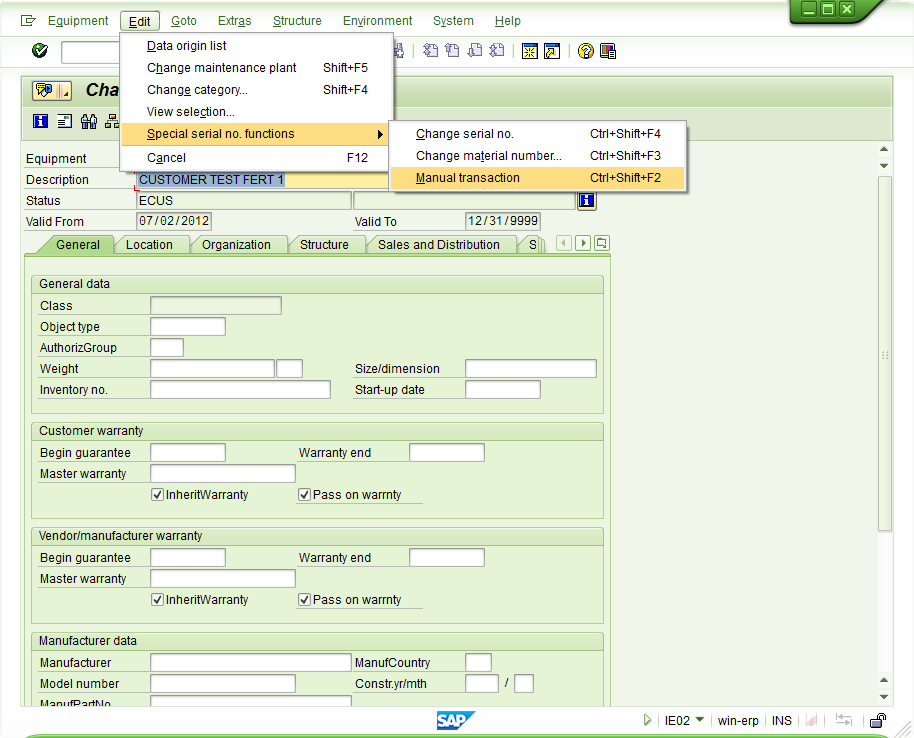
Once inside of the equipment record, edit–>special serial number functions –>manual transaction.  The manual transaction is the equivalent of the equipment status reset.  It allows you to force the status (remember, this won’t impact the stock)

blog2-02

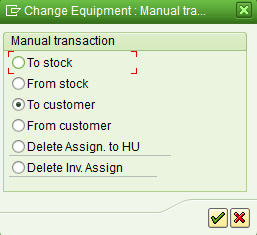
that will bring up this nice pop-up window that presents you with the following options:

To stock: ESTO
From Stock: add AVLBTo Customer: ECUS
From Customer: ESTO
Delete Assign to HU: Clears the handling unit
Delete Inv. Assign: clears inventory connection

Save, and should be able to continue with your transactions.
Good luck and thanks for reading.

Development – Staying Focused

This topic is especially relevant to me as I type this.  I’ve just spent the better part of 3 weeks focused on learning a new client’s business process for service management.  While things like this can be tedious, they are also tremendous opportunities for new ideas and new products.  That’s exactly where I am right now.  I’m in the middle of 2 rather large development projects, but I’ve just been struck with several ideas that people are asking for!!!

So, how do you balance that.  I’m struggling right now.  I just want to pull up one of my original products and begin adding some new features to it…  I want to start developing a brand new application that I see is a perfect fit for several customers I’ve recently talked to…  But, I’m in the 75% complete for one our brand new production offerings.  And I’m a third of the way done in converting my first product from BSP to ABAP Web Dynpro.  Both of these are already more than I should be trying to handle at one time…  but I need to shift gears from time to time to help avoid burnout.

So, here’s what I’m doing…  I’m taking really good notes and adding items to my to-do list.  I’m trying to get my head back in the game on what I need to finish first.  Why you might ask?  you have a request from a customer?  an actual need!!!  true.  But we also have a business plan…  and my partner and I agreed to it.  We believe this new production product can be huge.  And while the Service Management side of our offerings is starting to gain traction, we will never get the same traction on the Production Execution side if we don’t finish the offering.  Plus, several half finished products equal ZERO revenue =)

So just remember, you started with a plan…  stick with it unless there is reason to deviate.  And even then, work with your team.  It’s easy to get excited about “potential”, but until someone signs on the bottom of your contract, it doesn’t mean anything.  it’s just something that someone asked for, but might never be willing to pay for.  There will be time later to reset priorities…  and that’s exactly what I plan to do after the SAP MFG conference =)

Marketing – Who is your Competition?

Well, as I’m sure you’re aware, a lot of my effort is being spent on my new business.  One of the big pieces that I’ve had to spend a lot of time learning is the marketing aspect.  While to some of you, this might seem easy…  well, I have that engineering mentality.  For those you that ever read Dilbert, you know that engineers & sales or marketing have very different mindsets.  Almost opposite 🙂  so it’s been a challenge for me to overcome that and try to play both roles.

One of the challenges I’ve always faced is that my area is very niche, and thus it’s been difficult to find any competitors or similar products to my own.  You might be scratching your head right now thinking “that’s not a problem!!!  No competition means 100% of the market”.  Well, that’s what I originally thought.  What I quickly discovered is that there are 2 far more likely possibilities.

1.  There is no market, and that’s why no one else is doing this.
2.  No one knows that anyone offers what I offer, so no one is looking.

It’s like anything, if you don’t know there’s a product out there, you might not even consider looking for it.  I’m gambling my resources on #2.  I truly believe there is a market for what I’m designing, so that means I need to try to get the word out there that the service management tools can be purchased and out of the box solutions exist.  It’s part of the reason I write to you guys most every day.  It’s my form of advertising.  I’m hoping that providing you valuable information, you in turn will remember that I sell stuff, and if you run into a client that might need it, you’ll think of me and point them my way =)

Posts navigation

1 2 3 81 82 83 84 85 86 87 97 98 99
Scroll to top