Personas – The latest experiment

Well, my friend Adeel recently turned me onto Persona’s.  Up until now, I plead ignorance.  I really thought it was just simple screens view-able as web pages.  So, for this reason, I’d pretty much ignored them until now.  After seeing some of the power they have, it’s really left me wondering why anyone would spend all the time doing UI5 (unless you were doing an application that would work 100% remotely).  Even in the short demo I saw, I was able to re-imagine a lot of what I’ve already done with my products…  not to mention easy changes from a consulting standpoint.  Short story, expect to see more about persona’s in the near future.  I’m currently in the process of installing Persona’s 3.0 on my system, and I’m running through an OpenSAP course to give me the basics as well.

If any of your are familiar with Persona’s and could shed some light on the pro’s and con’s, I’d love to hear about it.  I’ll be doing my own experiment soon now that Renovation is converted to the standard Dynpro screen, it will make for the perfect project to convert to Persona’s.

Hey, no matter what, I can add yet another buzz word to my list of skills 🙂

Thanks for reading,

Lessons Learned – Converting to Dynpro

It’s funny, I really believed I’d be able to convert my ABAP Web Dynpro app (Renovation) to good old SAP Dynpro in under a week.  After all, the heavy lifting was done, right?!?  Shame on me for not remembering how the real world works.  So I thought I’d just pass along some of the things I “relearned” during this experiment.

  1. Nothing is ever as straightforward as it seems.  Even though the back end stuff didn’t change, getting the correct screen formatting is still starting from scratch (but there will be more on this later).
  2. Dynamic formatting is NEVER easy.  When I did the work in Web Dynpro, it took a lot of effort to get things to work correctly.  SAP Dynpro is no different.  It’s still creating lots of subscreens, and logic and containers, to keep things dynamic.  Every platform is starting over when it comes to screen design and formatting.
  3. Creating functions to encapsulate existing logic (and prep for UI5) is worthwhile, but still requires a lot of re-examination.  I’ve had to relearn parts of my original app, just to understand what the hell I was originally thinking.  Don’t expect to remember why you did things…  and don’t expect all your choices to have been perfect when you did them them first time.  This goes for drop down menus as well as heavy duty functions to create documents.
  4. Pay attention because maybe everything wasn’t working in the original the way you expected. I found features that worked great for 90% of the scenarios, but during this design I discovered some test cases that were previously missed.  So, if you do an adventure like this, use it as another round of testing.  You’ll end up with 2 products that are better.
  5. DO NOT ADD MORE FEATURES – this one is tough for me.  As I start playing, I think of other new things I could just “throw into” the solution.  Instead, be smart about it.  Add those ideas to a list.  Just because you think it’s cool, doesn’t mean your customers want or need it.  Plus, it gets too easy to be sidetracked added new functionality, instead of just finishing the conversion.  STICK TO THE TASK AT HAND.

At the end of the day, these tips are just common sense in the design world.  But occasionally, even the best of us forget these simple lessons.

Thanks for reading,

Ideas for my next book?

Well, it turns out that writing e-books has really helped me connect with more people.  I’ve had a lot of people find me because of my books, and because of that I’ve felt like I’m helping people.  Which, at the end of the day is really my goal.  I’ve spent all of this effort in SAP Service Management, only to realize that everyone is just as confused about it as I was 10+ years ago.

So, as I begin to think about my next e-book, I would love to hear your opinions on what I should write about next.  Here are a couple things I’m considering:

  1. Advanced Configuration – part 2.  This would go into more of the configuration available for service management/plant maintenance.  things like maintenance plans, service boms, etc.
  2. A book about Service Orders – I did for the notification and the service contracts.  Would you be interested in something similar for the service order?
  3. Warranty Claims – this one might take me a little longer write since I haven’t been using it as much recently, but still a fun experiment.
  4. Variant Configuration – I’ve had a request to do a book on VC.

if any one gives me their opinion as a comment on my blog, I’ll be sure to send you a free copy when I finish my next book.

Thanks for reading,

ABAP – Refresh ALV GRID and keep position and current cell

Since I’ve been rebuilding my Renovation product into the old school Dynpro, it’s meant relearning a few tricks.  Today, my trick was to keep the position, selections and current cell after refreshing the data with new data or updated date.  First off, I need to thank this post for the great info.

Here’s the basics.  Before you refresh the table, you will need to perform the following on your ALV grid.

  dataes_row_no  type lvc_s_roid.
  dataes_row_info  type lvc_s_row.
  dataes_col_info  type lvc_s_col.
  datafes_row_no  type lvc_s_roid.
  datafes_row_id  type lvc_s_row.
  datafes_col_id  type lvc_s_col.
  datamt_cells type lvc_t_ceno.
  datamt_rows type lvc_t_row.

  grid->get_scroll_info_via_id(
  importing
    es_row_no   es_row_no
es_row_info 
es_row_info
es_col_info 
es_col_info
).

  grid->get_current_cell(
    importing
*        e_row     = e_row
*        e_value   = e_value
*        e_col     = e_col
      es_row_id fes_row_id
es_col_id 
fes_col_id
es_row_no 
fes_row_no
).

  grid->get_selected_rows(
  importing
    et_index_rows mt_rows
*            et_row_no     = et_row_no
    ).
  if mt_rows[] is initial.
    grid->get_selected_cells_id(
    importing  et_cells mt_cells ).
  endif.

Now, there are multiple ways to refresh the table, I use set_table_for_first_display, but the post example uses refresh_table_display.  Either way, after you do your refresh, then run the following to set the position and selections.

    if mt_cells[] is not initial.
      grid->set_selected_cells_idit_cells mt_cells   ).
    else.
      grid->set_selected_rows(
      it_index_rows            mt_rows
*        it_row_no                = it_row_no
*        is_keep_other_selections = is_keep_other_selections
      ).
    endif.

  grid->set_scroll_info_via_id(
  is_row_info es_row_info
is_col_info 
es_col_info
is_row_no   
es_row_no
).

    grid->set_current_cell_via_idis_row_id fes_row_id
is_column_id 
fes_col_id
is_row_no 
fes_row_no ).
  refreshmt_rows[]mt_cells[].

Thanks for reading,

JaveLLin Website goes German

My good friend Garett gave a good idea at lunch recently.  Since SAP is a German company, and a lot of other German companies run SAP, perhaps having a specific website in German might be a good idea.  So, I found a the domain with a .de.  Once I figured out the fun of DNS and nameservers again, I was off and running.  I translated my website to German and now it’s up and running out there in the ether.

The translation is the part I’m scared about. Since my German skills can almost talk to a kindergartner, that means I had to put a lot of trust in Google Translate.  So if any of you out there happen to be fluent in German, and notice something completely ridiculous, please let me know (and perhaps give me a better translation).  I’d really appreciate it.

www.gojavellin.de

www.javellinsolutions.de

Thanks for reading,

Open post

Service Management – Notification Long Text Windows

Something I recently discovered that was very interesting to me is the impact of running the BAPI:  BAPI_SERVNOT_CREATE on the long text.

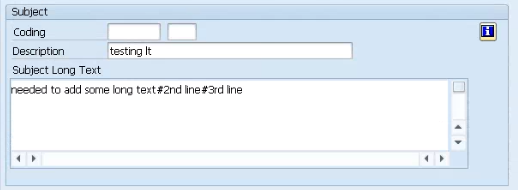
I followed all the rules and made sure to enter in the text table with all the appropriate keys.  What I didn’t find,anywhere is that depending on which long text you pick it will display differently in the notification.  In the configuration for the notification, you can select from 3 different versions of the long text.  Each of them behaves differently with the BAPI loaded text.  Take a look at this for example:

if you select the “standard” longtext – 030

blog030

this is what you will see.

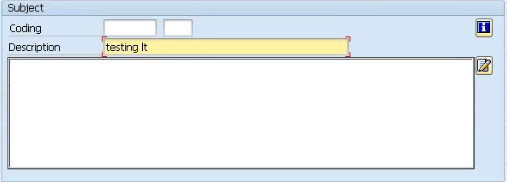
Next, take a look at the windows 32bit version – 031

blog031

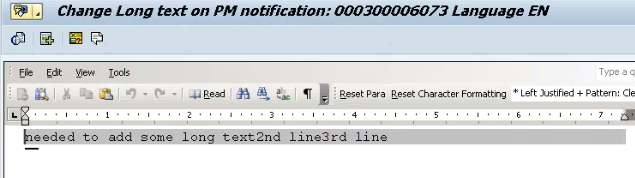
Notice it shows as blank, but if you press the long text button next to it, you will see the following:

blog031-1

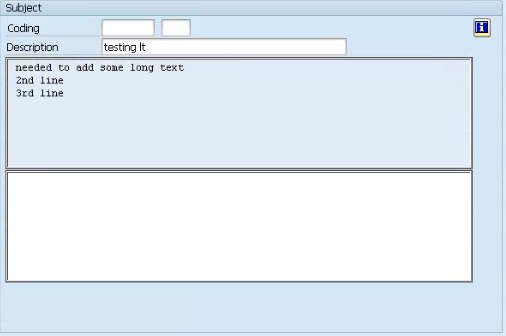
Finally, if you pick the webgui version – 033

blog033

You will see this version.  All of them contain the text that I typed in, but for some version I had to jump through hoops to see it.  So before you spend a lot of time checking your long text code to figure out why you can’t see it, make sure to check which long text is in your notification.

thanks for reading,

Consolidating To-Do Lists

Well, I have become the king of lists.  It seems to be the best way for me to get anything done.  Even my Mom knows that when I come to visit, if she tells me a bunch of stuff, I’ll get a few things done.  If she writes a list, I focus on getting all of it done 🙂  Well, I came to the realization this morning that right now I have 3 different lists that I’m working off of.  I have Remember the Milk which contains all of my scheduled tasks (things that need to happen on a certain date) or my recurring tasks, or my items I need to be working on.  Then I found another app called coach.me.  This was very cool, and it’s designed around keeping you accountable for each thing and saying that you will do something X times per week, and it gives you little high fives for meeting your goals.  Finally, I have my outlook inbox.  I have been flagging and color coding these items to show me what’s important in my inb0x.

Well, i discovered that I may have taken control of my inbox, but I now have 3 different check lists to be monitoring.  So, I figured out the next thing I can do to simplify my life.  Get myself down to a single to-do list.  My preference is Remember the Milk (RTM).  I’ve been using it for years with great success.  Coach.me was the first thing to go.  I only had about 6 different daily things I was tracking.  Two of them have become habits, so I removed them from the list.  Several items got added to RTM so they are recurring items.  Bingo… one down.

Outlook was a bit more challenging.  I have become very good at writing rules to manage all my incoming emails, but I needed to understand how I could send an email to RTM automatically, so it will create a task for me.  I found a post that explained within Outlook, you can press Alt+F11, and it will bring up the VB window.  It even had a simple script for me to start with:

Sub ChangeSubjectForwardProspect(Item As Outlook.MailItem)
Item.Subject = Item.Subject + ” <tagging stuff for RTM>”
Item.Save

Set myForward = Item.Forward
myForward.Recipients.Add “<my RTM email account>”

myForward.Send

End Sub

then, inside of the rules, there is an action called “call a script”.  I just had to pick this.  Now, when certain rules execute, instead of adding a flag, it will create an RTM task for me.  I’m still working on more scripts, but to start with, this is pretty easy.

Thanks for reading,

Service Management – Configuring the Exchange Process

I recently got an email from an old friend.  He started to describe a process that his current client wanted to do, and as soon as I read it, I knew he was talking about the Exchange (advanced exchange, etc.) process.  So I thought I’d go over the basics of how to set this up:

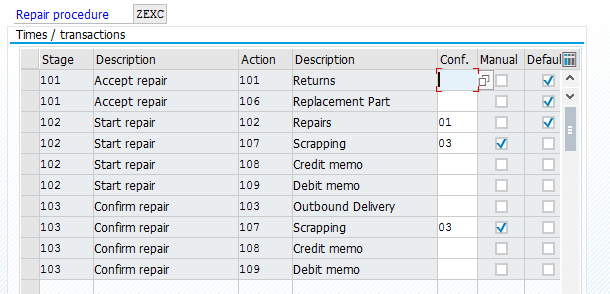
1. Define Repairs Procedure – you will need a new repair procedure that includes
action 106 in stage 101, as a default. This will place the exchange line on the
sales order upon creation.  See the sample below.

blog01

2. Define Item Categories * – you will need a new item category for the top level
to point to your new repair procedure.

3. Define Item Category Groups * – you’ll want a new item category group to
assign to the correct material to kick off the exchange process

4. Assign Item Categories *

5. Transfer of Requirements * – be sure to go through all 3 pieces of configuration
in this section. This is how you link your service order to your sales item
categories.

6. Create your Service Material with the newly created item category group.

7. Create/Process Service Products – this will link your service material to a
plant/work center/task list.

I do want to mention, that in addition to this, you’ll need to test the movement type
of 411-E. Since the customer’s equipment will still be processed and brought into
customer stock, you will need to perform this movement on the equipment to bring it
back into your rotable stock so it can be shipped to the next customer as an
exchange.

If you need more in-depth, check out my book.  It goes into the details of how to configure all the pieces in service management.

thanks for reading,

Going Old School – ABAP Dynpro

Well, I had a conversation with a new friend of mine.  He’s in a similar position was myself, starting a small startup software in the SAP space.  We talked for over an hour and shared war stories and advice.  One random piece of advice that he mentioned is that newest isn’t always better, at least in terms of software development.  Something about that chat really resonated something I’ve thought about, but kept telling myself wasn’t necessary.  Converting one of my applications FROM Web Dynpro to standard ERP Dynpro.

Now, this sounds totally counter-intuitive, even to me, but the more I think about it, the more it makes sense.  Currently my Renovation application is purely web based.  It uses ABAP Web Dynpro, but you can’t open a transaction inside of SAP to do the same thing.  Once upon a time, this all started because it was going to be a app for my client’s customers.  They wouldn’t have SAP, so it needed to be web based.  But since that time, it’s evolved into an internal application.  Since my customer base is all about the small to mid-sized shop, or service shop in a large company that is still run like a little shop, that means they might not want or need a web application.  They don’t care about fancy, sexy, web based.  They care about getting the job done faster, cheaper, better.  My plan had been to convert it to UI5.  Make it prettier, responsive, add a buzz word.

Even in my own test systems, the web dynpro can be flaky.  I’ve always chalked it up to my test boxes being small and my network being less than optimal, but what if it has nothing to do with my systems?  I don’t know the answer for sure, so I’m thinking it’s better to have the option.  It’s a small development price since all the hard work has already been done, and I can leverage everything with Proximity to get it up and running quickly.  This also keeps the door open for older systems that don’t have Web Dynpro as an option.

I’d love your opinion.  What is a better first task, convert to UI5 or convert to ERP Dynpro?

Thanks for reading,

Avoid the Rabbit Hole

So yesterday, I talked about a trick to upgrade my windows.  Well, I spent some time, finally got it the OS up and running, only to find that my SAP system running on top of it wouldn’t start.  So I started to go even further down the rabbit hole.  I tried upgrading the kernel, checking user environment variables, and on and on…  finally, after dumping a couple of hours into this, a big realization hit me.

What’s the point of updating the OS?  this is an old system, it works fine, and the only issues are that dropbox doesn’t work on it and the cloud connector can’t be installed.  I have plenty of other systems, so this exercise is trivial, and certainly does NOT move me toward my goal.

What’s the point of this random story?  stay focused on what is important.  It’s fun to do something random, and if you tried you might find a way to justify it.  But at the end of the day, if the activity isn’t moving you toward your goal, it’s moving you away.  Upgrading my old systems to a “newer” OS, has no impact on building my business, improving my life, or making me smarter.  It just served to waste my time.  So pay attention to the little things that steal your time…  enough little things will keep you permanently derailed.

thanks for reading,

Posts navigation

1 2 3 15 16 17 18 19 20 21 97 98 99
Scroll to top