In a previous post I talked about the equipment status. This field can be very powerful, but at times, it’s very painful. I have run into issues the status doesn’t get set or reset properly after certain transactions. Today I want to talk about how to reset equipment status.
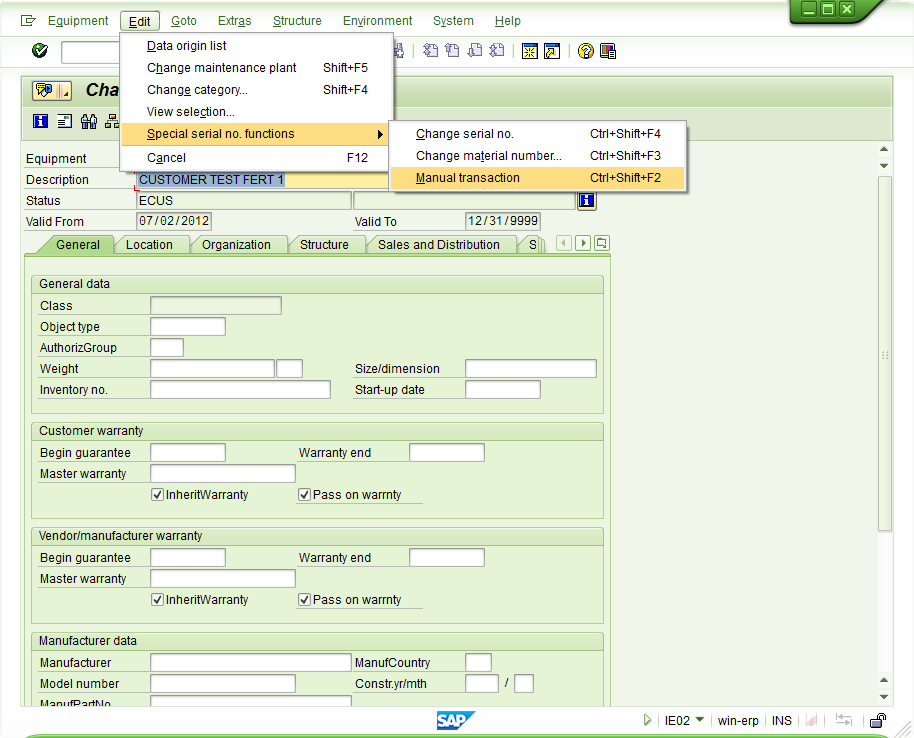
Once inside of the equipment record, edit–>special serial number functions –>manual transaction. The manual transaction is the equivalent of the equipment status reset. It allows you to force the status (remember, this won’t impact the stock)
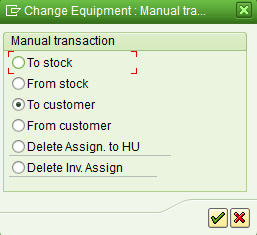
that will bring up this nice pop-up window that presents you with the following options:
To stock: ESTO
From Stock: add AVLBTo Customer: ECUS
From Customer: ESTO
Delete Assign to HU: Clears the handling unit
Delete Inv. Assign: clears inventory connection
Save, and should be able to continue with your transactions.
Good luck and thanks for reading.