Happy Halloween

If you are anything like me, it’s going to be a crazy day and a even crazier night.  Having a 3 year old and 6 year old hopped up sugar is always fun, at least until it’s time for bed.  ha ha ha.

Enjoy your time with family or a fun Monday night giving candy to all the goblins and super heroes.

thanks for reading,

Service Management – Service Orders – Refurbishment Processing

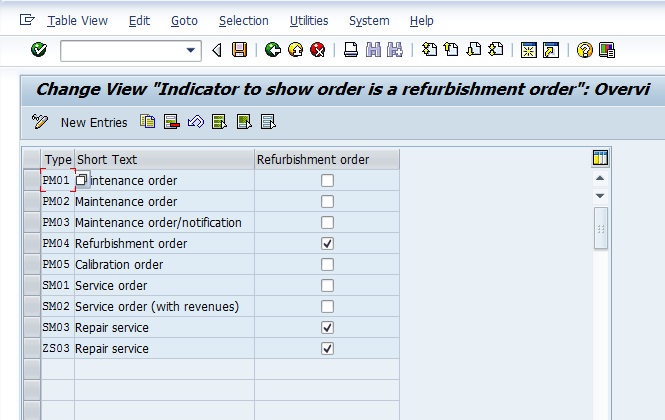
Next, we’ll talk about configuring the service order to be allowed for refurbishment processing.  This is ultimately what allows the service order to work in our in-house scenario.  The refurbishment processing is simply the act that takes in a material and allows you to perform a repair, a fix, an upgrade or whatever, and then deliver the product back out again.

This piece will copy setting if you perform a copy from service order.

blog-srv-ord-01

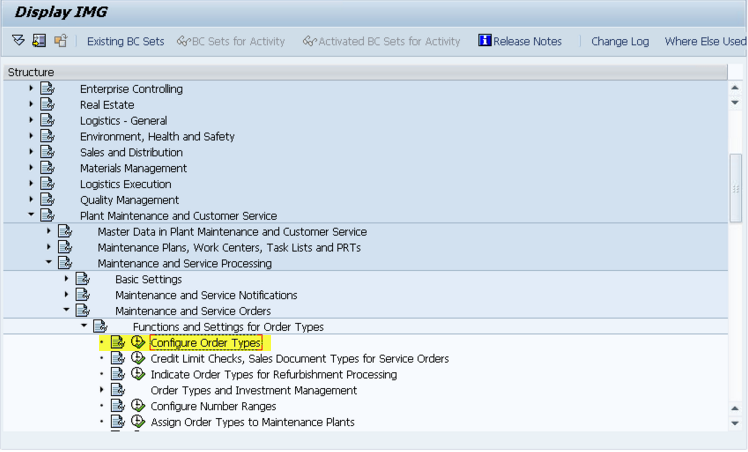
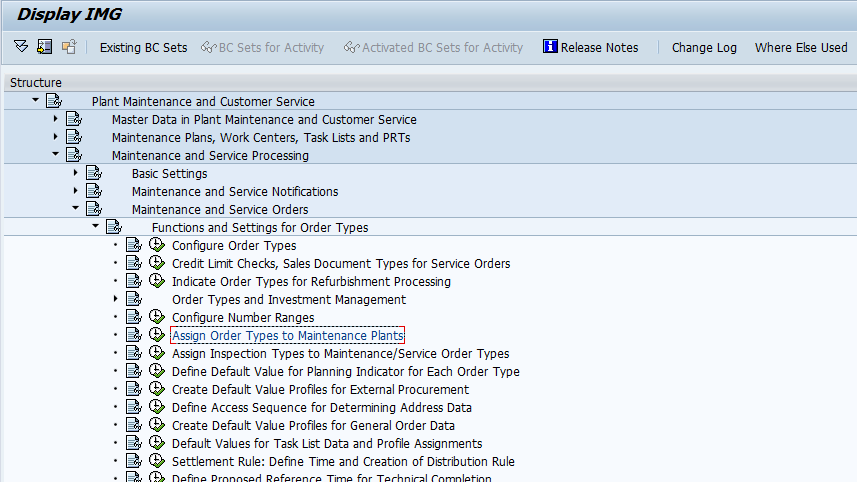
IMG->Plant Maintenance and Customer Service->Maintenance and Service Processing->Maintenance and Service Orders->Functions and Settings for Order Types->Indicate Order Types for Refurbishment Processing

blog-srv-ord-02

From here, if you want to use refurbishment, just check the box.  If you copied an existing order type like SM03, this field will already be checked.

Thanks for reading,

Service Management – Service Order – Configure Number Range

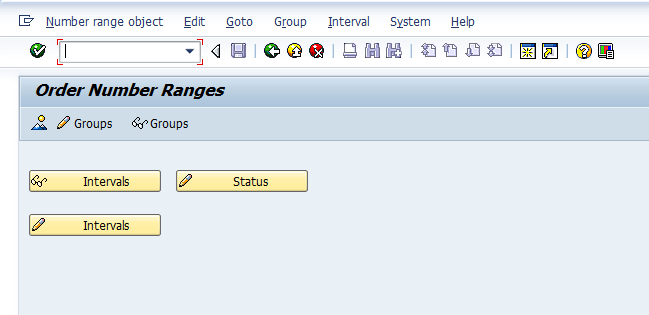
Now that you are familiar with creating an order type, the next most important piece of configuration is the number range.  Without the number range, your order type is pretty much useless.  So in this lesson I’m going to over the transaction OION, which the service order numbers range in configuration.
blog-srv-ord-01

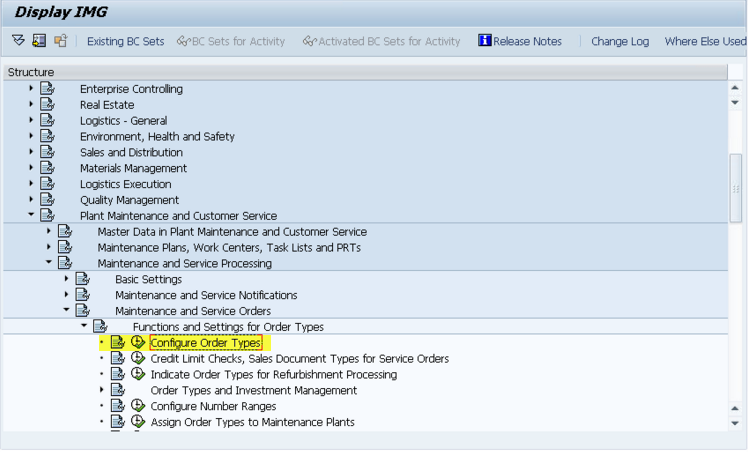
IMG->Plant Maintenance and Customer Service->Maintenance and Service Processing->Maintenance and Service Orders->Functions and Settings for Order Types->Configure Number Ranges
blog-srv-ord-02

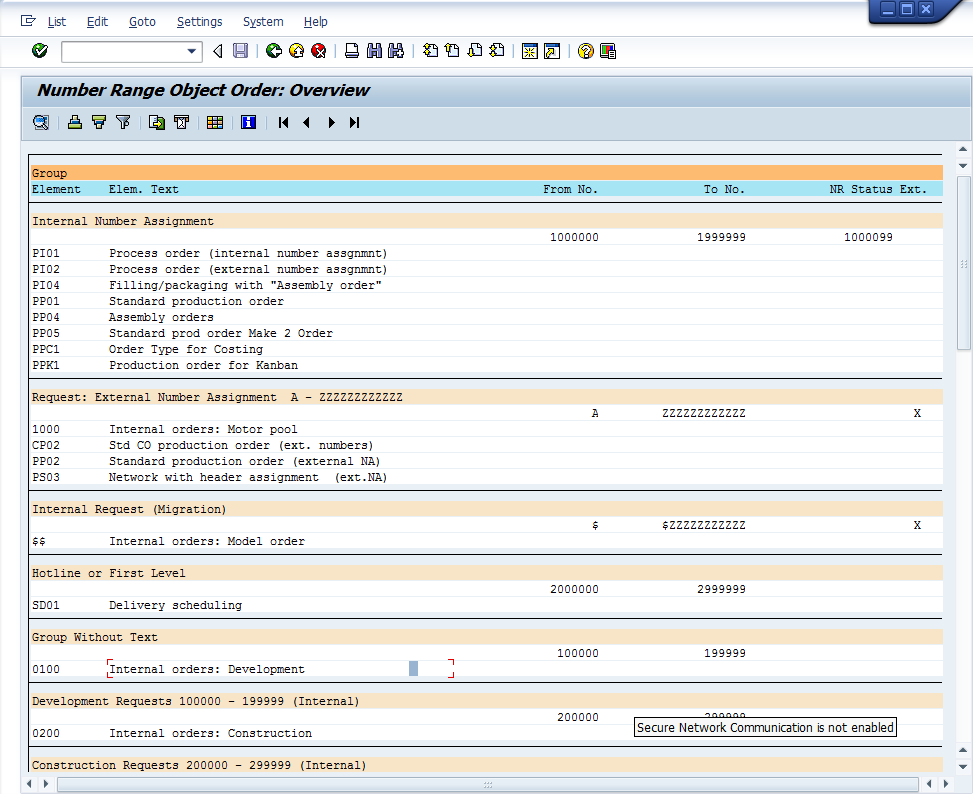
Now once you enter the transaction, there are several key areas to visit.  Since I’m a fan of going backwards in configuration, why change tradition 🙂  The first thing I recommend is pressing the mountain button (Overview).  This will show you what number ranges are assigned to each group.  It’s rare that you will create a new group or a new number range, but if you need it, have at it.  This will show what’s been used where.
blog-srv-ord-03

For example, the standard service orders get connected to Modules.  If you didn’t know that, you could quickly find out here because you can see that the standard SM01, SM02 & SM03 along with the PM and QM order types are all part of this number range.
blog-srv-ord-04

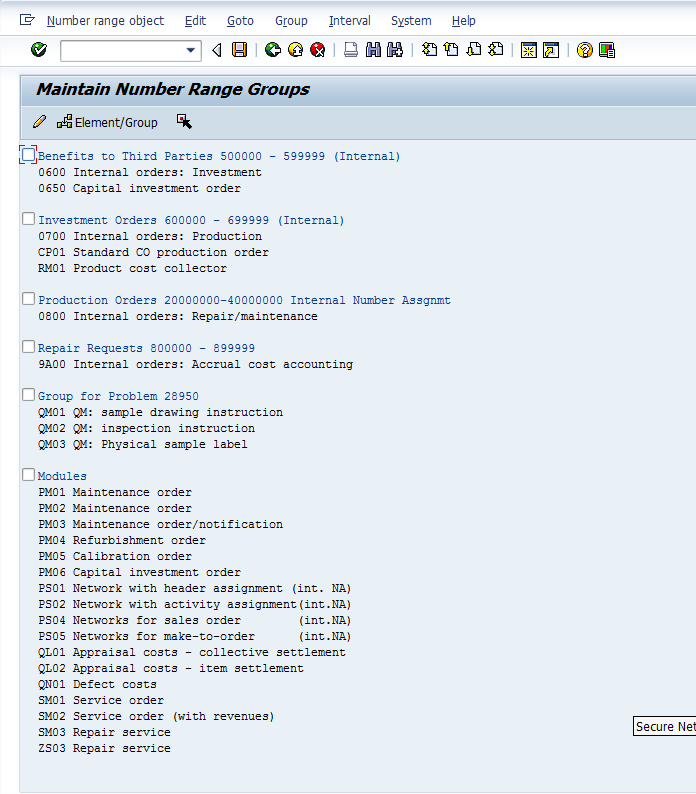
Now that you know what range you’d like to assign your service order to, you come into the maintain groups.

If you scroll all the way to the bottom, you will find any order types that haven’t been assigned to a number range.  Take special note, even if you copy from an existing service order type, the number range is NOT assigned to the order type.  This must occur every time (and in every system, since transporting a number range is usually a big no-no, unless it’s a new implementation with no data in it).

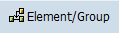
So in that case, find your order type.  Click on it, and press the select element button blog-srv-ord-05.  Then scroll up until you find the group you want to assign it to.  Check the box in front of the group name and press the Assign Element/Group button blog-srv-ord-06 and save.
Now, in the event you need a new group, you can use the menu group–>insert.  But, make sure the number range exists before you do this (since it will be required to create the new group).

So for giggles, here’s the number range screen if you haven’t seen it before:
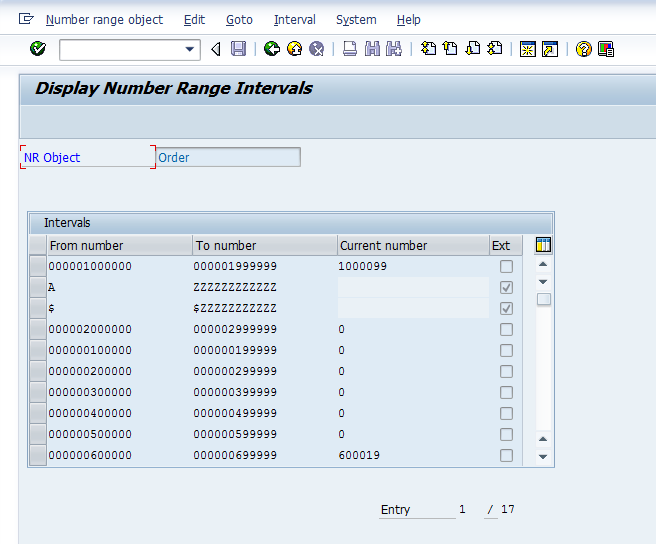
blog-srv-ord-07

You would just need to go into edit interval to create a new number range interval.  Remember, it can’t overlap with any existing ranges, so in this screen, it could be challenging since there are so many different number ranges already.  Regardless, this is all there is to setting the number range for your service order.

Thanks for reading,
Service Management – Service Orders – Configure Order Type

This first piece is the most vital to everything. It is creating the service order type.
Like many areas of SAP, I encourage you to copy from an order type that is close to
what you want. In our case, the SM03 order type is the standard order type provided
by SAP for in-house repairs. So it’s the perfect place to start.

blog-sm-ord-01
IMG->Plant Maintenance and Customer Service->Maintenance and Service Processing-
>Maintenance and Service Orders->Functions and Settings for Order Types->Configure
Order Types

blog-sm-ord-02
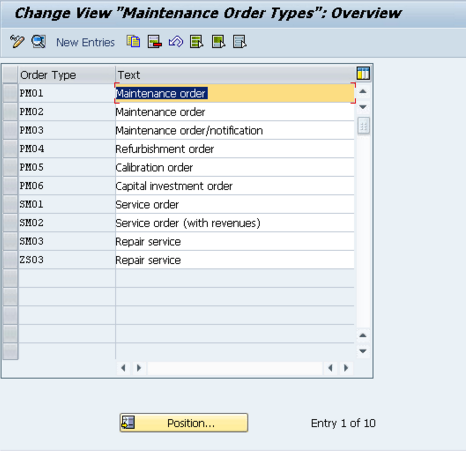
Here we see the available order types. I’ve already created a copy of SM03, called
ZS03, but for this example, we’ll look at the original SM03.

blog-sm-ord-03
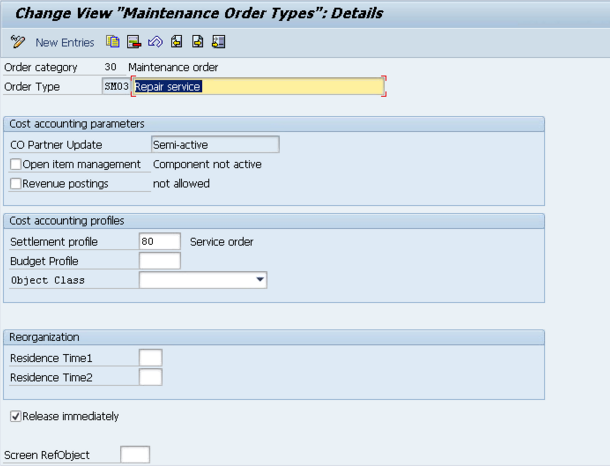
Now, most of these fields are pretty obscure to me, so I’ll do my best to explain them,
and most importantly what you need to worry about.

  • Open Item Management : is used for commitment management. This is used
    when you use budget functionality directly for Maintenance orders or when you
    want to have budget functionality through PS. If that is flagged then
    commitments like Purchase Requisitions which are generated from Maintenance
    Orders are checked when budget availability control is active
  • Revenue Postings : this is important because if you are using Repair sales
    orders, all of the revenue is captured at that level, and you cannot capture
    revenue at the service order level. So for in-house repairs, this must remain
    unchecked.
  • Settlement Profile : this is a financial setting, so I always defer to my FICO
    experts. Initially, just leave it as 80.
  • Budget Profile : The budget profile enables you to define budgets for individual
    orders. You should also activate the funds availability check. This allows you to
    monitor order-related budgets without using the project system. I have not
    personally used this function.
  • Object Class : You can set the object class of Investment, Overhead Cost,
    Production or Profitability Analysis.
  • Residence Time1 & 2 : Residence time 1 determines the time interval (in
    calendar months) that must elapse between setting the delete flag (step 1) and
    setting the deletion indicator (step 2).
  • Release immediately : This determines if the service order is immediately
    released upon creation. I prefer to leave this unchecked so that planning can
    occur before release.
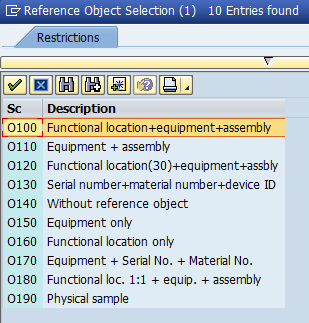
  • Screen RefObject : This defines what type of object will be associated with the
    service order. Typically, this is left blank, but you can define the object type.
    It’s the same screen that allows you to enter the object type into the
    notification.

blog-sm-ord-04
I haven’t used the budget aspects of the service order. If you are looking to
implement simple in-house service, the important fields you must be concerned with
are Revenue posting = blank, settlement = 80 (unless you are told otherwise by your
FICO group), and release immediately.

Thanks for reading,

Personas – First Impressions

I have been going through the OpenSAP course to see exactly what Personas can do.  After watching the videos, seeing some demos and playing with some of it myself, I wanted to share some of the highlights I’ve found so far.

  • One of the coolest things I found in Personas is that once you configure it for the webgui, it also applies to the Windows GUI.  This really opens the door, because you aren’t locked into using the web GUI.
  • Having control over the screen look and feel, making buttons into tiles, decent backgrounds, a web look and feel.  As  or my friend Jeff would probably say, it makes SAP not look like crap 🙂
  • Combining tabs within a screen is relatively easy.  It’s a bit clunky because it’s essentially do one step, save, exit, change tabs, move elements, and repeat.
  • Tables and Grids can move or hide columns, but you cannot add new columns.
  • Scripting is very powerful.  It can jump you around screens, tabs, etc.  It can pull data and populate dynamic fields, or even call RFC’s (this makes my creation of the RFC’s for services even more valuable).  Turns out, services are the key to everything going forward with SAP.
  • Installation and meeting the pre-requisites is manageable.  The differences in versions can be a pain.  Between kernels, versions, SAP Notes etc.

I have yet to try transporting my flavors or some of the more complicated scripting, but as I try them, I’ll be sure to post my thoughts.

Thanks for reading,

Faith vs. Trust

I recently heard a discussion that struck a cord with me.  Someone was talking about the difference between faith and trust.  The context I heard it was purely in a religious, but the message applies in any context.  Here was the basic premise.  Trust is believing because you have seen evidence to believe. For example, when you sit down on a chair, you trust it will hold your weight and won’t break.  Do you know that for sure?  No, but it may have been a chain you sat in before, or you saw someone else your size sit in the chair without any issue.  Faith is believing something without any reason. Heaven is typically the best example of these.  Countless people every day believe in a higher power and the belief in the afterlife.  No one that I know of has any proof of what happens when we die.  Yet billions of people have faith that if they live a good life, rewards await them after death.

What the hell does this have to do SAP or business?  Well, every entrepreneur needs a healthy dose of trust and faith.   First, you need to trust that it’s possible to start a business, make a profit, sell a product, make a product, etc.  Why trust this?  because millions of businesses have done this.  Not every business lasts forever, but all of the things it takes to make a business successful have been done many times.  In all these things you can trust.  Now, the faith is the harder part.  To make the business happen you need to have faith in your ideas, faith in your product, and most of all faith in yourself.  You need to have the faith that you can put in the effort to make the idea into a reality.  Faith that someone will buy your hard work.  Faith that it is worth it!!!

Faith isn’t easy, but it’s powerful.  Thanks for reading,

Installing Persona’s 3.0 lessons Learned

Well, like so many things in SAP, nothing is as straightforward as expected.  In order to finally get Persona’s up and running I had to go through a few iterations of updates.

Step 1.  Update the kernel.  Even this is more challenging than I expected, of course, a lot of it was user error.  ha ha ha.  I learned  I have to pay a lot of attention to make sure that the files I download are in the correct release as well in Unicode, the correct DB, etc.  I got very used to downloading files in the old version of Service.SAP.com.  The new UI5 version certainly looks nicer, but navigating it was a new adventure.

Step 2.  Install personas.  This part was easy 🙂  using SAINT, it was very straightforward.

Step 3.  Perform minor configuration.  Most of this was activating the new services.  For the list, check the oss note:  2222773.  Also, assign your user one of the new Persona authorization roles.  Admin is probably the likely one 🙂

I thought I was good to go here.  Unfortunately, I got nothing.  So I dug deeper into the OSS message, and it referenced a guide.  The guide directed me toward a host of OSS notes that I needed to apply.  Every version is different, so I won’t bother to include all the notes (and of course prerequisites).

Again…  thought I was done after this.  But it turns out if you upgrade your kernel to 742 – 401, then it’s too new for Persona’s, unless you upgrade to SP02 or SP03.  So my final step was to update to SP03.  Finally, I hit paydirt.  I may try this on my old EHP4 system, just to see what happens, but it might be more trouble than it’s worth.

Thanks for reading,

Repair Outbound Delivery and the Complete Delivery Flag

I recently encountered an issue that had me baffled for longer than I care to admit.  I would run through the RAS service process, get all the way to the outbound delivery, but the delivery would always issue a warning about the complete delivery flag.  So I quickly went to my own system, did an example and couldn’t replicate the same issue.  So I started checking configuration

  • requirements type
  • schedule lines
  • item categories
  • order types
  • deliveries
  • delivery item category
  • etc…

Every place I looked was set up the same.  Finally, I had no choice to but to go into Debug.  So after spending a while in there, finally found a reference to a flag LIPS-UPFLU.  I didn’t recognize this field, when to look at it and found it was talking about update the document flow.  Lightbulb!!!  I finally decided to look at copy control to the delivery.  It turned out for the newly created item category, the update document flow check box was blank.  As soon as I updated this to X, the delivery created without the message.  Even after all these years, I still run into things I haven’t seen before.  Hard to believe what a big difference one little checkbox can make 🙂

Thanks for reading,

Using DP80 and the Material Direct Flag

I just discovered a requirement for DP80 (perhaps DP90 as well).  If you wish to have your actual materials pulled into the quote, rather than a generic material that sums up everything, you must have the Material Origin flag set to X in the material master.  This field exists in the Costing 1 screen.  MBEW-HKMAT is the technical field.

Not being a FICO expert, I’m not sure what other implications this field has, but I do know that if you don’t check this, your materials will not be pulled onto a Resource Related quote.

Thanks for reading,

IW42 – Customizing Not Maintained – Error SE729

Well, I was recently helping out on a new service implementation, and ran into the the error SE729, customizing not maintained.  It’s surprising, but I haven’t run into this before.  It happened anytime I went into IW42.  I checked my confirmation configuration, and everything seemed fine.  So I finally went over to OSS and found the following note:

2051088 – IW42 – Customizing incorrectly maintained

The basics are that table T162V contains entries that correspond to a table control on transaction ML81N.  I’m a bit confused how this impacts IW42, but they must share some screen elements.  Regardless, you need to go into T162V in SM31 and update the table entries to match what the table control shows.  For all the details, check out the note.

Thanks for reading,

Posts navigation

1 2 3 14 15 16 17 18 19 20 97 98 99
Scroll to top