SAP – Copy Control of BOM Items

I recently came across something that had me stumped for a while, so I didn’t want to forget it.  I had a situation where I wanted to create a return order with reference to a sales order.  Sounded so simple.  The catch was that the sales order had a sales BOM.  Imagine you have a kit of sorts with a random assortment of pieces, and the customer decides to return one of them.  Depending on your business, you might allow for this.  Well, in general, SAP won’t let you do this.  You will get an error:

Item xxxxxx is a component of a bill of material so cannot be copied.
Item XXXXXX contains errors and cannot be copied.

Well, I did a lot of digging, and a lot of trial and error.  I thought the issue was with item portion of the copy control, so I kept trying different combinations.  At the end of the day, what I did was the following:

  1.  Remove the copy control for the main item of the sales BOM.  Since I was only doing components of the sales BOM, didn’t want to even allow the header.
  2. Needed to update the requirement for DataT with a bit of code.  The idea is that in the copy structure you manually remove the BOM data from the line item, allowing you to copy it.

LOOP AT CVBAP.
IF CVBAPSTLNR NE SPACE.
CLEARCVBAPUEPOS,
CVBAPSTLNR,
CVBAPSTLTY,
CVBAPSTLKN,
CVBAPSTPOZ.
MODIFY CVBAP.
ENDIF.
ENDLOOP.

Once I finally found this, everything else fell into place.  I hope I can save you some of the pain it took me to figure this out 🙂

Thanks for reading,

Service Management – Setting up a Quantity Contract Line

When dealing with service contracts, the header of the contract for a quantity and for maintenance can be identical.  In fact, for service I recommend it.  That means you just need both sets item categories.  Today I want to talk about setting up the quantity contract line.  For the quantity lines, there are two main pieces.  The contract line is the first piece, but the call off line is just as important.

The contract line:

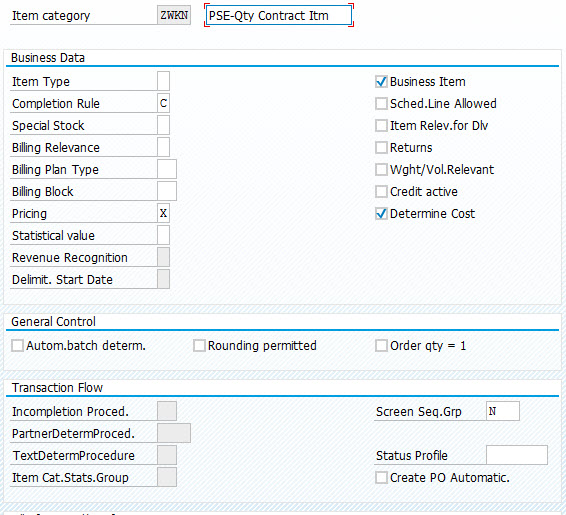
The important field is the completion rule.  I recommend C for quantity lines.

Now, in order to consume the quantity items, you need a sales order that will be created with reference to the contract.  (if you use a notification, we will talk about that in a later post).  For this, I recommend a change to the order header of the order type you will use as a call-off.

The important field is the Outline agrmnt mess.  I recommend ‘F’, this will pull up a popup at the item level automatically.  This will give you the opportunity to select a contract to link the line item to.  Please note, this will only work if you create the order in dialog.  In any other situation, the link to the contract will not be created.  In a future post I’ll talk about ways to get past this.  In the meantime, this should give you what need to get started on quantity contracts.

Thanks for reading,


Habits… Easy to break, hard to make

It’s amazing how time flies, and how quickly it is to get out of a good habit.  I realized it’s been too long since I’ve done any blog posts.  And it made me realize that habits are hard to make, but easy to break.  I was in the zone to write posts, and keep them coming.  Then suddenly I got a bit busy, and before I knew it, it had been a few weeks since my last post.  Why???  of course there are the typical excuses.  I was busy, went on vacation, big projects at work or countless other excuses.  But at the end of the day it all comes down to one thing.  Willpower.

I was listening to a podcast, and it was summed up really well.  Our most valuable commodity is our willpower.  Every day we get a finite amount of it, and it can it very easily be wasted.  Think of all the little things we try to do every day.  Maybe it’s eating healthier, exercising every day, learning a new skill or meditating every morning.  Well, if you only have a little bit of willpower, can you really spread it across multiple endeavors and expect to succeed?  of course.  The only chance you have is to guard you limited resource and use it wisely.  Pick one thing and focus all your willpower on it.  If possible, pick your skill and try to do it first thing in the morning to make sure your willpower doesn’t get used up.

Unfortunately, this won’t help you from breaking a habit, but if you invest a month or two doing something, you are likely to make it into a lifestyle.  Once you reach the point of just doing what you want to do without thinking about it, then you can move on to your next goal 🙂

Thanks for reading,

Service Management: using a batch in a service contract

I recently came across an interest challenge in SAP.  A company has both serialized products and batch managed products.  The catch is that a service contract can cover batch managed products as well as serialized products.  This is something I have never tried before, but upon inspection, standard SAP does not appear to this account.  So, from my perspective, I see 2 clear paths to handle this.

  1. Add a bunch of custom code and fields to the following objects
    1. Service Contracts
    2. Service Notifications
    3. Batch records (for enhanced warranty as well)
    4. Service Orders
    5. Repair Sales orders
  2. Create an equipment record for each batch

Both of these have pro’s and con’s.

Option 1 involves a lot of development work, as well as some creativity to try to leverage the service contract/warranty functionality in the SD and SM transactional data.

Option 2 doubles the amount of master data, but allows you to leverage all the standard functionality in the service realm for batches.

Is there a better way that I’m missing?  has anyone else encountered this requirement?  I would love to hear your take.

Thanks for reading,

The importance of gratitude

I’m sure I’ve mentioned it before, but at least for me, I know I need to pay attention when I hear the same message from multiple, unrelated sources and they both come in a short period of time.  The latest one is the need for gratitude.  Now I’ve heard this before, but like so many things in my life, I hear a lot of ideas, some stick at the time, and some pass me by…  until they hit me across the head with a 2×4 🙂  Gratitude is one of those.

I just finished reading a book about managing my money by Tony Robbins (Money: Master the game).  The funny thing is that I have a great financial planner, so in general, the book probably wasn’t something I need to spend my time on, but when I get the idea to read a book, it’s usually a higher power directing me 🙂  Well, the book was great because it got me excited about saving again… but importantly, the last chapter talked about how to “really” be happy.  Money is one component of it, but far me important is being thankful for what you have.  If you constantly spend your life thinking about what you don’t have, how could you ever be happy.  This simple idea really got me thinking of just how great my life is.  It also reminded me of something I heard in Brian Tracy years ago… “It’s never too late to have a happy childhood”.  And by that, when I look at who I am today, it’s directly because of all the things that built me character.  Even things I thought were regrets, or a rough periods are really just the opportunities to become better.   It’s all in how you look at it.

The very simple take-away is that if you want to be happy, you MUST be grateful.  Be grateful to all the people in your life, all the events that made you who you are today.  My latest morning habit is spend 3 minutes at the start of my day, close my eyes and think of all the things I’m grateful for.  The idea is deeply feel the appreciation for whatever you are grateful for.  Then, finish up by asking for good things for the people in your life.  Health, wealth, good luck, whatever.

I’ve only been doing it for a couple days, but it’s a great way to start the day.

Thanks for reading,

Variant Configuration – Allowing a material type to be configurable

I recently ran into this when trying to make a DIEN (service material type) configurable.  It let me check the box and everything was fine until I tried to add  a configuration profile.  (CU41).  No matter what I did, it wouldn’t allow me to add the class.  It finally hit me, the classification screen wasn’t active in class type 300 for the DIEN material.  If you run into something similar, here’s how to fix it.


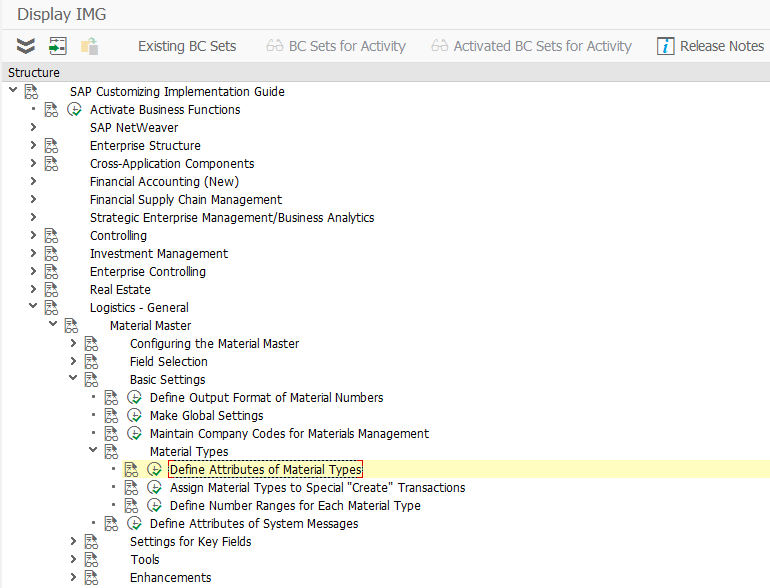
SPRO -> Logistic – General -> Basic Setting -> Material Types -> Define Attributes of Material Types

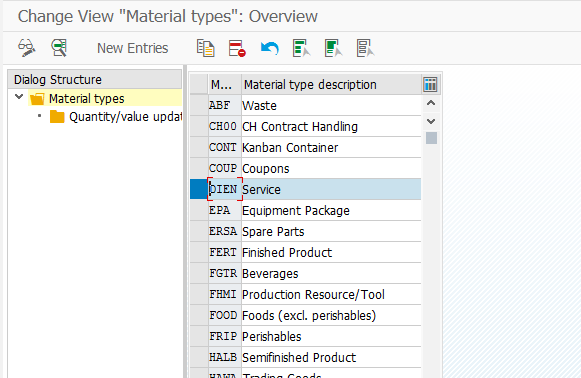
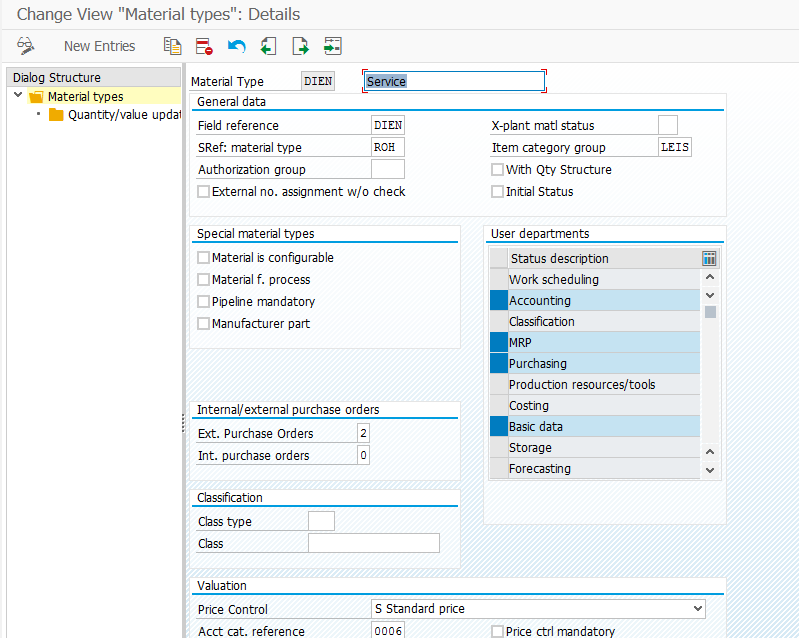
Select the material type and select the detail screen.

on the right side of the screen there is a list of screen.  If the screen you need (classification for me) isn’t highlighted, simply highlight it and press save.

Thanks for reading,

Service Management – Maintenance Plans – Configure the Category

Since I’ve recently been doing some work around maintenance plans, I thought this could be a good topic for a few blog post.

First you must setup the category for the maintenance plan.  I recommend creating a new category and then following the remainder of this section to complete all the needed configuration.
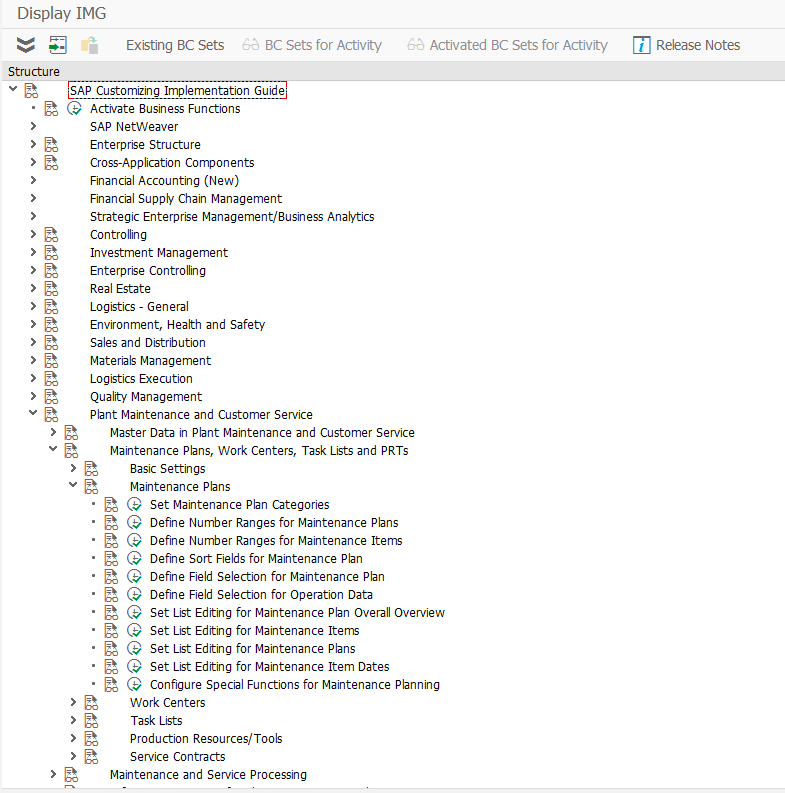
IMG->Plant Maintenance and Customer Service-> Maintenance Plans, Work Centers, Task Lists and PRTs -> Maintenance Plans -> Set Maintenance Plan Categories
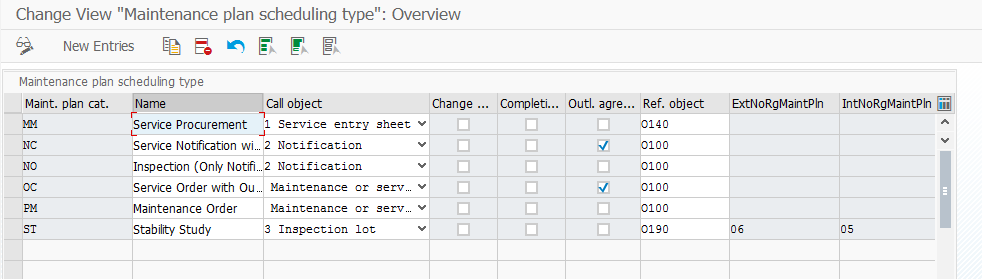
Click on new entries to create your own version.

Maint. Plan cat. : This is the 2 digit category for your maintenance plan type.  It is recommended to create a different category for each major category.

Name : This is just the description of the category.

Call object : This is the type of document that will be generated by the plan.  Keep in mind, depending on your process, you may select a “softer” document like the notification to put a reminder out to the call center to contact a customer to setup an appointment.  Or you may need a “harder” document that say on Nov 15th, a technician must be on-site to perform yearly maintenance.  This will often depend on your agreement with the customer.

Service Entry Sheet

Notification

Inspection Lot

Maintenance or Service Order

In service, the most common selections will be Notification or Service Order.

Change Documents: Do you want to collect change documents for any changes that you  make to the plan.  I’m a big fan of history, so I always encourage this to be checked.  You never know when you might need it.

Completion Data: You can use this indicator to influence the maintenance processing process. For example, you can prevent that every employee who can complete orders and notifications can also influence the scheduling of maintenance plans through the data.

With this indicator you can:

Activate a separate completion for the maintenance plan for the completion of call object notification and order.

Activate a dialog for the completion of notifications and orders using list processing.

Activate additional functionality for completing the call objects notification and order using a BAdI.

If you select the indicator completion date, you can enter a reference time that only applies to the maintenance plan, when you are completing a call object (notification or order) generated from a maintenance plan. To do this, you can also use the maintenance-plan-based fields completion date and completion time when you are completing an order or a notification.

These fields are pre-filled with the original plan date and the current time. If the current system date is displayed, then the original plan date is in the future and is replaced by the system date.

This is functionality I have not used in the past.

Outline Agreement:  Should this be created with reference to an outline agreement.  If you want to create a plan with reference to a service contract, this must be checked.

Ref Obj: This defines the type of object that the plan will “work” on.

O100   Functional location+equipment+assembly

O110   Equipment + assembly

O120   Functional location(30)+equipment+assbly

O130   Serial number+material number+device ID

O140   Without reference object

O150   Equipment only

O160   Functional location only

O170   Equipment + Serial No. + Material No.

O180   Functional loc. 1:1 + equip. + assembly

O190   Physical sample

You might recognize this list from the notification defaults.  I tend to always select O170.

Something interesting to take note of.  In my ECC 6.0 EHP4 system, in transaction IP50, the last category with the Outline agreement checked does NOT show up.  In my EHP7 system, this doesn’t happen.  I could not find anything in OSS that directly corrects this.  A workaround would be to create an addition plan 00 or ZZ or something with the description of do not use.  Then the previously created plan should show up just fine.

Thanks for reading,
Posts navigation

1 2 3 10 11 12 13 14 15 16 97 98 99
Scroll to top