Taking Care of Yourself

I’ve recently been feeling a bit run down, so I went back to some of my good ol’ self help audios 🙂  It’s funny how you often hear the right stuff at the right time.  I happened to start listening to something about good physical health.  Now, normally, I expect to hear the standard stuff like eat better, get more sleep, exercise, etc.  Either way, I was hoping for a little motivation boost.  Happily, I got some new tidbits that really hit home.

The number one thing that can impact your health is stress.  Well, let me tell you, stress often tends to hit me.  A good little story I heard about the zebra.  Zebra spend most of their time with little to no stress, but occassionally when I lion starts chasing them, they get a massive jolt of stress.  Now, this sort of stress is obviously beneficial.  It boosts adrenaline, and diverts your resources to survival.  But, what happens when you live every day under stress.  It doesn’t matter if it real or perceived, your body can’t tell the difference.  So when your system is constantly diverting valuable resources to daily stress, things like your immune system and general well being all suffer.

Currently, I’ve been under some additional stress.  Between busy time at work, traveling, Buying a house for my Mom, getting my Mom moved from WI to SC, plus all the financial worries that go along with this.  Personally, I have too much stress around finances as it is.  Growing up in an environment where finances were always in short supply, it has had the effect making me borderline paranoid when it comes to money.  I like to have my big chunk of savings, and not exceed my normal spending budgets.  In my case, this is irrational, because I’ve built up enough savings to take care  of the family for a while if anything happens, plus all the different insurances if anything really goes wrong.  Short story, I should NOT be stressing out about money.  So the #1 thing I walked away with is that I need to focus on removing the irrational stresses from my life.  It would be great to get rid of more than that…  but hey, start small and work my way up.

How much stress do you have in your life?  How much is silly or irrational?  how can you get it under control?  Wish I could answer this…  that’s my next stop.  if I figure it out, I’ll be sure to let you know.

Thanks for reading,
SAP – Digging for Answers

A long time ago, one of my friends once told me I was a digger.  I don’t think that really set in for me until I started to look at myself.  When he was talking about that, I had just gone through sifted through a lot of code, some custom tables, and found a solution that we could implement quickly.

Looking back, I finally get exactly what he meant.  One of my biggest skills in SAP is knowing how to dig for information.  So most consultants are really good at getting tables and field names, and even doing some debugging of screens.  What really separates the good from the great consultants is how persistent they are in finding the answer 🙂

I wanted to talk a little about my process, and I’ll give you an example.  A client of mine has some custom code to do lots of stuff within a notification.  Well, like any custom code, somehow a record got corrupted.  It had to do with a task record, and because of the fields that got wiped out, you could no longer make changes to the notification.  So I started digging.  Here’s what I did (not necessarily in this order).

  1.  found the BAPI’s for updating a notification.  I even tried running them in SE38 and doing the commit.  I got no errors, unfortunately no changes to the notification either.
  2. Next, I looked up the table and found it was QMSM.
  3. Then I went to Txn: Se11 and pulled up the where used of that table.  Unfortuantely, it was a rather large list.
  4. So I look that list, and when to SE38 and ran my favoriate report:  RPR_ABAP_SOURCE_SCAN
    1. I entered in the list from the where-used, and looked for anyplace with the term update (since I needed a way to update the record without doing all the standard checks).
  5. Then it was a bit of trial and error to look at each of the results.  Luckily, I even found a different piece of custom code that I could execute.  and happily, everything got fixed.

Now, there is also the alternative of changing fields in debug.  I was in production for this event, so that wasn’t an option, and it’s also something you need to be very careful doing, as you are likely to run into unexpected results 🙂  so try that in development first.

None of this is rocket science, but some days I’m just too persistent to know when to quit.

Thanks for reading,

Service Management – Revisiting the Exchange Process

I’ve been visiting the advanced exchange scenario recently.  One of the challenges I have always struggled with is that if you create a default exchange line as soon as you create the main line and inbound delivery line, that you cannot automatically generate a service order.

So my repair procedure is setup like the following:

101 Accept repair 101 Returns  (default)
101 Accept repair 106 Replacement Part (default)
102 Start repair 102 Repairs 01 (default)
102 Start repair 107 Scrapping 03
102 Start repair 108 Credit memo
102 Start repair 109 Debit memo
103 Confirm repair 103 Outbound Delivery
103 Confirm repair 107 Scrapping 03
103 Confirm repair 108 Credit memo
103 Confirm repair 109 Debit memo

The important part is the 101 & 102 areas.  The repairs line should be able to be added automatically by just visiting the repairs screen.  Unfortunately, this doesn’t work.  What I found out is that it is related to the user status for the main line item.  As soon as you ship out a unit, it sets the status to BDMD (business decision made).  The repair line is looking for BDRQ (business decision required).  With this system status, SAP will ignore this line, assuming that it OK since you shipped a part out already.

My next mission is to see if I can reset this status to be re-opened.  If I can pull that off, it should be possible to have SDREPA01 create the service order in the background.  More to come.

Thanks for reading,

Service Management – Accounting Indicator from DP90

I recently discovered something with DP90 I hadn’t previously discovered.  I was doing DP90, and I had the accounting indicator set as one of my fields.  However, when it added the items to my debit memo request, it wasn’t bringing over the accounting indicator field.  Normally, I might not have noticed this, but I have it as part of my pricing.  So when it wasn’t getting populated, I started scratching my head.

The trick turns out that unless you check the box NoSummarization in the DIP Profile (Transaction ODP1), it won’t copy that field.  I checked the box, and my problems were solved.

Thanks for reading,

Persona’s – Installation

Well, you can’t experiment if you don’t have the software.  So step one was getting Persona’s installed.  Step one, of course, is to go to SAP and download Persona’s 3.0.  Now, being the glutton for punishment that I often am, I tried first to install it on my old system (ERP 6.0, with a 7.20 Kernel).  Well, of course that didn’t work.  Persona’s 3.0 says that it requires Kernel 722.  So I tried a quick experiment to upgrade my kernel, but unfortunately, my old system wasn’t having it. So I went the easy path and installed it on my EHP7 system, which worked very easily.

Step one, make sure you have your webgui turned on.  <server>:<port>/sap/bc/gui/sap/its/webgui/
if this gets you a forbidden error, go to txn: SICF and activate the webgui node.

Next up was trying to use it.  I had the initial exercise from the OpenSAP class, but of course, I missed some configuration.  If you don’t see the “P” on the top of your webgui screen, you don’t have it activated.

You can see more on some of my previous posts on Persona’s.

Thanks for reading,


Service Management – Create a General Task List

Sometimes it’s nice to go through a simple walk-thru.  I’ve been playing a lot with task lists lately, so why not add it to the blog.  A perfect addition to my next book 🙂

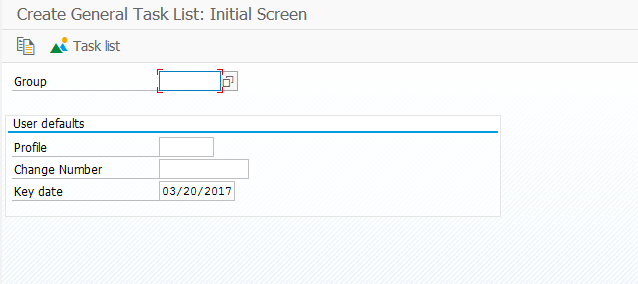
Transaction IA05

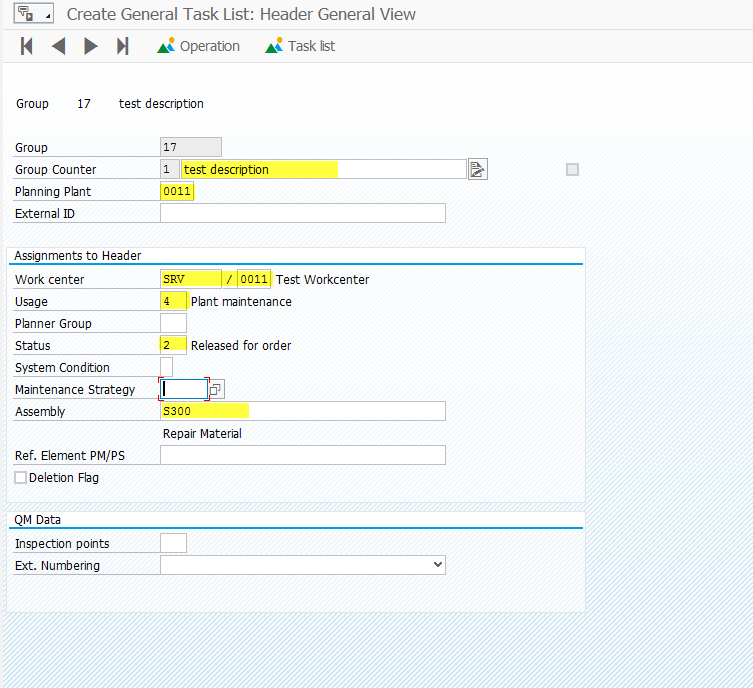
Don’t enter anything here.  Just press enter.

For me, the highlighted fields are typically the ones I care most about.  The assembly part number is critical if you choose to use maintenance BOM’s.

Press the Operation Button 

Enter in the operations you want in the list.

Press the Components button: 

From here, you can press the Component Selection  if you want to insert an entire maintenance BOM, or you can manually enter in the components.

If you enter in a maintenance BOM, it will pull in all the components from the BOM and allow you to select the items you want.  Typically, I will press  to pull in all the items.  Then I press Control and select the main item so it will not be pulled in.

Press:  to select the items you want.

Or you can manually enter in the items and quantities.  Be sure to include storage locations, bulk material flags, backflush flag, etc.

Press the green arrow back: 

Press Save: 

Thanks for reading,

Pricing – Condition Table Limitation

I recently discovered a limitation with creating a pricing condition table.  I never ran into this before, because I typically haven’t run into much automated pricing for service (usually it’s made up on the fly.  ha ha )  Or typically, just time and material with a markup.  Well, I was attempting to create a pricing table with 13 key fields.  YIKES!  But when I attempted to activate it, I kept getting the following error:

ERROR: VK709 Activation was interrupted

Well, it turns out that you can have a maximum of 11 fields when creating a new condition table.  Luckily, I found a way to combine what I needed (or overall, a better approach), but be aware of how complex you choose to go with your pricing.

Thanks for reading,

Variant Configuration – S/4 and IPC

I recently found an interesting discovery.  The new platform of SAP S/4 will no longer support the IPC.  I this very interesting as SAP has spent so much time and effort to build this better platform, but currently according to OSS, there is no plan to integrate it.  If any of you out there have heard the plan in the CWG, please let me know.

The concept is that since IPC is java based, and HANA/S/4 have no concept of Java…  so it means that within S/4 you cannot select a configurable material and make it IPC to look nicer.

Would love to hear any input on this, I was certainly disappointed.

Thanks for reading,

Outlook – Adding Categories to IMAP accounts

Well, I’m back to this again.  I had it working for a while, and then suddenly it was only working in one of my accounts.  I’m not quite sure what happened, but I found a trick to fix this.  Since I’m always dabbling in multiple things, it means I have quite a few different email accounts.  It turns out that you need to define the categories for each different account.  Not just one time for all the accounts.

http://www.techrepublic.com/article/reclaim-outlook-categories-for-imap-accounts/

This post walked me through how to get the categories set up for each account.  The trick is to open up a new message.  You can just update it or add categories anywhere.  This was the piece that helped me out.

Thanks for reading,

Posts navigation

1 2 3 8 9 10 11 12 13 14 97 98 99
Scroll to top