Sometimes it’s nice to go through a simple walk-thru. I’ve been playing a lot with task lists lately, so why not add it to the blog. A perfect addition to my next book 🙂
Transaction IA05
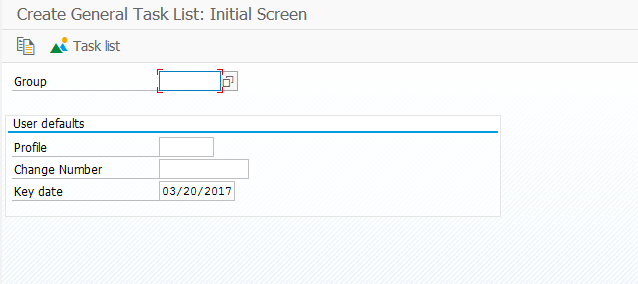
Don’t enter anything here. Just press enter.
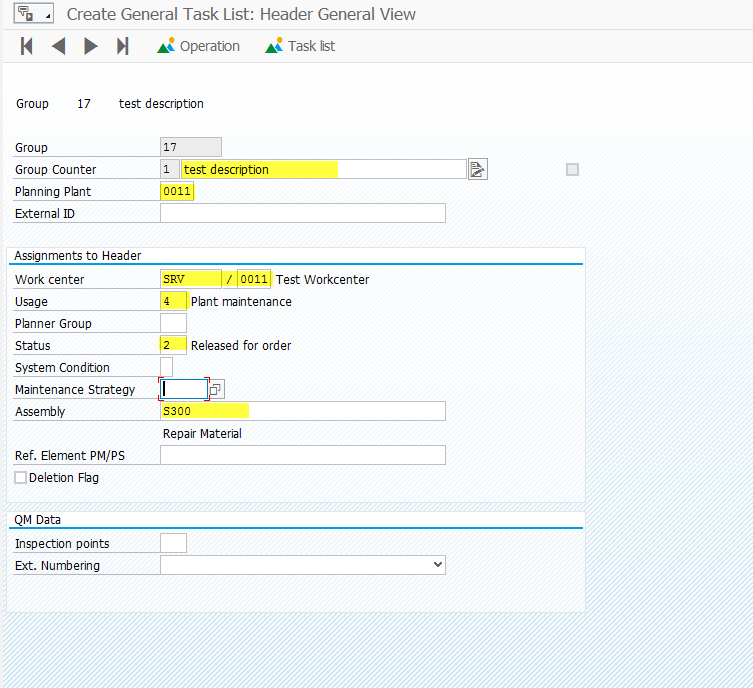
For me, the highlighted fields are typically the ones I care most about. The assembly part number is critical if you choose to use maintenance BOM’s.
Press the Operation Button 

Enter in the operations you want in the list.
Press the Components button: 

From here, you can press the Component Selection  if you want to insert an entire maintenance BOM, or you can manually enter in the components.

If you enter in a maintenance BOM, it will pull in all the components from the BOM and allow you to select the items you want. Typically, I will press  to pull in all the items. Then I press Control and select the main item so it will not be pulled in.

Press:  to select the items you want.

Or you can manually enter in the items and quantities. Be sure to include storage locations, bulk material flags, backflush flag, etc.
Press the green arrow back: 
Press Save: 
Thanks for reading,