I wanted to keep going with the different pieces of configuring the equipment category.
Assign Partner Determination Procedure to Equipment Category *
IMG->Plant Maintenance and Customer Service->Master Data in Plant Maintenance and Customer Service->Technical Objects->Equipment->Assign Partner Determination Procedure to Equipment Category
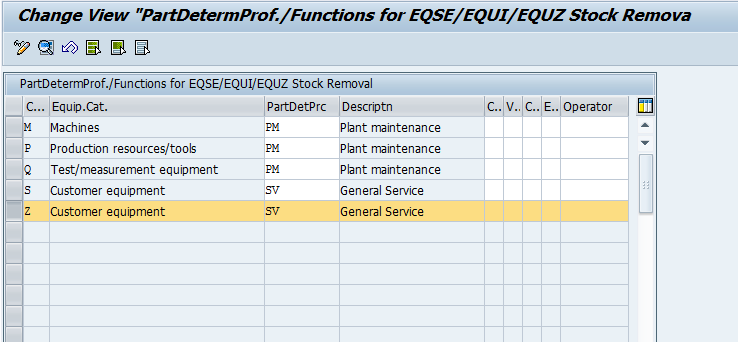
We will drill into the details to explain what can happen here.
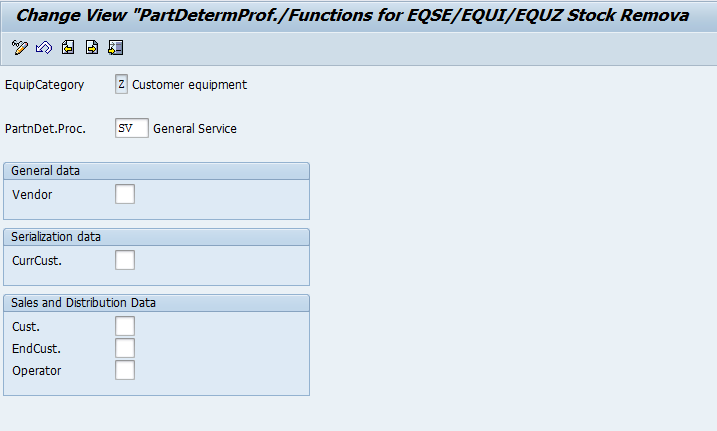
Partner Determination Procedure: this is very straightforward. Enter in the appropriate partner procedure that should have been defined already.
Vendor: You only need to populate this if you plan on serializing your vendor’s equipment. Be sure the partner type you select is defined as unique in the profile.
CurrCust.: This is the current customer for the serial number.
Cust.: The partner function for the customer within the equipment master. Be sure the partner type you select is defined as unique in the profile
EndCust.: The partner function for the End User within the equipment master. Be sure the partner type you select is defined as unique in the profile
Operator: The partner function for the operator within the equipment master. Be sure the partner type you select is defined as unique in the profile.
thanks for reading,