It’s Business – Don’t take it personally

You know, those words are so easy to say, but often difficult to live by.  If you’re anything like me, when you get stressed and tired, everything can feel like a personal assault.  It’s during these times that you really need to take a step back and not go on the defensive.

My current situation has me on a late night shift, and still working all day at my “day job”.  Realistically, this shouldn’t be that different from my normal work schedule, except that I get to work on my own stuff during the late nights.  But something about having to be “on” all day and “night” can be very tiring.  Also, when I start to get tired, I can’t just call it a night until my shift ends.  Because of this, I’ve noticed that I’m really tired, often irritable.  When I read my emails, I have this tendency to see things as an attack.  So, what’s important for me, and maybe you experience this too, is to hold off on any responses that you can while you feel like this.  Don’t IM, text, call, or email until you are more rested (or at least are a few minutes separated from reading).

The other important thing is to remember that rarely is anyone out to assault you.  If it’s a co-worker, they want everyone to succeed, so they are just pointing out opportunities to improve.  If it’s family, well, they love you, and just might not realize your frame of mind…  so there’s your word of advise…

thanks for reading,

Marketing – Segmenting your list

Well, lately it’s been marketing mode for me again.  As much as I want to spend my time developing, need to build the business up a little first 🙂  So one of my latest lessons has been segmenting my mailing lists.  Originally, when Mike and I started, we gathered up our prospect list, and put them into a couple of lists.  Seemed good.  It was based off of how promising the leads were.  Well, this can work if we didn’t have 2 very different segments to the business (at that time it was 3).  Since I’ve been the more focused marketer, it means I’ve been blogging more, and sending out more emails.  Well the problem is that a list that contains SM and PP and VC prospects, what do you suppose happens when the list only receives information about SM?  you guessed it…  lots of unsubscribes, because in general, PP and VC people don’t care about SM.

Well, after getting ourselves a decent list of prospects from our recent conference, we realized that we need to break these lists up and target the group effectively.  Of course, this is easier said than done, but Capsule CRM has actually been pretty good at helping me find the people that were broken into a segment.  There will always be some people we have no idea about, so they will get everything…  but the ones we know about, we can target to only send them PP stuff, or SM stuff.  In general, it’s probably better to send less stuff, than the wrong stuff.

So, that’s been one of my recent endeavors, to classify all of our prospects…  so now we have a few lists…  the next step is to send them useful information.  In general, I have more than enough blog posts, some white papers, etc. that I should be able to handle this 🙂  at least for a few months.  ha ha ha.

Anyway, take it from me…  focus the right information at the right people.  The spray and pray method, really doesn’t work (at least it didn’t for me).

thanks for reading,

Time Management – Outsourcing… but what???

It’s interesting, because as I read more books and listen to more audio program, similar these constantly keep appearing.  the latest thing I’ve heard is using outsourcing to do the work you don’t like.  I’ve heard it a few times before, but like so many things I looked at it, and thought…  eh…  I don’t need to do that.  Now that I realize just how valuable my time has become (maybe it’s because I feel like I have so little of it free), I find myself wondering, what can I outsource???

Those of you that know me, might describe me as hands-on (that’s a nice way of saying micro-manager/control freak) 🙂  While this isn’t all bad (as long as no one is micromanaging me. ha ha ha), it means that i Have a hard time letting things go to other people.  I’m even noticing it in my “day job” that I just don’t trust other people to do things…  so instead I try to run the whole show.  This is a terrible trait for someone that aspires to be independently wealthy and be able to enjoy life.  So my most recent struggle is…  what can I let go, to get some time back into my life?  I know myself well enough, to realize that I better start small, so I can get a quick win…  but when I look at my to-do list, it turns out I have a lot of little things…  none of which I’m anxious to hand over to someone else…  for example…

Paying random bills – there are always some bills that I have to log into my bank or the website and send a check for.  I could hand this over to my wife, but again… control freak.  I don’t want to hand over the checkbook…  so… what’s next…

check the garden, empty the compost pot…  I actually like doing these things.  Not glamorous, but I love mentally checking out…  so what’s next?

Writing blog posts…  well, as nice as it would be…  that’s gotta come from me.  Don’t get me wrong, anyone out there interested in doing a guest post, please hit me up.  I’d love to take a day off =)  but in general, this is something I can’t delegate…

File Papers… well, who the hell would understand my filing system.  To me it’s logical, but my friends will attest, what I see as logical, doesn’t always gel with the rest of the world.  Afterall, I was crazy enough to join the USMC at the age of 28.  I can’t be all there…

Creating landing pages for some of my new White Papers…  now, here’s a good potential.  I know I’m not the creative type, and someone could likely do this better than me…  ok.  I think I found my first potential…  but now what…  where do I go?  Elance?  on-line search?  crap, now I added something new to my list.  ha ha ha.  never ends.  But going forward, this might be a great place to start.

Infinite Development Tasks. Now here’s a potential as well.  I have so many things on my list, and really, coding another web app isn’t that exciting.  Rather, I’d prefer to do the design work, and then let someone else handle the web dynpro portions…  now, I need to find some help.

Well, thanks for letting me ramble…  And if you happen to be interested in some free lance development work, please let me know.  I’d love talk to you…

thanks for reading,
Variant Configuration – Balancing Options vs. Maintenance

Today, I’m going to talk a little bit about the “theory” of variant configuration.  I use the term loosely, because, well, everyone has their own theory.  I guess that’s why it isn’t a law 🙂  One of the struggles I encounter over and over again is clients that want to use the variant configurator to handle 100% of the options for a product.  Without a doubt, the first place I learned VC was still one of the most solid implementations I’ve ever seen.  But ever there, the line would occasionally get blurred.

Let me walk you through what I mean.  Whenever I walk into a VC project, I go in with the expectation of being able to handle 80% of the product options.  Some places more, some less, but it all depends on the complexity.  For example, let’s just say you have an option that is order twice a year, but it works like everything else.  It’s just a simple option, no complex logic, so in my mind, it’s a no brainer, add it and probably never sell it, but life isn’t any harder from a maintenance perspective.

Now, we take the flip side.  We have an option that gets order let’s just say 12 times a year.  But this option has a lot of extra rules built around when it can be picked, what it can be used with, complicated BOM components dependent on multiple things.  Well, now what do you say?  if it’s me, I try to push back saying it should be a special.  What’s a special Mike???  Well, very simple.  It’s a standard part number in the system, you can even copy the BOM rules from VC to get everything else right.  But you keep that stuff out of the VC.  “But why?  VC can handle it?”

While that statement is technically true, VC can handle most anything.  What becomes the defining factor is the increased logic that all the simple things now have to work around, along with the time to “decipher” what is happening every time a new option gets added, or something simple changes.  That costs time, money, and even processing speed.  For a “possible” 12 orders, that just as easily could have become standard part numbers.

Now everyone will take their own stance on this, and everyone is probably right…  for their scenario.  I’m just telling you from my standpoint, specials should be special…  standards should be VC 🙂

Thanks for reading,

Variant Configuration – Using the SCE Debug

Well, a while back, I did some posts about different ways to debug in the IPC.  THere was one more way that I never talked about, mostly because I hadn’t been able to get it working on my machine.  Using the SCE Debug as a tool is a great way to test your models on a local machine.  While it won’t contain all the same information as doing it online, it does give you the opportunity to play with your model without being connected to SAP or even the internet.

The modeling happens in R/3 as usual. If something is to be tested in IPC, a runtime version has to be created. This is of course the same pre-requisite for the IPC running in VMC of ECC. However instead of calling the report to publish the runtime version to VMC’s DB, you download it, using transaction CU36. It will download the whole KB into flat files. The flatfiles will then be imported into a (local) database. This process is executed by a simple batch file. After the flatfiles are imported, the RTV is available to SCE.  For more information on this, see my previous posts.

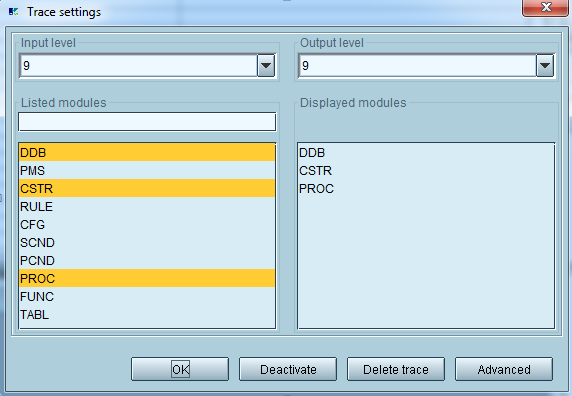
Select from the menu Trace–>Trace Settings.

blog01-01

In the dialog you can select an appropriate input level for filtering out some details (if wanted). 9 will show everything, which makes sense for a trace.

Select from the list of modules, for what you want to receive log entries. They are as follows:

Module Description
DDB Dynamic Database. This is the memory of the inferencing engine, storing all facts about the current configuration state.
PMS Pattern Matching System. Constraints are considered declarative. This means in opposite to procedural coding where everything is executed line by line, constraints describe a status and will be executed in any undefined order if their pattern is fulfilled. The pattern usually exists of an object declaration as well as a condition. The pattern matching system is responsible to find those constraints, which patterns are fulfilled.
CSTR Constraint. This is useful for figuring out for example in combination with DDB, how a constraint influences facts.
RULE Rules. (If used) Mainly used in Advanced mode as monitoring rules
CFG Configuration
SCND Selection condition (good for troubleshooting existence or missing items on a bom explosion). See super bom.
PCND Precondition. If used. It is strongly recommended not to use any preconditions.
PROC Procedures. This option makes most sense in combination with DDB, seeing which modifications happen.
FUNC Functions
TABL Variant Table access

Table 1 “traceable engine modules”

Very typical and useful settings are DDB,CSTR,PROC. Eventually SCND if the bom explosion is to be verified.

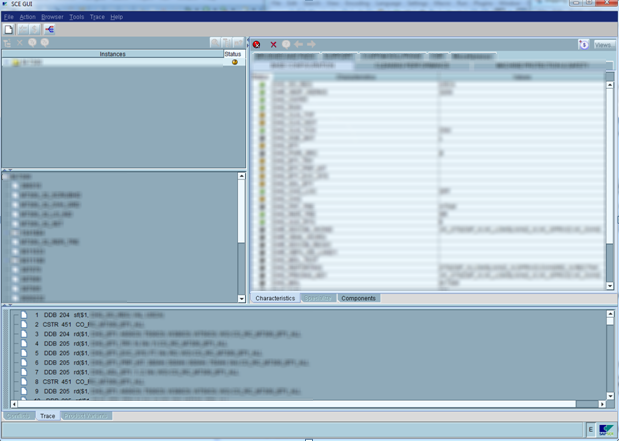
After selecting the options, you can do any modification directly in the SCE UI. With each selection / modification, you see traces being updated in the lower part of the window:

blog01-02

The trace area is not very powerful regarding functionality like search etc. The right click menu allows to clear or to save it to a file. It is however possible to select all entries with ctrl + A, copy the traces (ctrl + C) and paste them into an external editor, such as notepad++.

One of the biggest benefits of using the SCE over using IPC is if you want to see the initial logic being executed, you activate the trace and create a new configuration session (with the white paper icon in sce).  The IPC will automatically execute the initial logging before you can begin the simple trace, so often this will help you find problems within the initial execution of your dependencies.

As always, Thanks for reading,

Service Management – Using the Installed Base

I recently decided I wanted to understand a little better how the installed base works within in ERP 6.0.  I certainly found some things I liked, and some things that were disappointing.  For any of you experts out there, perhaps you can tell me if I’m missing something in configuration (I looked, and found nothing).  So, let me tell you about my finding…

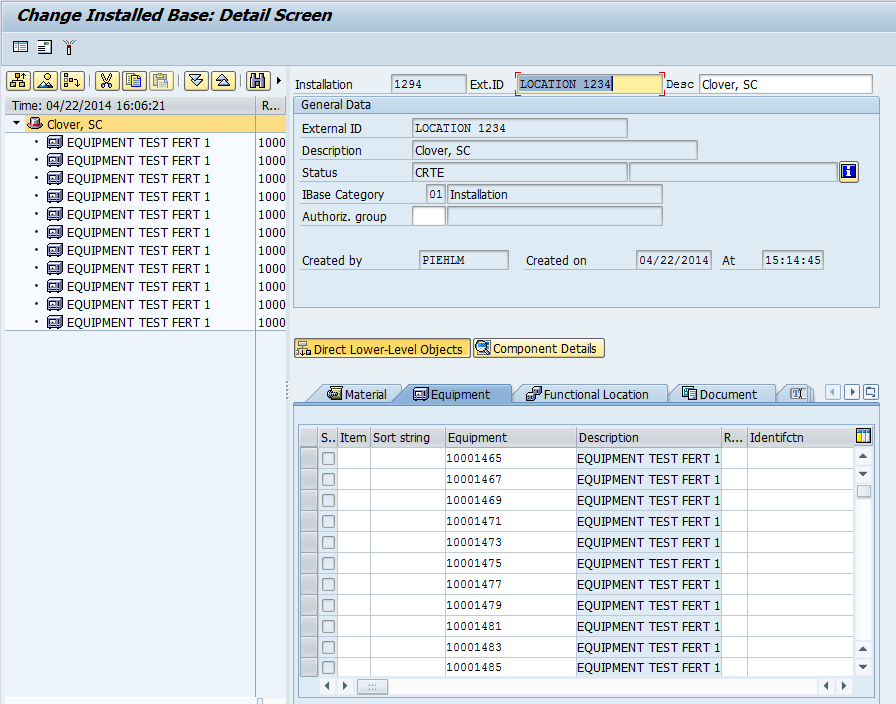
Transaction: IB51 allows you to create a standard installed base.  you select your type of IB and simply press enter.  Here is a sample screen shot of a quick IB that I put together.blog01-01

What I like is the ability to add most any type of object into the installed base.  I can add straight materials, equipment, functional locations, Documents, Text or even other Installed Bases.  Very cool, because it can truly be a repository of most anything you might have at a location.

Now, it got even a little more cool, when I looked at transaction IB61, this allows me to copy from a sales order or a production order and bring in the items automatically into the installed based.  A very handy tool.

Now, for the con of the Installed Base.  The number one thing I was missing was the ability to assign partners to the Installed Base.  I have become a big fan of attaching partners to equipment records, functional locations, notification etc…  suddenly not having that option left me feeling a bit naked.  You can assign a single address, and probably work some hokey methods to tie text to a partner number.  But why not just integrate the option.  Oh well.  It could be worse.  In addition, installed base does not fix the issue of having to manually maintain everything when something changes.  So, just like the serial number hierarchy within the equipment record or functional location, if you make any changes, you have to manually do the adjustment in the installed base.  The most common example I run into is that a customer sends back a piece of equipment and for one reason or another, a new unit is sent to the customer and the old number remains at the plant (or gets scrapped).  You must manually go into the installed base and make the swap if you want to keep things accurate.

Overall, it’s not bad functionality, if only I could assign partners to it.  If you know what I’m missing, please comment on this post.  I’d love to know 🙂

Thanks for reading,

Variant Configuration – SCE UI Load KB

Well, since I’m on a roll, figured I might as well show you how to load the KB into the SCE UI within your local database.

The first step is to make sure that you extracted the latest files from CU36 (see my previous post for details on this).

Now, here is where you need to do a little work.  In your IPC installation directory (and I use the word installation loosely, since it was just a zip file with a bunch of files).  So, what needs to happen is to copy all the flat files into the ..\db directory (for me, there was an intermediate folder, so for me it ..\db\temp\ to hold all my flat files.

Now, one additional step that I needed to do was copy the file sce_import_meta_data.sql from the ..\lib\scripts\ directory and place it in the ..\db\ directory (notice that even for me, it was not in the temp directory).  Now, I also needed to rename this file to be: import_meta_data.sql

Once this prep work has been completed, go the ..\bin\KBAdmin.bat

blog03-01

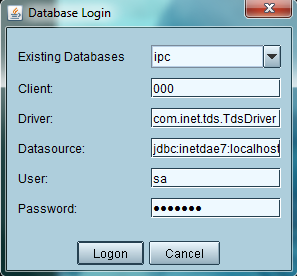
Verify your DB settings (see my previous post on the SCE if you need more details on how to set this).

blog03-02

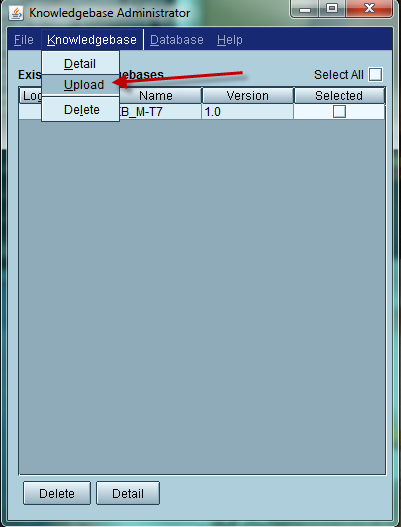
Use the menu:  knowledgebase–>upload

blog03-03

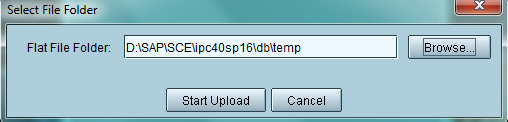
enter in the location you used for the flatfiles (see above for more details).

Press Start Upload.

When it’s done, you will now have the DB populated with the knowledge base you loaded.

When you know what to do, it’s pretty easy…  but this took me a few hours of experimenting to figure out what to do… =)

Thanks for reading,

Variant Configuration – Creating the Knowledgebase

Well, now that you know how to get the database setup for the SCE UI, you need to work on creating the knowledgebase.  This is pretty straightforward exercise, but it does require a few transactions to perform the whole process.  Let’s walk through what you need to do.

blog04-01

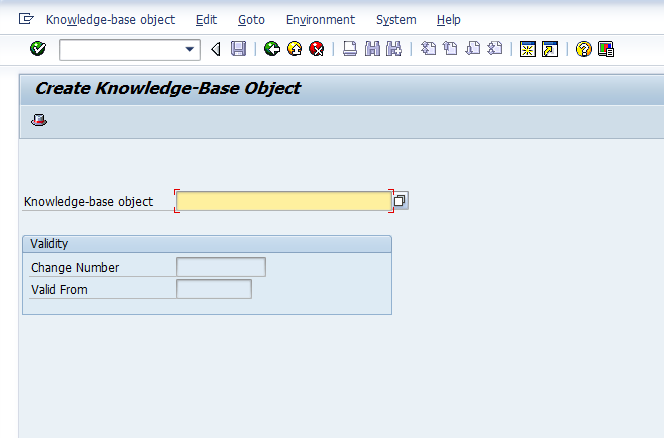
We start with Transaction: CU31 to create the KB object.

blog04-02

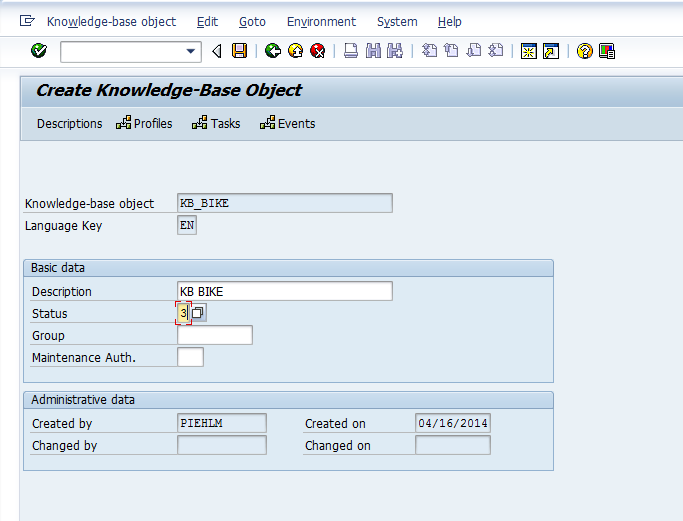
Much of the information is just descriptive, so set the status and give it a description.  THen press the profiles button.

blog04-03

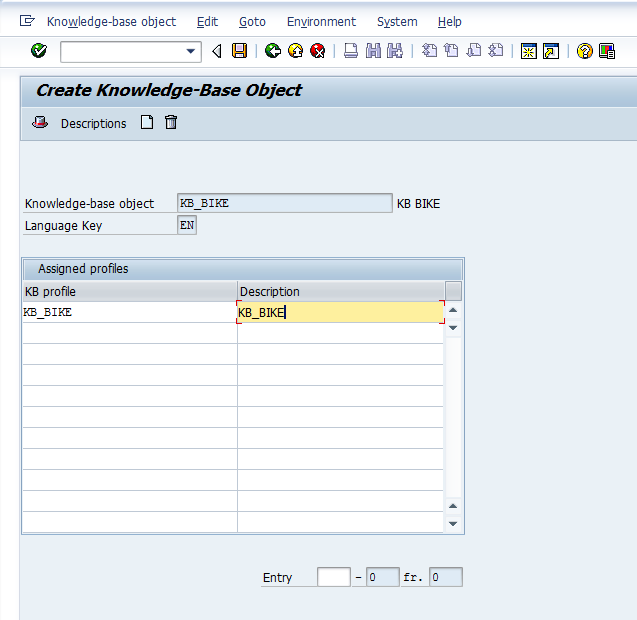
Again, these are just names, so name the Profile and give it a description.  Then press enter.

blog04-04

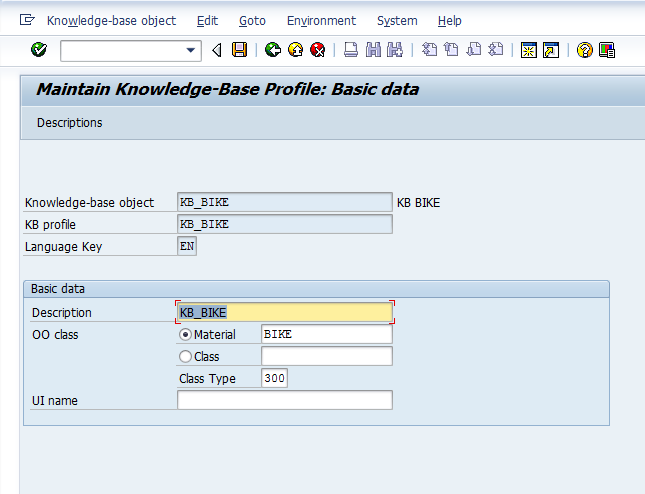
Now, we finally get to some real data.  I typically enter in the KMAT material, but you could do it by class and class type.  Add a description and then save.

blog04-05

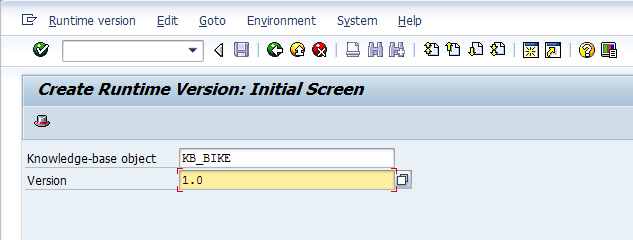
Now that you have a knowledge base, you can create the runtime version (RTV).  Go to transaction CU34.

blog04-06

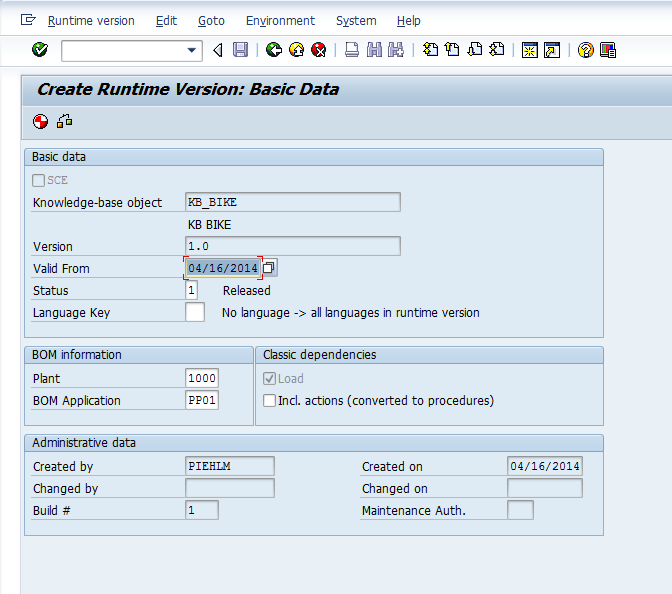
IN this screen, we set up all the vital stuff, including what plant the BOM should be looking at, if it’s a production BOM or Sales BOM, etc… Also, a very important field is the valid from date.  Remember, that KB’s and RTV’s have no concept of engineering change.  This means that the valid from date is VERY important for your process going forward.

After you enter in the info, I encourage you to check.  Press the syntax check button, and you will receive a report of your model.

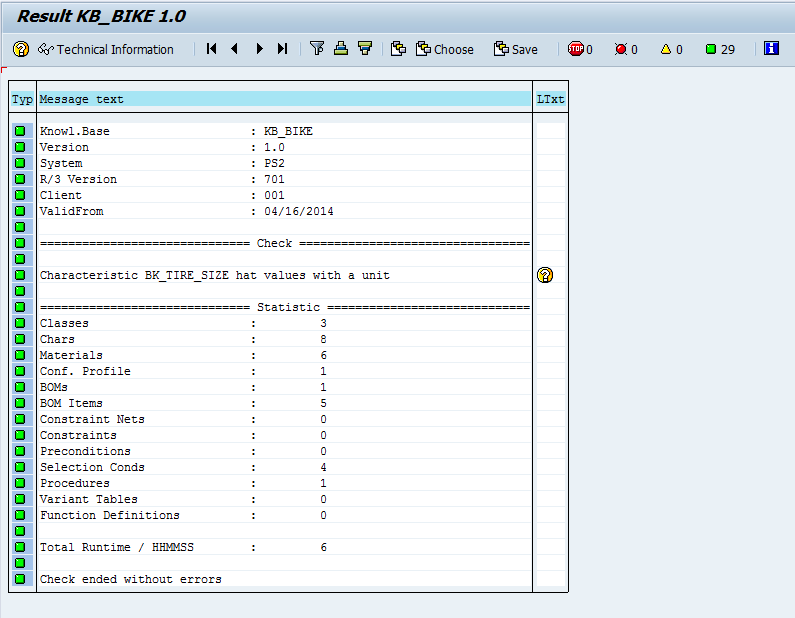
blog04-07

My model is very simple, so everything is green.  If anything is yellow, be sure to pay close attention.  This could cause you issues within the SCE/IPC.  The question mark to the right often has good information.

Finally, green arrow back, press generate, and you have your RTV.

The last step is just to download the flat files.

Use transaction CU36

Enter in your KB and version, then press the export button.

blog04-09

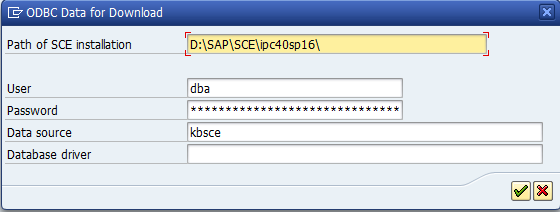
The only field you need to be concerned with here is the Path.  the rest only applies if you are using R/3 or CRM as the your SCE installation.  For my purposes, I’m focusing on the offline database only.

Hit the green check and you’re ready,  Next post I’ll talk about uploading the flat files into the SCE.

Thanks for reading,

Variant Configuration – Installing the SCE UI in a Local Database

Now, I struggled with this one for a while.  I was able to get the IPC 4.0 files that include the stand alone version of the SCE UI.  I recently learned that in all the versions after 4.0, this option is no longer available.  So, to me, 4.0 is still a premium, just to be able to do the offline testing of a model (especially for someone that periodically travels on airplane.  ha ha ha).  Anyway, after some digging, I was finally able to figure out how to get this installed.  If you’ve read my previous posts on the SSC installation, you’ll remember that you need SQL Server on your local machine in order to make this work.   Please refer back to this post if you are having issues connecting.

Now, the first thing you need before you can do anything is set the system variable for JAVA_HOME.  If you aren’t familiar with this, following the next couple of steps.
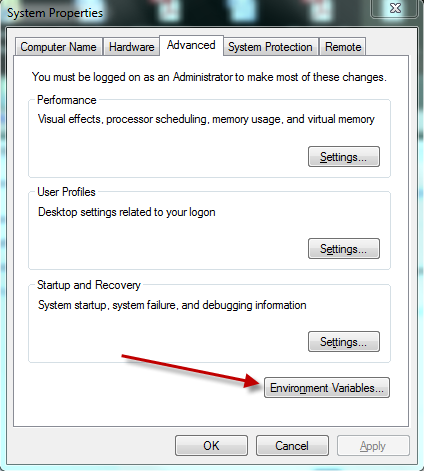
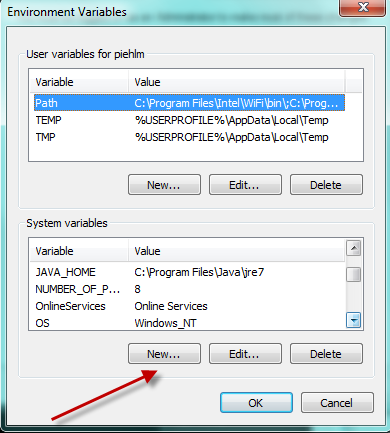
Right click on my computer, and select properties.  If you are in windows 7, click the advanced system settings, and press the environment variable button.

blog01-01

blog01-02

blog01-03

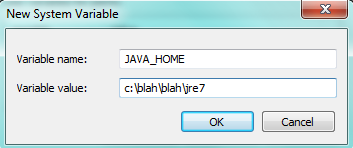
The variable name needs to be: JAVA_HOME

the value is the path on your hard drive to get there.

Now, once you have this, you can move on to the harder pieces.

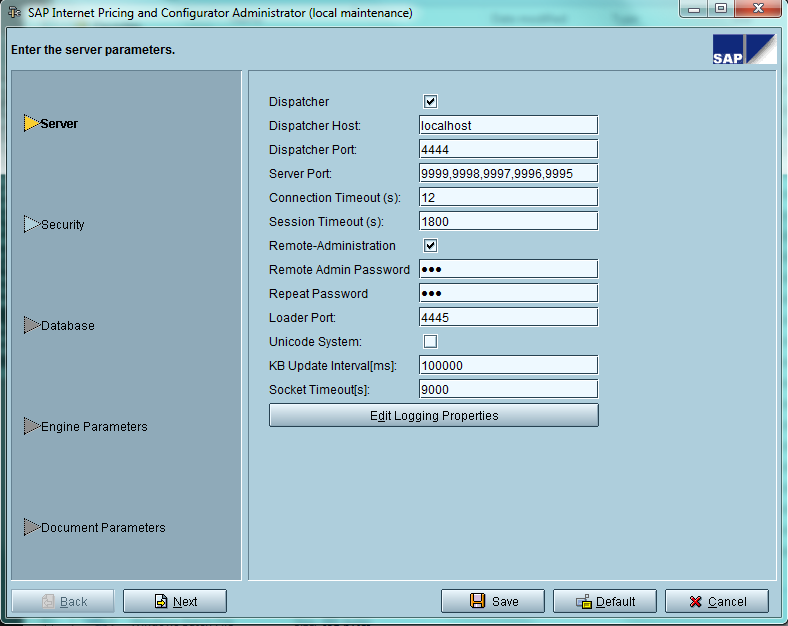
The next thing you need to do is locate the files for the ipc, and go to the /bin directory.  This will have a bunch of batch files.  The first file you need to execute is:  admin.bat

blog01-04

The first screen, you can leave this defaulted as it is.  This would be more important if you wanted to connect directly to R/3 or CRM.  Go ahead and press Next. and then Next again, since you don’t need to worry about security on your local machine 🙂

blog01-05

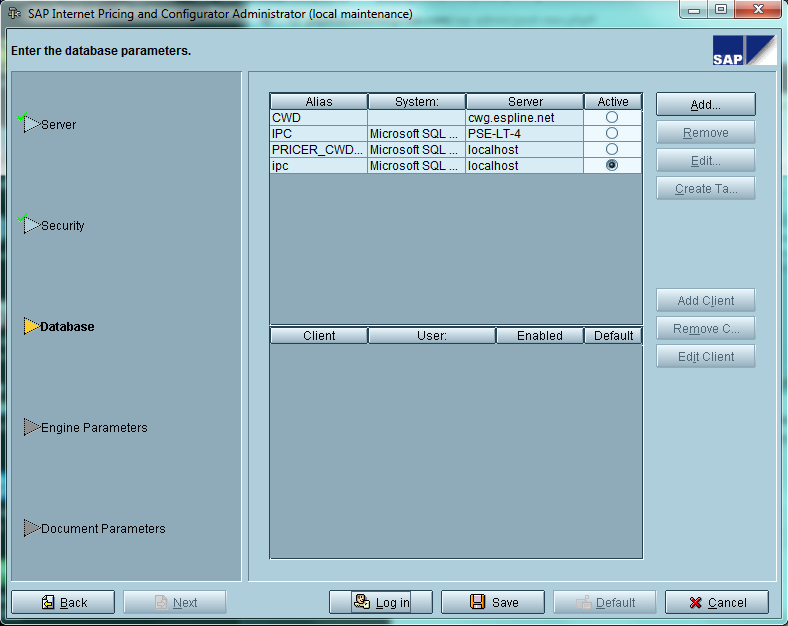
this screen is where all the work comes in.  Press add to add a new connection

blog01-06

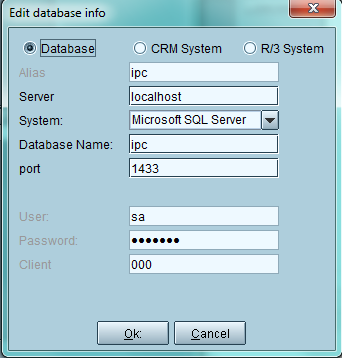
Now, all of these values will come from the SQL Database you created.  See SSC installation for more details.  Be sure to create a new database, I called mine IPC.  Then populate all the other values.  The Port you can accept the default, for Client, you can just use 000 since it’s local.

Finally, make sure to highlight the new DB you added, and press the Create Tables button.  Then press save.

I’ll take more about this soon, including how to upload a model into the stand alone database.

Thanks for reading,

The “Sabbath” – It’s not just for religion

Ok, many of you know that I’m a bit of a self-improvement junkie.  I’m always looking for ways to make myself more productive, a better person, better husband, better father, successful entrepreneur.  Well, I started listening to something new a few days ago.  Well, you start watching a movie or listening to something to and just start nodding because they are telling your story?  Well, that’s the sort of moment I got this morning listening in my car.  As I type this, I even have the excited butterflies in my stomach…  that usually means I’m onto something pretty good (or I had too much caffeine.  I hope it’s the former 🙂 ).

Well, this is something I got from a Perry Marshall program.  The special guest was named Steve, and he started talking about how hard he works, and he eventually started to feel hollow.  The business was growing, he had more work than he knew how to finish, along with his full time job.  Well, this pretty much describes me perfectly.  So, I’m nodding along, listening, and wondering how can I fix myself from this same problem.  Well, this program has a bit of a religious spin to it.  I’m not an overly religious person, I spent a lot of time in Lutheran school as a kid, but I had fundamental “challenges” with organized religion, and I’ll just leave it that.  Anyway, Steve started talking about the Sabbath…  well, I remember that one, it’s Sunday right???  turns out if you dig into the true definition, it just means rest…  but a very special type of rest.  It’s a rest that you have to give one way or a another.  You can voluntarily take the rest, or it will take you in sickness, disease, burnout, numbness, etc.  You get the idea.  So it starts to hit me, that I’m always on…  I take a couple hours a day off to play with the kids, or maybe work in my garden…  but generally, I’m doing something all the time until I can’t think straight again.  So it hits me…  I need a Sabbath…  now, I haven’t figured out how to accomplish this yet…  but the crazy excitement I’m feeling is my inner voice telling me I need this…

Steve actually gave a great example.  A bow has to be unstrung, or it become less effective and weaker over time, until it finally breaks.  Well, looking back, my bow has been strung tightly for far too long.  How about you? are you burning the midnight oil?  do you find yourself in perpetual motion…  maybe you need a “sabbath” too…

Thanks for reading,

Posts navigation

1 2 3 57 58 59 60 61 62 63 97 98 99
Scroll to top