Networking your SAP Virtual Server to the outside world

What can I say?  this one has been on my wish list for a VERY long time, and thanks to a new friend of mine, Brent Brunner, I can finally see my BSP’s/web applications somewhere beyond my local machine.  It is so cool, for first time I know that my Rapier BSP doesn’t work on the Safari browser (not great, but now I can address it).  So for anyone out there, here are the basic steps to accomplish this:

On the Virtual Machine
1.  be sure the network is setup as a bridged adapter.
2.  for that adapter, you need to set the network to be a static IP address.  It doesn’t really matter what address you pick, but you don’t want it changing.  So go into your network adapter and specifically enter the IP address/gateway/etc…  If not sure of all these values, use the CMD prompt and the command:  ipconfig -all  This will give you all the network numbers you need.
3.  find out what port SAP is expecting for <HTTP Port>.  You can use transaction SMICM.  by default, the value is 8000.

On your router settings:  (I’m not going into much detail here since very router is different).
1.  find your primary machine.  You need to set this as a static IP address.  It should match the IP address you chose on the virtual machine.  On my AT&T Uverse box, I went to LAN–>IP Address Allocation.  I found my actual computer, and set it to the IP address from step 2 above.
2.  you need to define some exception ports.  Is should be the same port you found in transaction SMICM.  For this I went to Firewall–>applications and I clicked add a new application.  Then I filled in TCP/IP and the ports I wanted to exempt.  Then I selected my main system, and attached the applications.

Find your public IP address
1.  You can use the website:  www.whatismyIP.com  this is now the IP address that the outside world can use to connect to your system.

On your hosting site (for me it was hostgator).
1.  create a subdomain = to your virtual system name.
2.  Create a DNS entry for your subdomain.domain = your public IP Address
3.  Wait 12 – 24 hours for the changes to propogate through the web.  (this was the part I hated, because I didn’t know if it was working).

Accessing your stuff.
now any BSP’s or anything like that, you’ll need to first give the server, so it will be the subdomain.domain:<HTTP port>/sap/bc/…

I hope I’m not forgetting any steps.  I don’t pretend to be an expert about this, but I’ve spent the last 24 hours learning from Brent and trying to make it all work.  Now as of tonight, it’s all working.  Very exciting to a geek like me.  Here’s my disclaimer.  I’m fairly sure my network is still secure, but like anything, when you open doors, someone could get in.  Make sure your anti-virus software is up to date, and keep on the lookout for anything strange.  Who knows?  I might have to turn it off at some point and pay the $$$ for a VPN to do the same stuff, or other such fancy networking stuff.

Thanks for reading…

And a special thanks to Jeremy Meier…  without your connection, i’d still be stuck with a local machine 🙂

Features vs. Benefits – It really does matter

My latest marketing lesson that I learned is just how important it is to sell benefits, not features.  Being a programmer, I’m used to dealing with features.  What does it do? is it cool? How fast is it? etc…  but after listening to the lesson, I learned that even I need to know the benefits.  Just because your new widget can do something, until I know why I NEED it to do that, I’m not going to buy.  The latest lesson had us focus on converting a feature into a benefit, simply by going down the ladder of why does my customer care?  For example, you have a feature that provides the fastest dry cleaning in the county.  Ok, great…  but why do I care?

Fastest Dry cleaning in the county:
It gets me my clothes faster than anyone else

why do I care?  I have a big meeting tomorrow, and I need to look my best.
why do I need to look my best? I need to give a great presentation
why do I care?  I need to be my most confident self.
why do I care? it makes me feel good about myself.

I apologize if I butchered that, but the short story is that everyone needs to feel good about themselves, so for every feature, you need to walk up the ladder until you can get that response.  IN this case, having my clothes ready tomorrow for the big meeting will give me the confidence to feel good about myself, so I can make a great presentation.  I just did this exercise with my Broadsword 1 page sales document.  It actually made a big difference.  No, I didn’t make a sale yet, but this gets me 1 step closer and increases my chances of feeling better about myself because my 1 page document are more likely to hook a prospective customer 🙂

Anyway, that’s all for now.

Mastermind Group – You Need One

Tonight, I made a new revelation. A mastermind group is invaluable. I’m doing this marketing class called the Remarkable Blueprint. I’ve been doing some of the exercises, and I kinda hit a wall a day ago. I got to the point of being overwhelmed with all the exercises and trying to apply it to the all of the materials I’ve already generated for my products. I’ve found that often I can get bogged down when I have too much to do, and I don’t have a good starting point. Which is funny, because every time I get to this point, as soon as I start doing something, anything, I get out of the rut.
Well, I was talking to my friend, Justin, who is also doing the Blueprint. He hit me with a flash of the obvious. Just pick one product, and perform the exercises for that one product. The other areas can be tackled later. So I just decided to do my dashboard. I’m going to start cleaning up all the marketing materials for Broadsword. I’m actually pretty excited.
Now, my original point is simple. If you want to get the most of your endeavors, you need someone (or a group) that you can bounce things off of. I actually gave Justin his own ah ha moment, much like he gave me. It’s often as simple as having someone that isn’t neck deep in the details to point out the obvious. So, start finding some people that have similar aspirations. I bet you can help each other out in more ways than you imagined. The funny thing is that I read this in Think and Grow Rich, many years ago… but it took until now for it to finally sink in. It’s amazing the things you learn and don’t use… then out of the blue, it hits you.
Anyway, that’s all for now… I hope you’re learning from my mistakes,
Mike

Our First Trade Show – Carolina ASUG – Lessons Learned

My latest learning experience was the trade show. Now I’ve attended trade shows in the past, but this is the first time I’ve gone to one in the vendor mindset. Now, this was a relatively small group. It was a regional ASUG, so it was a great place to learn. My partner Mike and I got up at the crack of down on Thursday morning and drove 4 hours. We hit the vendor fair, that had about 10 or so booths. We talked to about half of the booths, in order to try to learn what other people are currently doing. We talked to some companies that were even doing SAP Add-ins, just like us. So we got some great information about pricing and we saw some good marketing materials that we can strive to check out. (speaking, please check out our one page document on any of our products. I’d love to hear your feedaback).
Here’s some of the lessons I learned

Lesson 1: Consistent Image:  Mike and I were in the process of getting the new company launched, so that meant we both came in under our own company name, Paper Street Enterprises & DMS. This wasn’t terrible, but since we were often at a booth together, we got a lot of strange looks, especially when we presented a JaveLLin Solutions business card.   So we decided that we need to get some shirts to wear (polo for sure), get a logo, get business cards, change our membership to to the new company.  Little things like that.  ha ha ha

Lesson 2: Avoid panel discussions if possible: On the first day, the last presentation was a panel discussion about ABAP Add-ins.  It was awesome because it gave us a chance to give a quick pitch.  However, we ended up following a guy that took twice his allotted time and just wouldn’t get off the stage.  This quickly annoyed the entire audience because this discussion was holding people up from going to happy hour.  Nobody wants to hear a sales pitch when they could be drinking free beer.  ha ha ha.  We learned that it’s worth the money to be a vendor and do an actual hour long presentation.  Plus, that will give us a booth.

Lesson 3: Talk to Vendors:  This was a big bright spot in the conference.  in the course of the conference we met 2 great vendors that are actually interested in partnering up with us.  So talk to everyone, you never know.  These vendors can help us get in the mobile arena with little work on our part…  (more about this in a future post).

Those are the big things I walked away with…  I”m sure when I go to CWG in Oct, I’ll be doing another one these…

Thanks for reading…

Power of the To Do List

Now everyone has their own style of getting things done.  What I’ve discovered about myself is that I need to make a list.  It’s one of the things I’ve heard over and over again in the personal development audio programs I listen to.  The funny thing is that now I’ve really started doing it, I notice just how much more I get done.  I literally knocked off 12 things on my list today.  Many of them, I would’ve put off (for who knows how long).  The simple task of adding an item to the list means I get it done.  I see that outstanding item, and it bothers me till it’s done.  Now don’t get me wrong, some of the items just get postponed till tomorrow, but it forces me to look at it daily.

Now I use a tool called Remember The Milk.  I love it.  it works great on the iphone, and it serves as a constant reminder of what I need to be working on.  I encourage you to give it a try.  It doesn’t matter how you do it, a notebook, a smart phone app, or a deck of index cards.  The trick is, don’t do anything that takes more than 10 mins unless it’s on the list.  It forces you  prioritize what you need to do.  Anyway, I’m going to keep this one short because you get the point.  Make a list, and watch your productivity increase.

good luck.

GUI Scripting: A how to guide

Using SAP GUI Script

SAP GUI Script is a fantastic tool that can be used to create transactional testing data, Change existing master or transactional data, create master data in mass or even just data conversion for certain tasks that LSMW can’t handle.  GUI Script has been around for a while, but it always surprises me that so few people are familiar with it.
The basic concept around GUI script is that you can load information into an Excel worksheet, and using a macro, allows you to load data into SAP.  This document is going to walk you through creating your own GUI scripts and using them effectively.

Turning on GUI Scripting

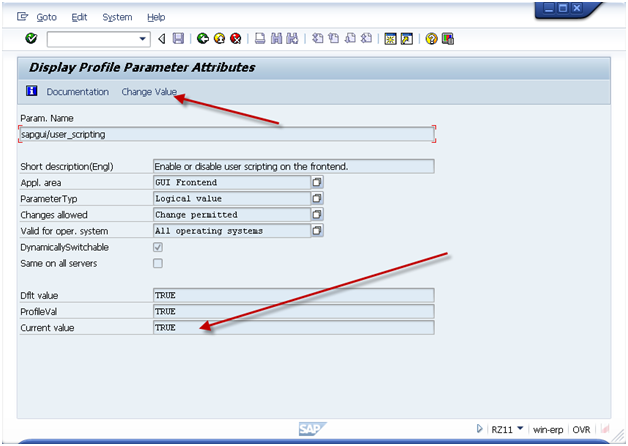
Tranaction: RZ11
Param. Name: sapgui/user_scripting

Press Display
gui-01
If current value is not set to TRUE, press the Change Value and set the value = TRUE.
Please note, typically this a basis function, so if you don’t have access to transaction RZ11, please contact your basis team.
As an additional hint, if you want to have GUI Scripting always active, it is encouraged to activate it in RZ10 (this adds it to the startup profile).

Recording the Transaction

When you are ready to perform the recording,  be sure you know the transaction you want to execute and the data that you can use.  You should also know the screens you plan to visit and the fields that you will be filling in.  Keep in mind, you can always update the recording file, but the better your recording, the less errors you will encounter.
The important thing to remember is that GUI script can NOT perform any logic.  it only works for repeating the same steps over and over again.  This means that if you receive an error on some records, but not others, you will need to execute 2 different scripts.  One script will do the non errors, and other script will do the errors.  You can cut down a lot of time if you can segregate the data early.
gui-02

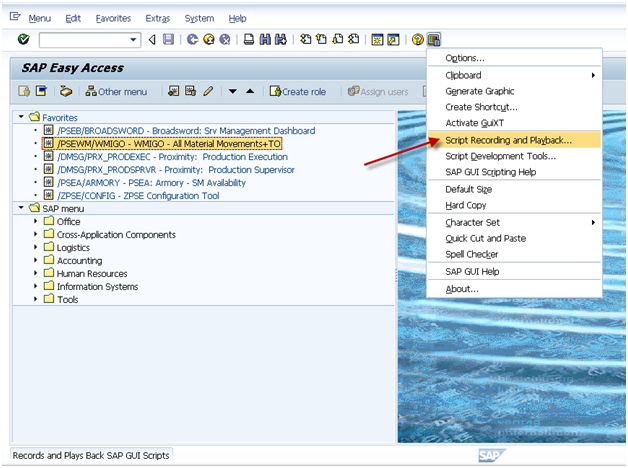
Activate the recorder.  It is encouraged to always start the main screen in SAP.  This prevents weird things that happens if an error occurs during the playback.
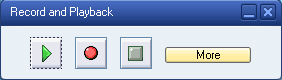
gui-03

Press More if you want to control where the file is saved.
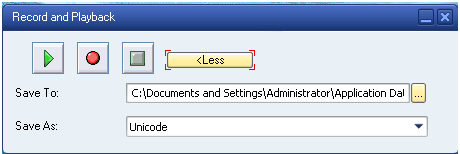
gui-04

When you are ready to start, press the record button (Red Dot Button).

Then proceed to execute the transaction you wish to record.
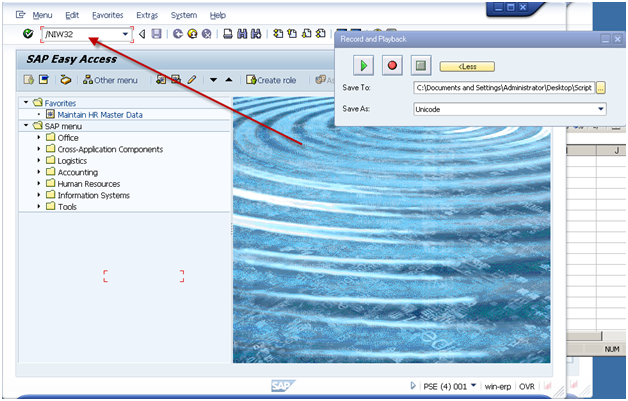
gui-05

Be sure to use ‘/N’ in front of the transaction code.
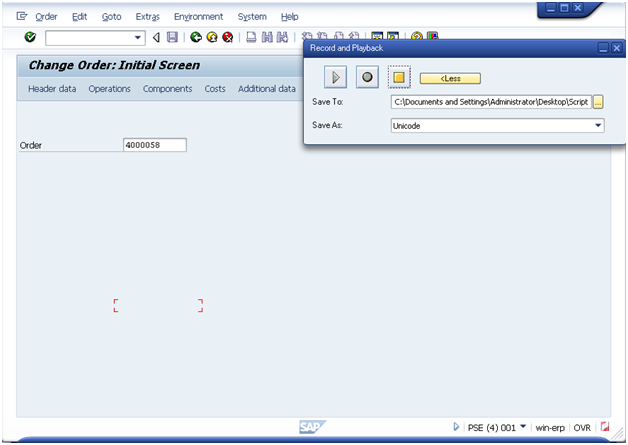
gui-07
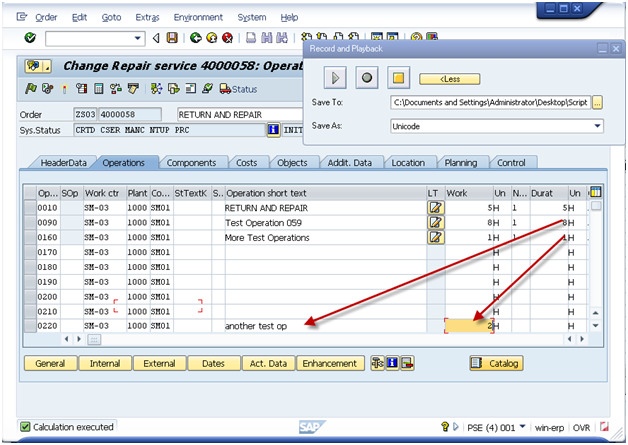
Enter in the document number and press Operations Button.
gui-08

Please note, when I added a new operation, I entered it on the bottom of the screen.  This allows you to avoid the risk of overriding exisitng data.

Press Enter.
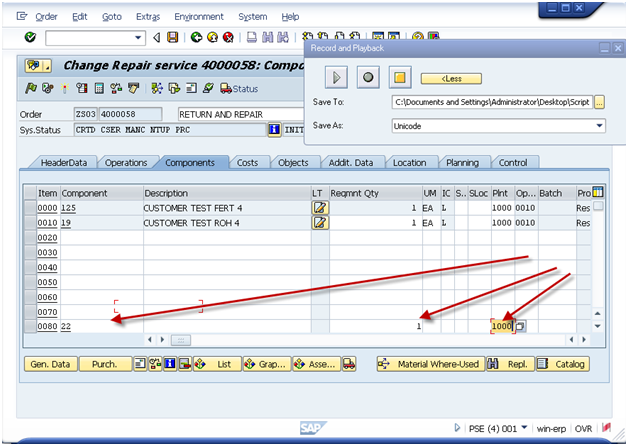
Press Components Tab
gui-09

Again, add the data to the bottom of the screen.
Press Enter
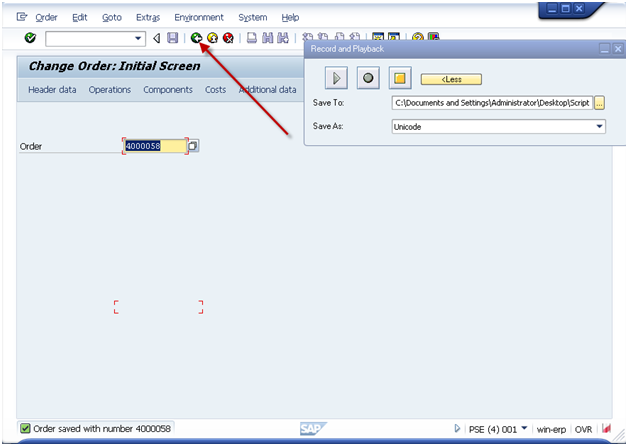
Press Save
Note:  sometimes there will be errors.  If errors occur, you need to remember that maybe not Every order you change will have the error.
gui-10
I encourage you to press the green arrow back on every recording at the end.  This just helps to avoid incorrect loading of data.
gui-11
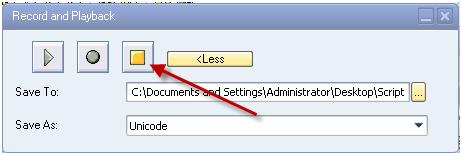
Press stop.
Now, go find the file.  Be sure to RIGHT click on it.  If you double click on it, it will attempt to execute the exact same transaction again.
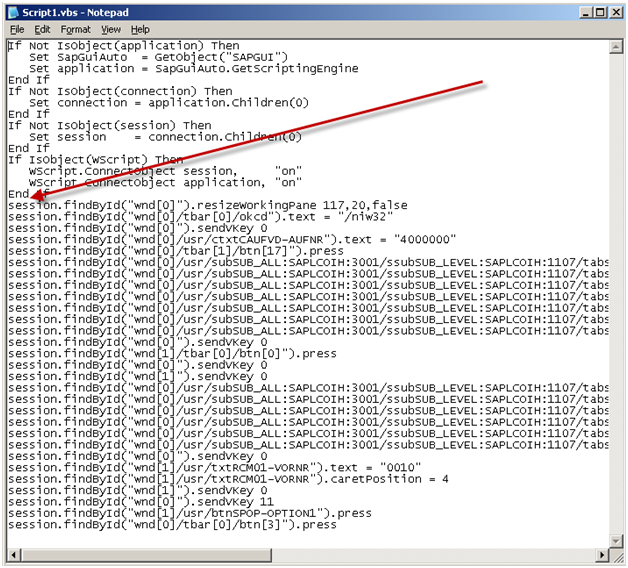
You should see something similar to this:
gui-12
The parts of this file you care about are the lines that start: session.xxx
I encourage you to skip the first line that resizes your screen.  and copy all of the remaining lines in the file.
Next up, add this information to the excel file.

Gui Script

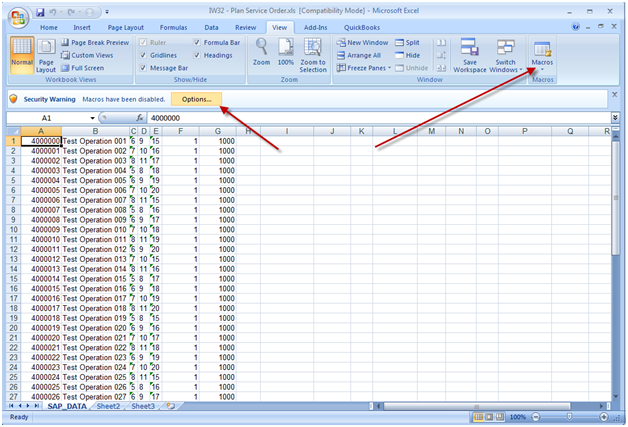
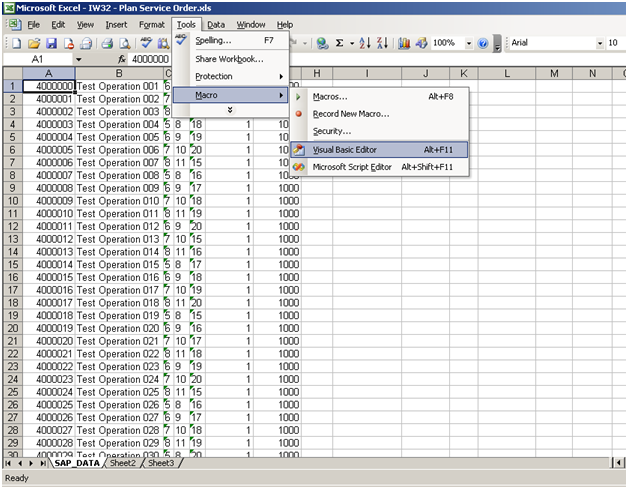
This will depend on your version of excel, but what you need to do is find the macro button:
MS 2003:
gui-13

MS 2007

gui-21
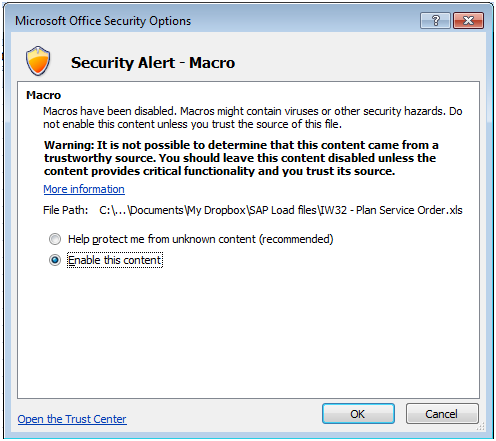
Be sure to enable macros.
gui-14
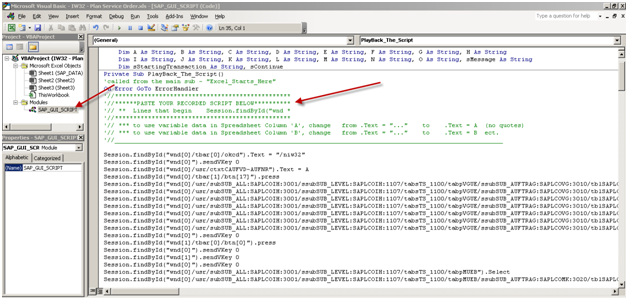
When the macro window opens, be sure to select the correct view on the left hand side of the screen.  Then move to the code section and find the area shown that says “Paste your recorded script below”.
If there is anything currently in this section, be sure to remove it, and replace it with the information from your recording (session.xxx).
gui-15

Now, I’m going to show you how to point this to your excel document.
session.findById(“wnd[0]/tbar[0]/okcd”).text = “/niw32”

session.findById(“wnd[0]”).sendVKey 0

Change:
session.findById(“wnd[0]/usr/ctxtCAUFVD-AUFNR”).text = “4000000”
To:
session.findById(“wnd[0]/usr/ctxtCAUFVD-AUFNR”).text = A

session.findById(“wnd[0]/tbar[1]/btn[17]”).press

Change:
session.findById(“wnd[0]/usr/subSUB_ALL:SAPLCOIH:3001/ssubSUB_LEVEL:SAPLCOIH:1107/tabsTS_1100/tabpVGUE/ssubSUB_AUFTRAG:SAPLCOVG:3010/tblSAPLCOVGTCTRL_3010/txtAFVGD-LTXA1[7,8]”).text = “my test op”
To:
session.findById(“wnd[0]/usr/subSUB_ALL:SAPLCOIH:3001/ssubSUB_LEVEL:SAPLCOIH:1107/tabsTS_1100/tabpVGUE/ssubSUB_AUFTRAG:SAPLCOVG:3010/tblSAPLCOVGTCTRL_3010/txtAFVGD-LTXA1[7,8]”).text = B

Since this can get long, I’ll jsut show you the first 2 changes.  You’ll notice that I found the first two lines where I entered in data.  I changed it to a single letter (no quotes).  This is the excel column where you enter in the data.  It’s that simple.  If anything is a constant, just leave it as it is.
When you’re done, press save and you’re ready to execute.

Executing the Script

Now, the first step before executing the script is gathering all the data.  Typically, this is done using SE16, SE16N, or certain reports (IW73, VA05, COOIS, etc).  As always, be careful with the data you enter.  It’s your user id that will be assigned to the change :).

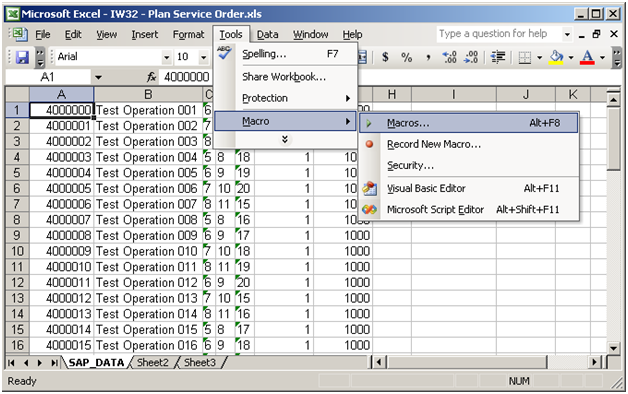
Once you have the data you wish to execute, simply go the excel worksheet and execute the macro
*** NOTE:  Remember, when the script is running you can’t do anything with Excel.  You can continue working in SAP, but Excel will be locked for the duration of the script.
gui-16
**** NOTE ***
This is a VERY important one.  Be sure that the first SAP window open on your screen is the client you wish to change.  If you are doubt, be sure to logout of any client/system you do not want to change.  For example, if you are logged into production and QA.  You want to make the change to QA, I encourage you to log out of production.
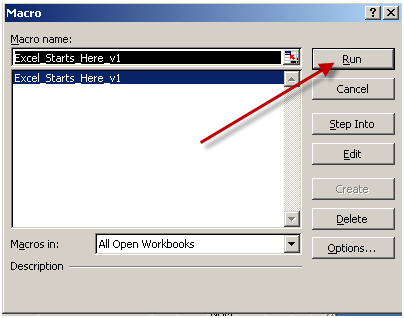
gui-17
Press Run
Note:  if you have multiple excel windows open, be sure the correct macro name is highlighted.  If you aren’t sure, close the other excel documents.
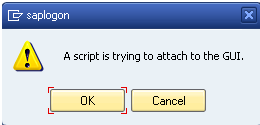
gui-18

Gui Script will always give you a chance to check the results of the FIRST record.
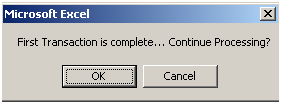
gui-19

I encourage you to always check and make sure it saved properly before pressing ok.  If it did not, press cancel.  Otherwise the script will go all the way to the end.

Once you are done, it will return control back to excel.
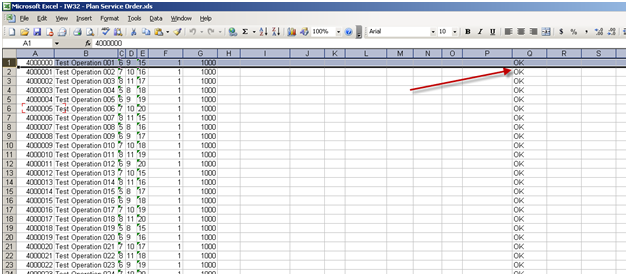
gui-20

As long as you see OK in the row, the record processed.  if you don’t see ok, you’ll need to check that record and possibly reprocess it.


Tax Planning – Making Sure Uncle Sam gets his cut, and nothing more

A few days ago, I asked my accountant to make sure I was on track for my tax withholding for the 2012 year.  To my surprise, i wasn’t 🙁
What I quickly discovered is that the better I do, the more I need to pay in (gotta love our system, penalized for working harder).  The short story is that you need to be inconstant communication with your accountant.  I made a big mistake in not communicating my changes to my accountant.

So, here’s what I recommend.  First off, if you are a contractor, make sure that any time your rate changes, notify your accountant.  My rate changed by $10/hr in Feb, and that threw off the calculations by quite a bit.  To make things worse, I was also helping some clients remotely.   All of this factors into a much higher tax payment.  I always recommend working with your accountant because he can keep up to date if your tax bracket changes.  For me, I hate have to come up with large sums of money in April, I try to pay my estimated taxes as I go.  Even if you pay the whole bill in April (not sure if that’s allowed or not) you still need to be accruing money to pay that bill later.

Just as a side note, remember that in the US, the more successful you are, the more you are expected to be pay in taxes, and not just as a straight percentage.  This is always a conflict in my heart.  I strive to be successful and keep increasing my income in order to clear off all my debt and provide for my family’s future.  However, I vehemently disagree with how the government chooses to spend my money, so my ultimate goal is to start checking out of the system.  I want to pay off my debt, and build my homestead to be self sufficient, so that I can start to minimize the amount of money I pay in for taxes.  If you haven’t read Atlas Shrugged, I highly encourage it.  (for those of you without the diligence to read a 1000 page book, there is also a movie version that gives the same info.  ha ha).  So, my rant is over…

Just remember, keep in close contact with your accountant.  You don’t want a major surprises in the middle of the year (or in March).

Still learning the hard way…

“Who is John Gault?”


My Ideal Customer – More Marketing Stuff

Last week I started to talk about the unique selling proposition.  That was step one of the marketing class that my friend Justin and I both undertook.  The class is pretty good, but has some gaps, but that what you get when you sign up early and pay the bargain price =)

Well, step 2 (I’m a couple weeks behind on this, but luckily there are no tests) it to define who my idea customer is.  In my head this sounds easy, my ideal customer is anyone that will pay me a lots of money for my applications (or even services, but I’m trying to move out that model if possible).  However, after listening to the class, I learned there is a lot more to it.  Every person you interact can connect with you on different levels.  For example, I met my best friend James one night at a pick up game of flag football.  We had an instant chemistry, and someone knew after that night we would be lifelong friends.  Now I’ve met other people that when I initially met them, they drove me crazy, and hated to be in the same room with them.  Then we eventually built some rapport, and started to find common ground, and some of those people are now friends of mine that I keep in close contact with.  What I personally learned is that I often saw traits in other people that I hated about myself.  Until I realized that I didn’t them, I actually hated that part of my own personality, I couldn’t bring myself to like them.  Anyway, enough with the psychology lesson.  What is important is to know what sort of people you want to deal with, probably on a long term basis.  According to the class, you want to be able to visualize a single person that will be your customer.  It helps to avoid trying to sell to everyone, the whole be all things to all people.  We all know it doesn’t work, but it doesn’t stop us from trying.  Since I need to keep blogging, I figured the best way would be for me to figure it out with you… my audience (that I really hope will eventually show up.  ha ha)

My Ideal Customer is:
1.  someone that knows what they need, and can articulate it to me.
2. someone that can express their needs without being blunt/as ass.  (we all know the type)
3. someone that can afford what I’m selling
4. someone with vision for their organization.  Someone that is constantly seeking improvement.
5.  someone that understand their business.  For example, for me, they should fully understand their Service business and it’s problems.
6.  someone looking to build a long term relationship.  I don’t want a 1 and done customer.
7.  someone in their mid 30’s to early 40’s.
8.  and entrepreneur.
9.  someone with a small family and wants to be able to spend more time with time.
10. someone that reads self improvement books and listens to audio books.
11. someone that LOVES what they do.
12. someone that has seen multiple ways of doing business, not just a single company for their whole career.
13. someone very unassuming.  Doesn’t live and die by name brands or status symbols.
14.  someone that believes in the constitution of the US.
15.  a gun owner, or at least pro 2nd amendment.
16. someone that takes pride in being prepared for possible disasters (corporate or personal)
17. someone unwilling to accept government handouts in exchange for government control.
18. a Green Bay Packer fan (couldn’t resist)
19. someone that understands that success comes from hard work, not just a good idea.
20. someone that roots for the underdog.
21. low maintenance.  Won’t be pestering me daily with every little thing.
22. someone that can make a decision.
23. someone that takes care of their employees and wants to see them happy. (family too).
24. eats primal/paleo lifestyle.

The deal killers, or traits that I don’t want to deal with:
1.  short sighted, doesn’t look at the long term picture.
2.  Micro-managers.  Needs to be a hands off type person that will give a destination, but will allow people to get there any way they choose.
3. someone that thinks the status quo is good enough.
4. someone that procrastinates and just won’t pull the trigger, even when they know exactly what they should do.
5. vegan

Finally, you have to name your avatar (and I don’t mean the blue guys in that movie)…  So for me, my Avatar will be Alex.  I know it’s bias, but for those of you that don’t know, I have the coolest little boy, just about to turn 2.  So I can’t think of a name better than his =)  He will be 6′ tall, athletic build, brown hair, blue eyes.

Think I have him in my mind…
now…  who’s your ideal customer???  according to the class, we need this guy/girl for later lessons…  so start picturing =)

WMIGO is ready for the next phase – MIGO + WM is a winning combination

For anyone that’s been reading, you’ll know that I started a tool that would allow you to do a material movement and create the transfer order in a single step.  Well, I’m excited because last night, I put the finishing touches on that tool.  I still need to do some full scale testing and create the documentation for it, but round one is done.  It uses the idea of transaction MIGO and incorporates the WM pieces into it.

Some of the lessons I learned while building this, don’t clone transactions, and even be careful cloning screens.  I ran into this when I began to set up the serial number entry screen.  At first, I started by just copying the screen from MB1B.  Nice and easy, right?  not so much.  I quickly  came to the same realization as I did when I copied the MB1B transaction completely.  It works, but it opens the door to a lot of potential headaches.  So, like the main transaction, I looked at what was happening in MB1B, and took the important pieces.  Now there may still be things that will need to be added into future releases.  For example, at this time I’m not covering the user exits and enhancement points that the standard material movement have built into them.  This may be a requirement for some of my future customers, and if so, at that time I’ll work on building those into my solution.  IN the meantime, the functionality works, and I’ve created a pretty slick tool.

Finally, big thanks go out to Jeff Bass, without whom none of this would’ve been possible.  Jeff is quite possibly the best WM teacher out there.  Certainly the best I’ve ever met.  I knew very little about WM before sitting down with Jeff for an hour.  After that, I have a very solid grasp of how it works (and at least enough to set up a simple WM configuration).  So thanks Jeff…  couldn’t have done it without you…

as always, I keep learning the hard way so you don’t have to.

Unique Selling Proposition – USP

Today’s post is again, more on the business side, and not focused on SAP.  I’m big on learning, and trying to make myself better.  lately, I’ve been focusing a lot on sales and marketing, because that is where I’m the weakest.  I recently joined up to a training called the Remarkable Marketing Blueprint.  Sounds like exactly what I need.  The basics behind this is that every week you get a some MP3 files, some pdf’s and the instructor helps give you the map to effective marketing.  Like everything, you have to actually do it, if want the results.  Week 1 had 2 focal points, the first I’m going to talk about today.  It’s the Unique Selling Proposition, or USP for short.  The concept behind it is very simple.  Why should someone buy from me rather than someone else (or buy nothing at all).  Since I’m in the midst of creating a new joint venture, it seemed like the right time to start solidifying this stuff.  Afterall, it makes perfect sense.  If I can’t verbalize why someone should buy our products, why would they bother to buy from me.

Now, I still haven’t come up with my final piece, but I have narrowed down a lot of reasons why my applications should be purchased.  If anyone out there has some thoughts…  or can even give me a different spin on this, please post a comment.  I welcome an outside opinion.

Why is Paper Street Enterprises, and soon to be JaveLLin Solutions the place to buy SAP Add-in’s?
1.  Industry experience.  I’ve worked at or consulted to 12 different companies, all with their own flavor of service management (many also encompassing Variant Config, my other specialty).  I believe my partner Mike is in the same ballpark on the PP side of the house.
2.  Not only have we implemented the solutions, we design them.  I have a special combination of skills that allows me to not only see the problem, but I can define it and solve it using ABAP.
3.  We design the best of breed, or best practice solutions out of the box.  No more painful design cycles.  We give you the tools to improve your business today, not 3 months from now.  Sure, you could hire a developer to do what we’ve done, but you also need to think through all the scenarios we’ve already factored into our tools.  In addition, we can provide updates for any issues encountered by any of our clients…  so your software purchased from us will mostly like cover any processes you have, if not, we can add it.
4.  We are small and nimble.  We can quickly react to the needs of our customers.  If you need a solution that we don’t currently offer, and it looks like it could be a useful tool for other companies, we can quickly change directions and design.

These are really the big things that make us special.  NOW…  how do we work that down into a sentence or two?  I’m still working through that…  the good news is, we know why we’re special.  We just need to get some customers to prove it…

As always, learning things the hard way, so you don’t have to.

Posts navigation

1 2 3 91 92 93 94 95 96 97 98
Scroll to top