Basis – Getting Support Packs

Well, I had to move back into the world of Basis again.  SAP sent out a message a couple months ago basically saying you have to implement a bunch of OSS notes, or move your system up to a certain support pack level.  Well, needless to say, I’m way behind on support pack for my systems anyways.  This is partly intentional and partly just a lack of time.  The intentional part helps keep me accessible no matter what version of SAP support packs my potential customers have.  Well, since I have to contractually do this, it was a good opportunity to update my systems.  This posts talks about my challenges of getting support packs for my SAP system.

Well, support packs, in theory, are very easy to implement.  Transaction SPAM does everything for you.  Well, the challenge for me came in to get the actual support packs to implement.  As it turns out, anything after a certain date can only be acquired using Solution Manager (there’s a way around this that I found).  Now my problem is that I have a solution manager system, but it’s not really connected to anything.  I’ve used SOLMAN purely to get the access codes for system installation.  Now I know that SAP keeps hyping up SOLMAN, but to be honest for my purposes it has no value add.  So I went through and started to manually download all of the support packs I needed.

Even the download was tougher than I expected.  I dug around service.sap.com until I finally found the support “stack” table of contents to find out what packages are required.  Initially, I did it the hard way of downloading the packs I thought I needed, tried to implement, and found out it had more pre-requisites.  Well, I finally found everything I needed, but in my SAP Download manager, it showed everything under needing approval.

Well, I can only guess that if I had a fully functioning SOLMAN, I could do this, but instead, I went out and posted an OSS message to approve the packs.  Be sure to set the area as:  SV-SMG-MAI-APR  As it turns out, SAP will quickly approve these and let you just download them (Thank goodness for that…).  I did make a very brief effort to get the SOLMAN component working to allow me to do it from there, but I had no success, and no time to investigate it.

Anyway, I wanted to pass along these little tidbits.  My EHP4 system is still running after 36 hours, so who knows how long it will take to finish, but it’s rolling =)  Thanks for reading.


Field Service Web Application – Help Please =)

This is going to become my center piece for Renovation.  So, I again have a question for my audience…  what features would you want to see in a field engineering application.  Please keep in mind, the initial release will not be a mobile app.  That comes next… first I need to design all of the features.  If your organization has on-site or field service, I could really use your input.  What features would you need?  what would you like to have?  and would could I offer that would make it a no brainer for your organization to purchase?

Now some of the obvious things I plan to include will be a worklist for the field engineer.  It will show all the service orders, notifications, tasks etc assigned to the engineer.  It will provide the option to show the details of each item on the list.  This will be configurable based on business need.

It will also include the ability to enter time and material to each order.  Enter in measurement documents for pieces of equipment.

So what would you like to see?  I appreciate your help and I look forward to providing a new application to help you out.

Rapier is now in ABAP Web Dynpro!!!

Well, this might not seem like a big deal to many, this is huge for me.  Rapier started as dream of mine almost 6 years ago.  That dream started this crazy adventure that I’ve been blogging about to all of you.  Well, my dream hit a new level that now includes ABAP Web Dynpro.

Well, Rapier was originally written in BSP, and little did I know that by the time I finished learning and writing my first real application, the technology would no longer be supported.  As a consequence of that, I found that my application that I spent so much time and effort on, only worked in a few browsers because SAP stopped updating browser support for BSP.

This made Web Dynpro my mission.  Not only did I need to learn Web Dynpro for Rapier, I have a lot of plans for my current applications to all be visible on the web…  and of course, my newest baby that I’m about to start…  my field service application.

Now, Rapier will work on Safari, Internet Explorer and Google Chrome.  Also, if your support packages are up to date, it will work on Firefox (this browser for some reason is tough to keep current with).  But Safari was a big win for me.  I’m currently testing it on the IPad to see how it work.  Wish me luck, and I’ll be sure to keep you posted.  Thanks as always for you Support…


Web Dynpro – Adding an Icon in a Dynamic Table Column

Here was another fun task I wanted my new ABAP Web Dynpro to be able to add an icon in a dynamic table column.  Again, I expected this to be easy…  well, not as much as I figured, so I thought it might be something you could use.  (and I’m looking for some fun things to write about).

 *** again, start with getting the reference to the table, and then getting all the columns
l_table ?= view->get_element( ID = ‘TB_XXX’ ).
lt_cols = l_table->get_columns( ).
LOOP AT lt_cols into wa_cols.
*** in this example, I want column DOC_ICON to show an icon, rather than text.
IF lv_col_fld = ‘DOC_ICON’.
*** for the correct column, you need to assign an image, rather than the standard text.  In this ***example, I just needed to tell it what to bind for the value (remember, I had this value already,
***so I just need to assign the correct context node.
lv_image = cl_wd_image=>new_image( bind_source = ‘XXX.DOC_ICON’ ).
*** this is the magic.  Telling it what cell editor to use what sets it as text vs. an Image.
Wa_cols->set_table_cell_editor( LV_IMAGE ).
ENDIF.
ENDLOOP.

And that’s the magic…  Hope this can make your life easier…  Because like the catchphrase goes, I learn things the hard way, so you don’t have to.

Any Questions out there???

From time to time, even the best of us run out of good things to blog about (and for the recommend, when it comes to blogging, I’m far from the best.  ha ha ha).

So, this is my request to out to any of you that read this frequently for some ideas.  What would you like to know more about?
is there something SM related that you would like me to talk about?
How Variant Config?
ABAP?
BSP?ABAP Web Dynpro???

I can’t promise I have all the answers, but if there’s a topic out there you want to know more about, I’d love to hear about it, and I’ll do my best to pull together some useful info…

Thanks in advance for you help, and I hope I can bring you the info you  need…

Web Dynpro – Changing Dynamic Table Header

Well, this strangely was a lot tougher than I expected.  I just wanted the ability to change the column headers based on my own descriptions (or perhaps by language).  Dynamic table header changes took more research than I originally expected, so here’s what I found…  Hope if can help you…

*** get the reference to your table
l_table ?= view->get_element( ID = ‘TB_XXX’ ).
*** get all of the columns so you can name them as you like
lt_cols = l_table->get_columns( ).
LOOP AT lt_cols into wa_cols.
*** Get the text you want to add to the column headings and assign to lv_col_text
lv_col_fld = “column name”.
l_col_hdr = wa_cols->get_header( ).
l_col_hdr->set_text( lv_col_text ).
wa_cols->set_header( l_col_hdr ).
ENDLOOP.

Happy coding =)

Web Dynpro – Creating a Dynamic Table

I hope you’re not getting tired of Web Dynpro.  I will get back to the function SM and VC stuff soon, but lately I’ve been consumed with converting my Rapier product to ABAP Web Dynpro, so as you can guess, that’s where all of my fun learning experiences have been.  For those you tired of this, I promise to be back in functional side again soon.  I’m not finished with my conversion, so that means its time to add new functionality…  Today it’s creating a dynamic table.  For everyone else, I hope you find this useful 🙂

So, to set the stage, a lot of the Rapier functionality is based on dynamic tables.  The idea is that you can define how you want your input and output fields to work.  That means, I needed to be able to build a dynamic table.  I had to a lot of online hunting to pull all this together, but finally got it working how I wanted.  Thought I’d share this with y’all.

I implemented all of this in the wdomodifyview method.

*** Coding for Dynamic Table
DATA: lt_col TYPE cl_abap_structdescr=>component_table,
col like LINE OF lt_col,
struct_type TYPE REF TO cl_abap_structdescr,
table_type TYPE REF TO cl_abap_tabledescr,
node_info TYPE REF TO if_wd_context_node_info,
node TYPE REF TO if_wd_context_node,
tab_XXX TYPE REF TO data,
row_XXX TYPE REF TO data,
l_root TYPE REF TO cl_wd_uielement_container,
l_node TYPE REF TO if_wd_context_node,
l_table TYPE REF TO cl_wd_table,
lt_cols TYPE CL_WD_TABLE_COLUMN=>TT_TABLE_COLUMN,
wa_cols TYPE REF TO CL_WD_TABLE_COLUMN,
l_col_hdr TYPE REF TO CL_WD_CAPTION,
lv_col_text TYPE string,
lv_col_fld TYPE string.
data: lv_image TYPE REF TO cl_wd_image.
data: nd type ref to if_wd_context_node,
nd_list type WDR_CONTEXT_CHILD_MAP,
wa_list TYPE WDR_CONTEXT_CHILD.
data: n type i,
idx TYPE i.
FIELD-SYMBOLS: <table> TYPE table,
<row> TYPE data,
<fs_col> TYPE any,
<fs_col2> TYPE any.

*** build table columns
loop at XXX into wa_XXX where visible = ‘X’.
col-name = “anything”.
*** note, if you use describe_by_name, LV_COL_FIELD must be a table-fieldname combination,
*** then the method will find the data type.  I wasn’t able to find any way to just enter in the date
*** type.
col-type ?= cl_abap_datadescr=>describe_by_name( LV_COL_FLD ).
append col to lt_col.
endloop.

*** build dynamic structure
struct_type = cl_abap_structdescr=>create( lt_col ).
*** returns meta information about the node
CALL METHOD wd_context->get_node_info
RECEIVING
node_info = node_info.

*** this simply checks to see if the node already exists to stop potential short dumps.  This is
***important depending on where you implement this code, and if it runs multiple times.
nd_list = wd_context->get_child_nodes(  ).
READ TABLE nd_list with KEY name = ‘XXX’ TRANSPORTING NO FIELDS.
if sy-subrc <> 0.
*** creates info object and adds it as a lower level node      CALL METHOD node_info->add_new_child_node(
exporting
name = ‘XXX’
static_element_rtti = struct_type
is_static = abap_false
RECEIVING
child_node_info = node_info ).
endif.
*** child node of lead selection or specific index
CALL METHOD wd_context->get_child_node
EXPORTING
name       = ‘XXX’
RECEIVING
child_node = node.
clear n.
n = node->get_element_count( ).
if n = 0.
*** Return RTTI object for sturcture type of static attributes
CALL METHOD node_info->get_static_attributes_type
RECEIVING
rtti = struct_type.
endif.

*** now you have all of the context nodes created…  next up, creating the table.
*** create table
table_type = cl_abap_tabledescr=>create( p_line_type = struct_type ).
FREE tab_xxx.
CREATE DATA tab_xxx TYPE HANDLE table_type.
ASSIGN tab_xxx->* to <table>.
refresh <table>.

*** create lines
FREE row_configequiphis.
CREATE DATA row_xxx TYPE HANDLE struct_type.
ASSIGN row_xxx->* to <row>.

*** populate the values for the table.  Don’t worry too much about this implementation.  This is
***uses dynamic tables to populate the structure.  What you need to do is populate all of your
***rows and columns to make a table that will be bound to your new table.
LOOP AT wd_this->it_xxx INTO wa_xxx.
loop at wd_this->it_xxx into wa_xxx.
ASSIGN COMPONENT wa_xxx-yyy OF STRUCTURE <row> to <fs_col>.
if sy-subrc = 0.
ASSIGN COMPONENT wa_xxx-yyy OF STRUCTURE wa_xxx to <fs_col2>.
if sy-subrc = 0.
<fs_col> = <fs_col2>.
endif.
endif.
endloop.
APPEND <row> to <table>.
ENDLOOP.

*** bind the table
node->bind_table( new_items = <table>
set_initial_elements = abap_true ).

*** build table
l_root ?= view->get_element( ‘TC_TABLE’ ).
l_node ?= wd_context->get_child_node( ‘XXX’ ).

cl_wd_dynamic_tool=>create_table_from_node(
ui_parent = l_root
table_id = ‘TB_TABLE’
node = l_node ).

There’s all the magic.  It’s as simple as creating the nodes, populating those nodes, and then binding them to the table.  Sounds easy right???  as you can see from the code above, it was a lot more complex than I imagined.  Hope this makes life easier for you.
 

Business – Keeping Pace with Hardware Demands

Now, with any small business, you understand that budgets are limited.  So we can’t afford to have a full server rack, or hundreds of TB’s of storage space.  So that means, we have to grow within our means, and still keep things  running smoothly.  Hardware may be getting cheaper, but it’s still an expense that a small business has to take seriously.

Here’s some tricks you can use to keep your organization running swiftly, but cheaply.

1.  I’ve already mentioned this one, but use virtual servers as your computer systems.  They are easy to replicate, using oracle’s tool it is free, and best of all, it is easy to backup.

2.  Re-use your old machines.  In my line of work, being a consultant means having a decent laptop, and you can’t let it get too old.  Typically, I can get 2 – 3 years out of a laptop.  That means that the old laptop still works.  If you need to, add a simple upgrade of additional memory, and you can use it as another machine to run a virtual machine from.

3.  External HDD.  These are getting cheap enough to get 3 TB for less than $125.  For me, the typical SAP system takes 200 – 300 GB.  That means in a 3TB drive, I can at least 10 systems and leave some room for growth.

5.  Multiple HDD’s.  In my previous post, I’ve talked about the importance of backup up your data.  This means multiple HDD’s so you have redundancy.

6.  The cloud.  I know, it’s this mystical catchall that now runs the world…  but using simple free tools like dropbox, give you a place to put your data that is off site.  I still encourage you keep local copies, but this gives you one more place to keep your data safe.  You can also use paid services to give you far more storage space.

7.  Good internet.  Make sure you either have the fastest wireless plan, or if you’re loaded, you can get a T1 line installed.  The point is, you need a fast connection if you do anything online.  For me, I’m building web apps, so if i want to demo them, I need a solid connection.

All this being said…  don’t grow beyond your means.  There’s time… if your idea is as good as you think it is, you can slowly grow it.  Hope this gives you some direction.


Web Dynpro – Logoff Button

This one turned out to be pretty easy, but it sure did take some effort to get to that point…  I guess that’s the irony of it all.  ha ha ha.  So, here was my goal.  I have a web dynpro application that uses a generic user to login as the default.  Then you login with an internet user.  Now the trick that had me stumped for a while was how do I log off the internet user, and reset the application back to the initial login screen the default user.  So this is my solution for creating a logoff button that would reset the transaction back to my original internet user.

I’m sure this sounds easy to any of you Web Dynpro experts out there, but it had me hunting through textbooks, google and my few Web Dynpro contacts.  Finally came up with the trick…  so here you go.

First, in your main window, you need to create an outbound exit plug.  Be sure to give it a parameter of URL.

I recommend setting a context element to hold the intial URL.  You’ll need it later.

Next, in the main view, give your button or however you want to execute the log off procedure.

Once you call the log off procedure, you simply need to take the initial URL and add ‘?logout_submit=true’ to the end.

Here’s an example:

CONCATENATE lv_e_url ‘?logout_submit=true’ INTO lv_e_url.
data: L_REF_MAIN_WINDOW type ref to IG_XXX.
L_REF_MAIN_WINDOW =   WD_THIS->GET_XXX_CTR( ).
L_REF_MAIN_WINDOW->fire_LOGOFF_EXIT_plg( URL = lv_e_url ).

Note:  XXX is the main window name.  LOGOFF_EXIT is the exit plug name.

See what I mean…  it really is that easy =)  good luck.


Conference Takeaways

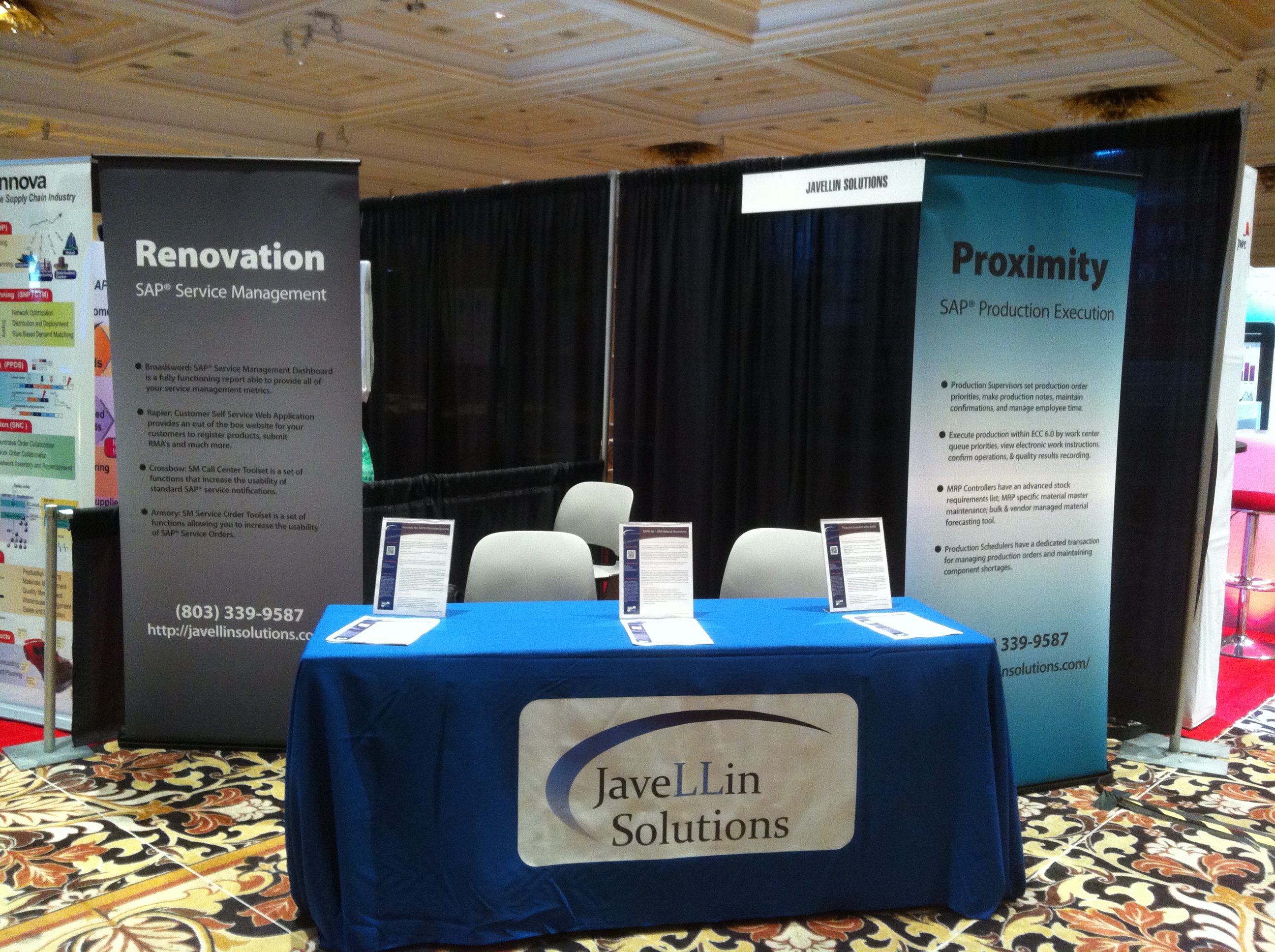
After spending a week in Vegas at the SAP MFG conference, there were some very valuable takeaways for us.  The first thing for us was our booth.  We got all the basic pieces, but we found that we were missing some key things.

2013-03-04 14.36.34

The first thing you can probably notice from the picture is that we don’t have a good backdrop.  We have the plain black curtain, and unless someone is looking down, it’s not obvious who we are.  So that is the first piece.  Next step is to enhance our banners.  We need to add the SAP Partner logo, our own Logo, and the SAP Certified label.  We add that, and I think we will be well positioned for our next show.

The next thing, and I mentioned this in an early post is “swag”…  despite the fact that we got some solid leads at the conference, Mike and I both came to the conclusion that we still want to get the “list”.  If you give away things, people come to your booth.  Perhaps they even stay and talk to learn something about what we do.  It just seems worth the expense because getting a booth at a conference isn’t cheap, so it’s worth it to build the list.

One big take away was booth location.  Mike did an awesome job finding a great spot for us.  We learned that staying in the middle, near SAP is a great spot.  We also ended up right next to the food tables during the receptions.  That ended up being huge for us since we had several people stop by during the reception.

There were several other things we’ll consider in the future…  perhaps a monitor to show a running demo.  If you have any ideas or feedback of what we could enhance, I’d love to hear them.  This is a big learning experience for us, so we’d love to improve on our performance the next time around.  Thanks for reading.


Posts navigation

1 2 3 79 80 81 82 83 84 85 96 97 98
Scroll to top