Service Management – Output Determination part 1 – Deliveries

Today I want to talk about Output Determination, more importantly, I want to talk about how you can notify your customers when things happen.  Not that long ago, I spoke with a prospect, and one of their requests was to have the customer notified at different points of the process.  I originally thought about doing it inside of my app, but then I realized that everything is “PULL” in a web application.  The easiest way to do it standard configuration.  There are multiple areas within service management that you might be interested in notifying your customers.  This first piece, in my opinion, is probably the most valuable, and most commonly used.  We’re talking about deliveries.  Today, what I’m going to show you is how you can setup output determination for inbound or output deliveries that get triggered upon Goods Issue.  The idea is that often your customer wants to know when you receive their equipment for repair, and even more important when you ship it back.  The configuration I’m going to show you today will work for either.  So let’s jump right into it.
blog01-00

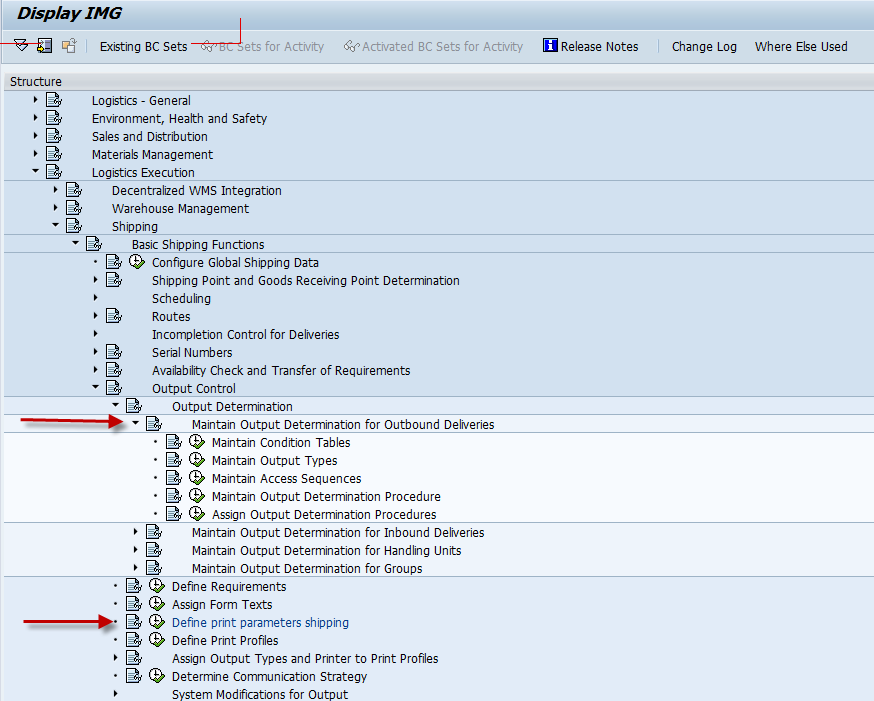
First off, you’ll need to do some work in configuration.  In SPRO, here’s where you need to start.

We’ll start with the Output Determination for Outbound Deliveries folder.  We’ll start the Maintain Output Types.
blog01-01

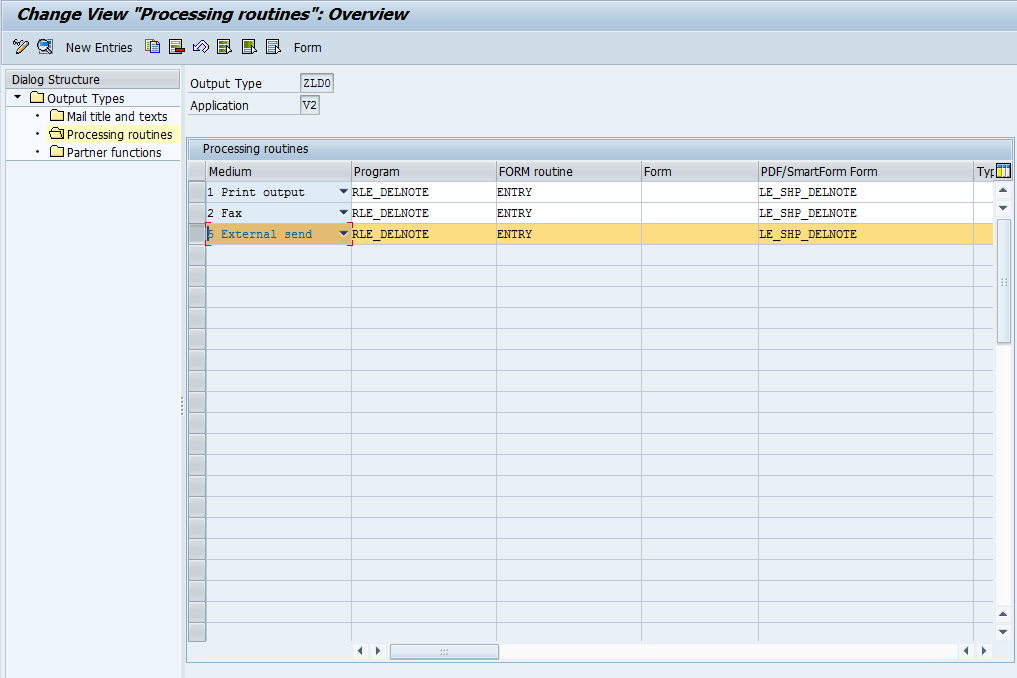
In my example, I made a new output type ZLD0, and made a copy of LD00.  For starters, make sure you have a line for 5-External Send.
blog01-02

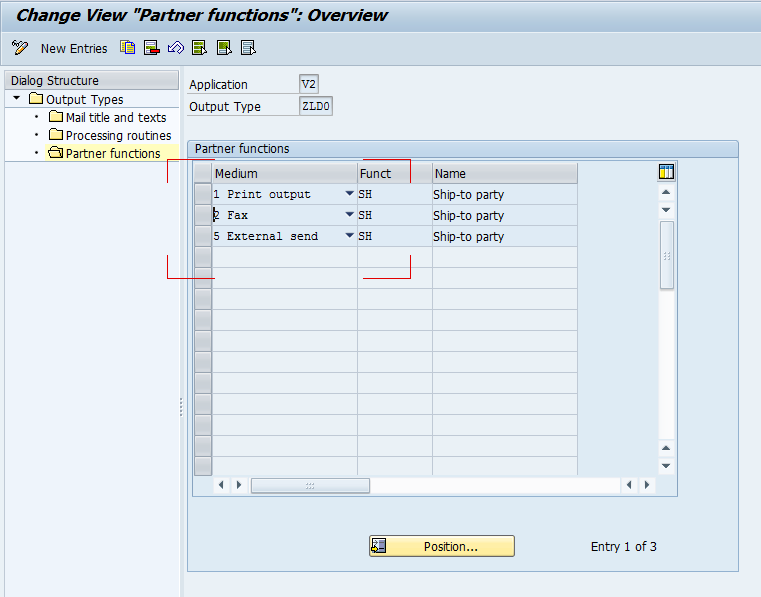
Don’t forget to update the partner tab, and make sure whatever Partner Type you want the email address from (I’m using SH), is assigned to 5-external send as well.

Next up we move to Maintain Output Determination Procedure
blog01-03

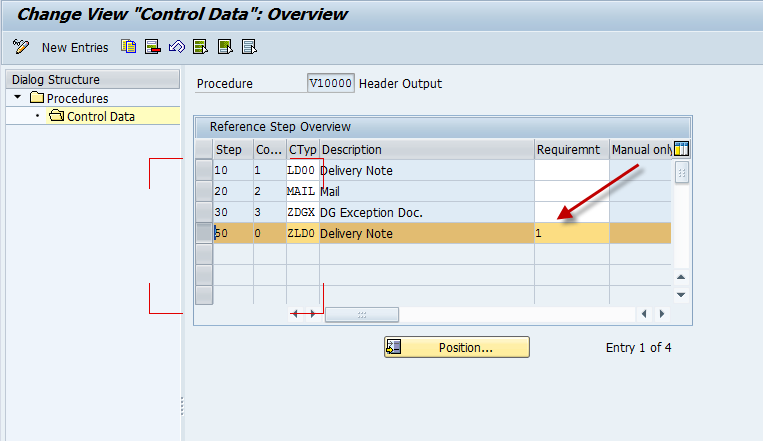
Now you will either need to create a new procedure, or update an existing one.  For simplicity, I just updated the V10000.  I then added step 50 for my output type.  The real key here is the Requirement.  “1” happens to be the requirement that Goods Issue must occur.  There are a bunch of predetermined requirements you can use for Output Determination, but if you can’t find one to fit your needs, you can always write your own.

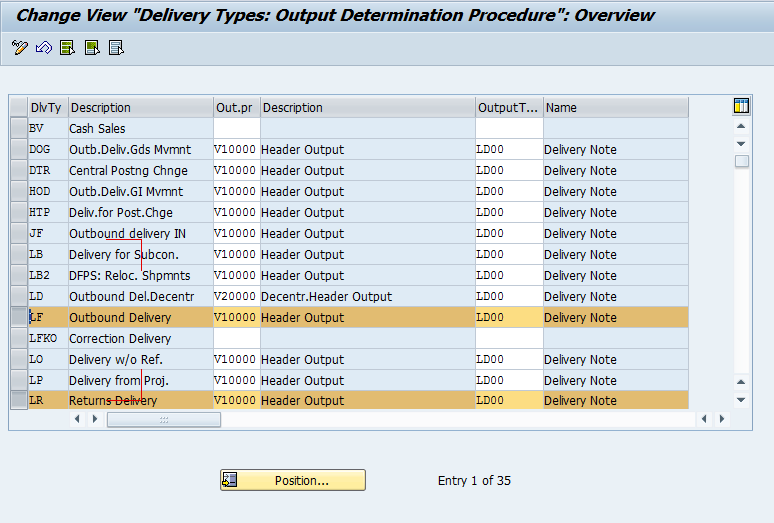
Next, we move onto Assign Output Determination Procedure
blog01-04

Finally, make sure the procedure is assigned to your delivery type.

Next up, you need to make sure your shipping Point is setup for your condition type.  If you are using an existing condition type, you probably won’t need to do anything, but I’m throwing this in because it wasn’t setup in my new condition type.
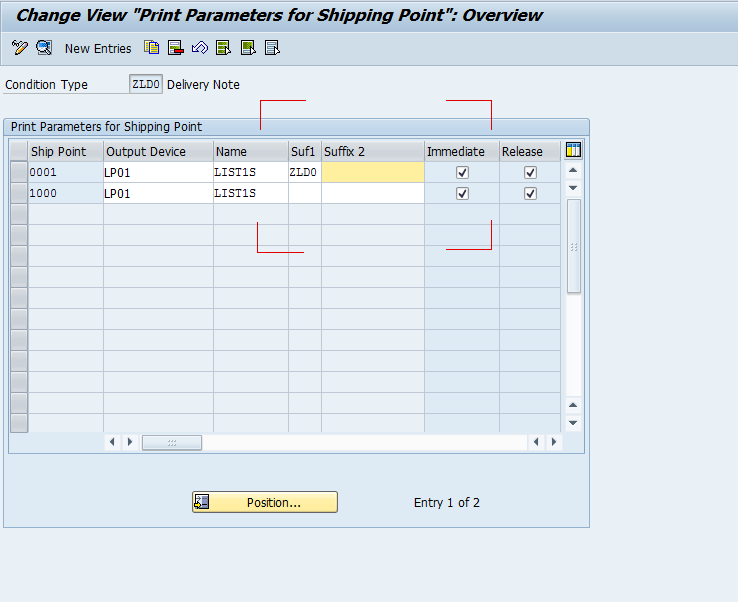
blog01-07

Alright, with all of that out of the way, the configuration is complete.  But it won’t do anything for you without master data.

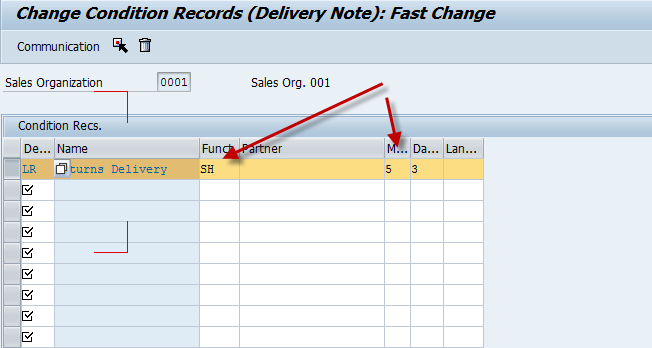
So head to your trust VV21/22 to create condition records.
blog01-05

I’m highlighting 2 fields that will matter for you.  Keep in mind, that the fields shown will depend on your access sequence you choose for your condition type.  Mine was simply Sales Org/Delivery Type.  So I’ve entered in my returns delivery, and told it to look at my SH partner, and use 5-external send as the medium (email).  Go ahead and save, and the next time you PGR an LR delivery, it will generate this output.

In the upcoming parts, I’ll talk about doing the same thing for Sales Orders, Service Orders and Notifications.

As always, thanks for reading.

Variant Configuration – Change Plant based on configuration

Now I apologize, because the title of this post might suggest that you can actually accomplish this feat.  Unfortunately, to the best of my knowledge, you cannot dynamically change plant based on the configuration.  In my experience, this was always a no-no.  Now if anyone has actually gone down the user-exit approach and made it work, I’d be curious to hear it.  In the meantime, here are some approaches to potentially help you… or at least give you some ideas of your own to change plant for a configurable item based on the configuration.

The biggest problem is that you get to choose one plant for each sales organization to be the default.  And even using configuration, it doesn’t matter if something within the configuration can only be done in Plant 0002, but Plant 0001 can do everything else (and should).  That being the case, here’s some approaches/techniques that may help.

1.  Multiple KMAT’s.  This is probably the most common/standard approach to change plant for a configurable item.  You can have one KMAT for each different plant.  You can reuse all of the dependencies, and create new configuration profiles etc.  Now the drawback to this approach is that you have to know in advance which product you want to manufacture.

2.  Use special procurement keys on a sub-KMAT.  Here’s the idea.  Set up your main KMAT A.  In the BOM add 2 SUB-KMATS, X & Y.  X will be the standard produce here in house (whatever plant is listed on the sales order).  Y will be a KMAT with a special procurement key pointing to the other plant.  Then using object dependencies select either X or Y.  I admit, I’m pulling this one out of my ass, so if anyone knows if this does or doesn’t work, let me know.  It sounds promising, but I have my doubts it would actually work =).

3.  Material Determination – this is a handy trick that could be used to make #1 easier for the sales order entry folks.  What you could do is create something “meaningful” to the entry people, that they could type in and it pull up the second KMAT in another plant.  For example it could X – Express, would pull up the KMAT with the least number of options that would be shipped the fastest.

4.  User Exit – you could always go down the path of adding new entry into VCSD_UPDATE for werks and using User-exits, drive the plant change this way.  Like any good SAP consultant, this is always the last resort, but for my current project, this may be the way we have to go.  Based on a little online research, it appears you’d want to use the following:  VCSD_UPDATE and transfer the changed values from the configuration to the sales order:  EXIT_SAPLCEI0_001 (include fields in structure VCSD_UPDATE)  EXIT_SAPFV45S_002 (process changed field values)”

Now, all that being said…  option 2 would be the coolest way to “possibly” do it with standard SAP, but I have a feeling that #4 is only way to accomplish a change plant based on configuration.

Thanks for reading,

Happy Birthday Alex – My Little Man

On a personal note, my little guy is turning 3 on Saturday.  It’s amazing how fast time flies.  But seeing him grow into a toddler has been an incredible journey for both of us.  I remember when he was first born (well kinda, it was 3 years ago after all.  ha ha ha).  He just kinda laid there, cried a lot, and I wondered what all the fuss was about.  Then he started to move around, interact with things, and before I knew it he wanted to play football with me, or play cars, baseball, hockey, soccer…  and that was all within 10 minutes.

He’s my constant reminder of why I do what I do.  He’s the reason I spend my time working after he goes to bed, instead of sleeping like I probably should be.  ha ha ha.  I do this business stuff so I can be around to continue to see him grow up.  He’s just about to start soccer, and I’m realizing how great it is to be able to be there for all these moments.  I know I’ll get there with Olivia too…  but for now, Alex is my little man.  If you’re out there trying something similar, remember to truly be with your family.  I know it sounds corny, but forget about work (as much as you can) and just enjoy your family.  For me, it’s why I do it…  ask yourself…  why do you work?  do you love the job?  or does it get you one step closer to more time with the people you love.

Happy 3rd Birthday little man.


Google Adwords – Balancing out impressions

I just recently picked up a new trick from my Ad-words book.  I highly recommend Perry Marshall’s book.  It really is worth the money.  Here’s my problem.  I was following the formula, use 2 ads per ad group.  Great.  The problem I was having is that some ads were getting a disproportionate amount of impressions.  In cases, 95%/5%.  This makes it very challenging to determine which ad is truly performing better.  Especially because often I’m getting a great click through rate on the 5%, but far fewer clicks.

What I figured out was that there are advanced settings I wasn’t even aware of.  And unless you click the right buttons, you never see them. See, here’s what I found.  Go to your campaign settings.  Under the general settings, click edit.  Be sure that All Features is selected.  This opens up the advanced configuration I didn’t realize existed.  Once you accept this, you can scroll down to  :Ad delivery: Ad rotation, frequency capping –> Ad rotation.  Change it to:  Rotate evenly: Show ads more evenly for at least 90 days, then optimize.

This will force Google to show both ads on a “close” to even rotation.  There it is.  Another ad-words tip I just learned.

Thanks for reading.


Don’t Forget to Relax from Time to Time

I’ve found that it becomes too easy to get obsessive about my goal.  As a result, often end up too close to burning out.  Like I mentioned in some of my previous posts, I’ve been working with all my extra energy to continue launching the business.  Well, it’s a simple fix (I’m laughing as I write those words).  Taking a break, enjoy the little things, and remember why you’re working so hard…

Now for me, this is always a challenge.  I  have this drive that I have a difficult time turning off.  My aspiration to make the business successful means that I have so much to do, so much to learn and it’s incredibly difficult to turn it off.  As a result, I drive myself beyond the limits I should.  Now, this sounds great…  I get so much done, but then I go too far…  I stress my body beyond my limits, and end up either sick, burned out, or just generally in trouble with my wife =)

Now, like I mentioned, it’s simple.  Take a break.  Make a point of taking at least one night off every week.  Go to bed early, go out with friends, or just read a fun book.  The goal is remind yourself why you’re working so hard.  It gives your brain an opportunity to focus on something else (Often resulting in new ideas or renewed energy), it keeps you healthier… and keeps everyone in your life happier =)  Take it from me… it’s worth the time.

thanks for reading,

Variant Configuration – Debugging Restrictable Characteristics

Lately, I’ve spent a lot of time working on the front end of my variant configuration models.  In that effort, I’ve been spending a lot of time restricting the restrictable characteristics within my model.  Whenever I focus on the front end, I tend to rely heavily on tables to restrict the characteristics.  While, this method is the best in my opinion, it certainly comes with it’s challenges in the initial setup.  Here’s a few lessons learned in my recent models.

1.  Beware of characteristic values that are restricted through classification.  While your table might be perfect, if you accidentally restricted the wrong the value, your table could give you very unexpected results.

2.  Be careful setting defaults.  Restrictable Characteristics could easily get locked in a loop if you restrict the values using constraints, and then set defaults on the characteristics that “restrict” each other.  Now, what can happen is that defaults get set on cstic A & cstic B.  A & B are used to restrict each other.  When the default gets set for A, and for B, you can only remove one default at a time, so resetting one value still leaves the other locked.  And you end up in a loop.

3.  If you use tables to restrict your values, don’t forget to include ALL the combinations.  Often I forget the values that don’t have an impact, like Without or Not Applicable.  If you don’t include these values in your table, they aren’t available and often end up setting values you didn’t expect.

There’s a couple of pointers when dealing with restrictable characteristics when you are designing the front end.

Thanks for reading,

Focus your Efforts

Well, with any small business, everyone wears many hats.  Now the problem with that is that it is impossible to do everything.  If you’re read some of my other recent posts, you know that I’m struggling with that fact.  I try to put in 3 hours or more every night after I work a full day at my consulting job, and put my toddler and infant to bed.  I’m finding this isn’t even close to the time I want to be putting into my business.

Now the  real question is priority.  What is the most important?  what is the best use of my time?  Damn, I wish I had a better answer to this question, and I struggle with it daily.  Part of the reason I still blog daily is just force myself to think.  Of course, it’s also to cultivate more potential second customers, but it helps me work out my thoughts as well.

So, my dilemma, I’m a developer, and I’m the only developer in our software company.  At the same time, I’ve been spending a lot of time learning marketing…  but obviously, it’s not my specialty.  Now, the challenge comes in that my partner is not a developer.  He writes great specs, but doesn’t code.  I’m also way ahead of him in my learning of marketing.  All that being said, we are a team…  so what matters most?  the software or the marketing…  I’m leaning toward the marketing, but at the same time, I have major development work to improve Rapier (not to mention the creation of our Field Service Engineer product).

So, I’d love to hear from anyone out there…  is it better to hand off the marketing to my partner, even though I’ve been spending more time learning it and focus on development?  or do I focus on getting the customers/sales, and then develop when it starts coming in?

Thanks for reading,


Variant Configuration – Configurable Assemblies Only

Today I learned a simple lesson, but frankly, I should’ve known a long time ago, but never ran into this scenario.  In my current assignment, we ran into an issue in testing where an item was sales relevant was showing on the sales BOM, but wasn’t exploding it’s BOM (think of it like a kit).  Naturally, my first instinct is look into the item category and item category assignment.  Everything was on the up and up there.  Finally one of my colleagues tried the Configurable Assemblies Only check box on the configuration profile, and it magically solved our issues.

All this time, I thought that check mark only controlled what BOM VC spit out.  Until today, I never realized that the check box for configurable assemblies only also controlled how the Sales order would explode out components.  Just one more reason to never assume you know how something works, or everything it impacts.  I learned a new lesson today.  Thanks to Pat.  I must admit, I feel dumb for not finding this myself, but even the best of us have things to learn.

Thanks for reading,

Variant Configuration – Simplify your Dependencies

Now today’s post is just  simple reminder to keep your variant configuration dependencies simple.  Lately I’ve seen a lot of dependencies that work just fine, but the logic is more complex than needed.  So here’s a couple of pointers I’ve noticed lately that should help to simplify your dependency code.

1.  If you’re using SET_PRICING_FACTOR, and it should be applied if the condition exists (for example, it’s always a factor of 2 or 4 if the condition exist), don’t add any additional logic beyond that.  The pricing factor can only be applied if the condition exists in the configuration.  You don’t need an if statement unless the pricing factor doesn’t always apply to the variant condition.

Before: (psuedo code, sorry)

$SET_PRICING_FACTOR($SELF, VAR_COND_1, 2) IF ….  (same logic that sets VAR_COND_1).
should be:
$SET_PRICING_FACTOR($SELF, VAR_COND_1, 2)

2.  If you set a default, you don’t have to delete that default if you are setting the value for that characteristic.  $DEL_DEFAULT only needs to be used if you want to remove the default and you aren’t explicitly setting the value.

3.  If your if statement has CSTIC = X, you don’t need to add if CSTIC SPECIFIED AND CSTIC = X.  It will be true if the cstic is specified already.

There’s just a few examples of ways to simplify your code and make it easier to read and maybe even improve performance.

Thanks for reading,

Adwords – Testing a new Product Idea

I’m sure I’ve mentioned it before, but it is incredibly easy to waste days, weeks, months or even years on a good idea that no one is interested in.  Believe, I know from experience (in case you haven’t noticed the name of my blog.  ha ha ha).  So needless to say, I’m always looking for tricks to make sure I don’t make the same mistakes again.

I recently came across a great idea from my Google Adwords book.  The idea is so simple, that it’s worth all the money spent on the book =)  Here’s the idea…  when you come across that great idea, before you spend 100’s of hours creating it, you go down a different path first.  You spend a couple hours building a web page to “promote” your idea.  You can even sell it like it already exists.  Then, go set yourself up a google adwords campaign (if you haven’t already).  Then, just create some ads for your new idea.  Like every good ad, make it compelling and sell the idea.

Now, you can get real world feedback on your idea.  First check your clicks and see if anyone is interested in the idea.  Then you can see if anyone is willing to take the next step to contact you.  Then you really know you have a winner.  If it doesn’t take on the first try, remember to tweak your ads for a while.  Also, tweak your website for new ideas or variations on the theme.  When your idea is “mature” enough, you’ll be getting clicks in your campaign.  That’s when you know it’s worth investing the time.  If despite all your best efforts, you get few clicks or no interest, you know that idea wasn’t what the market was looking for.  It doesn’t mean it was a dud…  maybe just ahead of it’s time, or maybe just needs a different spin.  Shelf it for a while, and if you still love it, try again.

Thanks for reading.

Posts navigation

1 2 3 70 71 72 73 74 75 76 96 97 98
Scroll to top