ABAP – Web Dynpro – Dynamic Cell Variants

Well, in my continued adventure, I found a new component in web dynpro call a cell variant.  The basic idea behind this is that you can change what kind of cell is within a table.  For example, sometimes you may want a field editable, based on the contents, and other times it should just be a text view.  Well, I had something similar in my latest web dynpro experiment.  I needed to do  dynamic cell variants.  By this, I wanted to add the cell variant to an ALV table, so I couldn’t just manually add it to the column.  Well, thanks a cool document I found, I was able to pull this off…  mostly.

http://www.sdn.sap.com/irj/scn/go/portal/prtroot/docs/library/uuid/f0e7461d-5e6c-2b10-dda9-9e99df4d136d?overridelayout=true

Now, I use the term mostly, because of course, I tried branch out on my own.  It’s probably easiest to explain with a little code and my example.  First, I had a column in my ALV table that either listed a single serial number, or should provide a link to another window to show all the serial numbers associated with the document.  This is perfect for the cell variant.  I set it up so that

Here’s where I started, and syntactically, it would fine:

data: l_cv_ser TYPE REF TO cl_salv_wd_cv_standard,
lr_link_ser TYPE REF TO cl_salv_wd_uie_link_to_action,
l_col TYPE REF TO cl_salv_wd_column.

create OBJECT lr_link_ser.
lr_link_ser->set_text_fieldname( EXPORTING value = ‘SERNR’ ).
* create cell variant
create OBJECT l_cv_ser.
  l_cv_ser->set_key( VALUE = ‘MULTIPLE’ ).
* add link to action editor
l_cv_ser->set_editor( lr_link_ser ).
* Get column
l_col = lv_value->if_salv_wd_column_settings~get_column( ‘SERNR’ ).
* add cell variant to column
l_col->add_cell_variant( r_cell_variant = l_cv_ser ).
* assign attribute
  l_col->set_sel_cell_variant_fieldname( ‘SERNR’ ).

Now, if you pay close attention to the bold lines, these were my problem.  See, the data in the column might be MULTIPLE, or it be 1, 2, 3, 800034234, or any serial number.  So in my initial testing, it was all multiple, so it worked great.  suddenly I was getting a short dump when it hit a cell with a value other than MULTIPLE.  It finally hit me…  with a cell variant, you either need to define an editor for each value in the column?  or you need to make a new column with only 1 value or blank.  i ended up going down the second path.

data: l_cv_ser TYPE REF TO cl_salv_wd_cv_standard,
lr_link_ser TYPE REF TO cl_salv_wd_uie_link_to_action,
l_col TYPE REF TO cl_salv_wd_column.

create OBJECT lr_link_ser.
lr_link_ser->set_text_fieldname( EXPORTING value = ‘SERNR’ ).
* create cell variant
create OBJECT l_cv_ser.
l_cv_ser->set_key( VALUE = ‘X’ ).
* add link to action editor
l_cv_ser->set_editor( lr_link_ser ).
* Get column
l_col = lv_value->if_salv_wd_column_settings~get_column( ‘SERNR’ ).
* add cell variant to column
l_col->add_cell_variant( r_cell_variant = l_cv_ser ).
* assign attribute
l_col->set_sel_cell_variant_fieldname( ‘CV_SER’ ).
lv_value->if_salv_wd_column_settings~delete_column( id = ‘CV_SER’ ).

I hope this sheds some light on the cell variant.  it really is a pretty slick tool.
Thanks for reading,
Netweaver Gateway – Creating the Project

Well, since I recently spoke about using the gateway client, I figured I should talk about creating the service to use the gateway client.  The first step in this process is creating the project.  Like so many things, you must start small in order to build…  so let’s the netweaver gateway project and get this party started.

First, go to transaction SEGW

segw01

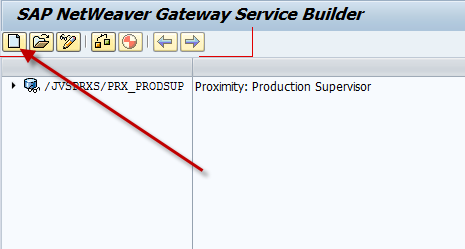
Press Create.

segw02

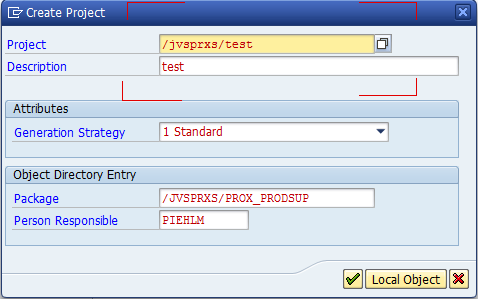
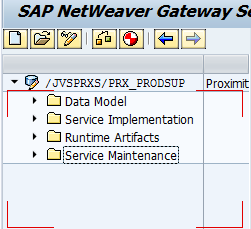
Now, put in the project name, description and package.  For me, I do everything within my own namespace, so notice how both the project and the package must start with the namespace.  Press the green check and you have your project.

segw021

In future posts, I’ll walk you through the next steps.

Thanks for reading,

Warranty Claims – Define Action Controls

Sorry, it’s been a while since I talked about the Warranty Claims configuration.  Time is always working against me, so finding the time is often challenging 🙂  So, on with the show…  This post is going to jump ahead a little bit from where we left off.  The reason being, to me, the sequence of configuration doesn’t really flow with the way you’d set the system up.  So it’s my blog, I can do it my way.  Defining the process is one of the most important pieces of the claims process, in my opinion at least, so I wanted to start with the action controls.

wty01-01

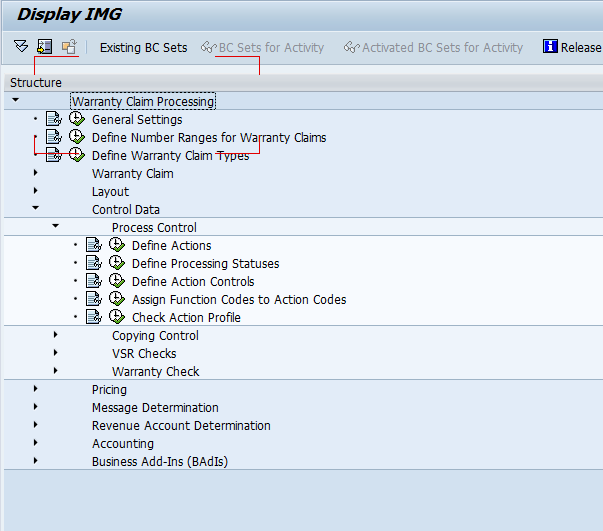
First, go to OWTY, and you this is where you find the configuration.

wty01-02

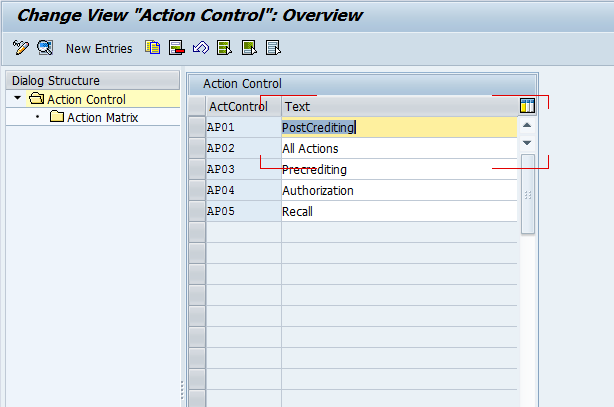
First, pick your claim type.  You can will often be using a custom claim type, but for simplicity, I’ll start with the AP01, post crediting claims.

wty01-03

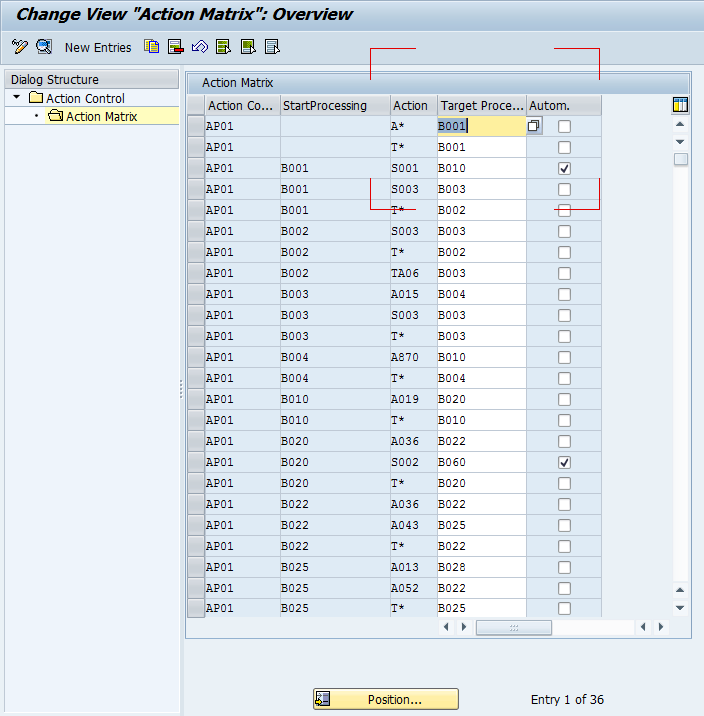
Now, here’s the where things get heavy.  The first column, is our chosen claim type.  The next 4 columns are where the power comes from.  Now, in the start processing, this is the current status your claim is at.  Column 3 is the actions that are allowed to happen at that status, and column 4 is the status that the claim will move to if that action is taken.  Let’s look at an example
when the status is B001 is Warranty Claim New.  When the claim is at this status, you have the following actions you can take:

S001: Automatic Processing Postcrediting after VersionsFrClaimant
S003: Warranty Check (A200) and VSR Call (A006)
T*:  this is all the T actions…  however, you won’t see the TXXX actions in the list (because they are “hidden” actions).  But things like T060, complete claim are available by pressing other buttons, so you want to make sure they are available.

Now, if we pick S001, it will set the claim status to B010: Claim Sent to Reimburser, along with the back end actions that go along with it (we’ll talk more about that later).

wty01-04

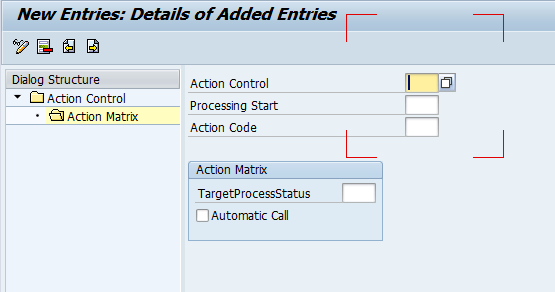
If you want, you have the option to create your own options or change the existing ones.  Once you understand this concept, you can more easily build the “road map” to the process you ultimately need to create.

Thanks for reading,

Netweaver Gateway – Using the Gateway Client

Well, I just found a great document out there in SCN for how to use the Gateway Client.  I was kind of struggling with this, but after finding this trick, it makes it a lot easier.

http://scn.sap.com/docs/DOC-47626

There really isn’t a lot to say about this.  The author did a great job of making it simple.  I’ll be doing more posts in the near future about NW gateway, since I’ve recently learned how to make an RFC and create a service for it in the Gateway.  Don’t want to forget what I learned, and maybe you will find it valuable as well.

Thanks for reading,

Saying Goodbye to a Friend

It’s been a pretty rough couple of days.  Yesterday we said goodbye to Fargo.  For my close friends, I’m sure most of you remember our 12 year old Weimeranier.  Saying goodbye to my buddy was so much harder than I ever expected.  So as I sit here, it’s hard not to be sad…  but at the same time, I’m trying to remember all the good times.

IMG_0008I still remember the first time I met Fargo.  I was one maybe my second or third date with the girl that would later become my wife.  We went skiing for the day at Welch Village in MN, and we went back to her place.  She told me she just needed to let her dog out, and then we’d go inside and have a beer.  I figured, no big deal.  Suddenly, he sneaks right past her.  Takes one look and proceeds to sprint around the neighborhood for the next 10 minutes.  She finally managed to wrangle him back into the house.  Thinking the adventure was over, we sat down on the couch and I went to kiss Julie…  Suddenly, I glance over, and here’s her dog, maybe a foot away from me, just glaring.  To this day, I don’t know if I was in his spot on the couch, or if he was mad I was moving in on his woman 😉

IMG_0058

He just might be one of the craziest dogs I’ve ever met, but by far, he was the best.  A lover to the core.  Great with the kids, he put up with the cat chasing him around, and I loved how fast his tail wiggled whenever I came home from a business trip.  Our home won’t be the same without him…  but will live on forever in our memories.  If you knew Fargo, I’d love to hear your favorite story about him.

Anyway, thanks for reading…

Basis – Using SGEN

One of my old colleagues recently pinged me, and asked if I could talk about the SGEN.  For anyone not familiar with SGEN, this is nice built in tool from SAP that regenerates all the program in certain areas.  Now the most important time to execute this transaction is anytime you update a kernel, apply some support packs, etc…  This is typically when I execute it.  So I’ll walk you through the basics of what I know.

sgen01

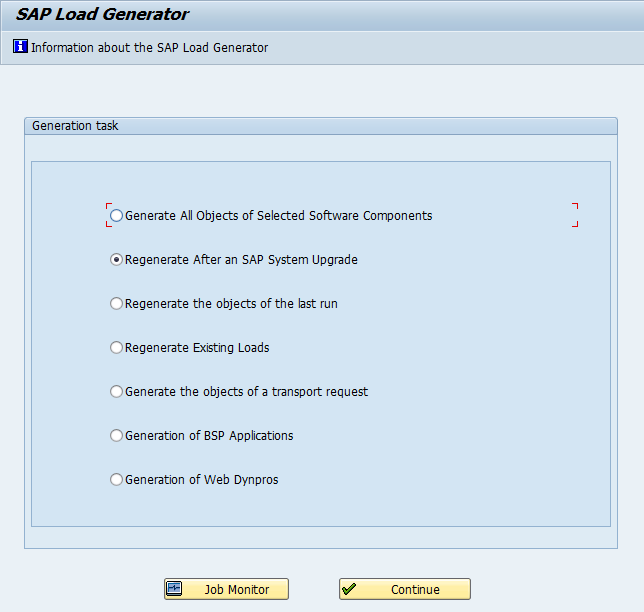
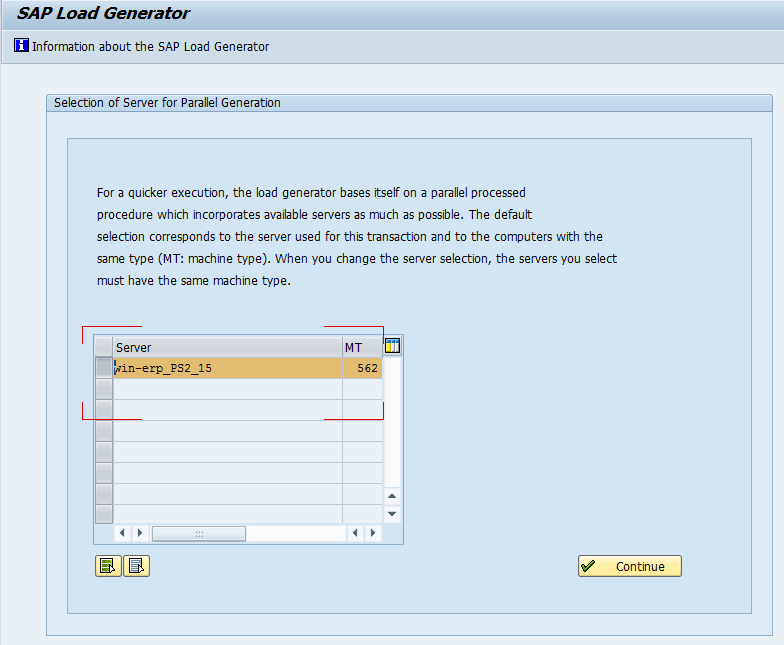
When you first execute SGEN, this is what you’ll see.  The descriptions are pretty easy to interpret. I typically use the first option, because I’m not sure how to get the second option to work.  I’ve applied support packs, but there must be some step I’m missing because it always gives me an error that say I can’t use this.  I’m going to show you the first option, because it will work no matter what.

sgen02

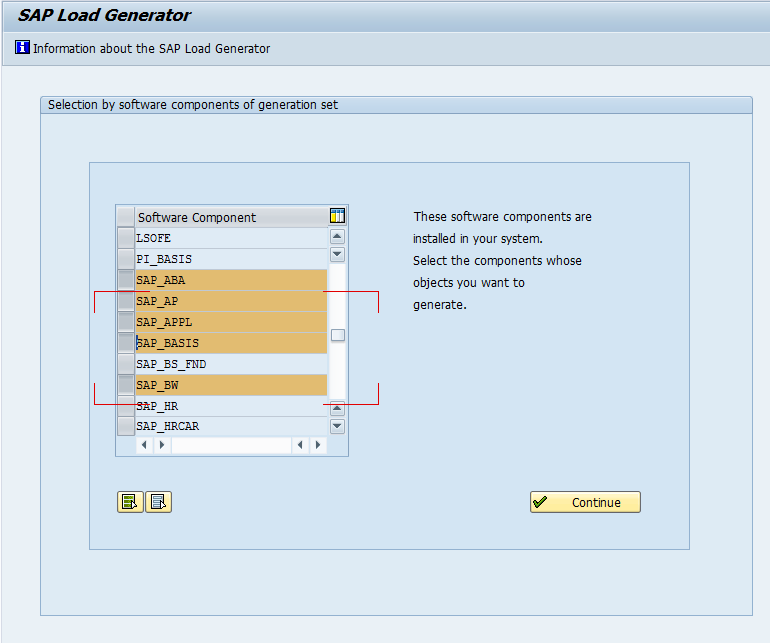
Now, once you get here, you have a huge list of SAP components that you can choose to regenerate.  Now keep in mind, this is a very process intensive transaction, so be careful what you choose (and when you choose to do it).  Of course, if everything is compiling anyway, what do you have to lose.  ha ha ha.  I’ve highlighted the most common areas that apply to everyone.  Just a word from experience, you will still encounter some compiling even after you run this.  (unless you choose to regenerate every component, which will likely take some time.).  So, choose the components with care.  It’s often better to get 90%, and save 2 days of processing =)

sgen03

Once you pick your components you can choose what servers will do the regeneration.  Mine is a small system, so I only get one choice, but most corporate environments will have multiple servers to execute against.  Once you’re done, press continue.  Often, this can run for a while.  This step finds everything to regenerate, and strips out includes and stuff.  depending on the processing power of your system, it can take a few minutes, up to a couple hours.  (trust me, I’ve experienced both.  ha ha ha)

sgen04

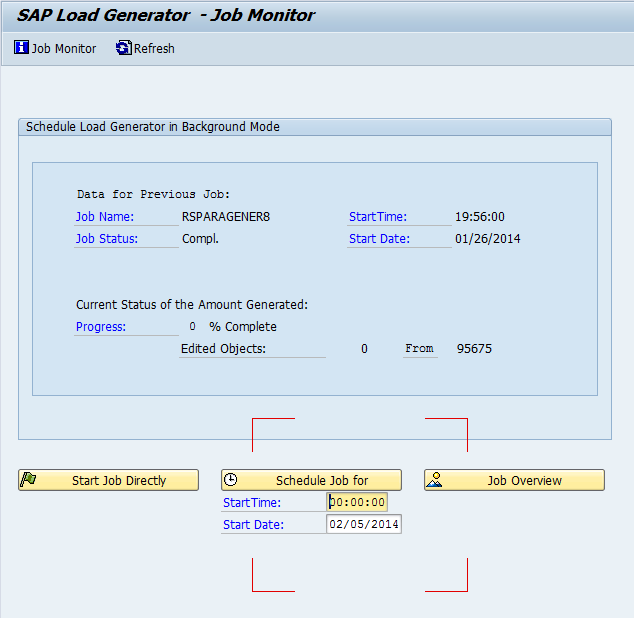
Now, once you get this far, you’re ready to go.  You can either select Start Job directly (fancy way of saying, execute now).  Or you can schedule it for an off time, like you’d schedule any other job.  Once the first 100 items have been executed, it will give you an estimated time of completion.

That’s what I have for today.  As always, thanks for reading,

Free Time – How do you use it?

Just recently, my wife told me something that kind of made me angry at first, until I stopped to thinking about it.  We were talking and she told me she likes to spend her free time being active, I like to spend my time on my computer.  At first I got defensive…  I like being active too, but I just don’t have the time.  But I stopped to think about it, I do have the time, but my priority is my business.  It isn’t a matter of what I like to do… it’s more a matter of what I need to do.

One of my favorite gurus, Brian Tracy said in one of his programs that in order to succeed, you need to be working while everyone is sleeping or playing or watching TV.  I guess I took that heart, maybe a little too well.  My goal is to launch my software business so that I can do what I want, and be here with my family, not traveling to the client site every week.  So, with that one end goal in mind, I guess I’ve chosen to make my business my free time.  Which I have to say, isn’t a whole lot of time anymore, now that I have 2 kids.  ha ha ha.

The whole point is that your free time can be fun, it can be productive, or if you’re really lucky, it can be both at the same time.  =)  I don’t know if I’m quite there yet…  but the result will be worth the price when it all comes together.  So if you’re like me…  just keep that goal in mind.

Thanks for reading,

Challenges of Updating the Website

Well, for those of you who’ve read me my stuff for a while, know that my website hasn’t really changed in a while.  Well, we used the exact setup for the JaveLLin Solutions website as well.  I was able to transistion this over to my partner to run (I still have to write my own content…  but at least he’s handling the day to day stuff).  Well, he wanted to update our look, so I said ok.  We purchased Optimize Press, and he started playing.  Like anything, it’s a big ramp up period, so he found someone that was willing to help on their off time for an hourly rate (don’t get me started on this one).

Well, I thought great…  I have a ton of content out there on the web, so it should be more than enough for someone to chunk it up, shuffle it around, make it look better, make it sound better, etc…  Damn, was I wrong on that.  As it turned out, it was nearly as much work to have someone else come in.  Even though the concepts of SM are second nature to me, when a complete SAP outsider looks at the data, it’s pretty much jibberish to them.  So, I spent a lot of time re-writing my own content.  In the end, will it be a better product?  probably?  do I feel it was worth the huge investment of my time and our limited business capital, not at all.

What’s the lesson for today…  there’s a couple that i leanred.
1.  For anything like this, do NOT do an hourly engagement.  The person Mike picked didn’t know SAP & didn’t know Optimize Press.  This turned out to waste a lot of time, and in essence, we paid for them to learn a new skill.
2.  Make sure who ever you outsource this to has at least MOST of the knowledge you need.  Like i just mentioned, no SAP knowledge, and no Optimize Press knowledge made things go a lot slower and cost a lot more.  It also increased the amount of time Mike and I had to invest in rewriting our own content, or bringing back content that was trimmed out, but was very important to the message.
3.  Make sure the contractor understands what you really care about.  And even more important, make sure everyone is on the same page of what needs to happen.  For example, my big hot button was to get some template pages setup, so we could just plug and play our content.  And I wanted landing pages to direct people to for our new White Papers.  Mike was interested in changing the whole look and feel.  Not that I was against this…  but it wasn’t my priority.  Anyway, get on the same page before you do anything.

Good luck and thanks for reading,

ABAP – Creating an RFC

Now, in one of my many latest endeavors, I need to create RFC’s to port my code out to an Iphone/Ipad application.  Happily, we have a great contact that is helping me with this stuff.  Now, I knew this was coming, so at least I put the majority of my code into objects/methods.  This makes moving the code pretty simple.  however, I still needed to add a new wrapper to an existing object.

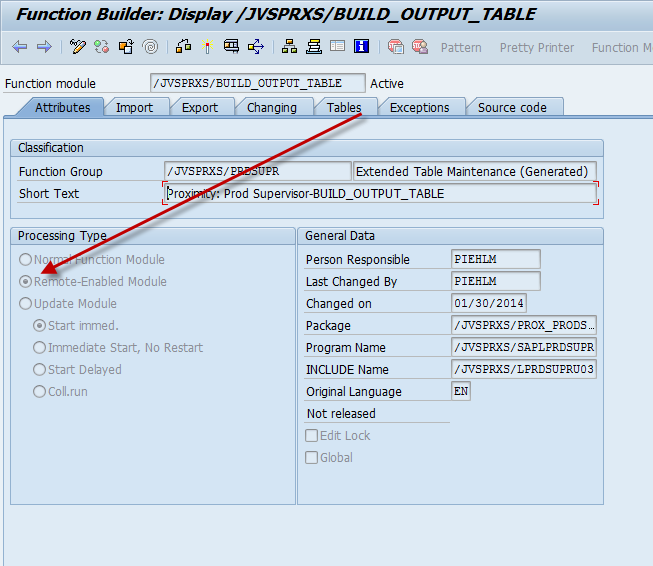
So I go to SE37, create myself a function.  Under attributes there is one major piece to turn on:

blog02

Set this flag, and you’re good to go.  Now, I have run into a small little obstacle that I have yet to overcome.  I’m using the Netweaver gateway to port my code to the application.  Initially, I had set a bunch of tables (so it would like a select option).  For some reason, we were unable to get the information to be sent to through the gateway like this.  When we moved it to be a straight exporting parameter, everything worked fine.

So, if you happen to be someone that knows NW Gateway, is there a trick to send in information as an input table?  and still have the information sent through the gateway?  I’m sure it’s something dumb that I missed, so any feedback you might have, please post a comment.

Thanks for reading,

ABAP – SELECT vs. SELECT INTO CORRESPONDING FIELDS OF TABLE

Well, it turns out my new system is teaching me all sorts of things lately.  Today, I learned the value of how to code the select statement.  In my old ERP 6.0 SR3 system, I built a small program to make notifications in my system.  I use it to generate master data to test my dashboard.  Well, the statement worked just fine so I didn’t think anything of it.

Select equnr from VIQMEL into lv_equnrfor all entries in lt_equip
where equnr = lt_equip-equnr and

kzloesch = ” and
owner = ‘4’.
… do something here.
Endselect.

The statement seemed harmless enough…  until I went to load this into my new EHP4 system.  It has the upgraded kernel, latest support packs, blah blah blah.  It suddenly when a minute, to hours to execute this same piece of code.  I still don’t know exactly what changed…  but sure as hell, my code changed 🙂

I moved to:

select equnr from viqmel into corresponding fields of table lt_qmelwhere equnr = lt_equip-equnr and
kzloesch = ” and
owner = ‘4’.
loop at lt_equip into wa_equip.
read table lt_qmel into wa_qmel with key equnr = wa_equip-equnr.
if sy-subrc = 0.
… do something…
endif.
endloop.

this dropped it make into the less than a minute to read the new code.  wow.  I don’t know what caused the issue, maybe it was 7.01 vs. 7.00, but the same table read in a slightly different way made a huge difference in this program.
Thanks for reading,

Posts navigation

1 2 3 61 62 63 64 65 66 67 96 97 98
Scroll to top