Service Management – Cost Element Groups

Now this is one of the few tricks that I’ve picked up when it comes to the finance portion of the world 🙂  And the only reason I care about this is because it simplifies my configuration for service order costing and also resource related billing.  The concept is called Cost Element Groups.  And they are exactly what they sound like, a group of cost elements.  Now, why do I care?  in both service order cost display and resource related billing, I can enter each cost element into the configuration, transport it, and call it good.  Now, when a new cost element is suddenly introduced, I now need to go back to my dev environment, make sure the cost element exists, then add it to my configuration again, and transport everything.  Cost Element Groups let this all be controlled through master data.  I connect the cost element group one time, and I’m covered for life.  so, let me show you how easy they are, and you can be the judge.

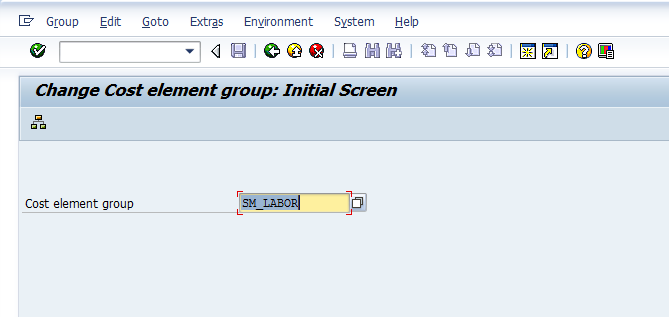
Everything starts with transaction KAH1/KAH2/KAH3.  Below, I’m showing you KAH2 for an existing cost element group, but it’s basically the same for any of the create/change/display transactions.
kah2-01

Enter in the name of the group and hit enter, or the hierarchy button.
kah2-02

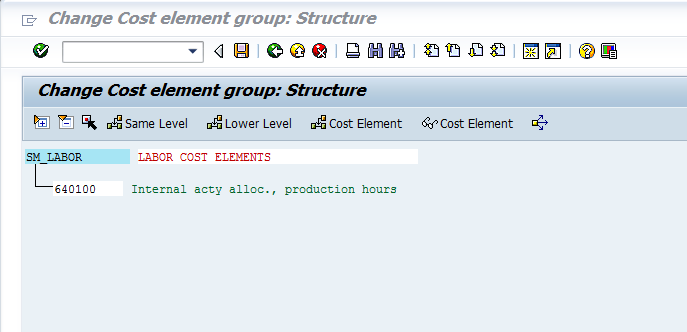
This will bring you to the above screen.  You can add or change the name of the group, then press the Cost Element button.
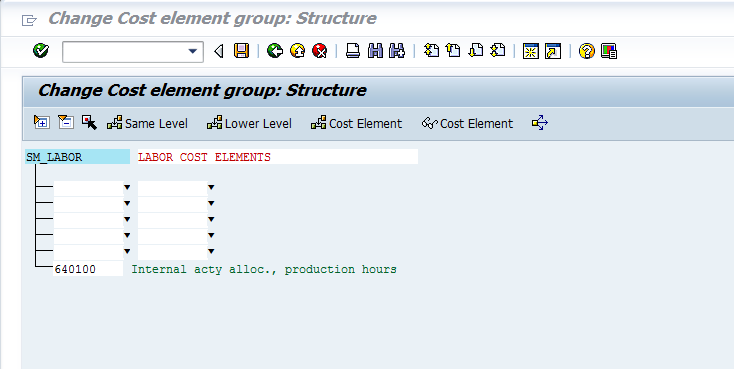
kah2-03

Once you press the button, you will see some new blanks show up.  You can either enter in individual cost elements (just enter the number in the left column) or you can do a range, by entering the start in the left and finish in the right.  Then it will show you all the cost elements that were located within the range.

Simply save, and you’re ready to go.  Now, you do need to remember to create this master data in every system you want to use it, but the flexibility is worth the master data effort.

Thanks for reading,
Remember what you accomplished…

In today’s fast paced world, and constant deadlines, it can be very easy to get lost in everything you need to do.  This quickly becomes a very depressing environment to be stuck in.  I’m guilty of this quite a bit.  So, it’s important to remember how far you’ve come.  I don’t care if it’s a project, a business, or a marriage.  It can be very easy to focus on what you haven’t accomplished.  Whenever this mindset starts to get you down, I encourage you to try the following…

Write down everything you are proud of.  Pull out a notebook, and just start writing.  Enter as many things as you can.  Don’t confine it to any one area of your life.  This simple exercise forces you to look back at all of the good things you’ve done or accomplished.  For example, you can proud of overcoming your fear of heights by going up into a skyscraper, or you can be proud that you fixed those shelves in the garage on your own.  It doesn’t matter…  the whole idea is to shift your mindset to what you’ve done, because it will help remind you that you are capable of accomplishing all the things left on your list.

I encourage you to make this a regular habit.  Either just re-reading your list, or adding to it for everything you accomplished recently.  It’s important to remember that you can be just as proud of little things, as big things, and often the little things are more valuable to the people in your life.

Take it from me, I often get hung up on all the things I want/need to accomplish, so i really need to look back.  It’s a quick refreshing exercise to shift you into a positive mindset.

thanks for reading,

Marketing – The power of the survey

Well, I confess, this is all new to me, so I’m again in learning mode.  I’m just about to try my first experiment.  So I went over to Surveymonkey and created a free survey, and sent it off to a list I had in mailchimp (apparently, I have a thing for monkeys).  Now, the idea behind this isn’t to know every detail about my users, but to help me get that rough pass of who I should even be talking to.  Now, I have a decent list of people that I email from time to time, but I know very little about them, including if they might just be marketers.

The idea behind the survey is that if I can at least gage who is willing to answer the answer the survey, I can at least judge for those people if I should even leave them on the list, or if they sign up by accident.  In my mind, the best thing I can do is to cut out all the “prospects” that don’t even use SM or PP.  Why even bother sending them emails?

Now, if you’re curious, this is the survey.  As you can see, it’s pretty elementary, but it gives me that machete pass to see if I’m even talking to the right people.  If someone answers the survey and say we don’t use SM or PP or VC, well, I probably don’t have much to offer them.  On the other hand, if someone responds to me, and gives me a big laundry list of things they hate about SAP, I know they are passionate…  so, let’s see if anyone answers.  If you’re bored, take my survey 🙂  I can at least feel better if I get one answer 🙂

https://www.surveymonkey.com/s/9BD39BB

Thanks for reading,

Service Master Data – is there an ROI?

Now my last couple of posts started talking about SAP service management, and the power that it has.  I noticed that I left out some key information.  Namely, is there any return on investment for maintaining all of this data in your system?  Now, ROI is a very subjective term when it comes to something like data within SAP.  One organization might easily be able to monetize that data, while others struggle.  So, let me give you some ideas to consider when you decide from a financial perspective, what is all that data worth?  I’m going to go through several different scenarios that I’ve seen throughout my career.  Keep in mind, not all of these scenario apply to ever business, but I’m willing bet if you read through these, you might be able to make the leap to your own processes.

1.  Product Registration.  Now, this is something that I often see overlooked in organizations.  Collecting product registrations.  Now, if you buy an appliance, or piece of electronics, you will often see a little card you can fill out to register your product.  Often it is used to start your warranty, or maybe just to give you special offers, or updates as new software becomes available.  From the business side, this information has huge potential upside.

  • it allows you to connect to your end user.  If you use distributors, without registration, you’ll never be able to find out who is really buying your stuff.
  • It allows you to start and end standard warranties on your products.  This is especially valuable, if you offer your user a one year warranty.  Well, most business don’t start that warranty from the time it’s produced, rather when it is purchased.  If you customer buys it 3 days or 3 months after production, you’re still on the hook for 1 year worth of warranty.  If you run into any percentage of returns or product defects, being able to cut off your free service has a definite financial advantage.
  • When you know your end user, you can go to the up sell.  By that I mean, you can offer discounts to buy extended warranty, upgrades, etc.  This allows you to extend the life of your products, while keeping your customer happy.  If you keep providing the latest upgrades or enhancements to your customers, they will remember.  Or more the point, if you don’t provide this, they will remember.

2.  Keeping track of what your customer owns.  This is valuable for any industry, especially if you offer systems of products that might work together.  When you maintain this data, you will quickly be able to know what your customer has at a particular site, or even be able to drill down to a particular area within a site.  This is often contingent on doing the installation yourself, however, it still buys you a lot of valuable ROI with your customers.

  • If you provide on-site service, the more you know about what a customer has installed and where, the faster your technician can get your customer up and running again.  You can minimize the down time by having the correct parts with them.  You can do initial troubleshooting, just by knowing that product X & Y are both installed, and sometimes can have side effects if used in certain ways.  KNowing that in advance better equips your technicians to  fix the problem the first time.  That saves you money, and gives you a lot of goodwill from your customers.
  • If you install serialized components installed into other serialized components, you don’t to ask your customer to disassemble half the unit, just to tell you the serial number.  Instead, you can quickly look into your installed base, and see what is installed within each unit, often drilling down several levels.  While this might not generate a lot of money, it will generate goodwill with your customers by making it easy to do business with you.
  • If you ever need to do a recall (like say GM), knowing where every serial number is located will quickly let you be proactive with your customers, to let them know what needs to be fixed/upgraded/replaced.  You can generate campaigns to notify your customers before they start having problems.  This will save you definite dollars by avoiding last minute, emergency service trips, and instead garnering more goodwill with your customers by letting them schedule when things can be serviced.

3.  Maintaining as accurate warranty dates.  This one seems pretty obvious, but I’ve been surprised how many organizations  are willing to “wing it” for this information.

  • Not only can you cut costs buy knowing when a product is no longer under warranty.  You have the ability to generate revenue when it does break down and your customer wants it fixed.
  • You encourage registration (see above) by allowing that date to be the starting registration date, rather than the original ship date.
  • You can quickly run reports on items coming off of warranty in the next month to send an offer to extend their warranty for a reduced cost.  This keeps customers coming back to you, and not your competitors.

There’s more I can say, but I’ll save it for another time.  The thing to take away from all of this is that if any of this stuff applies your business, and you aren’t collecting this data, you are losing out on all of the benefits that come with it.  I can even show you simple ways to start collecting that data…  but that’s for another post.

thanks for reading,

Service Master Data… are you collecting it?

Now, SAP is a great system.  It is incredibly powerful, and can provide more possibilities than any business could ever implement.  But no matter what system you use, SAP, AS400, Oracle, or Quick books, it’s all about the data.  I don’t care what system you use to run your business.  If you don’t have your master data in place, your system is an expensive word processor.  Service management is no different.  Depending on your business, there is the potential for a lot of data.  So what do you need to do business?  what do you need to do your service business really well?  Only you can answer that question, because every business is different.  I can say, that it truly in your best interest to capture as much data as you can…  within reason of course.  Now, there is a lot of data that SAP can help you capture.

The first and most vital, in my opinion, is the serial number.  This is building block for everything service related.  If you want to opportunity to track equipment, this is where it all starts.  SAP provides you with some great functionality, including letting you decide just what gets tracked for a serial number.  Do you want to it available or required for material movements, production orders, sales orders, deliveries, etc…  you can do all of that out of the box in SAP.  Now some industries are required to track serial numbers, but many of them do it for traceability.  An alternative to the serial number is the batch.  It’s not quite as exact, but it still buys you a quite a bit of functionality.

Now, you can take your serialization to the next level, but it comes with a price.  These next methods I’ll discuss lose the automation benefits.  You’ll need to invest some effort into building and maintaining these next pieces.  Now there are three ways to take things to the next level of grouping serial numbers together.  There is a the serial number hierarchy.  This method is very useful when you need to track serial numbers within serial numbers.  I often see this method when building up something larger, like say an engine.  There are special components that may need to be tracked within a larger unit that is also tracked.

The next method is building a hierarchy using the functional location.  Within SAP, the functional location is often associated with the plant or plant maintenance. The idea behind the functional location is exactly what the name suggests, it’s a location.  Within the location, you can build up the serialized units within that location.  The functional location can often be associated with large machines that don’t move, but may need maintenance, service, etc…  A functional location works like a serial number as far as SAP is concerned.

The last method is the installed base.  Now the installed base is like the functional location, only a lot more functional.  The installed base can hold materials, serial numbers, documents, and even other install bases.  This is is a big step, because it can become an installation within a customer site.  Depending on the size of the customer site, you can break it down as granular as you need to.  This becomes excessively valuable if you provide on-site service.  You can quickly pinpoint and direct your technicians to the exact location of the issue.  Of course, this assumes that you have communication with your equipment…  and that’s a whole other level of data collection…

We’ve talked about enough for today.  What I would like you to take away from this post is that the data building blocks within SAP are just that, building blocks.  We talked about the initial building blocks.  Soon I’ll talk more about why these pieces are so valuable.

Thanks for reading,

Service is Money… Are you helping your customers enough?

You know, it sounds cliche, but is very true.  I recently had lunch with a friend of mine, and he reminded me how often this simple fact is forgotten.  When I say that service is money, I’m talking about your aftermarket business.  I’m talking about selling spare parts, repairing items, selling extended warranties, and on and on.  While some companies recognize this as a part of the business, many organizations don’t realize the full potential.  In a climate when the economy is up and down, and every one is uncertain of the future, it means that more people are interested in extending the life of current products.  If you aren’t providing your customers every opportunity to keep doing business with you, you are throwing away revenue.  And I assure you, someone else is happy to take that business.

Now, the first thing that you really need to analyze is what can you being doing for you customers?  Now there are a lot of potential options, so start simple.  Start with what you already do, but do it better.  So, let’s say that you currently perform repairs for your customer.  Great, but how easy do you make it for your customers?

  • Do you provide them 24/7 access to initiate a service call?
  • Do you give them the option to buy an extended warranty?
  • can they print out their own shipping label or return merchandise paperwork?
  • Do you provide them a loaner or exchange option?
  • Could you provide them a complete history of what they’ve bought?

Get the idea?  All of the ideas that mentioned above make your customer experience easier, faster, better…  this encourages them to continue doing business with you.  And to top it off, many customers are willing to pay extra for some of the bonus features.  For example, the loan or exchange option can be sold at a premium to your customers.  Now all of these options are available right now.  All you need to do is setup some pricing and some processes.  The chances are you, already have refurbished units sitting in your inventory.  Why not use them as a loaner bank to keep your customer rolling along in their business while you repair their unit?

If you’re not already using some of these techniques, and are interested in learning how you can use SAP to deliver a better experience to your customers.

Thanks for reading,

Happy Memorial Day

You know, I almost forgot to even do a post.  I started thinking, well, it’s a holiday, I skip this one.  But then it hit me just how important today is.  While I look at the country, and see our freedoms eroding away, I also look back at all the brave soldiers that fought to give us the right to keep those freedoms.  It’s more important than ever to remember that freedom isn’t free.  And countless Americans have died fighting to keep our freedom alive.

So, while you’re enjoying a cold one, eating something off the grill, please take a minute to honor all of those brave soldiers who fought for our rights, and those of others.  And ask yourself, what can I be doing to honor their memory?  How can I be working to to maintain those rights?  How can I make sure they didn’t die in vain?

This is a song a heard a year or so back, and it really struck a chord with me (pun intended).  If you get a chance, take a listen today.

http://revolutionrockandroll.com/music.cfm

It’s called What Have you Done.  If you listen the lyrics, I’m sure you’ll see why it’s a great song for today.

As always, thanks for reading,

Service Management – Configurable Service Revisited

Well, after discovering the whole deal with configurable service, I just couldn’t leave it alone.  I had to keep digging until I could find the scenarios that work…  at least out of the box.  Here’s what I discovered.

Scenario Configurable Service Product Maintenance Task List w/Configurable Profile Task list is “configured”
IW31 – Manually create the service order  YES  YES  YES
 IW31 – Manually create the service order  NO  YES  YES
 IW31 – Manually create the service order  YES  NO  YES

So there you have it.  If you manually create your service orders, things are great.  Now, unfortunately, things get more complicated as soon as you put a repair sales order into the mix.

Scenario Configurable Service Product Maintenance Task List w/Configurable Profile Task list is “configured”
Repair Sales Order – when the requirement type generates the service order (field service)  YES  YES  YES
Repair Sales Order – when the requirement type generates the service order (field service)  NO  YES  No
 Repair Sales Order – when the requirement type generates the service order (field service)  YES  NO  No

So, in the event where either the material requirements type, or the item category requirements type generates the service order directly, you can make it work.

Now for the bad news…  no matter what I tried, I could not make the in-house repair scenario work.  I believe this has to do with the their not being a direct connection between the service order and the configured item on the sales order.  Since a sub-item generates the service order, I believe this means the configuration doesn’t get properly passed to the service order.

Now, there is one work-around to this, but it’s far from ideal.  If you do NOT connect the configurable general maintenance task list in TXN: OISD, and you manually add it the service order, the configuration can then be entered manually onto the service order.

Now, I’m still curious, so I’m going to continue digging.  I haven’t located where the configuration resides yet in the service order.  I believe if I can determine this information, I can come up with a way to automate this issue.  Looks like a new addition to Renovation will be coming soon if I can figure out how to make it work 🙂

Anyway, hope you found this as interesting as I did.

Thanks for reading,


Service Management – Configurable Service

Not long ago, someone asked me about configurable service.  Well, naturally, this peaked my curiosity.  After all, my two specialties are Variant Configuration and Service Management.  Now, I’ve always known that you could make a DIEN configurable, but as far as I knew, you could use it for pricing and classification, but that was about it.  So I decided as soon as I got some time, I’d do some digging into this.  Well, I finally got around to that digging, and was pleasantly surprised, and as so often happens, it was a mixed success.  So, let’s talk about the good part.

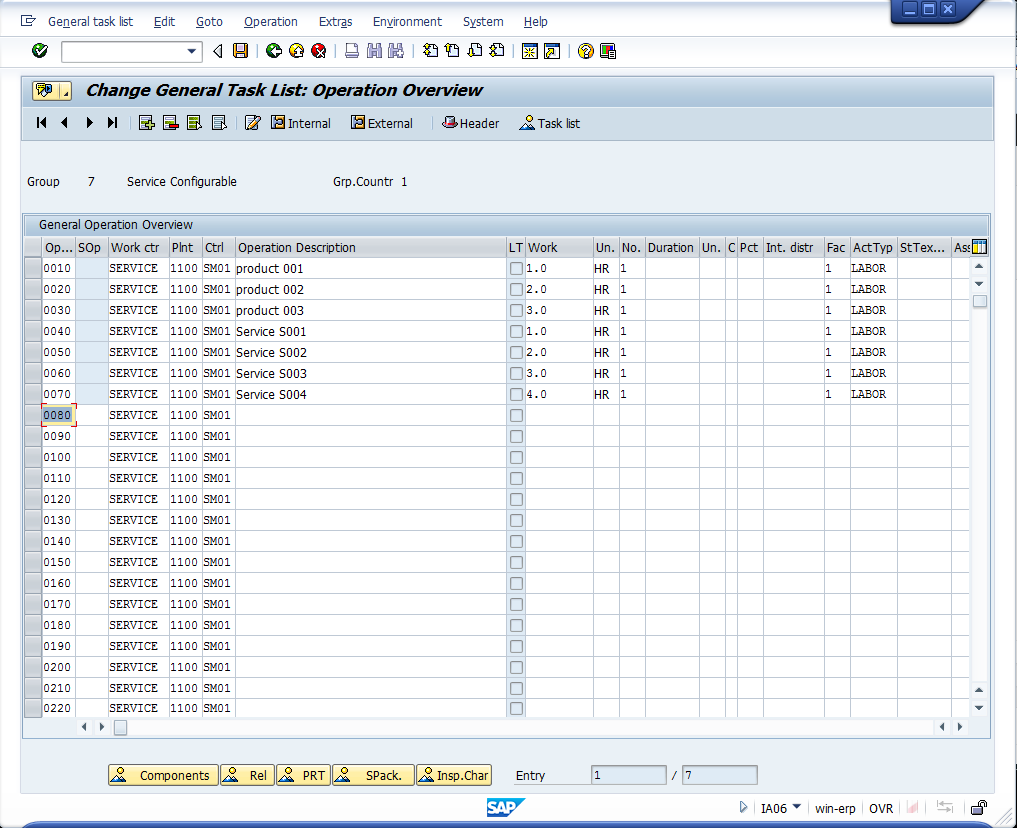
With some digging, and some experimentation, I was able to find 2 methods that gave me a configurable routing (and if I drill into it further, the components seems to be configurable as well).  So, start with your standard VC tasks.  Create the characteristics and the class to hold all your attributes. Next, you need to create yourself a Super General Task List.  Go to transaction IA05.

blog2-02

Just go ahead and copy or create a new task list.

blog2-03


Enter in all the possible operations that can be chosen for this service product.

blog2-04

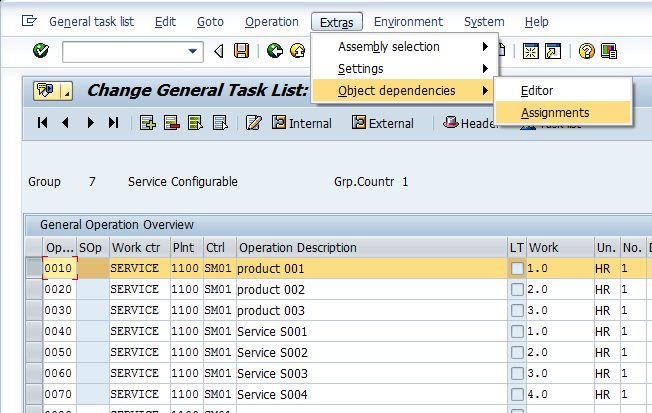
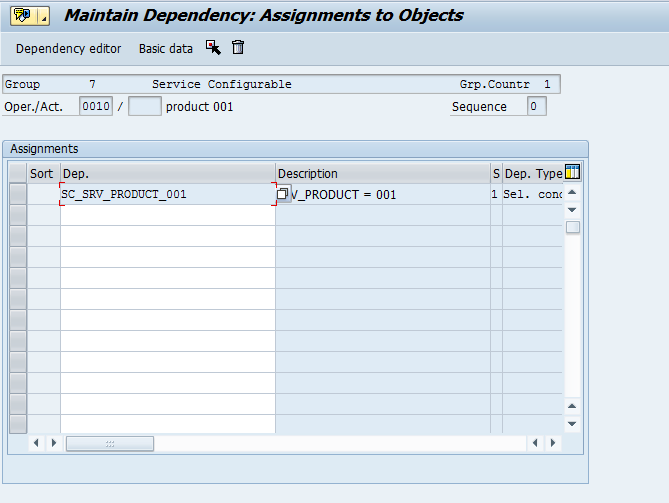
For each operation, enter in an object dependency, a selection condition to be exact.

blog2-05

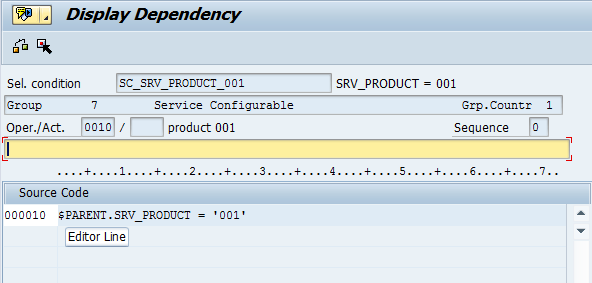
Here is a sample global dependency (by the way, I always recommend global over local dependencies).

blog2-06

As you can see, the code is simple.  Just a characteristic and a value.  Repeat this for all the operations that are dependent on certain characteristics.  Once you’ve enter in all the dependencies, save and move onto the next step.

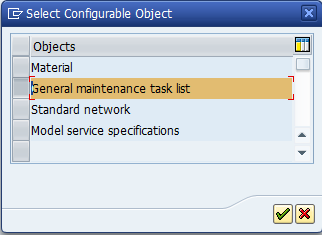
Now things change a bit when you move to the configuration profile.  I’m an old school VC guy, so I’ve always used material.  I’ve almost always looked right past the following selection.

blog2-01

So, if you select the General maintenance task list, instead of a material, you will need enter in the task list.  Once inside, the configuration profile is like any other profile.  You must assign a class (type 300).  You can get fancier here by adding procedures or constraints.  But for our example, I’ll keep it simple.

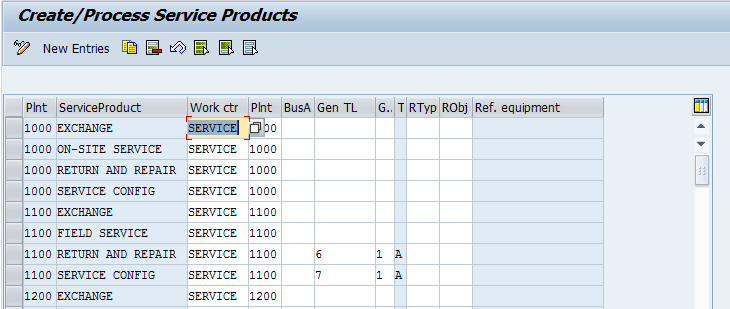
Now, to keep things easier to deal with, go to transaction OISD, to select the general task list.

blog2-07

My example uses the standard Return and Repair process.  So after receiving the equipment, I use the repair sales order to generate the service order.  Now, the drawback to this approach is that you must enter in the configuration during the first visit into the service order.

Up to now, I’ve been unable to make the routing recognize the configuration as a configurable service product.  Only if it is directly linked to the task list.

Now, reading the documentation…  it’s a little vague…

Use Features
PM, maintenance order Assign an object dependency and a configuration profile to the general maintenance task list.
CS, service order with configurable service product A configuration profile is assigned to the configurable service product. From this, assign object dependencies but no separate configuration profile to the general maintenance task list. If, however, you still choose to assign object dependencies, they will be ignored by the system.
CS, service order with “normal” service product Assign an object dependency and a configuration profile to the general maintenance task list.
PM and CS Assign an object dependency and a configuration profile to the general maintenance task list.

If you assign the general maintenance task list in the Customer Service component to a service order with a configurable service product, the configuration of the service product has priority over the configuration of the general maintenance task list.

I’ll continue experimenting, and if I can make it work, I’ll do a future post.

As always, thanks for reading,

The Art of Writing Specs

You know, it’s funny, I’ve spent a lot of my time writing specifications for my clients.  I’ve gone through and defined exactly what the business wanted, and I even spiced it up with enough technical details to make it pretty easy to develop.  Well, the strange thing is that I haven’t written a spec for my own business…  ever.  Until this past week, when I finally started to get smart, and realized that while I may be a good developer, I have great vision of what I want.  So my time is better spent defining what I want as the end product, instead of figuring out which is the best BAPI or function module to add one obscure piece of data.

The realization I’ve come to is that writing the specs is forcing me to better define what I want.  In the past, as I put together my latest piece of development, I’d pretty much wing it.  I’d write down a VERY basic outline of what I wanted, and proceed to develop, then add new ideas, then have to go back and define that for stuff I already did, and so on.  While this model can work, it didn’t force me to do my homework up front.  Rather, it kinda let me off the hook and allowed me to just let the product flow.  Don’t get me wrong, I’m still very happy with the end result, it took me a lot longer to get there.  It’s like that old proverb, Proper Planning Prevents Poor Performance…  (well, it might not be a proverb =) ).  Well, I’m finding as I go through my list and start defining all the pieces I still want to develop for my Renovation Solution, I have to thoroughly state what I want.  I can’t do the nebulous, “build configuration screen”.  I have to define how many tabs, what information, what it drives on the back end, do I use existing tables or create new ones, etc…

What I’m finding is that I’m getting back the skill I’ve ignored for a while.  I’m remembering how to define what I want, so someone else can do the work, instead of leaving everything up to me.  Like my partner keeps telling me, I’m finally starting to think like a CTO, rather than a programmer 🙂  Now, don’t get me wrong, I still plan on doing as much development as I have time for, just because I do enjoy the problem solving, but I’m starting to gain skill in the marketing area of our business, and there is a lot more money in marketing what we have than in adding a small feature to our existing offering 🙂

Anyway, thanks for reading,

Posts navigation

1 2 3 55 56 57 58 59 60 61 96 97 98
Scroll to top