Service Management – Output Determination part 2 – Sales Documents

Today I want to continue to talk about Output Determination, This second piece, we’re talking about is sales documents.  Today, what I’m going to show you is how you can setup output determination for sales orders and quotes based.  It is becoming more common that clients do quoting for the service management.  This can be for in-house quoting or field service.  In order to inform an end user that a quotation is ready you need a way to automatically notify a customer about that quote so they can approve it, reject it or request changes.  Today, I’ll walk you through how to configure this sort of output.
blog01-01

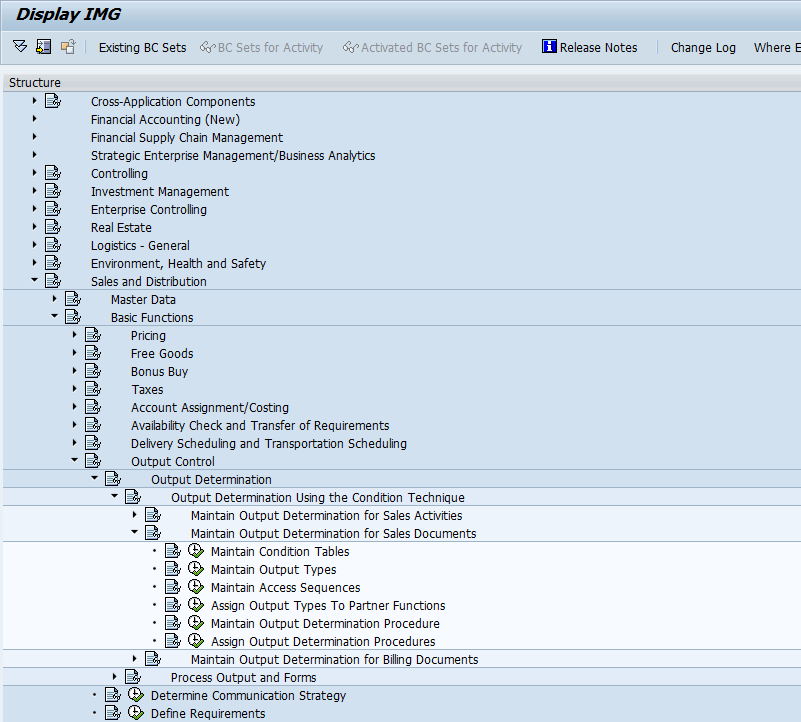
We’ll start with the Output Determination for Outbound Deliveries folder.  We’ll start the Maintain Output Types.
blog01-03

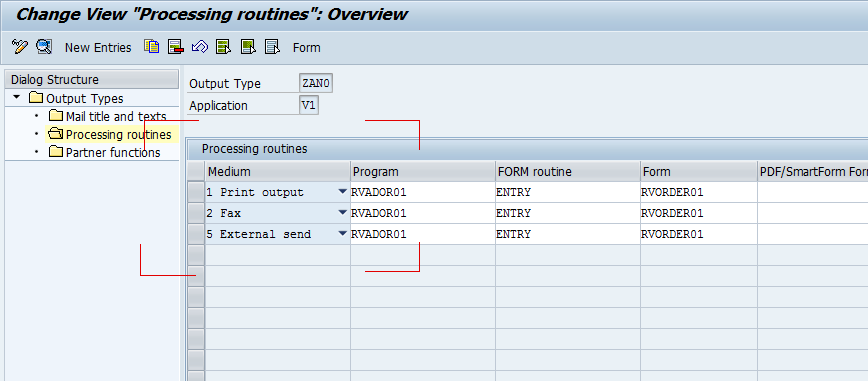
In my example, I made a new output type ZAN0, and made a copy of AN00.  For starters, make sure you have a line for 5-External Send.
blog01-02

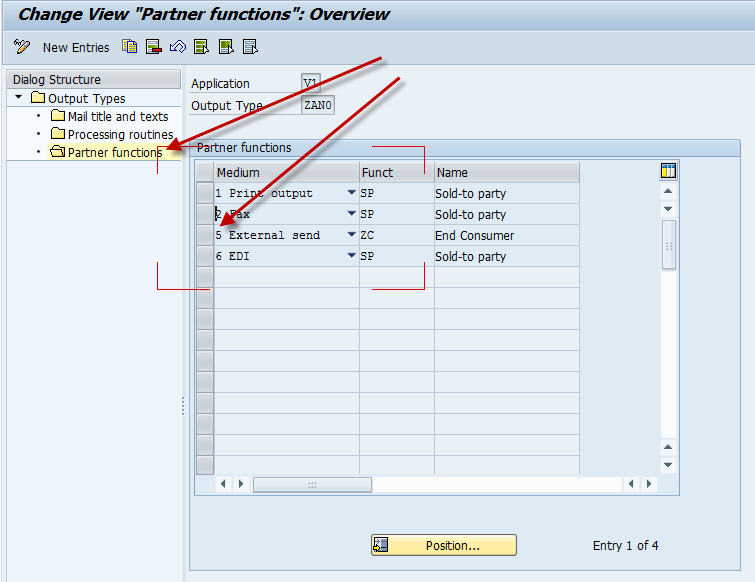
Don’t forget to update the partner tab, and make sure whatever Partner Type you want the email address from is assigned to 5-external send as well. I attached mine to a custom partner type of ZC, but this is whomever should be automatically receiving this notification.

Next up we move to Maintain Output Determination Procedure
blog01-04

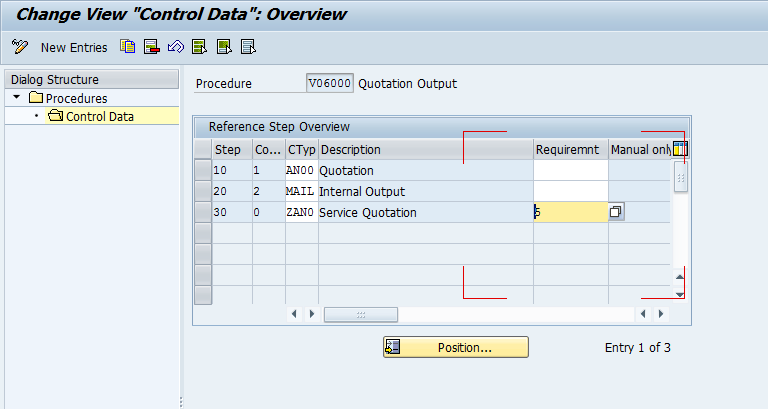
Now you will either need to create a new procedure, or update an existing one.  For simplicity, I just updated the V06000.  I then added step 30 for my output type.  The real key here is the Requirement.  “5″ happens to be the requirement that the document is complete.  There are a bunch of predetermined requirements you can use for Output Determination, but if you can’t find one to fit your needs, you can always write your own.

Next, we move onto Assign Output Determination Procedure
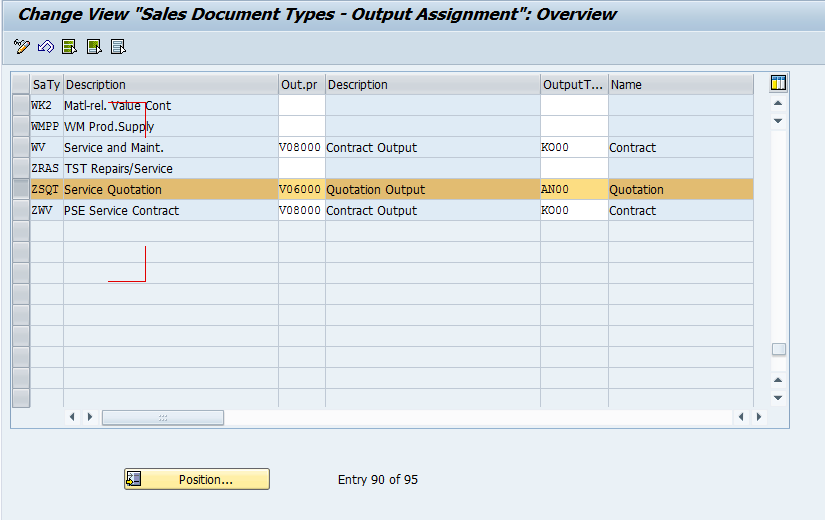
blog01-05

Next, make sure the procedure is assigned to your sales document type.

Next, you need to verify that the Print Parameters are set if you create a new condition type.
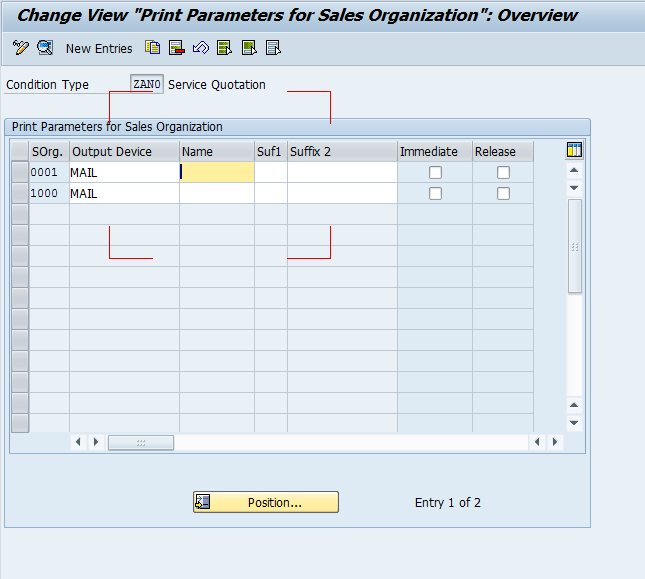
blog01-06

Alright, with all of that out of the way, the configuration is complete.  But it won’t do anything for you without master data.

So head to your trust VV11/12 to create condition records.
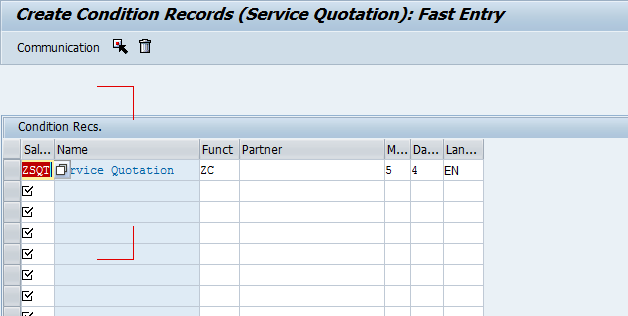
blog01-07

Keep in mind, that the fields shown will depend on your access sequence you choose for your condition type.  Mine was simply SalesOrder Type.  The partner type and medium are the biggest fields to be concerned with.

As always, thanks for reading.

ABAP – 4.6C code differences

Like I mentioned yesterday, we have a potential sale, if we can make WMigo work in a 4.6C system.  Sounds easy, right?  Well, it’s all part of my latest adventure.  First I had to figure out a way to convert my 6.0 Unicode system transport to go to 4.6C.  Check my post from yesterday if you want to know more about that.  Now, back to my story.  After overcoming the obstacle of getting the 4.6C system to accept my transport then I started to find code issues.  It turns out that a system more than 10 years old doesn’t have all the tools that I”m used to.  Today I want to talk about some of the 4.6C code differences I’m experiencing.

1.  Line length has a max of 72.  sounds simple, but I had about 20 + errors just on this.  When you get the nice word wrap type features, you don’t notice when you get to 75 or 80 chars, but it just rolls onto the next line.  Simple fix, but still a fix.

2.  is not INITIAL doesn’t work in 4.6C.  Instead, you need to change it to NOT <variable> is INITIAL.  it’s subtle, but again, I had a lot of instances that needed to change.

3.  some methods have changed parameters.  on_data_changed for example did not have the parameter e_ucomm.

4.  some methods need to be called “differently”.  for example: cl_gui_cfw=>set_new_ok_code( new_code = ‘OK’ ), needs to be
CALL METHOD cl_gui_cfw=>set_new_ok_code
EXPORTING
new_code = ‘OK’.
subtle, but necessary if you want to run in 4.6C

ABAP – exporttoascii to Move Code from a Unicode ERP 6.0 to 4.6C

Wow…  what an adventure.  I feared I might run into some issues doing this, but being small means we need the sales and we need the references.  So it means we do some things to go the extra mile.  We have a really strong potential with a new client, but they run 4.6C.  I had forgotten just how long ago that 4.6C came out.  I did the math, and realized that its been over 10 years since the last time I worked on a 4.6C system.  Well, today was my first challenge.  I already knew that I couldn’t create a standard package to send for our free trial period, so I had to use standard transports.  Well, we sent the transports, they tried and right off the bat, we get an error that you can’t import from a unicode system into a 4.6C non-unicode system.  DOH!!!

So, I hit the interweb and looked in OSS to find some clues.  The first thing I found was OSS note 330267 that talks about just this issue.  Cool…  Well, it turns out there is an additional parameter you can add to the transport system that outputs the transport in a format readable by 4.6C.  Score!!!  but there’s a catch, you have to be on a late enough kernel.  Guess What?  My kernel version wasn’t recent enough.

So I pulled out my trusty post about upgrading your kernel…  spent way too much time downloading files from OSS, and finally got it upgraded. So then i went to STMS, clicked the system overview button, double clicked on my system, went to the transport tool tab, and added a new parameter:

exporttoascii = yes

Such a little command, with so much power.  Once I exported this transport, I was able to move onto my next set of errors…  but I’ll save that for tomorrow.

Thanks for reading.

Development – How much functionality is too much?

Well, if you’ve been paying attention, I’m working on adding new functionality to Rapier.  While much of what I’m adding is a “no brainer”, I do start to question, how much is too much?  Right now, I’m working (mostly) full steam ahead on Rapier 2.0.  That means new functionality, new screens and new options based on things I’ve heard from potential customers.  Now, the problem comes when I start to over think things myself.  For example, I was working on enhancing the “My Notifications” portion of Rapier.  My original version just showed the notifications, but there was a request to show all of the follow-on documents as well.

Here’s where the analysis paralysis can quickly set in.  I see this functionality and think, cool…  But…  what new columns should I add, just in case a customer wants them?  Should I allow the functionality to be turned on or off?  Should I allow it be turned off for just end users, or for existing customers?  Do I allow the customer to configure the columns?  the sort order?

See where I’m going?  I could think this thing to death.  It’s one thing if I have a specific customer request, but when I’m thinking of everything a customer might want…  well, where does it end?

So I’m trying to reign myself in.  I’m going to continue providing any functionality I’ve provided for other screens, with the realization that customers may ask for more, and I can always add it later.

I’d love to hear your thoughts…  how do you determine where to stop?  do you purely go with what a customer asks for?  do you put it all in there?

Thanks for reading and I look forward to your thoughts.

Web Dynpro – Sorting Columns of Table

Now, in my recent experiments, I came to find just how much better the performance is when you can define the table in advance, and then manipulate it, rather than create the entire thing dynamically (check out some of my previous posts if you want to see how to do that).  So I decided create the full table in the layout tab, and then remove the columns I didn’t need.  Everything worked great, until I wanted to control the sorting columns of Table dynamically.

The first thing I found is that when you define a table using the wizard (not dynamic), it make the columns grouped columns.  I still don’t really grasp the difference, but it does force you to use a different set of methods and also has different behavior.  But thanks to Google, I found this nice little tidbit.  It showed me that you can delete the Grouped Column, and replace it with a standard column.  And with a standard column, you can define the sort order.  Here’s some sample code to get you rolling.

DATA: lo_table    TYPE REF TO cl_wd_table,
grcol         TYPE REF TO cl_wd_abstr_table_column,
tcol           TYPE REF TO cl_wd_table_column,
lc_element TYPE string VALUE ‘CTR_ITEMS’.

IF first_time EQ abap_true.
* get table reference
lo_table ?= view->get_element( id = lc_element ).
CALL METHOD lo_table->remove_grouped_column
EXPORTING
id                  = ‘COL_NAME’
index             = 1
RECEIVING
the_grouped_column = grcol.
tcol ?= grcol.

CALL METHOD lo_table->add_column
EXPORTING
index              = lv_sequence
the_column     = tcol.
ENDIF.

ABAP – Using BDC to create a Delivery – VL01

Wow…  I have to tell you, I pretty much feel like the dumbest guy on earth right now.  I’ve been fumbling for a few hours trying to do something as simple as automatically generate an inbound delivery for a repair order.  To set the stage, I’m trying to generate data in my test system is an automated fashion.  In short, I realize I need a lot more data to help me test the performance on my dashboards.  Well, if you want to at least make it look good, you should be generating some data every day, pretend like it’s a real company.  So I’ve got notification being generated every day, repair sales orders, and I thought the inbound delivery would be a nice easy piece…  Well, shame on me…

After spending way too much time on this, I wanted to give you benefit of my bonehead day.

1.  Be careful if you try to do BDC with an Enjoy transaction.  Sometimes it works, sometimes weird things happen, especially in the background.  I found this with VL01N.

2.  Most popup message DO NOT need to be addressed in the BDC.  This was the point that killed me.  I set it up to work perfectly on-line.  My example was to create an inbound delivery with serial number.  Well, if you have a status of ECUS on the serial number/equipment, you get that annoying popup to tell you that.  I confess, I haven’t played with BDC in a while, so I totally forgot that even though it happens on-line and in error mode, it doesn’t happen when you move to N mode.  “Doom on Me”, as one of my  favorite authors always said.  I eventually came to the revelation to find everything worked great.  DOH!

3.  Use transaction SHDB to get your recording information.  But remember #2 above.

Anyway, just wanted to float that tidbit out there in case you might be thinking of trying anything similar.

Thanks for reading,

ABAP Web Dynpro – Tree_by_Key and Tree_by_Nst

Hello again.  In my ever changing world, today I happen to be back to Web Dynpro and my Service Management Web application.  My life is truly fun and varied.  ha ha ha.  Anyway, my latest quest is to use a table tree.  Short story, a table tree looks like an ALV grid, but it has the branch/leaf concept like a tree.  I needed this particular structure because I want to sure additional columns when a node is a expanded, rather than just the node.  So I started doing some digging.  I was able to find a demo program in SAP to get me started.  I had 2 different web applications inside of the same program.  My immediate question was what is the different of between TREE_BY_KEY and TREE_BY_NST.

Strangely, this isn’t an obvious answer.  I started by looking at the code and there isn’t a lot of obvious differences.  So I went back to my trusty friend, Google.  While I may fear the amount of information they collect on me and pass to the government, they are still the best source of information when I’m looking for SAP stuff (I’ve tried Bing and Yahoo, but the results aren’t as good).  Anyway, I found a great blog that gave the answer I was looking for.  But like so many of my quests, it only got me half way there.  I learned that TREE_BY_KEY is for a known structure.  If you know the levels and everything before runtime, you should use TREE_BY_KEY.  Of course, in my world, I needed to use TREE_BY_NST because it is for dynamically building the folders and nodes when you don’t know the structure until during runtime.  So this blog is great because if walks you through the TREE_BY_KEY.  My next hunt is to learn about TREE_BY_NST.  I’m hoping that it will be similar, and I’ll be looking at the DEMO_TABLE_WITH_TREE application in SAP to give me a start.  Expect more information as I learn yet another new piece of ABAP Web Dynpro.

Thanks for reading,

ABAP – Using RPR_ABAP_SOURCE_SCAN as a code where used

Once again, thanks to my good friend Jeremy.  He has once again given me a cool tool to use.  The report:
RPR_ABAP_SOURCE_SCAN
It works as a Where Used within code to find any particular statement.  It’s provided by SAP, but like so many thing, it isn’t advertised.  Jer deals with a highly customized environment, so this tool is invaluable.

Here’s the basics of it, you get to define define what program(s) you want to search through (along with lots of other selection options).  Then enter in the String you are looking for.

In my recent optimization, I needed to hunt through my code and find all the places I was using ENDSELECT.  It would’ve been much easier had I used this program to find everywhere, instead of my hunt and paste methodology going through lots of different programs and ABAP methods.  So, my gift to those of you that didn’t know about this, here you go.  Courtesy of SAP =)
Thanks for reading,

ABAP – Optimizing your Code using SE30

One of my favorite tools when I’m developing is transaction SE30, ABAP Runtime Analysis.  I’ve been using this a lot more lately in an attempt to optimize my code in my Service Management Dashboard.  Whenever you deal with a dashboard, you are always hitting a lot of different tables, as well as implementing a lot of different code.  Using SE30 is a great way to quickly see the biggest pain points in your code.  Let me walk you through the basics of using it.

I’ve highlighted the 4 biggest fields you need to enter to execute it.

1.  Description
2. Transaction/Program/Function Module – I’m a fan of transaction whenever it’s available, but pick what you have.
3.  Execute Button – press when you populated everything else.
4.  Variant if you have one.

Press execute button, and you’ll see your program/transaction.  Execute all the steps you want to analyze.  Be careful with this step.  You maybe want to pinpoint certain parts of the transaction, and if you click too many options your results could be scewed.

When you’re done, you’ll this on the bottom.  Press Evaluate, and now you can start the real work.

This next screen will show you where all the work is, is it in ABAP, the Database, or the system.
PRess F5 to start the hit list.

Now, here’s all the information.  The column I tend to pay the most attention to Net %.  I will typically sort on this column to see where the worst performing code is.  Now you do need to be aware, that a lot of times your problems can be “obscured” if you code is too modular.  You may simply see that most of the time is in one function call or one method call.  So you may need to “throw” those numbers out and pay attention to next items on the list.  But i’m sure you’ll figure that out quick enough
Thanks for reading.

ABAP – Select Statement Optimization

Today, special thanks go out to my buddy Jeremy.  He set me straight on some things, and helped me streamline my code in my service management dashboard.

I’m quickly learning that my system works great, except when it comes to volume testing.  (I’m working on this in a separate initiative).  But back to my original thought.  The select statement.  I found out recently that using the SELECT with an ENDSELECT Statement to close it off, and then add some logic in the middle is terrible when it comes to database performance.  Take this example:


Select vbeln posnr from VBAP into (lv_vbeln, lv_posnr)
for all entries in table LT_TABLE
where pstyv = ‘TAC’.
<add some logic here>
endselect.

While this code works, and will produce the correct results, as the table VBAP grows, so will the runtime.  Now, the better approach (thanks Jer), is to build and internal table first, then loop through it…  like this.

define a type and a table for lt_result with the fields you want (vbeln & posnr)

Select vbeln posnr from VBAP lt_result
for all entries in table LT_TABLE
where pstyv = ‘TAC’.
loop at lt_result into wa_result.
<add some logic here>
endloop.

Now, this will improve performance, but the real trick to employ if you need to improve performance is to provide an index on the table you are seeing poor performance.  In essence, the index on a table is a lot like changing the key fields set for the table, and allows for faster searching.  This obvious involves a basis person and some additional storage space.  So, if you need to improve performance use the following guidelines.
1. try to set the key fields in the where statement.
2. avoid the select/endselect combination.
3. if using inner join, make sure you need to do it, and try to limit the number of inner joins to 2 or 3 tables max.
if you follow these guidelines, you code should work in nearly any enviroment.
Again, thanks Jer.  And for everyone else, Thanks for reading.

Posts navigation

1 2 3 68 69 70 71 72 73 74 97 98 99
Scroll to top