Warranty Claims – Configuration – Define Number Ranges

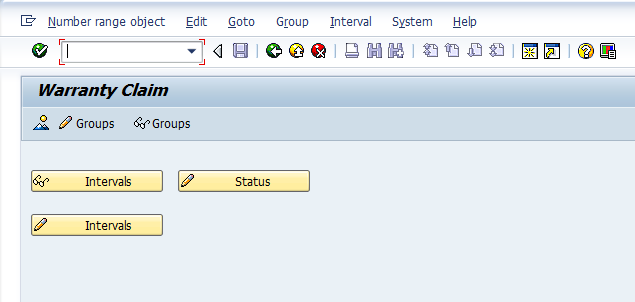
Now, I have to confess, doing the define number ranges step the first time was a huge pain.  The way the screens are setup don’t follow the standard convention of a number range screen.  For example, Change Status, or Change interval have no buttons.  But I’ll show you how to navigate through this…  Again, if you missed yesterday’s post, this the second step in configuring your warrant claim, at least it’s the second menu item listed.  Use transaction OWTY to get to this screen.

owty-01

So, when you first arrive at the screen, it looks like any other number range.  The biggest difference is that there is no predefined number range interval.  So before you can do anything you need to create the first number range.  Here’s how you do it.

owty-02

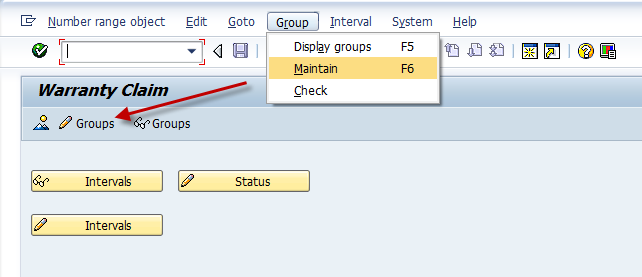
You can either press the change groups button, or use the menu Group–>Maintain.

owty-03

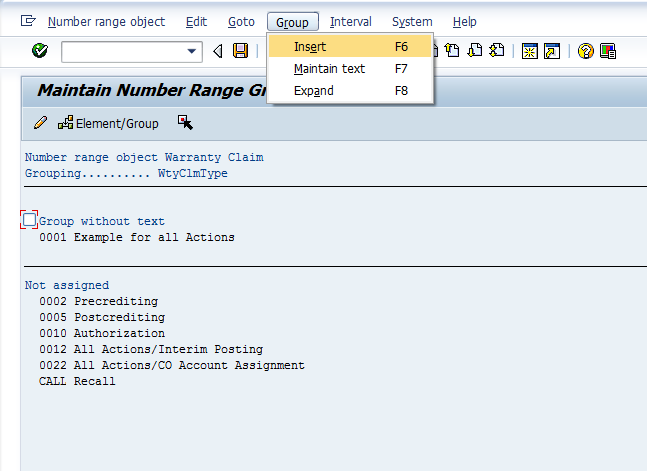
Once you arrive at this screen, you need to use the menu Group–>Insert

owty-04

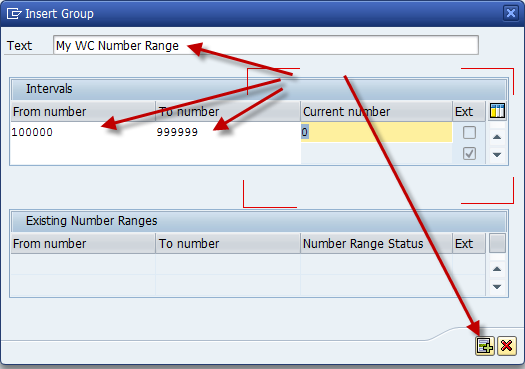
On this screen, give a text/description, the to and from interval, and then press insert.

owty-05

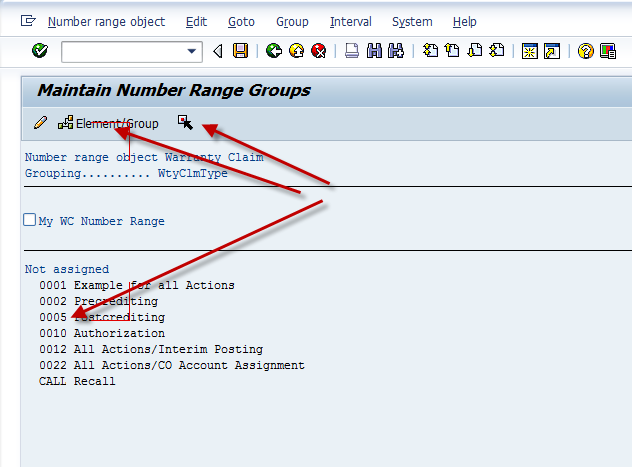
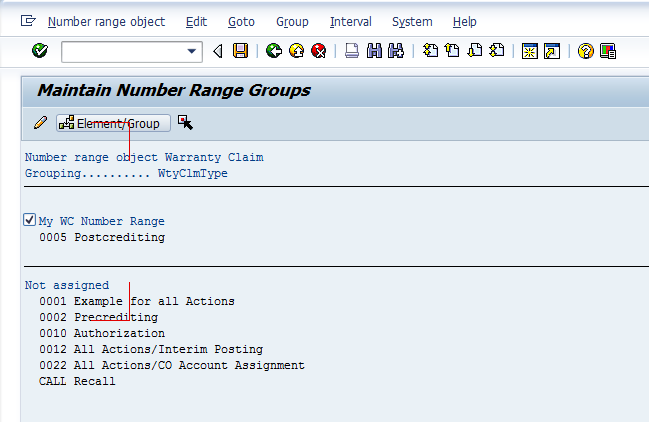
Now, you can finally do the standard task of assigning your claim type to the number range.  Keep in mind, you will have to revisit this step if you create a new claim type (which I will recommend in a future post 🙂 ).  So, first check the box next your number range (mine is My WC Number range).  Then place you cursor on the range you wish to assign.  I chose 0005 for this example, press the select button, then press the Element/Group button.  If you did it correctly, you should see this:

owty-06

So, that’s the trick to getting your number ranges rolling for warranty claims.

Thanks for reading,

Warranty Claims – Configuration – General Settings

I recently had a request to start talking more about warranty claims.  I did a post a while back that talked that the theory behind warranty claims and what you need to consider in order to implement it.  If you haven’t seen it, I encourage you to check out that post.  Now assuming that you know you want to implement warranty claims, let’s get started with step 1.  The general settings.

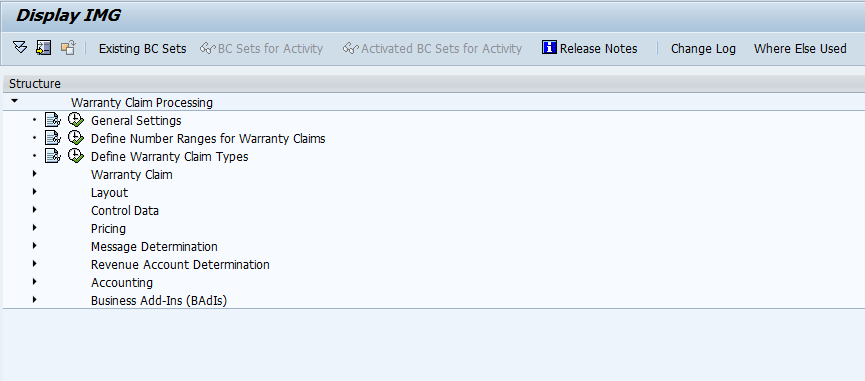
First, if you’re not familiar, the transaction OWTY is the place to go for all your warranty claims configuration needs.

owty-01

So, I like to start at the beginning, so select General Settings.

owty-02

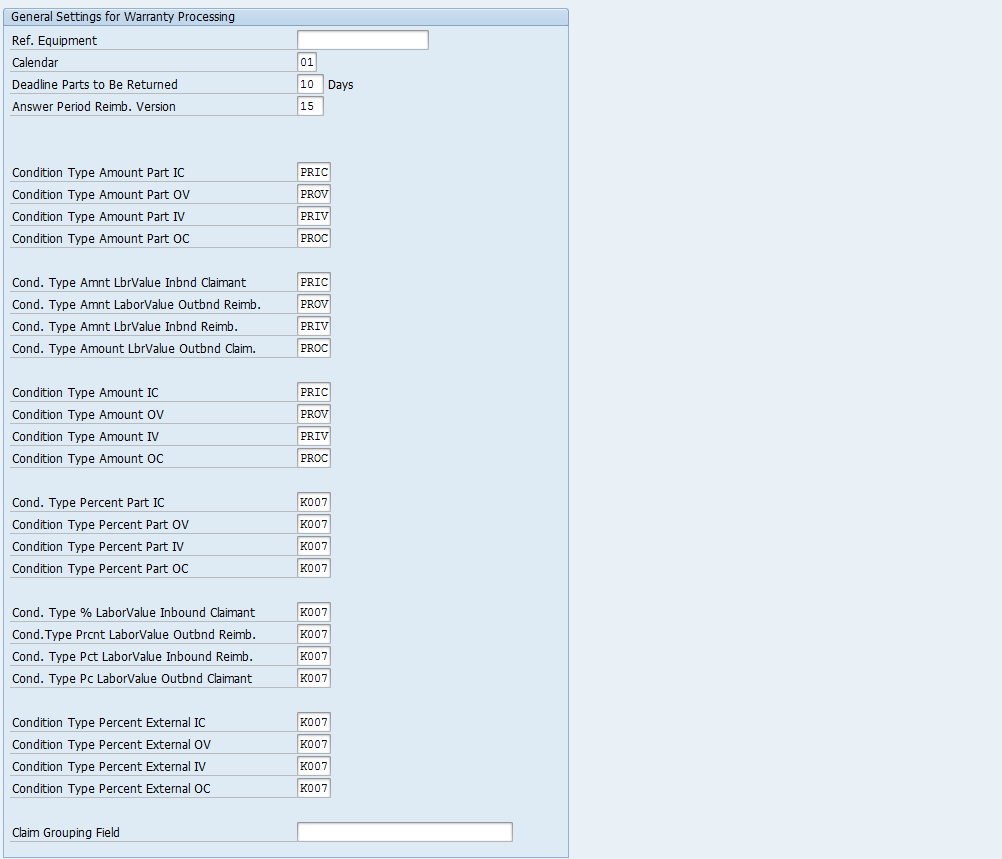
Now, you’ll notice that there are a lot of fields here.  So, let me begin by saying, many of these may not be needed, depending on the scenario you need to implement.  The first thing to recognize is the abbreviations used within warranty claims:

IC: Inbound Claimant – this is the information coming in from the customer or whomever is requesting reimbursement or a replacement.
OV: Outbound Vendor – this is the information to send to the vendor that will do the work.
IV: Inbound Vendor – this is the information sent back to you from the vendor.
OC: Outbound Claimant – this is the information you send back to the claimaint/customer.

Ref Equipment – this can be used as the reference piece of equipment to copy from.  Personally, this isn’t a feature that was useful in my projects due to the fact that the equipment records were always in existence before the claims occurred.

Calender:  This is the factory calender to use when calculating deadlines.
Deadline Parts to be Returned:  This is the number (in days) for the claimant to return the equipment to the vendor (or you) before the claim is no longer valid.Answer Period Reimb. Version: this only applies to a claim split.  This is functionality have not used in my previous projects.

For each of the following areas you can define a different condition for each of the IC, OV, IV, OC steps.
Condition Type Part Amount – this is the pricing condition for a parts/materials amounts.
Cond. type Amnt LbrValue – this the pricing condition for the labor amounts.
Condition Type Amount – this the pricing condition for the overall amount.
Cond Type Percent Part – this is the pricing condition for parts/materials as a percentage.
Cond Type % Labor Value – this is the pricing conditon for labor as a percentage.
Condition Type Percent External – this is the pricing condition for external as a percentage.

Claim Grouping Field – this field allows you to select the way claims are grouped within the warranty tree.  PARNR would be a common way to group things by customer.

So, that’s the first step in configuration.  While much of this screen is extraneous for any one particular claim type, you may have multiple claim types, each for a slightly different scenario.  Some dealing in percentages, some straight amounts, etc…  It is recommended to set a pricing condition for each of the fields.  Often times, you’ll want to make a custom ZXXX condition, to assure it goes to the appropriate account determination.

That’s our first step in Warranty Claims.  I’ll be doing more posts over the coming weeks.  Thanks for reading,

Web Dynpro – Editable ALV Table

Well, I’m still learning things about the Web Dynpro version of the ALV Table.  In this post, I’m going to about how to make an editable ALV Table within ABAP Web Dynpro.  So far, I’ve talked about how to make the table, and now it’s time for a little more advanced stuff.

Here’s some simple code to handle this aspect:

  data: l_ref_cmp_usage type ref to if_wd_component_usage.

" Instantiate the ALV usage
  l_ref_cmp_usage =   wd_This->wd_CpUse_My_Alv( ).

  if l_ref_cmp_usage->has_active_component( ) is initial.
    l_ref_cmp_usage->create_component( ).
  endif.

" Get reference to the model
  DATA: l_ref_INTERFACECONTROLLER TYPE REF TO IWCI_SALV_WD_TABLE .
  l_ref_INTERFACECONTROLLER =   wd_This->wd_CpIfc_My_Alv( ).

  data: lr_config type ref to Cl_Salv_Wd_Config_Table.

  lr_config = l_ref_INTERFACECONTROLLER->Get_Model( ).

|" Set read only mode to false (and display edit toolbar)
  lr_config->if_salv_wd_table_settings~set_read_only( abap_false ).

  data: lr_table_settings type ref to if_salv_wd_table_settings.
  lr_table_settings ?= lr_config.
  lr_table_settings->set_read_only( abap_false ).

Now, this is only the first half of the equation.  By default, every column is a text view within the table.  In order to have anything to edit, you'll need to change certain columns to be a different editor.  If you want to set something to say a checkbox, this is how you'd go about doing it.
  data: lr_column_settings TYPE REF TO if_salv_wd_column_settings,
        lt_columns         TYPE        salv_wd_t_column_ref,
        ls_columns         TYPE        salv_wd_s_column_ref,
        lr_checkbox        TYPE REF TO cl_salv_wd_uie_checkbox.

"  Embed the UI elements within the ALV
  lr_column_settings ?= lr_config.
  lt_columns = lr_column_settings->get_columns( ).
" Embed a checkbox within the column APPROVE
  LOOP AT lt_columns into ls_columns.
    CASE ls_columns-id.
      WHEN 'APPROVE'.
        CREATE OBJECT lr_checkbox1
          EXPORTING
            checked_fieldname = ls_columns-id.
        ls_columns-r_column->set_cell_editor( lr_checkbox ).
        FREE lr_checkbox.
    ENDCASE.
  ENDLOOP.

While there are a lot of ways to handle this, this is the most straightforward.  
As always, thanks for reading,

Happy New Year!

Since it’s the holiday season, I hope y’all won’t mind that there haven’t been as many posts as normal.  I’m trying to take a page from my favorite podcaster, Jack Spirko, and focus on my family this time of year.  So that means, enjoying my time with them and taking a little break from work (not an easy thing for me).

Anyway, I hope everyone has a safe and fun New Year’s Eve and a relaxing New Year’s Day.  Talk to you more next year 🙂

ABAP – Using ABAP Help On

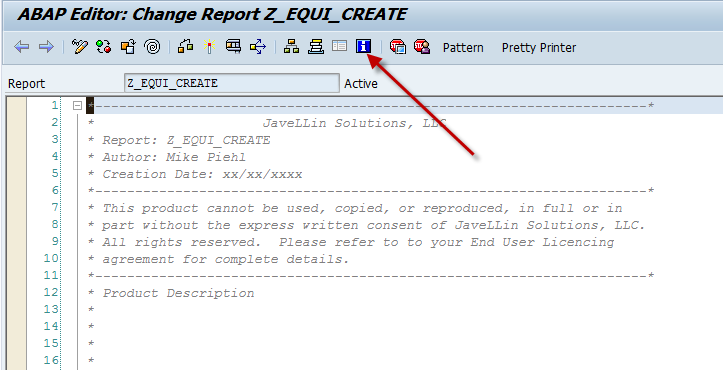
Since I’m working on training someone completely new to SAP and ABAP, I’m realizing there are a lot of tricks that I know that I take for granted.  One of the things I realized was the ABAP Help On feature.  It’s actually very good and often even includes sample code to show you how it looks.

blog01-01

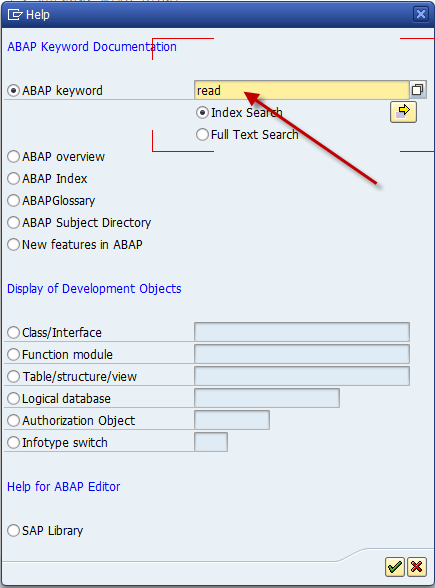
This is the magic button.  If you have some text highlighted, it will pull it directly into the next screen.

blog01-02

Now, there are a lot of options, but the most commonly used by me is the first option.  enter in your keyword, take the defaulted index search and hit enter.

blog01-03

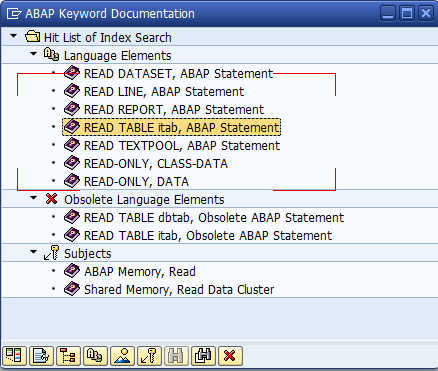
Now you get your result list.  Find the best match and double click it.

blog01-04

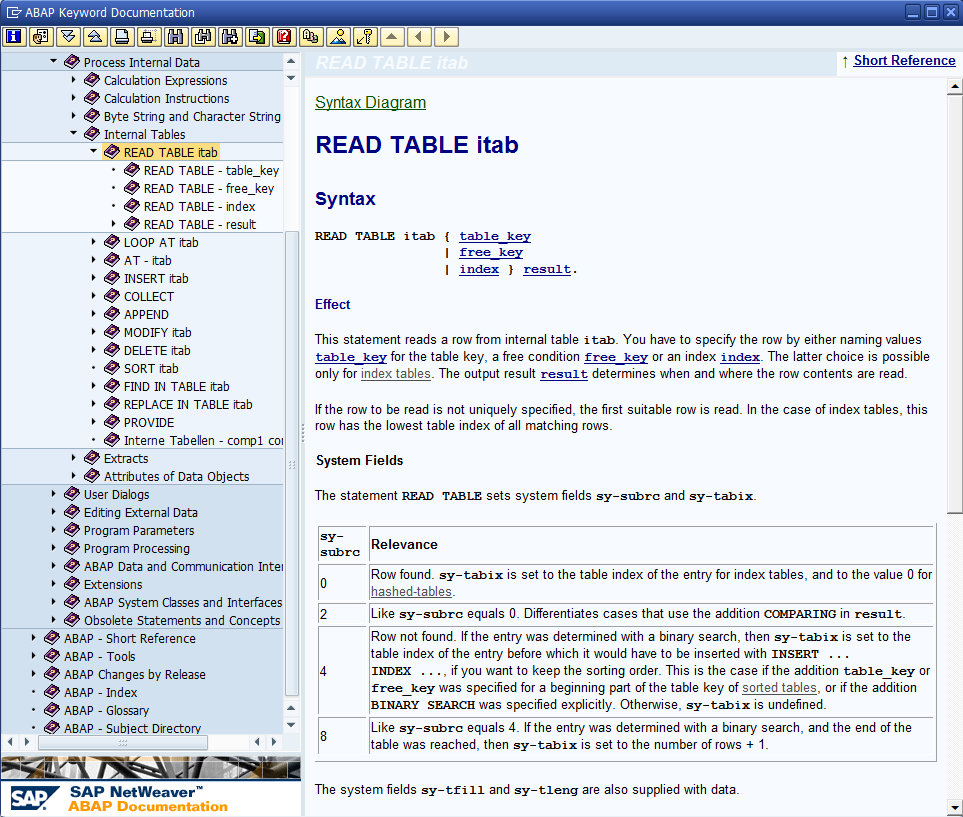
it will come back with a good explanation, syntax diagrams, options you can attach, and sometimes sample code.

in addition, it drops you into the correct place in the help menu, so if you didn’t pick exactly what you needed, you might see it in one of the nearby menu options.

Anyway, basic to my expert readers out there, but if you don’t know much about ABAP, it could come in handy.

Thanks for reading,

Merry Christmas!!!

I hope everyone has a great Christmas.  Take this time to enjoy your family and loved one.  I’m going to take a couple of days off and I’ll be back soon.  I want to focus on my family during this great time of year, and I hope y’all do the same.

Remember why we all work so hard…  for me it’s my family and love of the challenge…  but always family first.

Merry Christmas.

Variant Configuration – Setting up Sales Order Costing

When you use variant configuration, one of the things you often need or want to do is setup sales order costing for your configuration.  Surprisingly to me, sales order costing is NOT setup automatically for the TAC item category.  So let me walk you through how to set this up (at least as far as I can take you).  Like so many things, you’ll need some input from your FICO expert to make sure all the settings are proper for their world 🙂

blog01-04

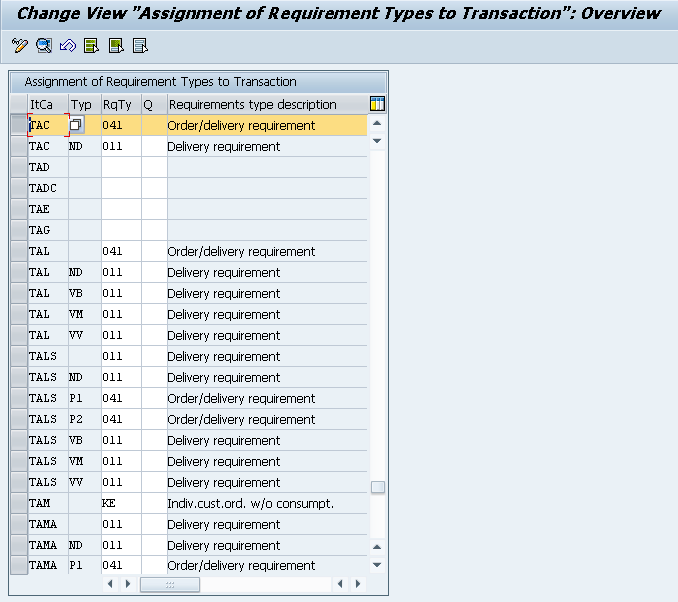
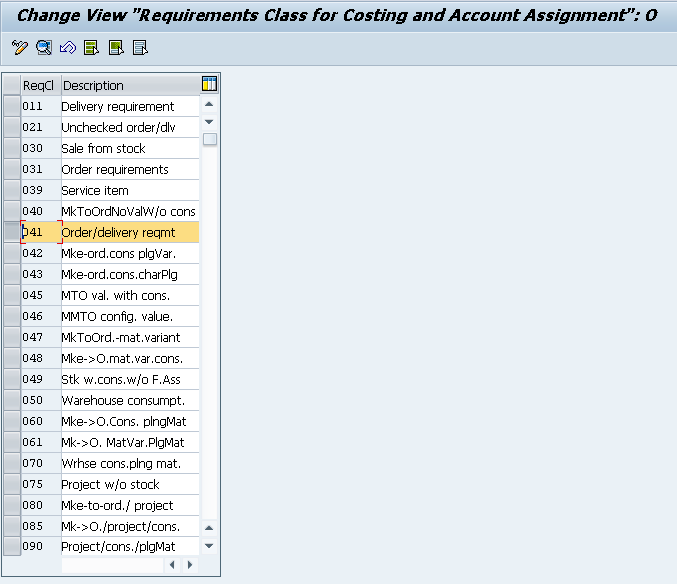
Now, I’m going to start at the beginning, so you might be able to skip this step, but I’m going to assume you don’t know the requirements class you need to update.

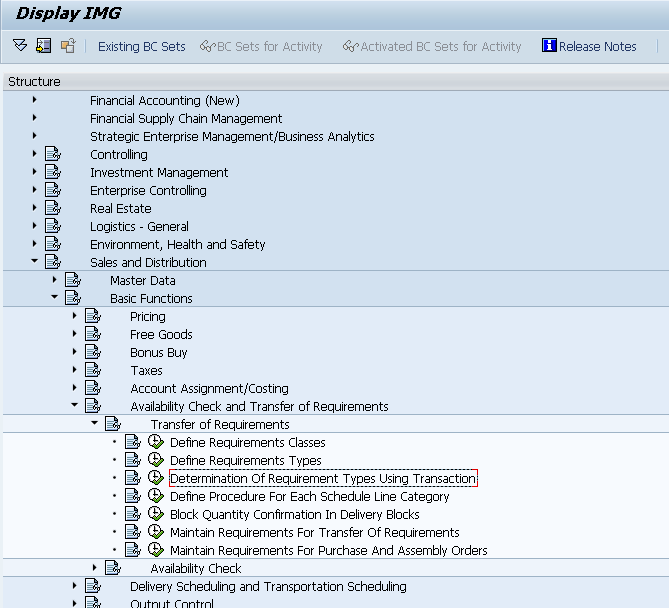
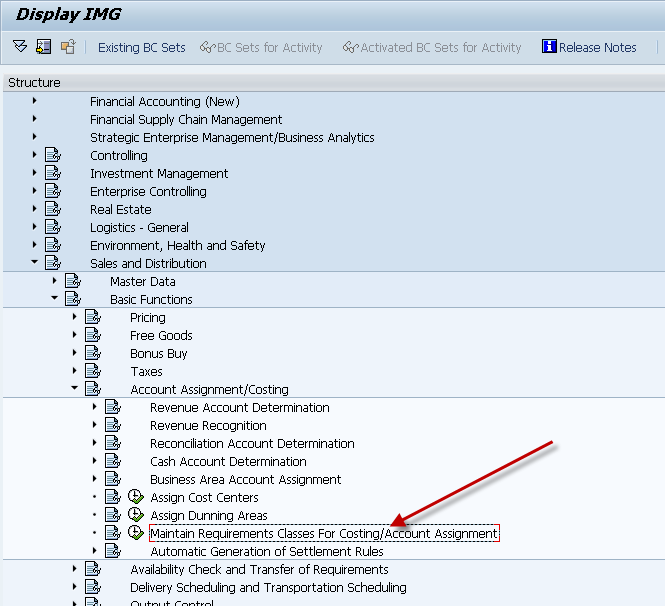
So, use this path to the IMG in order to find your requirements class based on your item category.

blog01-05

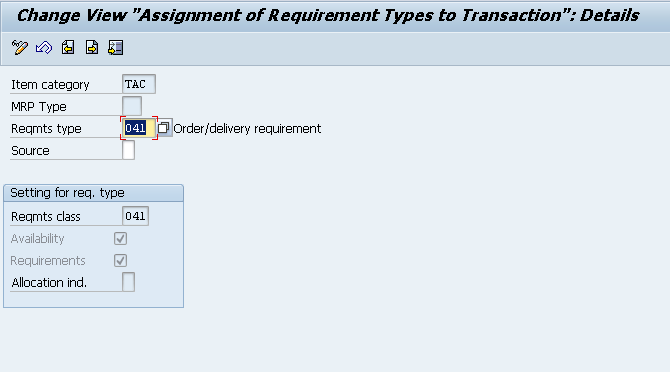
I’m going to show the standard Item Category, TAC for a configurable material.  You can simply substitute your item category in here.

blog01-06

Now, it’s nice because you can see your requirements class at the bottom portion of this screen without backtracking to the requirements type screen.

blog01-01

We can get to the real work.  We have to go to a little bit different spot in configuration to adjust these settings.

blog01-02

Now, using the requirements class we located earlier, we can go to the details.

blog01-03

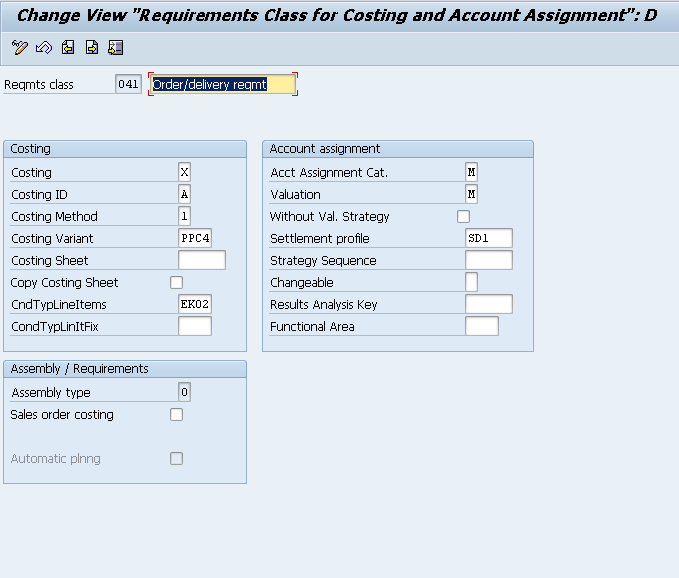
Now, all the work happens on this screen.  Originally, this screen was completely blank in standard SAP.  What I’ve populated is the most standard configuration I’ve used in the past.

Costing:  Setting this to X makes it required for sales order costing.
Costing ID: determines if you want automatic sales order costing (A) or automatic with marking (B).
Costing Method: (1) Product Costing, (2) unit costing
Costing Variant: PPC4 for sales order costing

CndTypLinItm: this is something optional, but it tells you where you can put the value within pricing  if you wish to use it for margin or cost plus calculations
Acct Assignment Cat: M for Ind Cust wo KD-CO
Valuation: M Separate valuation with reference to Sales Document/Project.

Settlement Profile: SD1 – Sales Order Make to Order Production

The one field I skipped is the Settlement Profile.  This one I always defer to my FICO person.  I don’t even pretend to know which one of these to select.

Once you set this stuff, you should be good to.

Thanks for reading,

ABAP – BDC ABAP Code

Well, we’ve created a program, and done the BDC recording.  Now, all that’s left is the BDC ABAP Code to make it all useful.  So, let’s jump right into it.

First off, you’ll need 2 FORMS and some standard data declarations:

DATA:   BEGIN OF bdcdata OCCURS 100.

INCLUDE STRUCTURE bdcdata.

DATA END OF bdcdata.

DATA: mess TYPE TABLE OF bdcmsgcoll WITH HEADER LINE.

*———————————————————————*

*       FORM BDC_DYN                                                  *

*———————————————————————*

*       start a new screen in the BDC table                           *

*———————————————————————*

*  –>  PROGRAM                                                       *

*  –>  DYNPRO                                                        *

*———————————————————————*

FORM bdc_dyn USING program dynpro.

CLEAR bdcdata.

bdcdata-program = program.

bdcdata-dynpro = dynpro.

bdcdata-dynbegin = ‘X’.

APPEND bdcdata.

ENDFORM.                    “bdc_dyn

*———————————————————————*

*       FORM BDC_FLD                                                  *

*———————————————————————*

*       add a field to the BDC table                                  *

*———————————————————————*

*  –>  FNAM                                                          *

*  –>  FVAL                                                          *

*———————————————————————*

FORM bdc_fld USING fnam fval.

CLEAR bdcdata.

bdcdata-fnam = fnam.

bdcdata-fval = fval.

APPEND bdcdata.

ENDFORM.                    “bdc_fld


Now, the actual transactional stuff that will change with every transaction…

FORM load_cnf.

REFRESH: BDCDATA, MESS.


PERFORM bdc_dyn USING ‘SAPLCORU’ ‘3000’.

PERFORM bdc_fld USING CORUF-AUFNR ‘ ‘4000100’.

PERFORM bdc_fld USING CORUF-VORNR ‘ ‘0010’.

PERFORM bdc_fld USING ‘BDC_OKCODE’ ‘=ENTR’.    ” ENTER

PERFORM bdc_dyn USING ‘SAPLCORU’ ‘3200’.

PERFORM bdc_fld USING AFRUD-ISMNW_2 ‘ ‘2’.

PERFORM bdc_fld USING AFRUD-LEARR ‘ ‘SRV’.

PERFORM bdc_fld USING AFRUD-AUERU ‘ ‘’.

PERFORM bdc_fld USING AFRUD-LEKNW ‘ ‘’.

PERFORM bdc_fld USING ‘BDC_OKCODE’ ‘=MB03’.    ” ENTER

PERFORM bdc_dyn USING ‘SAPLCOWB’ ‘0130’.

PERFORM bdc_fld USING ‘BDC_OKCODE’ ‘=WEIT’.    ” ENTER

* runs transaction defined above, mode ‘A’ goes step by step, use this

* to prototype code, mode ‘N’ runs automatically, use this in

* production, mode ‘E’ generates errors only, use this for debug

COMMIT WORK AND WAIT.

CALL TRANSACTION ‘IW41’ USING bdcdata

MODE ‘A’         ” mode ‘A’,’N’,’E’

UPDATE ‘S’

MESSAGES INTO mess.

endform.                    “load_cnf

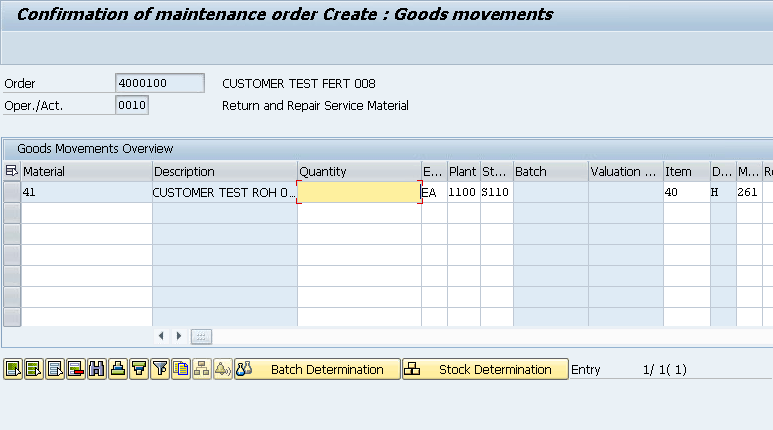
Now, the biggest piece to remember is the MODE.  In the code above, it’s set to A, which means that it will go through step by step. When you execute, it will look something like this.
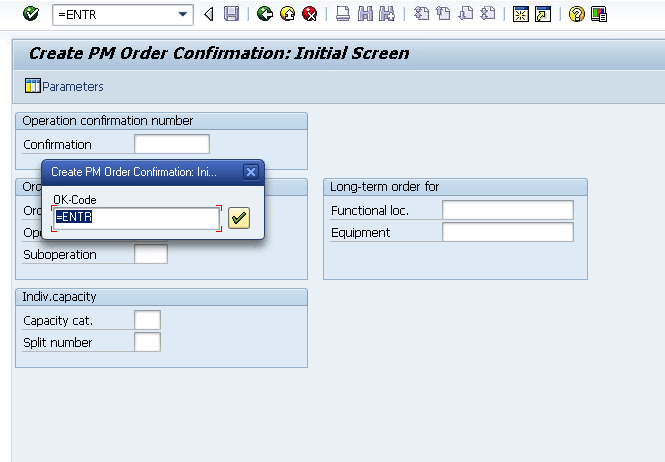
blog01-12

Beyond that, it’s all about translating the recording into the steps.  You’ll notice that every screen must start with the bdc_dyn.  The bdc_fld will be all the steps within that screen.  At the end of each screen, you will add a BDC_OKCODE.  This will be like hitting enter, or pressing a button.  After ever BDC_OKCODE, you will do a bdc_dyn (even if you don’t leave the screen).

Beyond that, it’s all about entering in the data to populate the screen.  Now something to keep in mind, it won’t always be sufficient to use the same data type as the screen field.  For example, I did transaction IW41, and you have to enter in a number of time units (hours/mins/etc).  I used the same data type, but when I executed the transaction, it told me that the values didn’t fit in the field…  WTF?”.  So i changed it to a text field to enter in the number, and magically it worked.  Keep in mind, you may need to do tricks like that from time to time.

Hope you found this useful and thanks for reading,
ABAP – BDC Recording

Well, since I’ve been talking about BDC, seems logical that I should actually show you how to get a BDC Recording.  It’s easier than you might expect, but reading the results can take some effort.

blog01-01

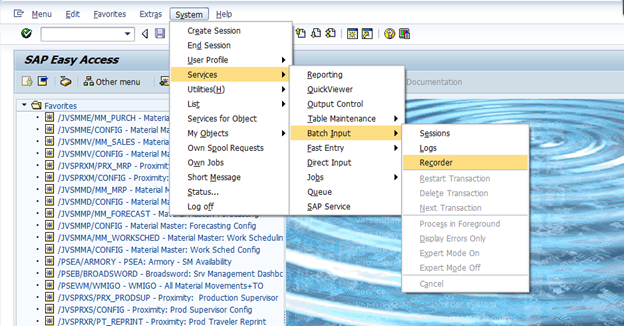
Use this menu path to start the BDC recorder.

blog01-02

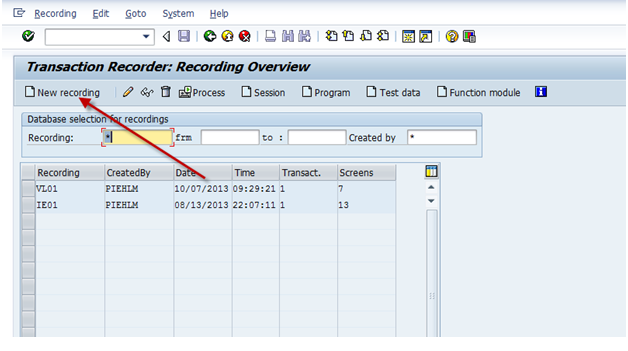
Start a new recording.

blog01-03

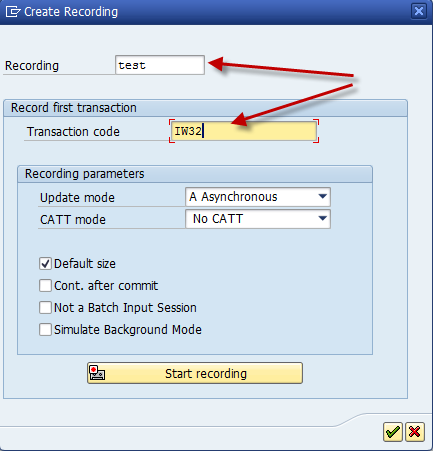
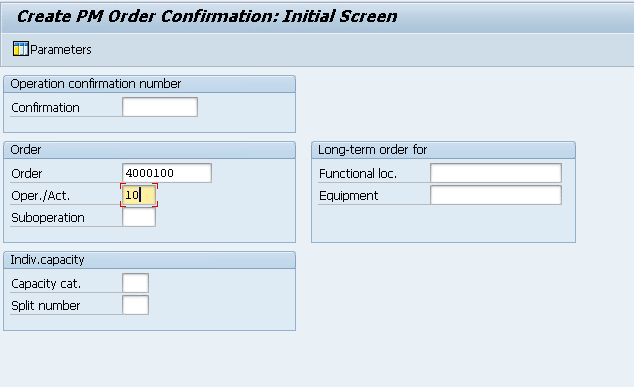
Enter in your transaction, and a description.  Then press Start Recording.  Just to give you an idea, let’s walk through a simple recording.

blog02-01

Now, the biggest thing to keep in mind is to know the steps of your transaction, eliminate extra steps (don’t randomly hit enter) and make sure to populate every field you want to be able to populate in your program.

blog02-02

Fill in the values you want, and then press the Goods Movement Button.

blog02-03

Finally, press Save.

Now, you will get your results:

Now, the recording will give you this result:


                                               0000                T                      IW41

SAPLCORU                                                       3000                X

                                                0000                                       BDC_CURSOR                                                                                                                                                   CORUF-VORNR

                                                0000                                       BDC_OKCODE                                                                                                                                                  =ENTR

                                                0000                                       CORUF-AUFNR                                                                                                                                                 4000100

                                                0000                                       CORUF-VORNR                                                                                                                                                 10

SAPLCORU                                                       3200                X

                                                0000                                       BDC_CURSOR                                                                                                                                                   AFRUD-LEKNW

                                                0000                                       BDC_OKCODE                                                                                                                                                  /00

                                                0000                                       AFRUD-ARBPL                                                                                                                                                  SERVICE

                                                0000                                       AFRUD-WERKS                                                                                                                                                1100

                                                0000                                       AFRUD-ISMNW_2                                                                                                                                                   28

                                                0000                                       AFRUD-ISMNU                                                                                                                                                H

                                                0000                                       AFRUD-LEARR                                                                                                                                                  srv

                                                0000                                       AFRUD-BUDAT                                                                                                                                                12/06/2013

                                                0000                                       AFRUD-AUERU

                                                0000                                       AFRUD-LEKNW

                                                0000                                       AFRUD-OFMNU                                                                                                                                               H

                                                0000                                       AFRUD-ISDD                                                                                                                            01/11/2013

                                                0000                                       AFRUD-ISDZ                                                                                                                            07:00:00

                                                0000                                       AFRUD-IDAUE                                                                                                                                                 H

                                                0000                                       AFRUD-IEDD                                                                                                                            12/06/2013

                                                0000                                       AFRUD-IEDZ                                                                                                                            23:31:37

                                                0000                                       AFRUD-PEDZ                                                                                                                          24:00:00

SAPLCORU                                                       3200                X

                                                0000                                       BDC_CURSOR                                                                                                                                                   AFRUD-ARBPL

                                                0000                                       BDC_OKCODE                                                                                                                                                  =MB03

                                                0000                                       AFRUD-ARBPL                                                                                                                                                  SERVICE

                                                0000                                       AFRUD-WERKS                                                                                                                                                1100

                                                0000                                       AFRUD-ISMNW_2                                                                                                                                                   28

                                                0000                                       AFRUD-ISMNU                                                                                                                                                H

                                                0000                                       AFRUD-LEARR                                                                                                                                                  SRV

                                                0000                                       AFRUD-BUDAT                                                                                                                                                12/06/2013

                                                0000                                       AFRUD-OFMNU                                                                                                                                               H

                                                0000                                       AFRUD-ISDD                                                                                                                            01/11/2013

                                                0000                                       AFRUD-ISDZ                                                                                                                            07:00:00

                                                0000                                       AFRUD-IDAUE                                                                                                                                                 H

                                                0000                                       AFRUD-IEDD                                                                                                                            12/06/2013

                                                0000                                       AFRUD-IEDZ                                                                                                                            23:31:37

                                                0000                                       AFRUD-PEDZ                                                                                                                           24:00:00

SAPLCOWB                                                      0130                X

                                                0000                                       BDC_OKCODE                                                                                                                                                  =WEIT

                                                0000                                       BDC_SUBSCR                                                                                                                          SAPLCOWB                                0806HEADER

                                                0000                                       BDC_SUBSCR                                                                                                                          SAPLCOWB                                0510TABLE

                                                0000                                       BDC_CURSOR                                                                                                                                                   COWB_COMP-ERFMG(01)

Now, this will translate into the following ABAP code.   In a future post, I’ll give you the simple bdc_dyn and bdc_fld form code.

PERFORM bdc_dyn USING ‘SAPLCORU’ ‘3000’.

PERFORM bdc_fld USING CORUF-AUFNR ‘ WA_CNF-AUFNR.

PERFORM bdc_fld USING CORUF-VORNR ‘ WA_CNF-VORNR.

PERFORM bdc_fld USING ‘BDC_OKCODE’ ‘=ENTR’.    ” ENTER

PERFORM bdc_dyn USING ‘SAPLCORU’ ‘3200’.

PERFORM bdc_fld USING AFRUD-ISMNW_2 ‘ WA_CNF-TIME.

PERFORM bdc_fld USING AFRUD-LEARR ‘ WA_CNF-LEARR.

PERFORM bdc_fld USING AFRUD-AUERU ‘ WA_CNF-AUERU.

PERFORM bdc_fld USING AFRUD-LEKNW ‘ WA_CNF-LEKNW.

PERFORM bdc_fld USING ‘BDC_OKCODE’ ‘=MB03’.    ” ENTER

PERFORM bdc_dyn USING ‘SAPLCOWB’ ‘0130’.

PERFORM bdc_fld USING ‘BDC_OKCODE’ ‘=WEIT’.    ” ENTER

* runs transaction defined above, mode ‘A’ goes step by step, use this

* to prototype code, mode ‘N’ runs automatically, use this in

* production, mode ‘E’ generates errors only, use this for debug

COMMIT WORK AND WAIT.

CALL TRANSACTION ‘IW41’ USING bdcdata

MODE ‘N’         ” mode ‘A’,’N’,’E’

UPDATE ‘S’

MESSAGES INTO mess.

That’s it for today.  The recording is pretty easy.  Using it, well, I’ll get to that soon 🙂

Thanks for reading,
 

ABAP – Copying a program

Continuing on my training of an intern, one of the things I need is a series of BDC programs to automatically generate data within my test systems.  While, there are a lot of ways to make transactional data, I need something that I can “fire and forget”.  So that means I need programs with either a BAPI or BDC.  In my opinion, for this, I want simple and I want quick, so I’ve gone down the BDC path.  So…  I’m using it as a training opportunity for my intern.  Today, I’m going to focus on simply copying an existing program.  I know it sounds simple, but hey, not everyone is an ABAP expert.  That’s what I”m going to be sharing with y’all today 🙂

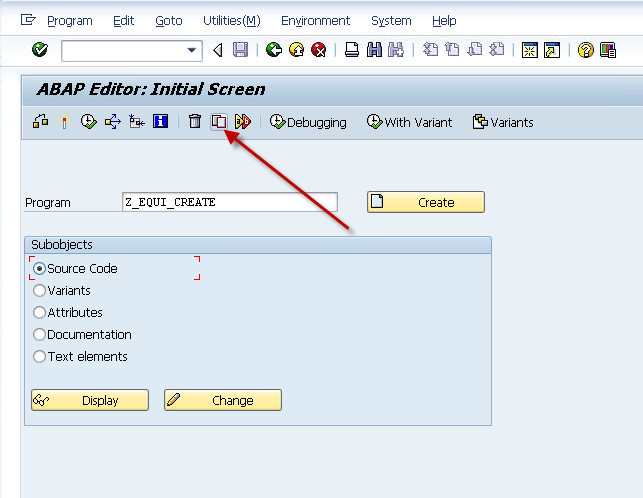
blog01-01

Now, since I’ve already developed a few of these (I’m working my way through the in-house repair process), the easiest way is to copy from an existing one.

blog01-02

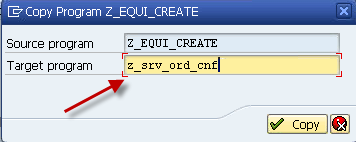
This program will be to generate service order confirmations.

blog01-03

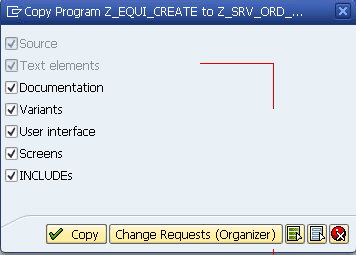
Now, the next question is if you want to copy all the attached pieces of the program.  In general, I say yes, but obviously, this depends on your goal.

blog01-04

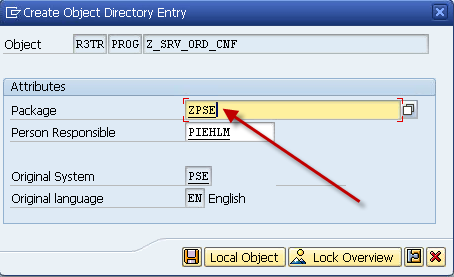
Now, the transport portion.  This may depend on your system and your plans.  For me, I want to make sure I can transport this forward, but perhaps you’re just playing.  In that event, skip the package, and just select Local Object

blog01-05

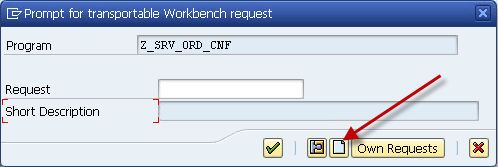
But, if you choose a transportable object, you’ll need to create a transport.

blog01-06

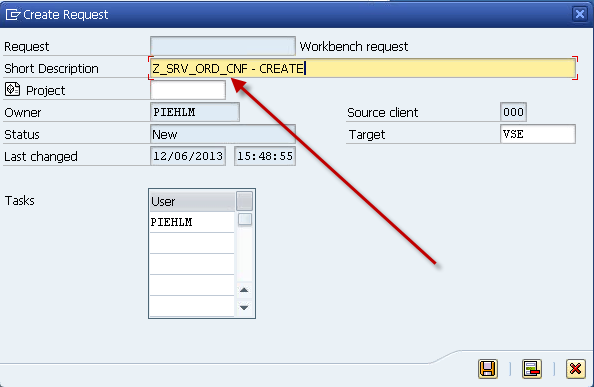
Give it a description, press Save.

blog01-07

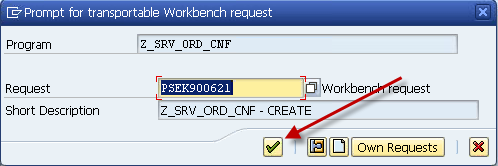
Now your transport is listed, press the green check to accept it.

blog01-08

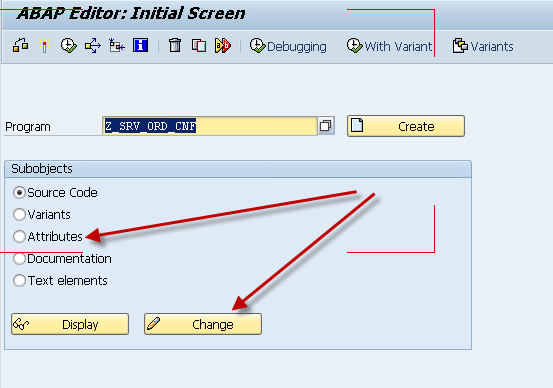
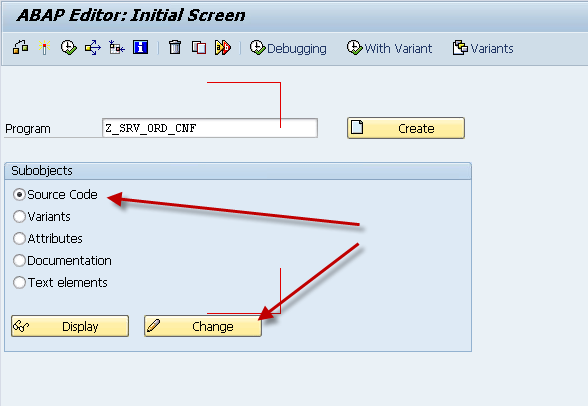
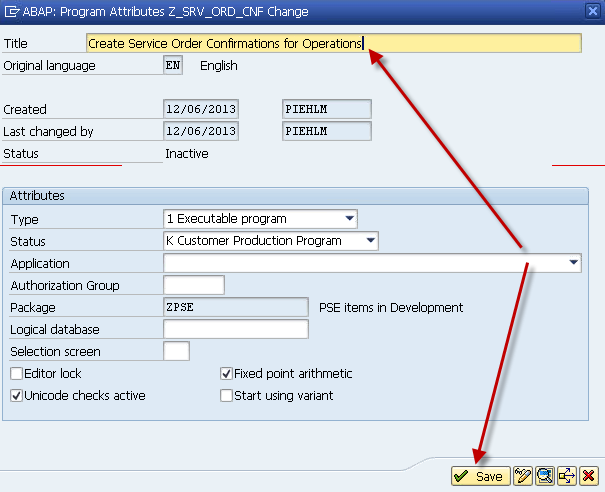
Finally, we just need to make some minor updates, like the program title.  Select Attributes and Press Change.

blog01-09

Change the title and press Save.

blog01-10

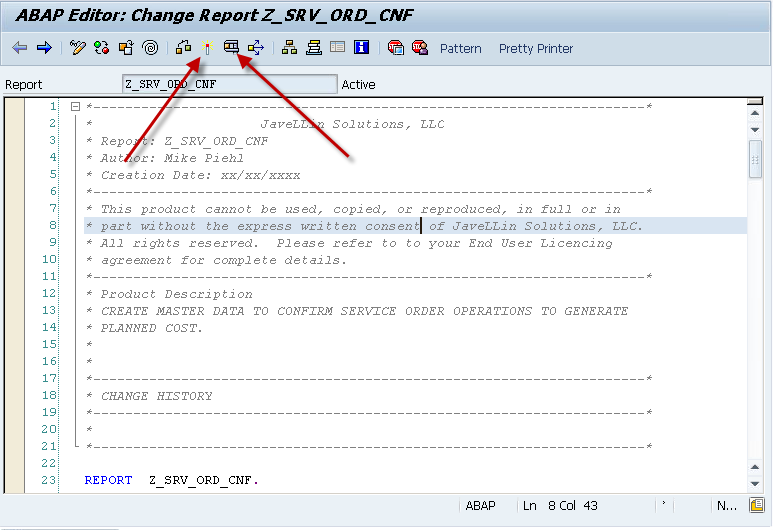
Normally, I’ll change the boilerplate as well.

blog01-11

Once I add the information to boiler plate, you can activate it, and even execute it if you choose (granted, it’ll execute the program you copied, but at least you can be sure syntax is good to go).

There you go…  how to properly copy an ABAP program.

Thanks for Reading,
 

Posts navigation

1 2 3 64 65 66 67 68 69 70 97 98 99
Scroll to top