Basis – More Memory Increases Connectivity

Well, if you know me, you know I’m no basis guru.  I’ve learned just enough to keep my systems up and running, and have built enough redundancy in my backups that I can also restart the clock if something becomes non-salvageable 🙂  But, with the addition of my server, I’ve found that the increased memory in the box makes it more reliable and easier to connect to.  I can explain why, I just know that it’s running on the same internet that my other systems run on.

As an example, often when trying to connect to my old system it might 3 or more attempts before it finally connects.  With the new server, it usually connects on the first try (sometimes it takes 2).  This is a nice feature.  In my world, it’s not a show stopper, but sure is nice not to have to keep clicking the logon pad waiting till it finally connects to SAP.

Anyway, thought I’d share this…  and if you happen to be a basis guru, maybe you could explain what the hell is happening =)  Thanks for reading,
ABAP – Finding Icon Codes

I just picked up a new little trick.  Often when I’m programming, I like to pull in the standard SAP icons.  The problem is that it is always a hassle to find the 4 digit code that corresponds to the icon I want to use.  So I found this little trick online to simplify the process.

1. Go to transaction ICON to find the icon you wish to use.  It will have a full description, like ICON_ORDER for example.

2. Go to SE11, enter ICON into the Type Group.  Press Display

3.  Scroll through the list (or use Control-F) to find the icon code associated with the ICON_ORDER.

Pretty slick,  Thanks for reading,

SAP Logistics and SCM Conference – Are you Coming?

Our big conference of the year is coming up quickly and we’re in the middle of all our prep work (thanks to my business partner, Mike, for taking care of most of this).  Well, this time around we are going to be a presenter as well as just a vendor.  So if you’re planning on going, check us out at booth 100.  I’d love to meet you in person.

http://scm2014.wispubs.com/LasVegas/

It’s  a fun show with lots of info.  Hope to see you there,


Single Handle your Tasks

Well, yet again, I learned a valuable lesson.  Last fall, I spent a considerable amount of time enhancing SM customer portal application.  I’m pretty excited about the stuff I added to it.  The problem is that I got pulled off to do some stuff for our upcoming conference (turning the production execution app into web dynpro, and creating the RFC’s for a mobile IPad app).  Why am I rambling about this???  well, I was just on an airplane and I thought I’d jump in and put the finishing touches on the Rapier changes I made 3 months ago.

Needless to say, I quickly found that I forgot much of what I did.  I remembered the functionality, but I didn’t remember the details.  And in typical Piehl Fashion…  I didn’t document what I had done.  So I have a bunch of configurable options…  but I no longer know what the flags did or what the possible options are. To further compound the issue, I rolled back my test system, so all my test data is long gone.  So now, in order to wrap up a little bit of work, I’ll have to build test data and dig into my code to figure out what I did.

The lesson learned…  single handle your tasks.  Finish something completely before moving to the next task (if you can).  Now, if you cannot do that…  document what you did before you move onto the next task.  It’ll save you a lot of headaches in the future.  Now, back to create test data =)

Thanks for reading,
Warranty Claims – Check Action Profile

Since I’ve been talking about warranty claims, and in particular the process control, I figured I better talk about all of it 🙂  This latest installment is a little piece called the Check Action Profile.  Now, I hadn’t used this feature a whole lot in the past, but it’s more functional than I originally gave it credit for.  Let me show what it can do.

wty01-01

First off, head to OWTY, and you can navigate to this particular step by following the above screenshot.

wty01-02

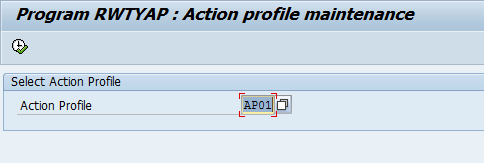
Next, you’ll see this screen that allows you select a single action profile.  I picked the post crediting profile, since it’s the one I use the most often.

wty01-03

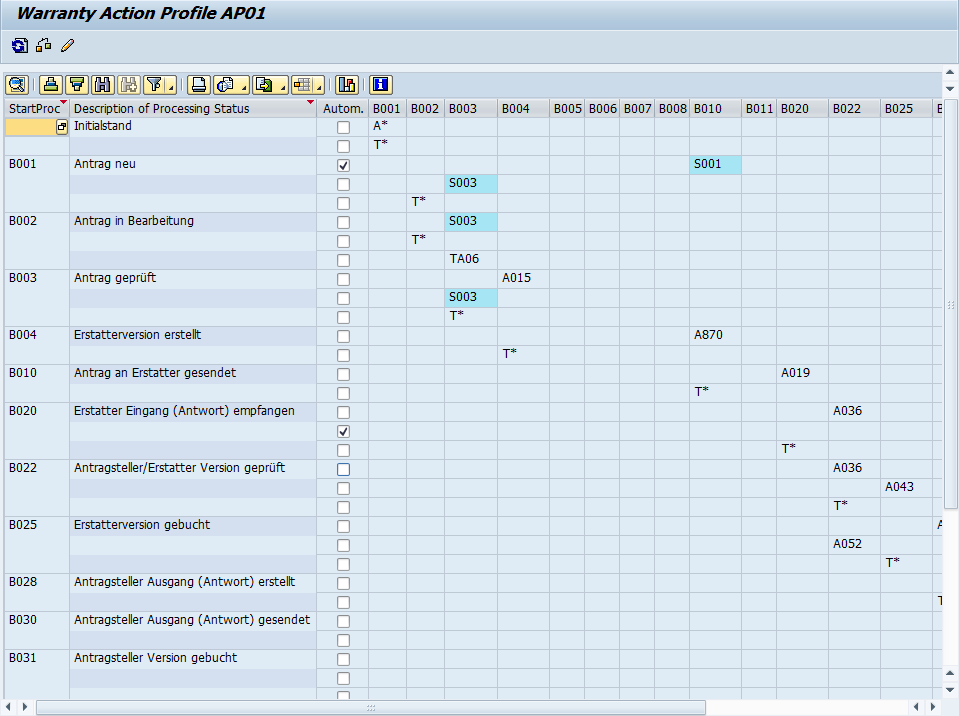
Now, as soon as you execute, you’ll notice a huge grid, that gives you the road map of the entire process control you have setup.  You can see at a glance what Processes can call what actions, what is automatic, etc…  Now, the piece that I liked the best was the check.

wty01-04

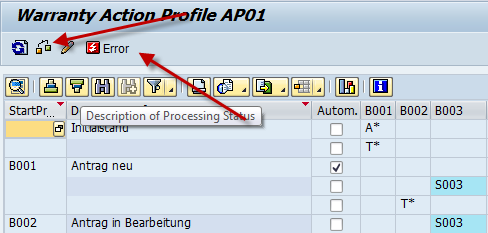
so if you press the button that looks like a syntax check, it will either come back with nothing, or you will see the little error button.  If you press this, you’ll see what is inconsistent in the profile.

wty01-05

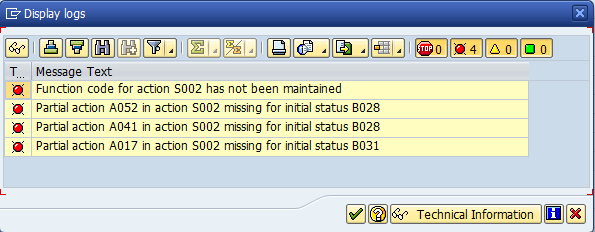
It’s hard not to laugh a little, since this is the untouched process that SAP provides to you, and it has things missing.  The important thing is that you can quickly identify where you missed something or where you should revisit to close the gaps.

It’s all pretty easy, but very helpful.  Thanks for reading,

ABAP – Changing SAP Data Type Descriptions

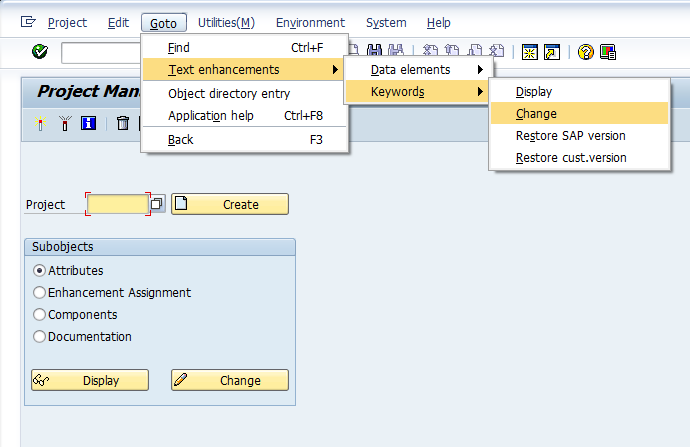
Well, completely by accident, a friend of mine taught me a cool new trick.  There is a standard way to change data type descriptions of standard SAP fields without doing any sort of core mods.  It’s all built right into transaction CMOD, and I never knew it was available.  I truly learn something new about SAP all the time.  So, here goes…  go to transaction CMOD, then use the following menu path:
Goto–>Text Enhancements–>Keywords–>Change

blog02-01

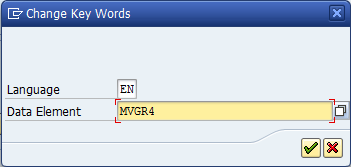
Next, select the data element you want to change the description.

blog02-02

I picked MVGR4 for an example.

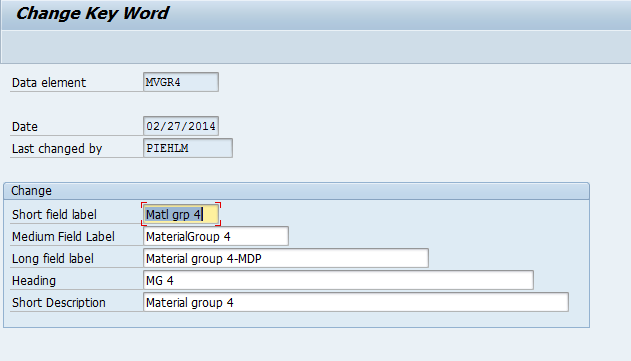
blog02-03

Now update any descriptions you want to change.  Save it, and attach it to a transport.  You’re done.

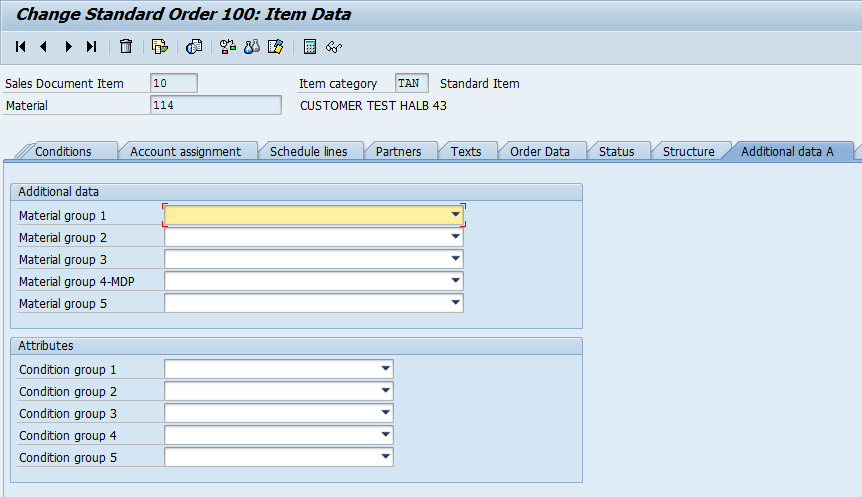
Take a look at what happens in VA02 for this field now:

blog02-09

Pretty cool, and pretty easy.

Thanks for reading,

Netweaver Gateway – Service Implementation

I’m finally getting back to the Netweaver Gateway stuff.  This piece is the most powerful, and also the most complicated.  I struggled with this for a while, so it’s a good idea for me to explain it and make sure I don’t forget myself 🙂  I’m going to focus on the query implementation, but all of the options work the same way.

segw01-01

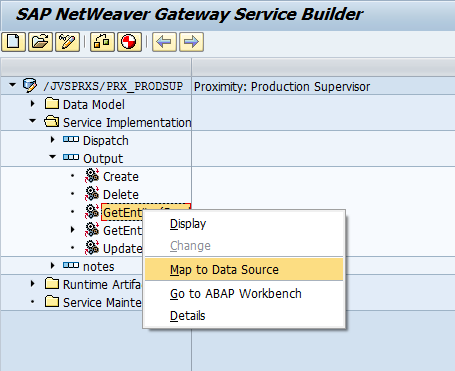
Open up the Service Implementation folder, then open the entity set you wish to map.

Create – Use this to create a new entry.
Delete – Use this to delete an entry
GetEntitySet(read) – use this to read back a single entry
GetEntitySet(query) – use this to read back an entire table.
Update – use this to update an existing entry.

Now, one of the things I’ve found is that for most of these entries, it really all does depend on your RFC that is being called.  For example, you could likely call Create or Update using the same RFC and it would work, as long as your RFC code was properly defined.

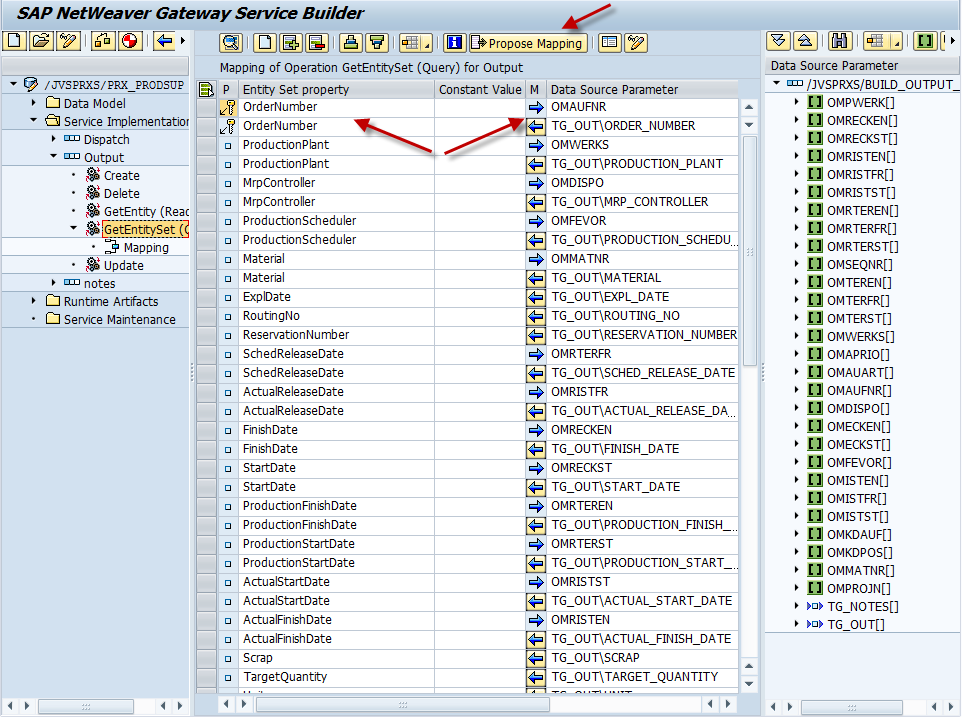
segw01-02

Now this screen shows you a completed mapping for the query operation.  Depending on your RFC and how you defined things previously, you can use the Propose Mapping button to fill in all of the fields for you.  Or, you can drag and drop from the right hand window.  Now, one of the things that I originally had issues with supplying the inputs for my RFC.  What I discovered, is that in Netweaver Gateway, you can have the same parameter show up multiple times, once as an input and once as an output.  All you need to do is point it to the correct field.  If you look above at the OrderNumber field, you’ll notice that it’s listed twice, once with an arrow pointing left (output) and one with an arrow pointing right (input).  If you look in the mapping field, you’ll notice that the input and output point to different fields.

Like everything, you must know your RFC to do this correctly.  Then, if you need to use the same field again, you must use the insert, select the field from the list, press the arrow until it points to the right, and finally select the mapping field from the RFC that should be the import.

At this point, if you have the gateway configured, you are ready to test and connect it to your mobile app 🙂

Thanks for reading,

Warranty Claims – Assign Function Codes to Action Codes

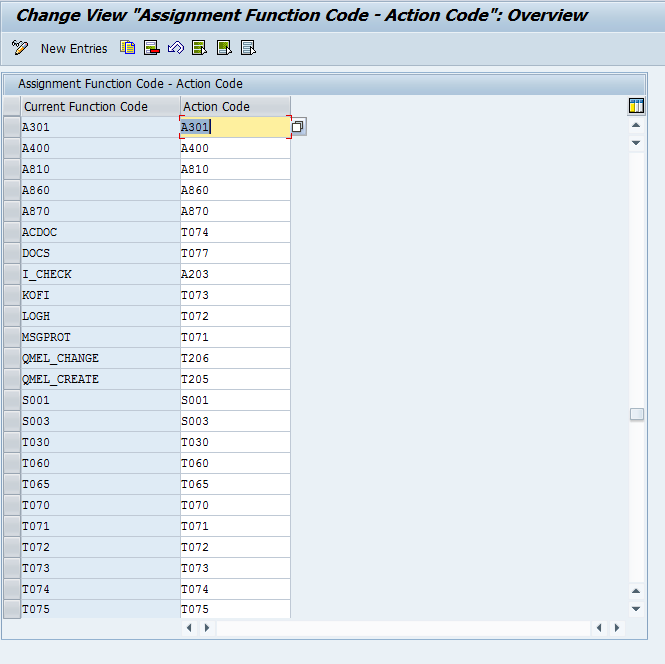
Well, since I’ve been hitting the warranty claims stuff pretty hard lately, I figured I might as well through another easy one out there.  This piece of configuration is really pretty straightforward, and likely something you will never touch.  But in my own quest for knowledge, and since I may put together an e-book in the future about warranty claims configuration, I decided to find out what this configuration was all about.  As it turns out, in 99% of the cases, the function code is equal to the action code.  About the only time it might be different is if you add some custom buttons.  Regardless, if you need it, here is how you do it.

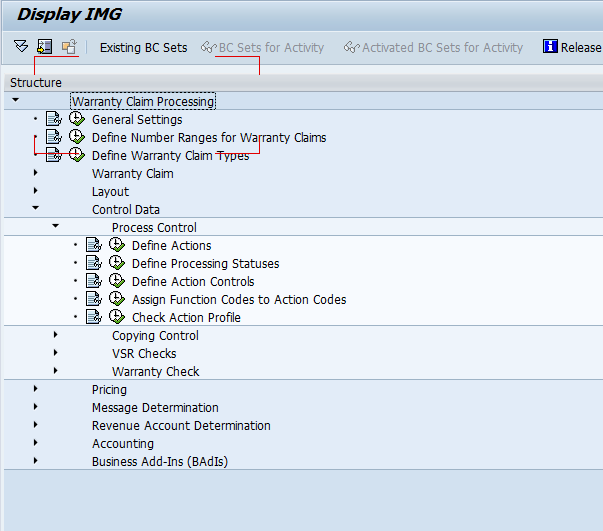
wty01-01

Go to OWTY to find this menu path.

wty02-02

Beyond that, like you can see, there are 2 columns, and in most instances, they are identical.  There are a few instances where a different function code exists, but all in all, a pretty mundane, and rarely used piece of configuration.

Thanks for reading,

Warranty Claims – Define Actions

Now, getting back to warranty claims.  Today I’m going to talk about the define actions step.  This is another piece connected to my last 2 warranty claim posts.  Defining an action is the piece that does the work.  Last post we walked through creating/changing a status.  Today we talk about the action, so after all of this, the process control will make sense 🙂

wty01-01

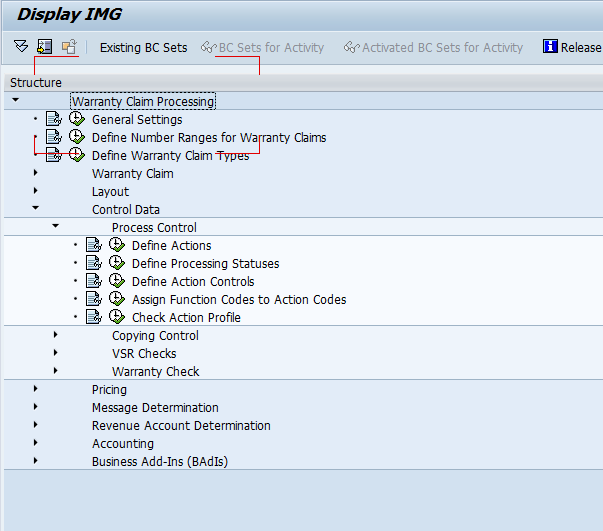
Start at OWTY to get to the configuration.

wty01-03

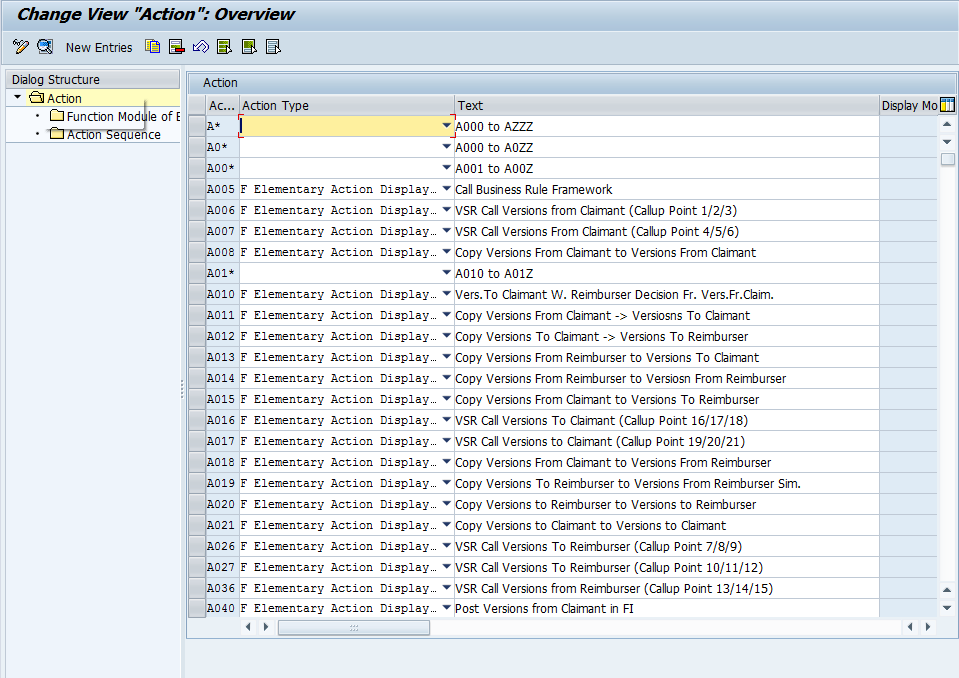
Now, the first thing you’ll notice is that there are a LOT of actions available.  There are 4 types of actions:
Elementary Action Displayed in Action Box
Elementary Action Hidden in Action Box
Interlinking Action Displayed in Action Box
Interlinking Action Hidden in Action Box

Elementary Actions are exactly what they sound like.  They perform exactly 1 function.

wty01-02

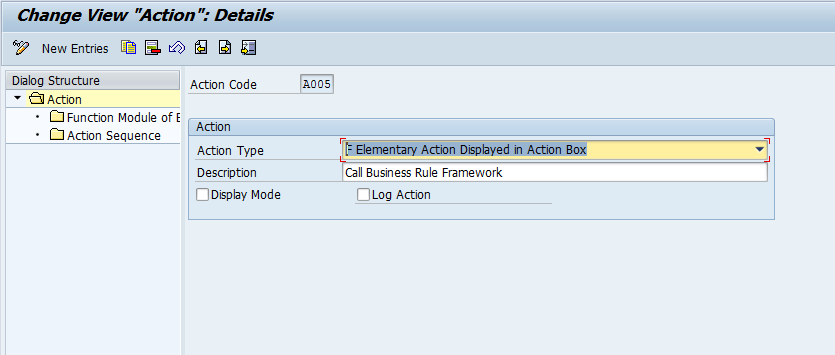
Now, I picked the A005 to show you the action details.  Notice you can set the action type & the description.  In addition, you can check Display Mode, which means the action can be called, even in display mode.  Finally, Log Action check box allows you to include this action in the log for the claim (in my opinion, all actions should be logged… of course, I’m a big fan of seeing what’s happened in the past).

Now, if we move onto Function Module of the Elementary.
wty01-05

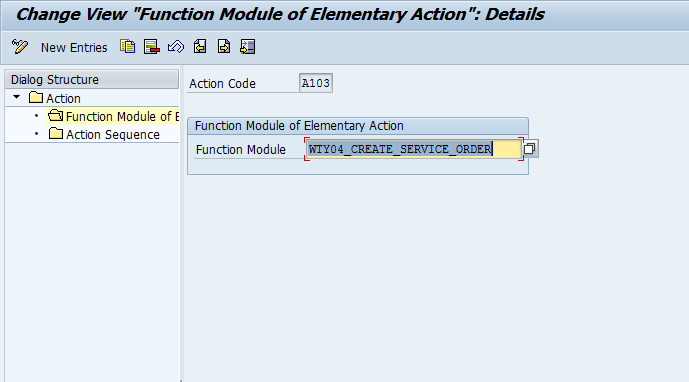
This time around, I selected action A103, and you can see the function module that gets called .

Now, if we look at an interlinking action.

wty01-04

Notice, now you can chain together several elementary functions.  Doesn’t matter if it’s hidden or displayed.  This is fun functionality, since you can pull together multiple steps at once, so the user doesn’t need to perform multiple actions to accomplish a task.

So, that’s the define actions step.  Thanks for reading,

Schedules and Scope – Keeping a Balance

Now, if there’s one thing I’ve learned in all of my consulting, it’s that schedules and scope increases just don’t mix.  Have you ever been on a project and heard the phrase, “this is the date, and it can’t change”?  Now, this statement on it’s own isn’t a problem.  If project management did their job, the schedule is reasonable, and the date is achievable.  Now, this statement suddenly becomes a huge risk when you throw in additional work, additional scope, or poor original planning.

So, why am I talking about this?  Call it a cautionary reminder.  There are several key things to get right when you plan any project (even if it’s completely controlled and implemented by yourself :> ).

1. Plan your initial schedule with a reasonable end date.   a. Get sign off from the business on their requirements.
b. Factor in some fudge time to make sure that the inevitable rework can still be done.
c. Keep in mind that if you depend on multiple resources, they may not be as invested in the end date as you are.  Don’t assume they will work 70 hr weeks just because you will.

2. Stick to your scope.  The business will always come back and say “I forgot that I need this too”, or “I can’t do my job unless you give me this”.
a.  you need a process.  Typically, this should involve a trip to the steering committee.  This way, someone else can make the call if the new work will be included in the project.  And of course, they will be aware of what those changes will do to the end date of the project.

In my experience, #2 is the biggest issue most companies encounter.  None of this is rocket science, yet I see the same mistake made over and over again.  So, this post is a little bit of venting, a little bit of advice, and mostly a cautionary tale.  Scheduling matters, and you can’t keep piling 15lbs into a 5 lb bag.  No matter how loud you yell or how hard you push, it either won’t fit, or the bag will break.  Either way, it makes more sense to put the most important 5lbs into the sack instead of waiting for it to burst.

Thanks for reading,

Posts navigation

1 2 3 60 61 62 63 64 65 66 97 98 99
Scroll to top