Happy Memorial Day

You know, I almost forgot to even do a post.  I started thinking, well, it’s a holiday, I skip this one.  But then it hit me just how important today is.  While I look at the country, and see our freedoms eroding away, I also look back at all the brave soldiers that fought to give us the right to keep those freedoms.  It’s more important than ever to remember that freedom isn’t free.  And countless Americans have died fighting to keep our freedom alive.

So, while you’re enjoying a cold one, eating something off the grill, please take a minute to honor all of those brave soldiers who fought for our rights, and those of others.  And ask yourself, what can I be doing to honor their memory?  How can I be working to to maintain those rights?  How can I make sure they didn’t die in vain?

This is a song a heard a year or so back, and it really struck a chord with me (pun intended).  If you get a chance, take a listen today.

http://revolutionrockandroll.com/music.cfm

It’s called What Have you Done.  If you listen the lyrics, I’m sure you’ll see why it’s a great song for today.

As always, thanks for reading,

Service Management – Configurable Service Revisited

Well, after discovering the whole deal with configurable service, I just couldn’t leave it alone.  I had to keep digging until I could find the scenarios that work…  at least out of the box.  Here’s what I discovered.

Scenario Configurable Service Product Maintenance Task List w/Configurable Profile Task list is “configured”
IW31 – Manually create the service order  YES  YES  YES
 IW31 – Manually create the service order  NO  YES  YES
 IW31 – Manually create the service order  YES  NO  YES

So there you have it.  If you manually create your service orders, things are great.  Now, unfortunately, things get more complicated as soon as you put a repair sales order into the mix.

Scenario Configurable Service Product Maintenance Task List w/Configurable Profile Task list is “configured”
Repair Sales Order – when the requirement type generates the service order (field service)  YES  YES  YES
Repair Sales Order – when the requirement type generates the service order (field service)  NO  YES  No
 Repair Sales Order – when the requirement type generates the service order (field service)  YES  NO  No

So, in the event where either the material requirements type, or the item category requirements type generates the service order directly, you can make it work.

Now for the bad news…  no matter what I tried, I could not make the in-house repair scenario work.  I believe this has to do with the their not being a direct connection between the service order and the configured item on the sales order.  Since a sub-item generates the service order, I believe this means the configuration doesn’t get properly passed to the service order.

Now, there is one work-around to this, but it’s far from ideal.  If you do NOT connect the configurable general maintenance task list in TXN: OISD, and you manually add it the service order, the configuration can then be entered manually onto the service order.

Now, I’m still curious, so I’m going to continue digging.  I haven’t located where the configuration resides yet in the service order.  I believe if I can determine this information, I can come up with a way to automate this issue.  Looks like a new addition to Renovation will be coming soon if I can figure out how to make it work 🙂

Anyway, hope you found this as interesting as I did.

Thanks for reading,


Service Management – Configurable Service

Not long ago, someone asked me about configurable service.  Well, naturally, this peaked my curiosity.  After all, my two specialties are Variant Configuration and Service Management.  Now, I’ve always known that you could make a DIEN configurable, but as far as I knew, you could use it for pricing and classification, but that was about it.  So I decided as soon as I got some time, I’d do some digging into this.  Well, I finally got around to that digging, and was pleasantly surprised, and as so often happens, it was a mixed success.  So, let’s talk about the good part.

With some digging, and some experimentation, I was able to find 2 methods that gave me a configurable routing (and if I drill into it further, the components seems to be configurable as well).  So, start with your standard VC tasks.  Create the characteristics and the class to hold all your attributes. Next, you need to create yourself a Super General Task List.  Go to transaction IA05.
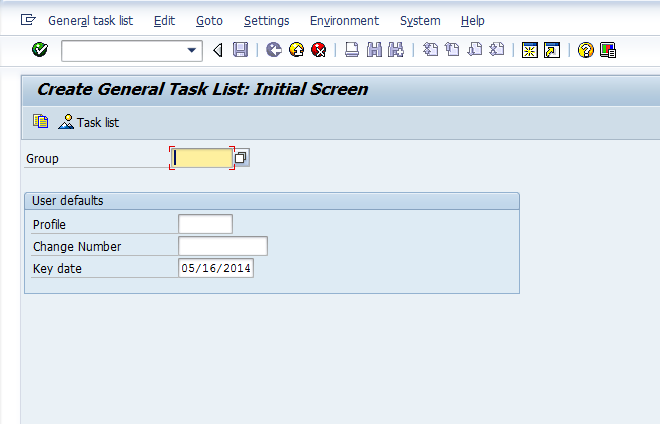
blog2-02

Just go ahead and copy or create a new task list.
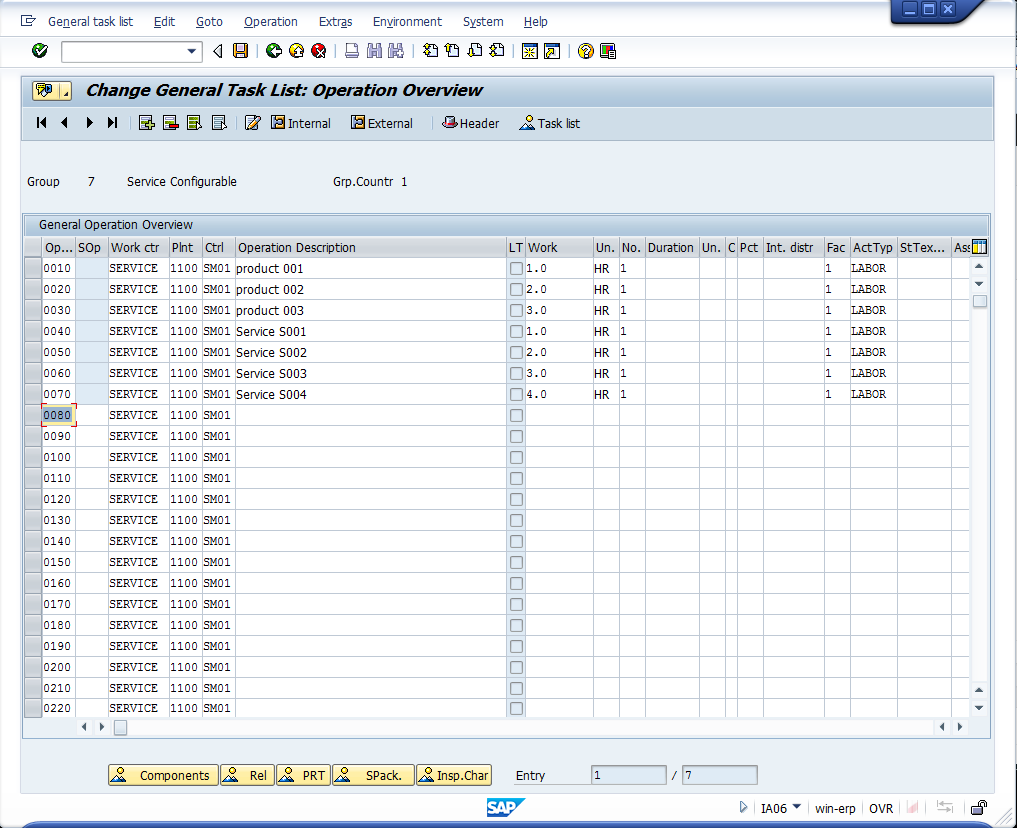
blog2-03


Enter in all the possible operations that can be chosen for this service product.
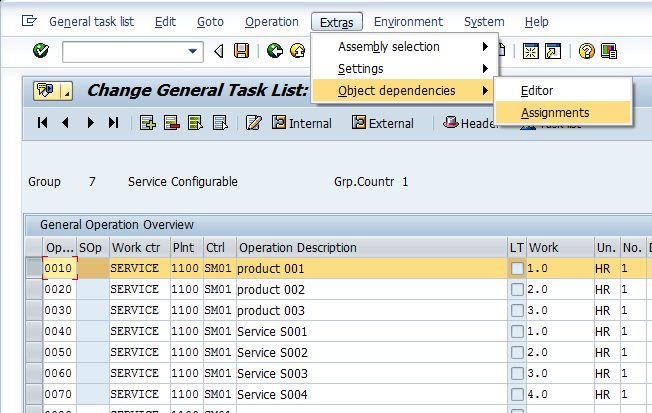
blog2-04

For each operation, enter in an object dependency, a selection condition to be exact.
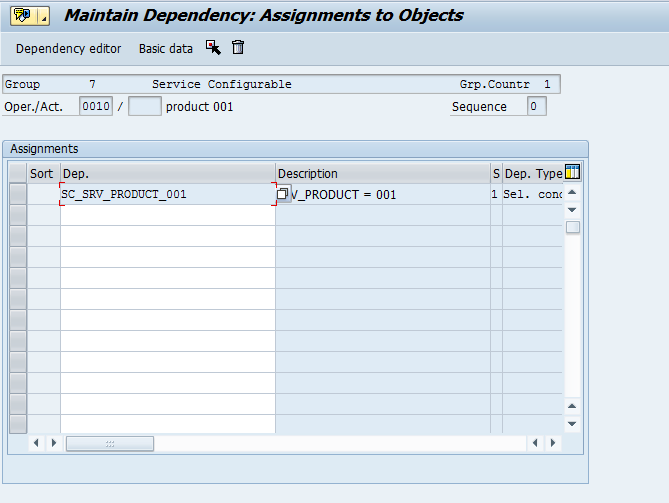
blog2-05

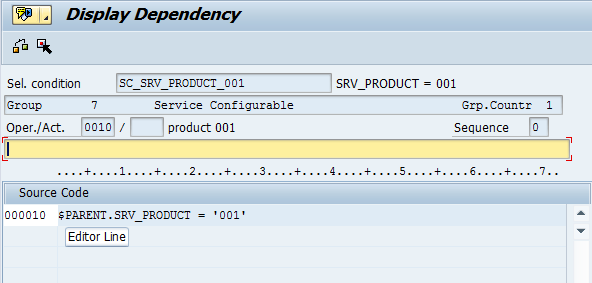
Here is a sample global dependency (by the way, I always recommend global over local dependencies).
blog2-06

As you can see, the code is simple.  Just a characteristic and a value.  Repeat this for all the operations that are dependent on certain characteristics.  Once you’ve enter in all the dependencies, save and move onto the next step.

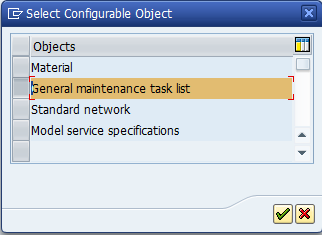
Now things change a bit when you move to the configuration profile.  I’m an old school VC guy, so I’ve always used material.  I’ve almost always looked right past the following selection.
blog2-01

So, if you select the General maintenance task list, instead of a material, you will need enter in the task list.  Once inside, the configuration profile is like any other profile.  You must assign a class (type 300).  You can get fancier here by adding procedures or constraints.  But for our example, I’ll keep it simple.

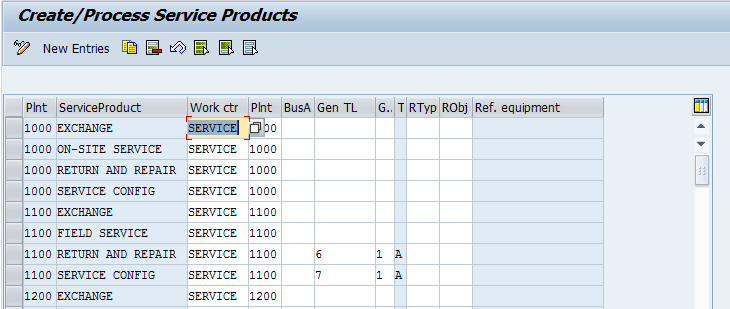
Now, to keep things easier to deal with, go to transaction OISD, to select the general task list.
blog2-07

My example uses the standard Return and Repair process.  So after receiving the equipment, I use the repair sales order to generate the service order.  Now, the drawback to this approach is that you must enter in the configuration during the first visit into the service order.

Up to now, I’ve been unable to make the routing recognize the configuration as a configurable service product.  Only if it is directly linked to the task list.

Now, reading the documentation…  it’s a little vague…

Use Features
PM, maintenance order Assign an object dependency and a configuration profile to the general maintenance task list.
CS, service order with configurable service product A configuration profile is assigned to the configurable service product. From this, assign object dependencies but no separate configuration profile to the general maintenance task list. If, however, you still choose to assign object dependencies, they will be ignored by the system.
CS, service order with “normal” service product Assign an object dependency and a configuration profile to the general maintenance task list.
PM and CS Assign an object dependency and a configuration profile to the general maintenance task list.

If you assign the general maintenance task list in the Customer Service component to a service order with a configurable service product, the configuration of the service product has priority over the configuration of the general maintenance task list.

I’ll continue experimenting, and if I can make it work, I’ll do a future post.

As always, thanks for reading,
The Art of Writing Specs

You know, it’s funny, I’ve spent a lot of my time writing specifications for my clients.  I’ve gone through and defined exactly what the business wanted, and I even spiced it up with enough technical details to make it pretty easy to develop.  Well, the strange thing is that I haven’t written a spec for my own business…  ever.  Until this past week, when I finally started to get smart, and realized that while I may be a good developer, I have great vision of what I want.  So my time is better spent defining what I want as the end product, instead of figuring out which is the best BAPI or function module to add one obscure piece of data.

The realization I’ve come to is that writing the specs is forcing me to better define what I want.  In the past, as I put together my latest piece of development, I’d pretty much wing it.  I’d write down a VERY basic outline of what I wanted, and proceed to develop, then add new ideas, then have to go back and define that for stuff I already did, and so on.  While this model can work, it didn’t force me to do my homework up front.  Rather, it kinda let me off the hook and allowed me to just let the product flow.  Don’t get me wrong, I’m still very happy with the end result, it took me a lot longer to get there.  It’s like that old proverb, Proper Planning Prevents Poor Performance…  (well, it might not be a proverb =) ).  Well, I’m finding as I go through my list and start defining all the pieces I still want to develop for my Renovation Solution, I have to thoroughly state what I want.  I can’t do the nebulous, “build configuration screen”.  I have to define how many tabs, what information, what it drives on the back end, do I use existing tables or create new ones, etc…

What I’m finding is that I’m getting back the skill I’ve ignored for a while.  I’m remembering how to define what I want, so someone else can do the work, instead of leaving everything up to me.  Like my partner keeps telling me, I’m finally starting to think like a CTO, rather than a programmer 🙂  Now, don’t get me wrong, I still plan on doing as much development as I have time for, just because I do enjoy the problem solving, but I’m starting to gain skill in the marketing area of our business, and there is a lot more money in marketing what we have than in adding a small feature to our existing offering 🙂

Anyway, thanks for reading,

Service Management – Creating the RFC to download to Access

One of the recent discoveries I found was that you can download the table structures and populate them in Access on a local machine.  This is kind of a cool concept, as I never realized this functionality was available.  So I decide to dig in a little further.  The baseline configuration is pretty easy (check out my post in SDN if you want more details – Service Management – Basic Settings – Print Control – Download – Download Structures to PC).  Now, what isn’t really explained is that you need some stuff in place in order to be able to use this.  The main piece being a couple of RFC’s.  Now, I’ve been able to piece together a few things, so I thought I’d share them with you.

First and foremost, before you can do anything, you need to get or find several files:

wdpsastr.exe
wdpsatab.exe

Without these 2 files, you won’t be able to create the RFC.  Now, after some digging I’ve found a few things. First, there are some OSS notes that explain a lot of this, so I”m going to include them here.

443027 – MS Access Interface – Access 97, 2000, 2002, 2003
583698 – FAQ note – MS Access Interface
118827 – Interface MS Access, setting the TCP/IP connection

These notes explain what I’ll be going over here, but consider my post a short cut for service 🙂

Also, if you have trouble finding these files, check out the SDN post.

http://scn.sap.com/thread/292398

I had trouble getting the files from Service.sap.com, but I was able to find them in an old version of my gui installation.  However, it doesn’t appear to have the installation files to put the correct dll files in place.

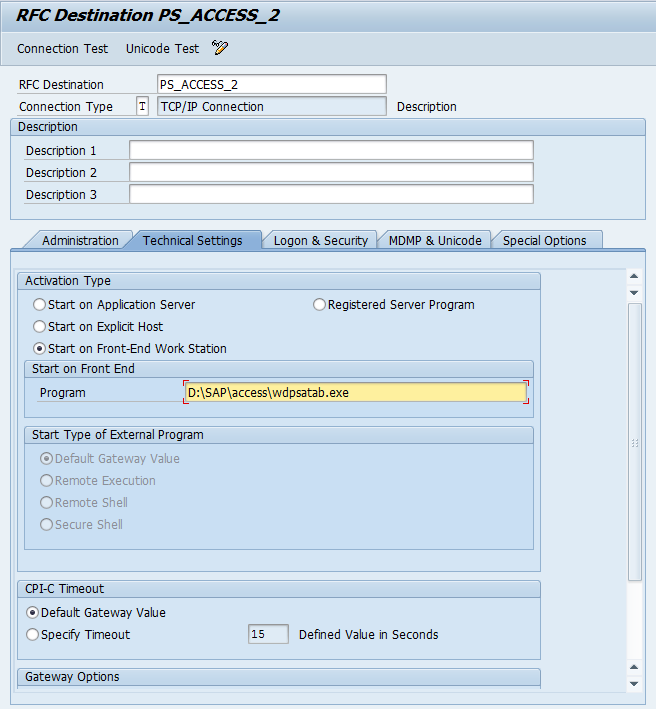
Once you have this installed, you can go to SM59 to create the 2 new RFC destinations.

blog2-01

Press create to make a new connection.  You will need to do this twice.

blog2-02 blog2-03

Now, you should be able to proceed with the actual configuration to download the service management tables into access.

Thanks for reading,

A New Realization to get time back in my life

I kind of had a small epiphany just the other day.  I started looking at my stack of untouched development work.  I started to feel overwhelmed and began wondering, how can I ever do all of this???  Then it started to hit, my value isn’t in the coding of all of these things, but in designing these things.  I’ve been thinking small…  I keep thinking that everything has to be designed, coded, tested and sold by me.  My realization started to take me down a different path.  What I need to be focusing on is designing what I want, writing a very solid and clear specification for it, then handing it off to a decent developer to write it.

I realized that my own micro manger has been getting in the way of my success.  There is no possible way one person can develop all the ideas I’ve jotted down.  But it doesn’t mean I can’t outsource those ideas for a small amount of cash.  I started down the right path when I first considered outsourcing some of my coding.  I quickly went to my inbox and found a friend of mine that I trust.  Then I started writing my first spec for some things I think I’ll need in the near future.  The next logical leap for me to take (and sometimes I’m a bit slow) is to focus my effort on design, and not code.

So, I think just had one of my 80/20 moments.  I can get 80% of my value, by focusing on writing the specifications, and then finding capable programmers to carry it out.  I feel like I just took a big step…  what about you?  what are you holding onto that someone else can do better?  try to find just one thing…  and start to regain some time back in your life.

Thanks for reading,

Variant Configuration – Class Type 200 vs. Phantom KMATs

Recently, I was reminded of one of the biggest downfalls of using class type 200 within a VC BOM.  The is the inability to track the changes using ECM.  This got me to thinking about the differences between the approaches of Class Type 200 vs. Phantom KMATs.  While both methods cwill ultimately get you to the same place, there are very obvious differences between the 2 methods.  In general, both approaches are very valuable, but each has pros and cons.  So let’s talk a little about the differences…

Let me define what I mean by a phantom KMAT.  This is simply another KMAT that sits on the top level BOM.  So this turns into nested KMAT’s, but often there is no configuration that occurs on the phantom level.  It is more of a BOM grouping, with pass through values (if could be configured, but for our purposes today, consider it just a group of parts).  You simply create a KMAT, say Hard Drive, that contains all of the possible hard drives you wish to use.  Then you add the selection condition to each component, set the Material master of the HARD DRIVE KMAT to be a phantom and you’re ready to go.

The first major difference is the change management aspects.  Because of the way the class type 200 works, you can’t add or change materials using Engineering Change Management.  For many organizations, this can be a show stopper.  The convenience of not creating selection conditions for each material, but simply adding characteristic values can be tempting…  but if your organization needs to do a lot of obsolete and supersceding of components, class type 200’s can be a major obstacle.  Now the Phantom KMAT will not have this issue.  But, the price is creating a selection condition for each material on the BOM, and also using a constraint to pass the values from the parent to the child KMAT.  You may also need to create a class for each Phantom KMAT that only holds the characteristics needed for those components, or you could reuse the entire class.  Either way, it can be more overhead.

Reuse of the items.  This is the place that both methods work great at.  Now, one of my favorite things to do is create generic KMAT’s that can be used across multiple product lines.  In my first VC job, we did a lot cables with 35 or more different connectors that can be used.  Well, since the same components were often used across multiple product lines, I could create a single phantom KMAT and use it on multiple top level KMAT’s.  the Obvious value is maintaining changes in one spot.  the hardest part of this method is thinking far enough ahead to make it useful.  Now you can do the same thing with class type 200’s as well.  So both methods are great for this.

A single component vs. as many as you need.  Now another obvious drawback to class type 200’s is the limitation of only being able to select a single part number.  If you had multiple part numbers, you would need multiple classes to select all the components.  Within a phantom KMAT, depending on your selection conditions, you could select as many as you need.

So far, everything seems in favor of the phantom KMAT, but here’s one that is big benefit to the class type 200.  If you work in an environment where parts change often, new options are constantly added, or perhaps you engineer as you need something…  well, the class type 200 can be set to required.  this means that your sales order will show as incomplete if the class doesn’t find a material.  Phantom KMAT’s don’t have an easy way to accomplish the same thing.

Now there are other pro’s and con’s, but in my experience, these are the 4 biggest features to keep in mind.  I’d love to hear your comments.  Thanks for reading,

Warranty Claims – Layout – Define Screen Layouts

Well, I thought I might as well do posts on the Warranty Claims.  I wanted to start talking about the Layout section of configuration.  If you are familiar with the notification or equipment records, you should be very familiar with this concept.  You have a lot of building blocks, and endless possibilities of what to show, what sequence and what tab.  Let me show you just how flexible it can be.  The Define Screen Layouts is ever more flexible, in my opinion, than the equipment record or notification.  You have unlimited items you can load onto a tab, not just the standard 4 or 5 fixed locations.

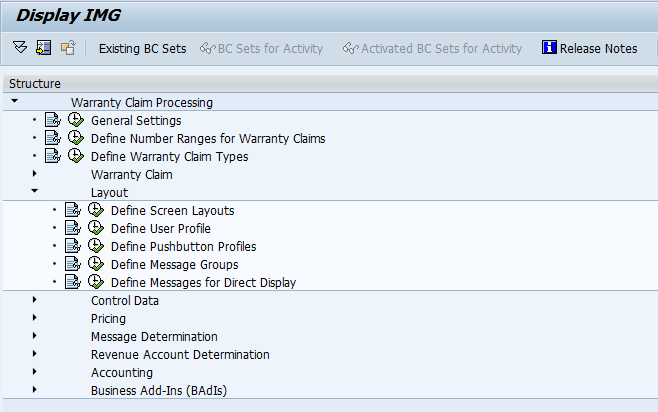
blog5-01

Using OWTY, you can see the layout folder.  Define Screen Layouts is our destination today.

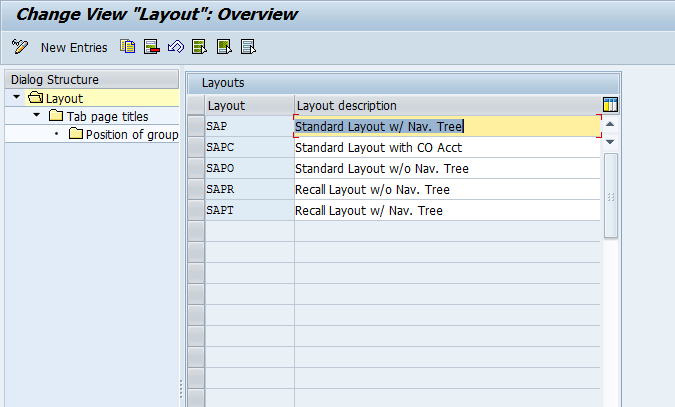
blog5-02

So, you will now notice the familiar tree structure on the left.  If you are designing your own layout, I highly encourage you to copy one of the existing layouts and change it to fit your needs.  For demonstration purposes, I’ll walk you through the SAP layout.  Highligh SAP, then double click on the Tab Page Title on the left.

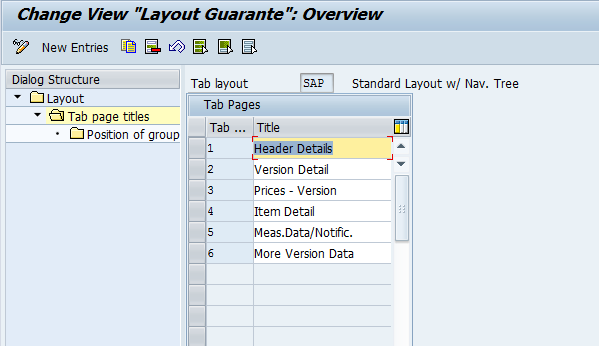
blog5-03

Now on this portion, you can see each tab that is configured for the layout.  Again, you can define as few or as many tabs to be displayed for your layout.  You can also adjust the titles of each tab.  For demonstration, I’ll select the Header Details tab, to show you the next drill down.

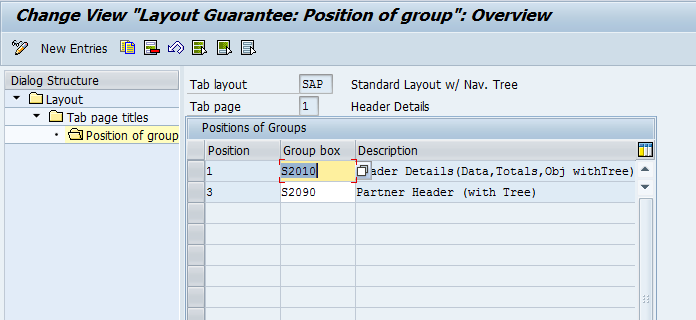
blog5-04

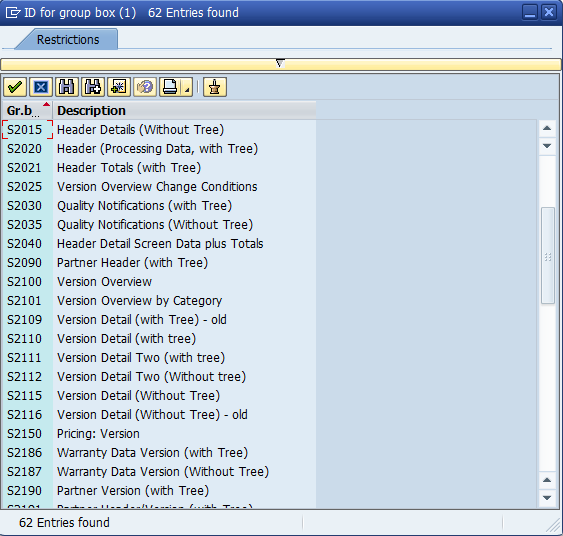
Now, for those of you familiar with the equipment configuration, this will be somewhat familiar.  The nice thing to notice is that you are not confined to the 4 or 5 fields.  You can add as few or as many boxes as you want.  The Group Box contains sets of fields that you can add.  Unfortunately, you cannot alter the fields within a group box, but at least you can limit what you show.  As an example, check out some of the many group boxes available for the warranty claim layout.

blog5-05

This is the part that typically requires a lot of experimenting.  Many of the options look similar, but will have quite a different look and feel.  So I encourage you test each one to make sure the optimal selection is made.

You’ll just continue this process for each tab, until you have your claim layout.  Remember, if you create a new layout, you will need to go back to your claim configuration and enter this new layout.

thanks for reading,


Warranty Claims – Control Data – Warranty Check

Well, I recently talked with some old colleagues about an upcoming new avenue of business for them.  One of the options was Warranty claims, so that got me thinking that I should get back to this configuration piece of warranty claims 🙂  Today I’ll discuss the Warranty Check.  The configuration itself is pretty straightforward.  The idea behind this single piece of configuration is how the action (A200 Warranty Check) should behave.

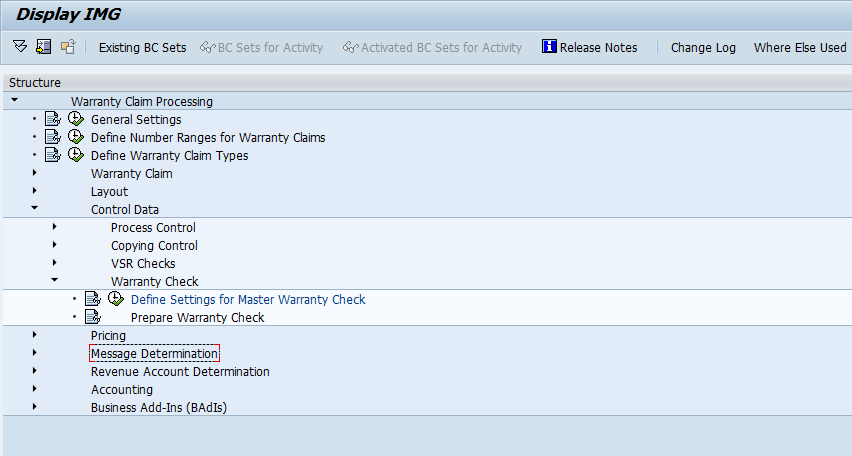
blog4-01

Using OWTY you can see where to configure this step.

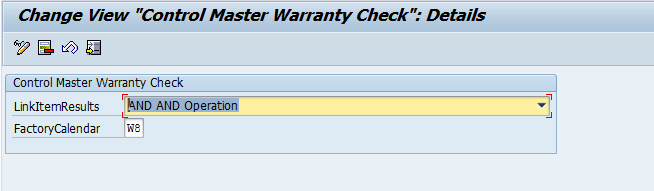
blog4-02

Now the configuration portion only has 2 pieces.  One is the LinkItemResults which can be either AND or OR.

This field comes into play if you have a complex master warranty that contains more than 1 item.  So if you have a simple time based, this won’t impact you at all.  But if your master warranty has multiple items within it, and you select AND, then all items must be true for it to be considered under warranty.  If you select OR, any one item will suffice to be considered under warranty.

The FactoryCalender is exactly what it sounds likes.  Just another calender, that will be used to calculate time based warranties.

I’ll try to post more warranty claims config in the coming days, as I don’t have anything else interesting to post at the moment.  I’m currently trying to catch up on my sleep after 3 incredibly long weeks.

Thanks for reading, and as always, if you want to hear about something in particular, let me know.

Powering Through… Is it worth it?

In my career, I’ve often had to fight through long stretches of work, with minimal sleep.  I’m in the midst of another of those stretches, and I’m realizing a few things.  The question I keep asking is “is it worth it?”.  A simple question, with a very complicated answer.

Now I’m used to working long hours because I have my “day job” and also my business.  Due to the nature of the game, my business has to take a back seat to the “day job”.  So I’m used to working late nights to keep my business moving toward my goal of doing my business full time.  So, I would’ve thought that doing the “night shift” during testing wouldn’t be bad.  Initially, it was ok, I get to watch all the hockey games, even the ones that don’t end until after midnight.  =)  but after a few nights, I started to notice how exhausted I was ever day.  Much of the problem is my controlling nature.  I’m responsible for a big chunk of the work, so I don’t want anyone else touching my models.  Now, this is a stupid mentality to have.  I’m a contractor, so these models won’t be mine forever.  Yet, I still don’t want to give them up.  I don’t even know why…  but I’ll save that conversation for another day.  But this is driving me to work the late shift from 10-2am, get up at 7am, get Alex rolling and off to school, then I log in for most of the rest of the day.  I take an hour off here and there, or maybe even take a brief nap, but in general, I’m “On” for the full day, and then again from about 9pm – 2am, Sunday – Thursday.

this is nearing the end of week 3.  Happily, the final week.  Here’s what I figured out…

1. I’m not as young as I used to be, so functioning indefinitely with little to no sleep, just doesn’t work.  Read my post on the “Sabbath” if you want to understand why 🙂

2. I have 2 small kids.  That means when I’m not working, I’m with them.  either playing, feeding, or putting them to bed.  That takes a lot more energy than I ever realized.

3.  Being “on” at the day job is a lot more taxing mentally than moving onto my own business stuff.  First off, I love doing my stuff for Javellin, so I don’t think of it as work.  Doing the “day job” means I need focused on work for far longer than I like.

4.  As the weeks have gone on, I’ve noticed that I’m getting sloppy, not focusing as well, and making a lot more simple mistakes that I generally wouldn’t make.  Simply, I’m tired, mentally and physically, so I’m not at my best.

All these combine to one simple fact…  I can’t do the 12 hour days for 3 straight weeks.  1 or 2 weeks, maybe for a go-live, but for testing, it’s not worth it.

The morale of this story…  don’t kill yourself because you’re too stubborn to let other help you.  It is not in anyone’s best interest.

Thanks for reading,

Posts navigation

1 2 3 56 57 58 59 60 61 62 97 98 99
Scroll to top