Where do you market???

Now this is something that obviously, I’m learning as I go.  I’ve experimented with multiple different forms of marketing, some clearly more effective than others…  The biggest problem is often determining the if they are effective, and how long will it take before it’s effective.  Let me explain more of what I mean.

This blog is probably one of the best examples.  I’ve been plugging away at it for several years.  And let me tell you, it isn’t always easy.  I’m not a terrible writer, but I’m no Hemingway either :).  And above all, coming up with things to talk about is often a challenge for me.  Now, for at least the first year, I really got almost nothing from the blog.  Some of my good friends would read it and post to it…  but very little in terms of new readers.  Then all of the sudden, I started going to new consulting assignments and I’d meet people that had been reading my stuff.  Little did I know, that I had a small following of people learning from me.  Now, it hasn’t generated me sales, but it has certainly increased my credibility.  This has been a mixed blessing.  My consulting career has never been better, but unfortunately, it hasn’t generated the sales I was hoping for in my software.  The good thing is that it has been pretty much no cost, except for a ton of my time 🙂

Now the exact opposite has been my experience with Linked-in.  Now, overall, LI has also been a good experience for me, but far more expensive.  I worked with a firm for a while, did some videos, revamped my profile and got nearly 12,000 new connections.  The problem was that it quickly become overwhelming with all the contacts that provided no value.  So I spent quite a few hours (in fact, I’m still in the process) of cleaning out non-value add contacts.  I have found some new connections and people that have graciously given me feedback…  but again, no direct sales.  I do believe it did directly help my blog increase in popularity.

Now due to the nature of my business, I’ve ignored things like Facebook, Twitter, etc…  as these are more likely to be direct sales approaches, rather than B2B which is what I need.  In addition, I’ve worked with Mailchimp, which has given me mixed results.  Building the lists is always the challenge, and then finding the right mixture of content to advertising to keep people reading what you send…  on top of it all, I slacked off for nearly a year focusing on LI.  Which brings me to my biggest take-away of this post.  Don’t just abandon ideas.  It’s ok to scale back, but I’m in midst of getting in trouble from MailChimp because my list is so old, that there were a lot of bounces.  Had I kept up with it at least monthly, I probably wouldn’t be in the same position…

For any of you out there marketing, I’d love to hear what is and isn’t working for you…

Thanks for reading,
Service Management – Generating a Return Order from a Notification

It’s interesting.  When I think of a call center, I think of returns and repairs.  Well, out of the box, SAP doesn’t provide an action box to accomplish that.  Originally, when I designed the functions for an action box to do just that.  It took a while, but I finally figured out how to pull all the pieces together to make this a truly useful piece of software.  I’ve talked about Renovation in some past posts, but now it’s finally coming together.  Today I’d like to give you a look at the return sales order functionality.

return-01

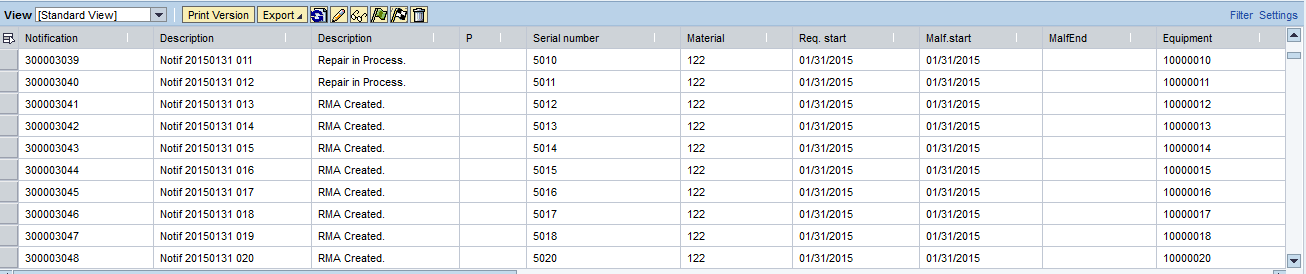
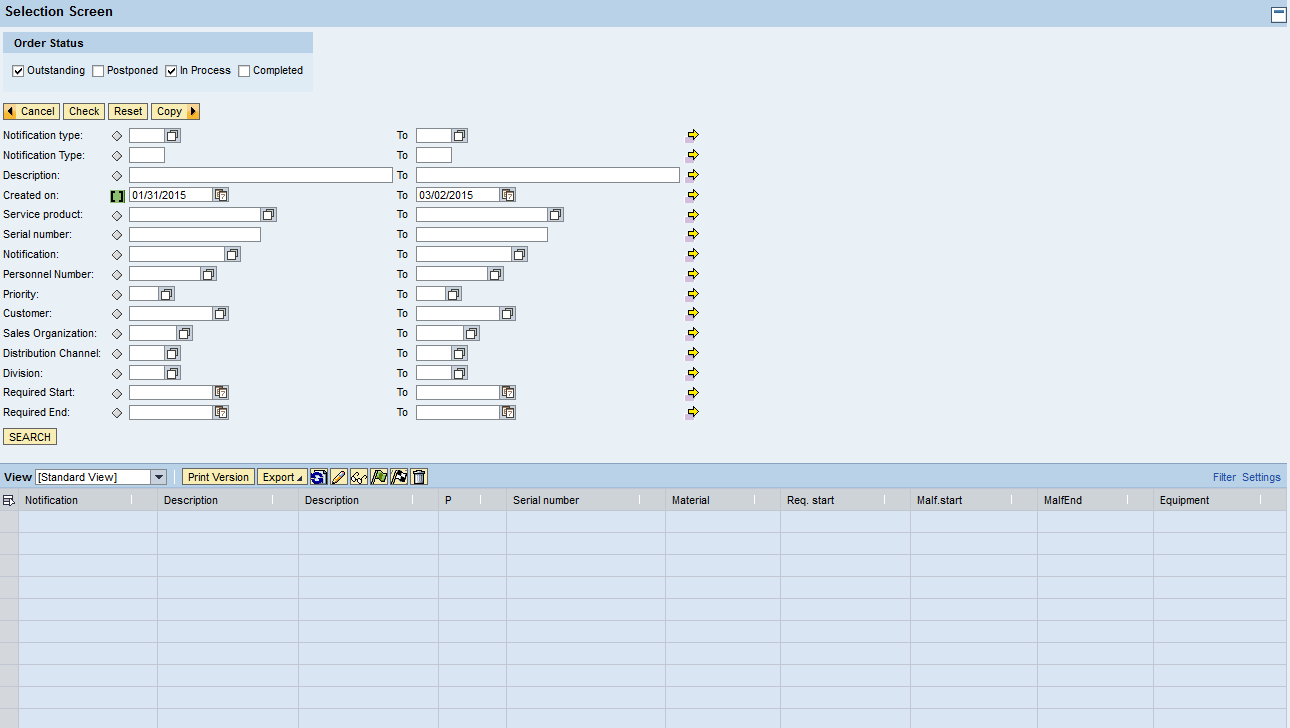
First we begin with a look at the notification list.  This is similar to the IW58 list, with some enhanced selections.

return-02

Now, the real improvement over the IW58 list is what we provide here.  We include all the typical fields that IW58 shows, and we added our own fields.  The best in my opinion is the status.  But it’s not just the SAP system status, rather it gives you the quick list of RMA created, Repair in Process, waiting for equipment, etc…  the sort of information you’d only find by digging through the document flow, one notification at a time.

return-03

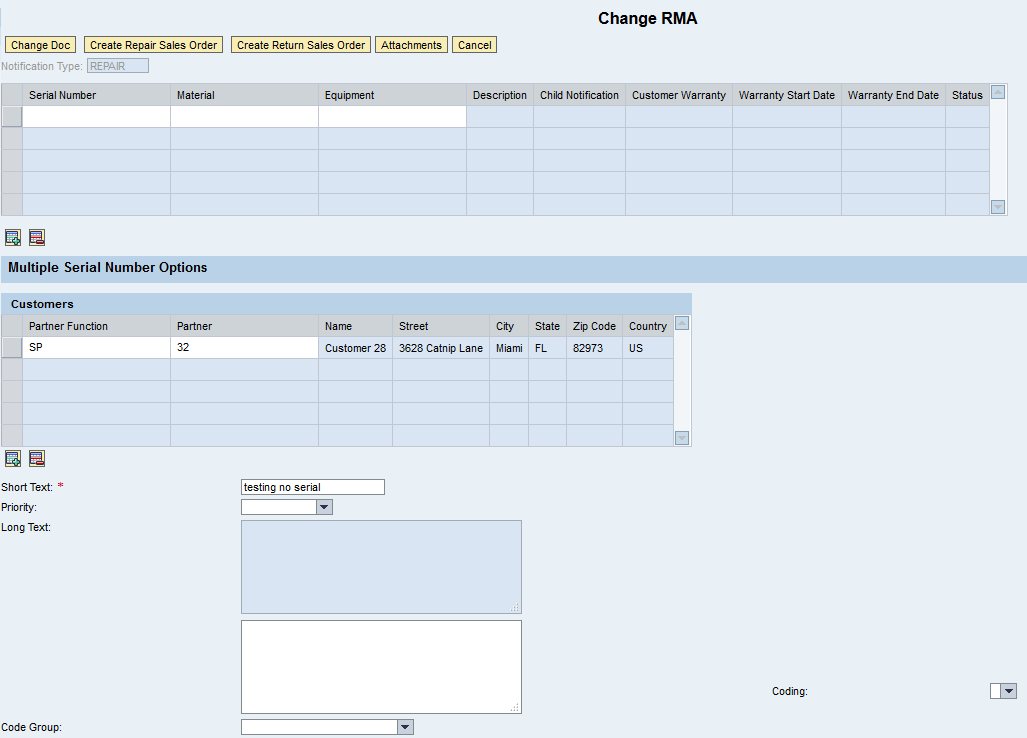
This is our fully customizable change notification screen.  Including the ability to add multiple serial numbers.  If you want more info on this, check my previous post, or email me and I’ll give you all the details.  Now I’m going to select Return Sales Order.

return-04

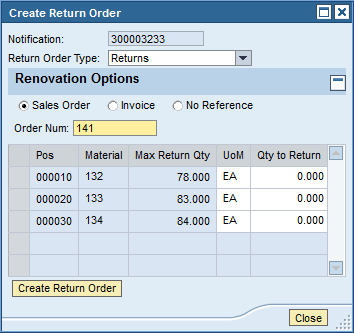
Now for what we came for…  this little window lets you pick the sales document type, then you can link to whatever type of document you want. (sales order, invoice or nothing).  Whatever you pick will be linked in the document flow.  Once you enter in the number, we pull in all the items, included the up to date quantity that hasn’t been returned.  You enter in the qty to return, and press create return order.  Now you get a sales order with the items, linked to both the notification and original sales document.

I think this is pretty cool.  And if you like this, wait till you see what I’ve done with the repair sales order.

Thanks for reading,


Service Management – Purchase Requisition Delivery Address

I ran into something interesting today.  In the service order, you have the option that you can create a purchase requisition for any non-stock item.  This could be for an one-time item, or a service.  Well, when you create the purchase requisition, it turns out that the ship-to delivery address in the purchase order takes the sold-to party from the service order.  While this functionality seems fine if you’re going to drop ship something to a job site, if you need to have the material shipped to your own repair facility, then you need to perform an extra step:

Go to the purchase order, delivery address tab, press Reset Address.

This will pull in the plant address, rather than the sold-to party address.

Every day, something new.  Thanks for reading,

Schedule Your Time and Set Priorities… Going back to the Fundamentals

Well, last week was pretty ugly for me.  I was cranky, stressed out, unfocused…  and in general, just a bit of a mess.  I spent some time on Friday going back to the fundamentals.  So if you’ve ever watched a sports team lose, and the coach goes back to practicing the basics the following day…  well, that was me 🙂  Everything comes down to scheduling your time properly and setting the correct priorities…  let me give you an example.

I have my consulting business and my software business.  I really enjoy doing my software business, but if I don’t have my consulting, I can’t fund the dream.  What does that tell me…  whether I want to or not…  my consulting priorities have to trump the business.  I was trying to make everything a top priority, and there wasn’t enough hours in the day.  So I had to look at what I was doing, and figure out what could wait…  and what I needed to focus on this coming week.

So, I dropped the development tasks for JaveLLin for this week while I spend some extra time focusing on the major milestones I have coming up in my consulting life.  Now, if I can plow through the consulting work quickly, I can pick up the JaveLLin stuff again…  but I had to drop that to a second priority.  My own timelines are not as rigid as the my consulting timelines, and I can’t afford to provide inferior performance to my clients.  And magically, I am far less stressed this week.  Now, does it still bother me that all these things aren’t getting done?  yup… but that’s just who I am.  However, I am focused on the top priorities first now…  instead of trying to do everything at the same time.

So my advise to y’all out there…  if you start to feel stressed, take a step back, write down everything you need to get done, and add a priority.  You’ll quickly see what needs to be done vs. what you want to do 🙂

Thanks for reading,

Turns out, I’m not Super-Human :)

Well, I thought coming back from a vacation I’d be all fired up and ready to take over the world.  Well week 1 back to the real world totally slammed me.  I’ve been battling a head-cold, not to mention that I’m not 30 years old anymore, and most important of all, I may have finally come to the realization that I can take on too much.  Trying to manage my own stuff and consulting clients has hit me like a ton of bricks this week.

Now, the good thing is that I realized, I don’t need to do everything at once.  So, I wanted to send out an early apology.  My blog posts will be sporadic over the next month while I wrap some things up and try to get myself back on track.  I may even try to get more than 6 hours sleep per night as well 🙂

I’ll still post whenever I find a neat trick or tip…  but I’ve been struggling to keep up with my blog, marketing efforts, consulting, and just general running of the business.  I’m also in crunch time for some of my consulting work, so I really need to give that the attention it deserves (even though I really want to finish up my updates on Renovation…  I’ll try to give you a peak at it this week, at least what I’ve done with generating return orders).  As always, thanks for reading,

ABAP Web Dynpro – Dynamic ALV Table – When to Bind

I just found a very subtle little thing, that has been driving me nuts for a few days.  I created a dynamic ALV table and I wanted to be able to select multiple lines.  Seemed pretty easy, I selected the correct Select option to do multiple line testing.  And no matter what I did, I couldn’t select or unselect anything.

Turned out it was a very simple fix.  You can only bind the table once.  If you bind the table more than one, it keeps resetting the selections. Since this occurs in the Modify View method, I needed to check if it was the first time it was executing.  If it was the first time, it needed to be bound, otherwise, don’t bind.  Since it was a dynamic table, for me it was just a matter of moving the bind statement within the IF statement.  Crazy simple, but like everything, little things make a big difference 🙂

Thanks for reading,

Service Management – Adding a configurable component

Now, I recently encountered a limitation of service and maintenance orders.  For those of you familiar with SAP Service Management, you will notice this is a common theme (why else would I spend late nights developing solutions to fill in the gaps 😀 ).  Well, today was an interesting discovery.  It crossed over between my two SAP skillsets, but strangely, I never tried this.  The service order won’t allow you to add a configurable material as a component.  In fact, up until ERP 5.0 or 6.0 (not sure), you couldn’t even repair a configurable material.

Now, this is what I’d consider a corner case, but again, I found a client that wants to do it.  So that leaves me in that familiar place of “how to solve it”.  Now, I’m still in the research phase, so if any of you have found a clever way to handle this issue, I’d love to hear what you did.

Now, I can only come up with two possible ways to handle this.

1.  Material Variants – this method will certainly work, but it takes a lot of master data to create/maintain.  So for every configuration, you’d need a permanent part number.

2.  Purchasing a material from “yourself” – Now this method “might” work.  The idea behind this is that you can generate a Purchase Req, describe the material and configuration, and set the vendor up as your own company.  Then from that PO, create a sales order and configure the material, make it and “ship” to the repair group.

The problem with both of these approaches is that they require a lot of extra data.  Option 1 creates a permanent material in the system.  Option 2 means you need to create a PO, sales order, delivery and invoice.  And all the while, you just want to make a production order for a configurable material and have it issued to the service order.

I’d love to hear your thoughts.  thanks for reading,

Why do I do this??? – Remembering Why I work so hard.

Now I know I’m a glutton for punishment. My normal existence is no less than 2 full time jobs, and sometimes I’m doing 2.5 or 3 at the same time. While this fits well for my easily bored personality, it can also be burning the candle at both ends. When I start to fall into a slump, it’s very important to take a break. I just got back from my vacation, and managed to avoid technology for the entire week. There were times I started to wonder what was going on with my projects, or even my own JaveLLin ideas. But, the resort saved me. I could only get internet in the lobby, and it helped remind me that I needed the time to unplug for a while.

Now, the really important piece of this is the ability unwind for a while. I spent a lot of time by the pool, and a lot of time enjoying my great friends that came along with me.

All of this reminded me of why I work so hard… it’s so that I can do what I just did. I could spend the week away from my computer, ignore my projects, and enjoy my friends and family. I noticed a lot of people parked in the lobby working, on their phones checking emails, face book or whatnot. It felt really good to live in the moment and just enjoy the fruits of my labor. If I just keep working hard… it’s easy to forget why I keep burning the candle at both ends.

So, take my advice, don’t forget why you work so hard and put so much effort into your own endeavors. Enjoy your hardwork 🙂

Thanks for reading,

When you Know you need a vacation!!!

You know, it’s funny, I spend so much time working, that sometimes I don’t even notice just how much I need to unplug. It was this past Friday, that it hit me like a ton of bricks. I was crabby at the world, I was annoyed by everyone I talked to, and the only thing that could help me keep it together was focusing on the kids (and of course, my upcoming vacation). Now, maybe I’m the odd-ball (and trust me, if you talk to any of my close friends, they will agree), but in all seriousness, when you start to get frustrated with your job, your co-workers or even your family… maybe you just need to get away for a little bit.

Now I know you can’t always leave the kids, leave the country, or ditch your family… but what you can do is ditch all your connections to work. For me, it usually hits me out of the blue. Life can be great… great… and then suddenly every email begins to annoy you, you stop sleeping well because you to start to stew about work or what you need to do…

My advise… turn off the tech. ignore all emails for a weekend. Do anything you can to keep yourself occupied and NOT thinking about work. Sometimes it can make all the difference.

Thanks for reading.

Variant Configuration – Disassociate Material Variants

This is a fun little trick, that I will probably never use.  This came from my friend Rama.  If you’re like me, when you create material variants, I’m sure you wondered why you cannot disconnect the materials from the KMAT.  For some reason, this field becomes locked as soon you save the material.  In my normal process, I tell businesses to obsolete the material if they screwed it up, assigned the wrong KMAT or just want it to no longer be connected.  Well, it seems that SAP has come up with a  process to disassociate the material from the KMAT.

OSS Note 941004 – FAQ: Configurable materials and Variants in Configuration
Topic 1.  (so this is the SAP “Approved” method to handle this).

THIS PROGRAM DOES DIRECT TABLE UPDATES AND IS FOR EMERGENCY USE ONLY!!!

1) Use SE16 to edit the MARC record in the database.  Change the STDPD to the new KMAT and change the CUOBJ to zero.


2) Run the RCU_DEL_CONF_FOR_ARCHMATVAR program to delete the instance from the CBase


3) Edit the material master and maintain the material variant configuration


OF COURSE you must be careful to avoid creating database inconsistencies


ALSO, if there are any existing sales orders for the material variant, then the CUOBJ for those line items must be changed in the database from the old cuobj (of the mv) to the new cuobj (of the mv).  After that, it is necessary to update the pricing for


REPORT zlogic_mv_change_kmat NO STANDARD PAGE HEADING.


* Declare variables

DATA: lt_marc type marc occurs 0 with header line.

SELECT-OPTIONS: s_matnr FOR marc-matnr OBLIGATORY,

s_werks FOR marc-werks.

PARAMETERS:     p_stdpd LIKE marc-stdpd.


* Select material variants to change the KMAT

SELECT * FROM marc into table lt_marc

WHERE matnr IN s_matnr AND werks IN s_werks and stdpd ne space.


WRITE:/ marc-stdpd, marc-cuobj.


IF p_update = ‘x’ OR p_update = ‘X’.

UPDATE marc

SET stdpd = p_stdpd

cuobj = 0

WHERE matnr = marc-matnr

AND werks = marc-werks.


SUBMIT rcu_del_conf_for_archmatvar

WITH matnum = marc-matnr

WITH testmode = space

AND RETURN EXPORTING LIST TO MEMORY.

ENDIF.


EXIT.


ENDSELECT.

Now, for my disclaimer.  While this is a nice trick, I still most likely won’t use this myself.  The process I preach is to disassociate the material number in SAP from any logic, or any reason to worry enough about 1 exact number to go through this hassle.  Make your materials internal only, so they mean nothing to customers, distributors, vendors, etc…  if you do this, you never need to do DB updates to fix things.  Thanks my opinion.

thanks for reading,

Posts navigation

1 2 3 44 45 46 47 48 49 50 97 98 99
Scroll to top