Finding the Latest SAP Functionality

This might be old news to many people, but going to the EAM show in Denver turned me onto a new part of the SAP portal.  The Find Innovation portion will allow you to search for the new functionality by release or service pack.

https://zinnovationdiscovery-supportportal.dispatcher.hana.ondemand.com/#/innovations

You can drill down by application, by industry or business function.  As I am used to, service still needs to look in multiple spots (EAM, Service & SD).  I should be used to being the oddball, but I was really hoping for a single location to see all the enhancements.  I did find a few things that SAP is implementing that I’ve already done.  One of the noticeable features is the mass availability check.  Something that everyone in service as known forever.  Glad to see that SAP finally added something 🙂  but in general, much of the functionality we’ve added into Proximity still isn’t available, even from a HANA perspective.  Personally, it’s nice to know that I haven’t been replaced by Hana 🙂

Anyway, check out this site.  Never know what enhancements might be able to help you on your current assignment.

thanks for reading,
EAM vs. SM

After attending a show dominated by plant maintenance folks (EAM), I learned that it might be time to talk a little bit about the differences and similarities between the two different modules. Those familair with PM or SM within SAP probably recognize that there are many transactions that overlap between the two areas. In fact, as far as the technical tables are concerned, there is no difference between a service order or a maintenance order.

The best way I came up with to describe SM to the PM audience was the customer. In SM, the customer is outside of your organization, in PM the customer is internal to your organization. Of course, there is additional overhead when you deal with “external” customers. You need to be concerned with sales orders, deliveries to and from the customer, etc. But at the end of the day, a service order and a maintenance order are nearly identical.

In addition, EAM has quite a unique flavor that I don’t often see in the service world. It’s the addition of functional locations. In the service world, I’m more familiar with using the installed base, or nothing at all. This leads to even more master data, and more master data maintenance to keep everything in sync.

The other thing that in the maintenance world it “can” be a more planned approach. In the service world, it is typically more unplanned work. This means that the maintenance world can care a lot more about scheduling and optimization. Not that service wouldn’t want to do the same thing, but it’s much harder to predict how your customers will use their equipment. PM needs to focus a lot more scheduling, resource scheduling, component scheduling. This pieces are still important for service, but are much less under the control of the business.

So, while there is solid cross over pieces, there are quite a few differences between PM and SM.

Thanks for reading,

EAM Conference – Technical Take Aways

After going to the EAM show, I learned quite a bit. This show is as close to our niche that is available out there. However, much of it is still a stretch for us. While Plant Maintenance (PM) and service management (SM) share a lot of commonality within SAP, at the end of the day, it’s still quite a different audience. For example, I quickly discovered that many people within the attendees (and even the vendors) had no idea what SM was, and probably were a bit confused why I was there. At least until I explained just how similar PM and SM are in some respects. (But I’ll save that for a another post).

The first thing that really struck me at this conference was the emphasis placed on master data. Rightfully so, because like any system, master data will make or break your system. However, I often walked away from a session feeling like I was just in a college lecture where the professors preached about all the ways to make it better. I often struggled with it, because it’s not like people are trying to ignore master data, or intentionally ignore entering every bit of data. Rather, all the people that I know struggle with the balance of time vs. data. Yes, a technician could enter a lengthy description of what they did, enter in 5 different codes, correctly enter their time down to the minute for each operation. But that takes time. Is that time better spent typing in data into SAP? or moving onto the next job?

In general, my feeling is often that the system makes life more difficult in terms of data entry than it needs to be. For example, if you tell a tech they need to populate 10 fields, across 7 tabs and 3 transactions, and you aren’t even going ot make the fields required, how often do you think it will happen? Let’s all be honest here, if you don’t make it dead simple to enter in the info and make it required, it just isn’t going to happen. Techs have too many work orders to process to spend that kind of time and effort. Now, the encouraging thing I saw at the conference was that many companies have recognized this by making new mobile apps, or web apps that consolidated things down to an easy interface. Much like what I have done at JaveLLin =)

More to come in a later post,
Thanks for reading,

Lessons Learned from the EAM Conference in Denver

Recently, Jeff and I were out in Denver to attend the EAM (Enterprise Asset Management) Conference in Denver.  Overall, it was a good show for us to attend, and I wanted to talk a little about what I learned while I was out there.  Special thanks to Jeff for helping me out at the show.  Just having a social guy with me helped me to get out of my shell a little more too.

First off, I learned that you don’t need to have a booth to meet with people.  In fact, not having a booth was probably the best thing we could have done.  On top of the money we saved by not being a sponsor, it allowed us to be far more mobile in the show.  I felt free to attend sessions, rather than feeling like I was tied to the booth the whole time.  In addition, it was easier to go and talk to vendors and introduce ourselves because we could go at our own leisure.  In fact, Jeff managed to walk away with a $1000 cash from one of the drawings at the show.  Talk about a nice way bonus 🙂

The next thing I really picked up was the fact to talk to anyone.  A lot of times, I’d see a company name, or a vendor and just assume there was no point in talking to them.  Well, thank goodness that we still did.  We ended up finding some great connections from people that I didn’t imagine, and found some groups that I thought would be interested to talk to us that weren’t.  It just went to show me that you never know where that next friend, partner or customer might come from.

Last, I walked with some really great ideas and connections of where I want to take JaveLLin in the coming weeks and months.  I came home really excited, and look forward to nurturing some of these new connection.

Thanks for reading,

Join Us at the SAP MFG Conference

Thanks to a fortunate turn of events, I will be in Las Vegas for the SAP MFG show.  I’ll be working in the Titan booth, talking about JaveLLin service management products and looking to make some friends.

Please stop by and say hello next week if you happen to be at the show.

Thanks for reading,

Adding an Action Box Item to a Notification

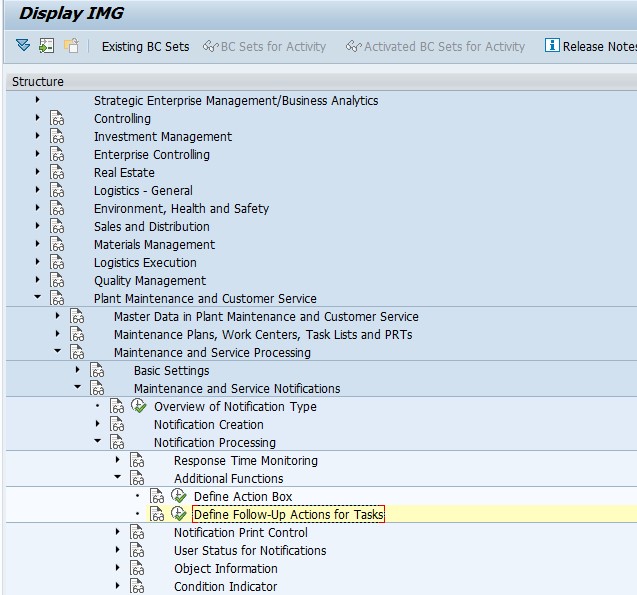
Here’s the full process to add an item to the action box.

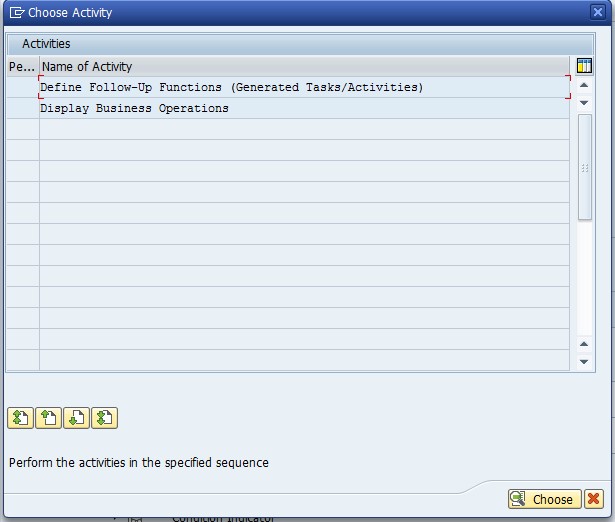
blog-01

Define Action Box

blog-02

Select: Define Follow-Up Functions (Generated Tasks/Activities)

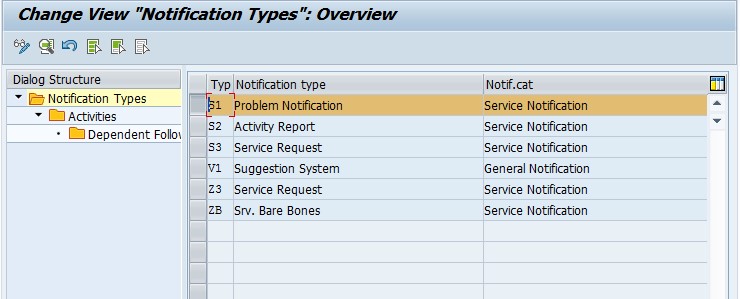
blog-03

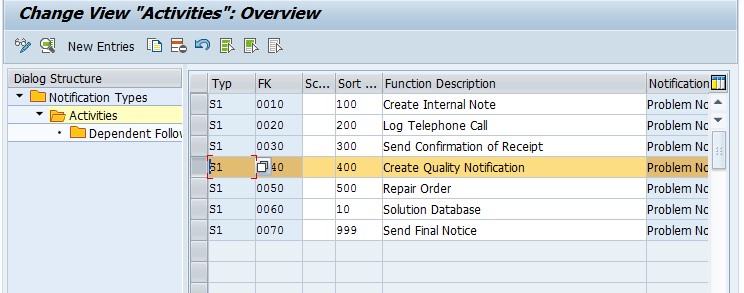
Find your notification type, and double click on Activities.

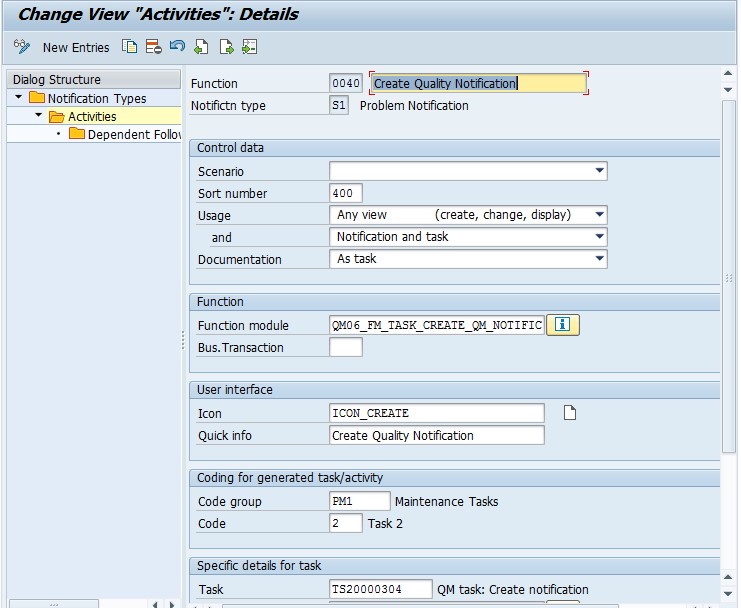
blog-04

Pay attention to the Code Group/Code listed below.  This code group needs to be assigned to a follow up function.

Green arrow back to SPRO

blog-05

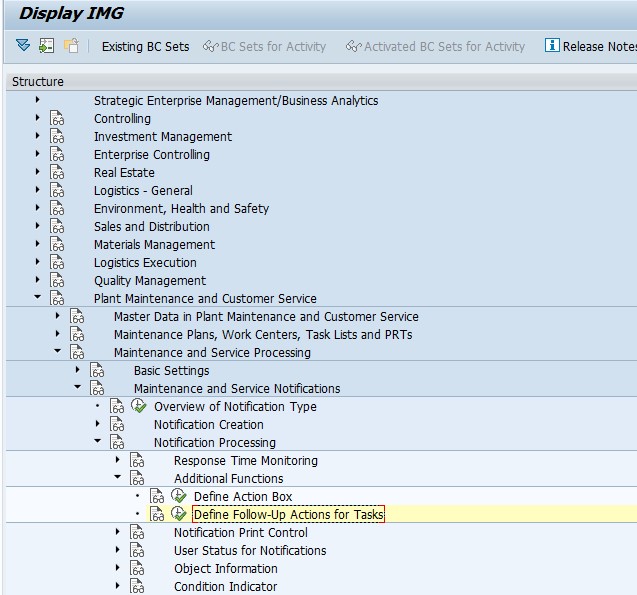
Select: Define Follow-Up actions for Tasks

blog-06

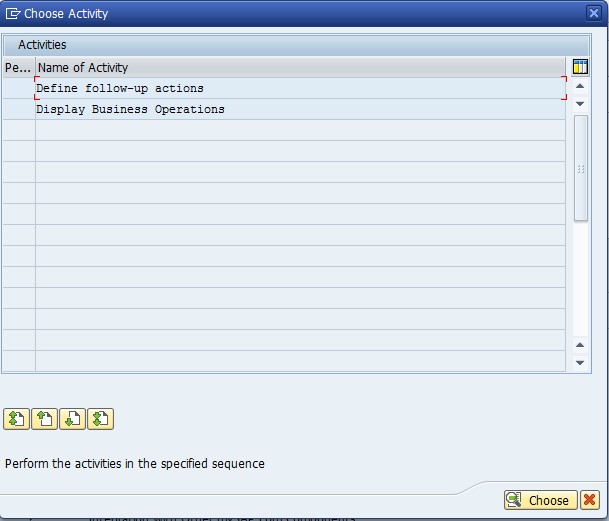
Select: Define Follow-Up actions for Tasks

blog-07

Select Define follow-up actions

blog-08

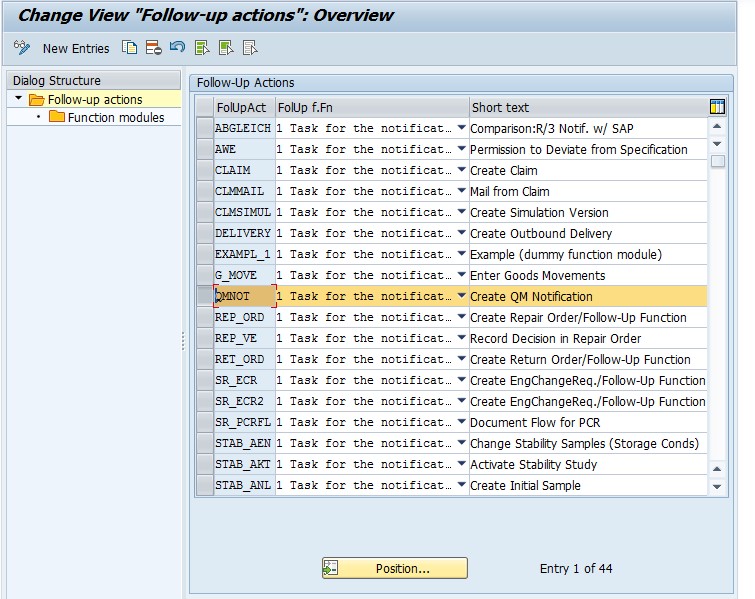
Select an existing item, or create a new one.  Double click on Function modules

blog-09

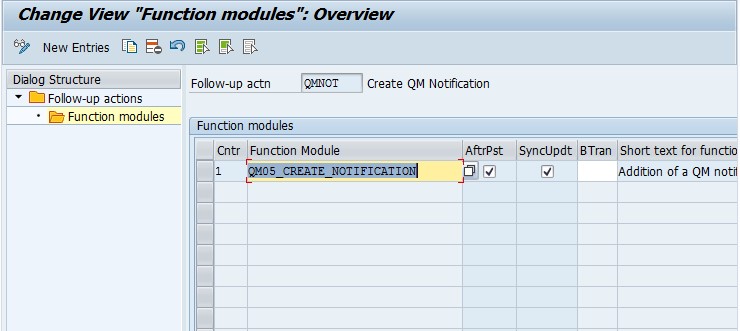
Add or review the function module listed.  Save and green arrow back.

Next we need to assign this to the code on the action box entry.

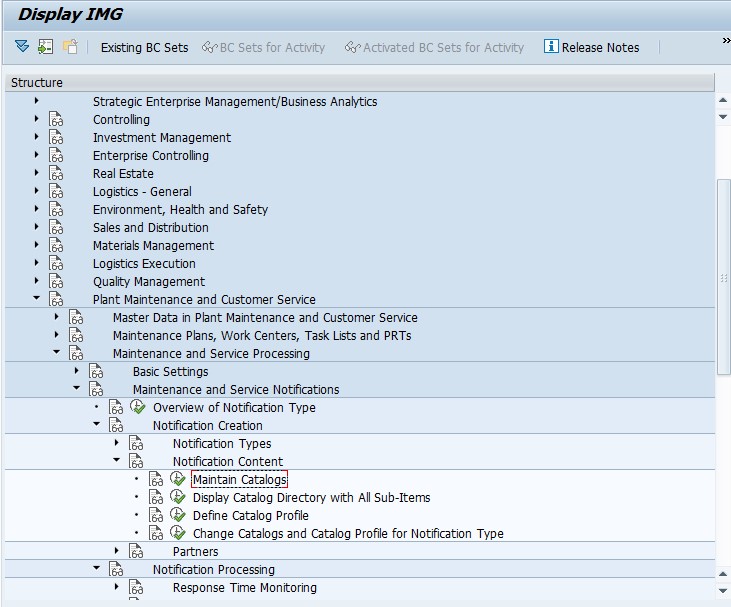
blog-10

Select Maintain Catalogs

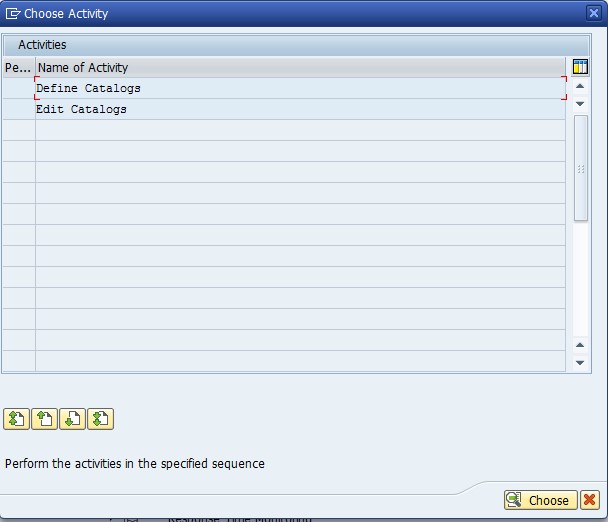
blog-11

Select Edit Catalogs

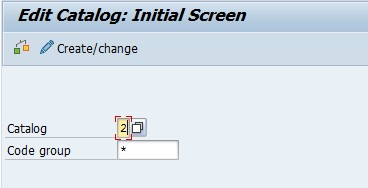
blog-12

Enter in the catalog for Tasks (default = 2)

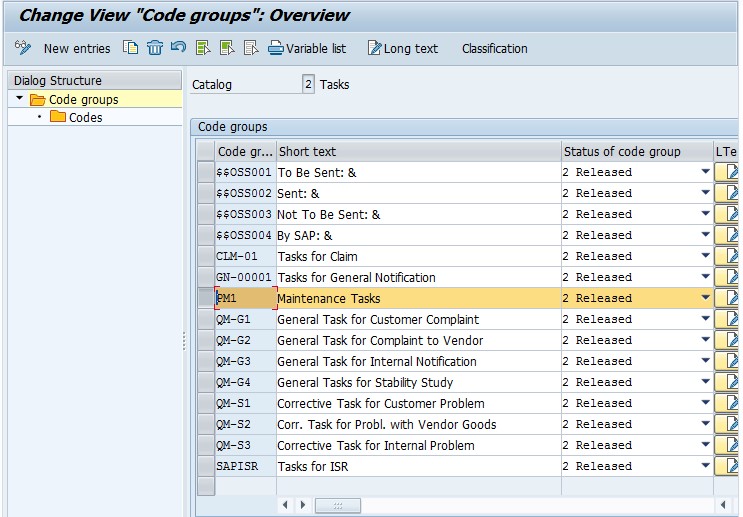
blog-13

Find the code group and double click on Codes

blog-14


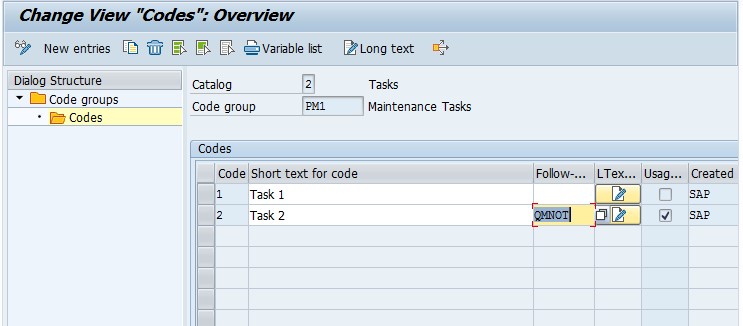
Find the specific Code and add the follow-up action you added above.

Save.

Now test your action box.

Thanks for reading,

The 8 Forms of Capital – Spiritual

This form of capital is a little more “out there” for me, mostly because it is very hard to quantify.  The idea behind spiritual capital is connection to religion or spirituality.  My own beliefs are cloudy at this point, so I had a hard time grasping this until I started to think of the some of the other things I’ve heard through the years.

The “Law of Attraction” is almost a spiritual form of capital.  If you aren’t familiar with the law of attraction, it basically says the universe will bring you what you think about, well at least opportunities for it 🙂  It simple idea is to think about what you want in your life, do NOT think about what you DON’T want in your life because the law of attraction doesn’t understand a negative 🙂

The best word that summed this capital up for me was karma.  The idea of what goes around, comes around.  All of these pieces fit into spiritual capital.  So, what do you believe?  do you believe everything happens for a reason?  do you find the good in things?  do you believe that god or something is looking out for you?  if so, then you have spiritual capital.  Make use of it.

thanks for reading,

Intellectual Capital

Recently I talked about there being 8 forms of capital that everyone has access to, but often we don’t even realize it.  The first form is Intellectual Capital.  This is probably one of the most obvious of the forms of capital.  This is most commonly known as knowledge.

This means that the things you know are often as good, or better, than money.

Now, knowledge won’t directly pay the bills, but it will certainly get you hired on a job.  The things you know can never be taken away from you, if you use them, they improve rather than get used up, and best of all, life gives you the opportunity to increase your intellectual capital on a daily basis.  This is often why learning is far more valuable money.

I’ve often heard people tell stories that many people have gone from rags to riches to rags to riches.  It’s pretty easy to go from riches to rags, but to do it again is often attributed to their knowledge more than anything else.  So, think about what you know, and what you need to know to order to make yourself unstoppable.

Thanks for reading,

Making the Physical world digital

Well, recently in my quest to get rid of cable TV, I’ve been setting the groundwork for using internet TV.  That’s meant experimenting with antennas so that I can still watch live sports (they work really well in the right locations, and do almost nothing in other.), solidifying the internet service, etc.  One of the things I didn’t really think about was an easy way to watch my own DVDs/BluRays.  My buddy Justin turned me on to a really cool app (when my Roku arrives) I’m sure it will be an even better channel.  It works as a movie server.  So you can just pick whatever movie I want to watch and stream it.  WOW.  so cool.

Now, with everything, there is a downside.  First off, physical disks need to be converted to digital.  Now, my point for today is the fact that we often don’t even realize how many physical things we have that could be converted to digital.  A few years back, I got in the habit of making a digital filing cabinet.  I scan everything, put it in it’s proper folder, and I can access it whenever I need it.  Traveling for work, this has saved my butt multiple times.  But, all of these things take time.  I’ve often wondered if there was a cheap service that could do it for you, or maybe I’m the only one anal enough to need all of this done.

I’m curious if anyone else does this, and have they found a good way to convert physical to digital.  I’d love to hear a better option if one exists 🙂

Thanks for reading,

How many Service Materials (DIEN) do you need?

Now when you set up your service business business, one of the questions you always begin with is how many DIEN materials do you need to run your business?  Now there are the obvious ones if you are using the lead service material model (RAS) within SAP:

Return and Repair
Field Service
Exchange

Now, you can even break this down further by warranty or some other breakdown your organization needs.  My personal take is to avoid going any deeper than the level I have above.  The further down you break things at this level will likely lead to confusion/mistakes when entering in the orders/notifications.  I typically encourage any further breakdown to be handled at a level that can change (like the accounting indicator).  If you use warranty as an example, once this is on the sales order, it’s very difficult to reverse.  So I encourage you to keep things like that out of the “rough cut”.
Once you have the main processes defined, you need to take a look at the next level.  Now, this is the  parts where things become more convoluted is if you begin to use resource related billing.  Now the trick with resource related billing (RRB) is knowing what you need to report on.  One of these days I’ll go into more details on RRB, but before you can do that, you need to understand what your goals are.  Now you can go simple, and just say labor and materials.  But what about subcontract costs?  do you need to break out travel costs?  or maybe even certain materials (ROH’s vs. HALB’s).  Keep in mind that much of your design will be based on your customer needs, but some of it should be based on what you plan to track as a business as well.

Of course, there is the alternative, and that is to use the leading servicable material (RA) model, which makes anything you repair it’s own service material.  Typically, this is my least favorite approach because it requires a constant update to the OISD transaction to allow a new material to be a service material.  The flip side is that it makes it very easy to assign a specific task list by material.

The short story is to have a plan.  You can add more in the future, but in order to handle Resource Related billing, you really need to figure out this part first.  When I talk more about RRB you’ll understand why.

Thanks for reading.

Posts navigation

1 2 3 26 27 28 29 30 31 32 97 98 99
Scroll to top